

Leaderboard




Popular Content
Showing content with the highest reputation since 02/25/2026 in all areas
-
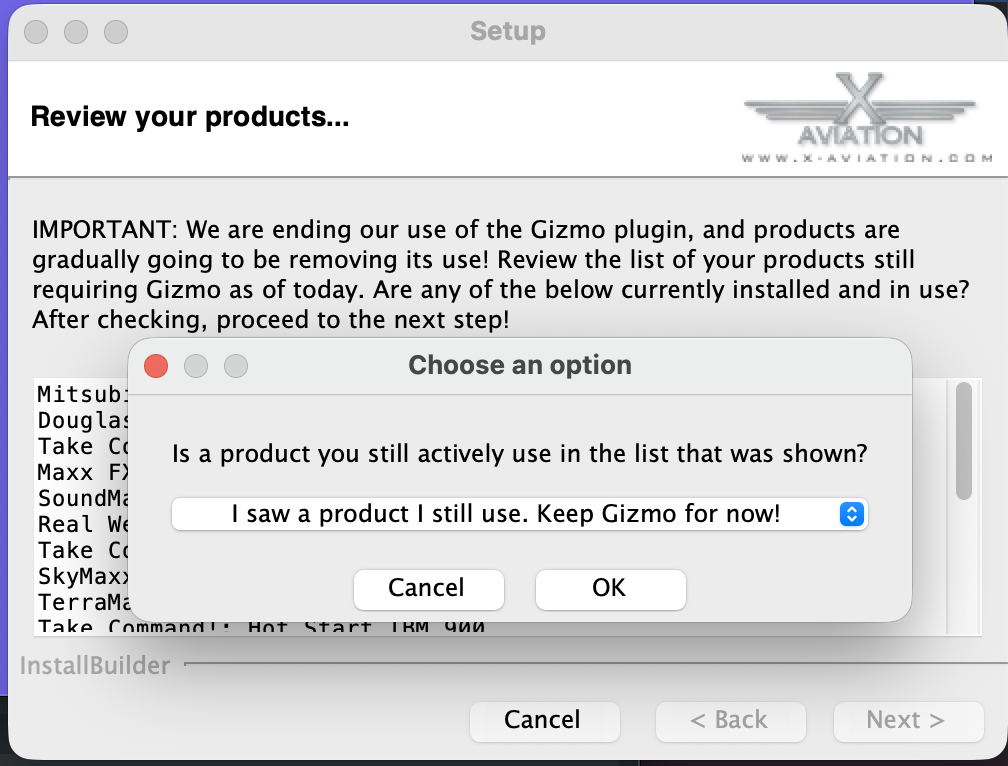
zzz....oh man...just woke up after a 18 month hibernation! Seriously....Nothing is forgotten, only life has happened. Here's a quick summary: Spent last 18-24 months in a significant life transition as I approach and prepare for retirement. Lots of loose ends to tie up and leave in the past. I now work full time for Laminar, a big change...and I have been positioning myself to stay in X-Plane work exclusively for the future. I'm wrapping up a 2-year private contract for the BETA ALIA production aircraft (which will be in X-Plane). I'll complete that work next month. Gizmo based code in all my products is nearing end of life and had complicated the update process due to the volume of code to rewrite......however AI has enabled a path to relearn concepts & rewrite the code as its become "X-Plane SDK aware" in the last year...This reduces the effort drastically and is a major catalyst. No fees for future updates on the MU2 or IXEG when they eventually go out. Updates will always be free for existing customers. They've earned that. After ALIA delivery, I'll return to push an update to the MU2 with the Gizmo code-base....I won't get OCD....I'll just push what I have, which is a good amount. After MU2 update, I begin code rewrites to serve as my future code platform for the MU2, IXEG and the forth-coming 717. This is foundational and absolutely required to guarantee long term compatibility for these products. Those aircraft will be the only three products I will maintain into retirement and beyond. That's the highlights. This gap in work has been all about my focus and preparation to sustain myself after retirement, and stay within the X-Plane ecosphere in the process.4 points
-
Version 1.3
61 downloads
This mod allows you to add pods on HotStart's Challenger. Some are fictional, some not. This is an early release, please do not hesitate if things are not working as it should. The readme file should be enough to install this properly. Are included: LocalEye (fictional) - the little sibling of the GlobalEye platform MVX - the pods used by Finnish Border Guard SLAR9000 - the pods used by Danish Air Force Artemis -the pods used by US Army Enjoy!3 points -
You obviously haven't been to our discord where we answer countless questions. The 2 most common ones? When is the 650 update coming out and when is the TBM update coming out. Both questions are always politely answered. Your comment is out of line and not true.2 points
-
Apologies for the late reply. I'm working on a large update for the DC3. I'll make a note of this and address it.2 points
-
This is the BN-2B Piston Channel but have the same issue.. could be XP12 12.4.1b1 and is applicable to the BN-2T as well. The image shows other issues. The plugin cannot be used as it crashes XP12.
.thumb.png.6b15dd6f0c010ce4025eebaac8226b61.png) 1 point
1 point -
Pods mod - CL650 View File This mod allows you to add pods on HotStart's Challenger. Some are fictional, some not. This is an early release, please do not hesitate if things are not working as it should. The readme file should be enough to install this properly. Enjoy! Submitter Christophe Submitted 02/08/2026 Category Plugins and Utilities1 point
-
OK, thanks for information. Would love to see it as improvement in the future.1 point
-
To the people that is too anxious: As former developer of biological simulations, I can tell that the computer programer can´t answer nothing about dates, because himself ignore when the work will be ready to release. Unexpected problems and new improvements are items that can alter the schedule. I prefer a developer that delay the release to set the best product possible, than other that release a program undone to catch the money early. Be patient, I'm sure that the CL650 will have the best weather radar.1 point
-
That did it. All's well now. I still am not a fan of needing to run Rosetta, but I do love this airplane and your sim is fun to fly, so I will wait eagerly for the update. For now, I'm happy and glad things are working. Thank you for hanging in there with me and resolving the issue.1 point
-
It looks like an easy fix, but it would require testing, and I want to bundle it with your other forum post fix. I'll discuss this with Ilias and Cameron and we'll organize something.1 point
-
This has always been the case since day one of the transition.
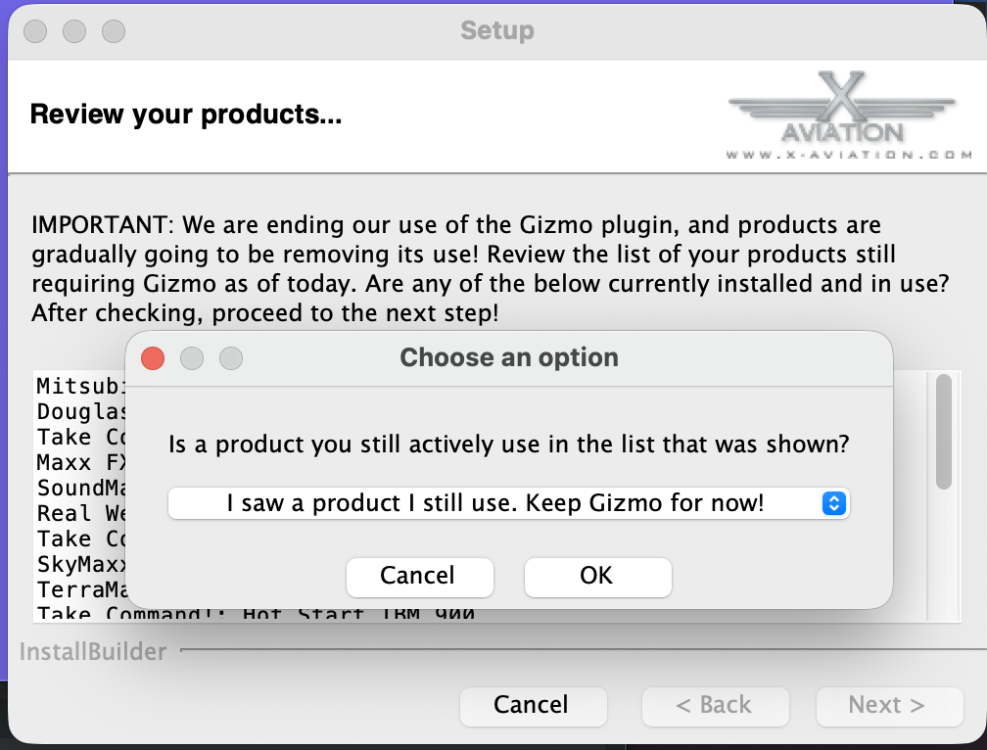 1 point
 -
I found that the MU-2 GLASS (+ G500) needs BOTH the Gizmo and the X-Aviation DRM plugins installed / enabled. I use xOrganizer and had the X-Aviation plugin disabled (as the MU-2 is Gizmo still). In that case there is no error message, but the G500 simply stays dark. So, reinstall of course installs fresh (and "enabled") copies of those plugins, but it should not be needed if you just make sure both Gizmo and X-Aviation plugins are enabled at runtime.1 point
-
It is being designed to operate as the real one, yes.1 point
-
1 point
-
Version 1.0.0
2 downloads
I made regional routes between 63 airports on United States. The 158 routes, charts of all the airfields, FMS flight plans, and support information, are on the RRR file. The description is on my YouTube channel (this page don't allow to embed the link. Search on YouTube: Rolo Bach Sim Flights)1 point -
Model is finished. Textures are finished. Saso is doing his best to take care of minor issues with the 650, one of which is getting the weather radar added to it. Once he finishes those, he'll send me a new TBM build so I can start initial testing in X-Plane 12 with animations and making sure textures look good. To sum up, as of this post, all artwork is considered done.1 point
-
Cameron, Glad to know my consistency matches yours. Maybe next year we can both surprise each other. Friendly banter aside, the lack of movement is the real concern. If the answer hasn’t changed in years, maybe the communication strategy should. Kind regards, Lucian Anghel1 point
-
Hi all, Just dropping in for my annual reminder that the TBM 900 “update” is still… somewhere. Every year we get the same beautifully crafted PR message about a massive rewrite, unparalleled quality, and how it’ll “definitely be worth the wait.” At this point I think the rewrite might actually be longer than the lifespan of the real TBM. If there’s actual progress, fantastic. If not, maybe it’s time to retire the yearly inspirational speeches and give us something concrete.1 point
-
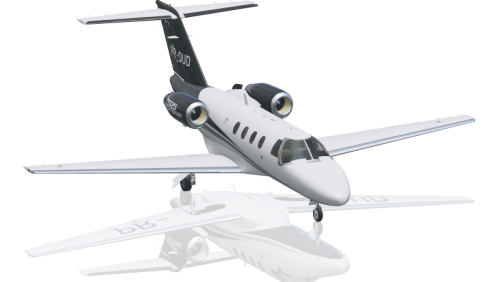
Version 1.0.0
31 downloads
This is an 8K-livery for the TorqueSim CJ525 To install, extract the zip file into the "liveries" folder. This also works without the winglets, the extra file just gets ignored. If you enjoy my work, consider supporting me on Patreon to cover some of the horrendous Adobe-costs ;).1 point -
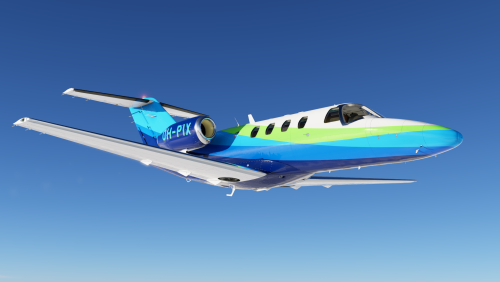
Version 1.0.0
12 downloads
A fictional personal livery I made for the C525, based on the design and colors Alaska Airlines has on the winglets of its 737's. 8K resolution.1 point -
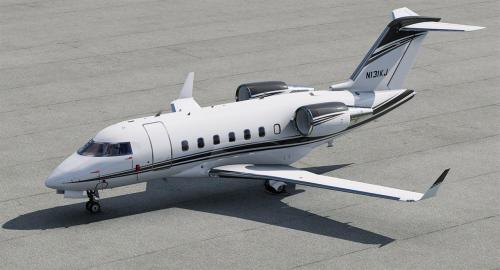
Version 1.0.0
275 downloads
This is a livery for the Hot Start Challenger 650. To install, extract the zip file into the "liveries" folder. You can supply your own registration, N131KJ is not printed on the cowlings. If you enjoy my work, consider supporting me on Patreon to cover some of the horrendous Adobe-costs ;). You can find 8K versions of the liveries there.1 point -
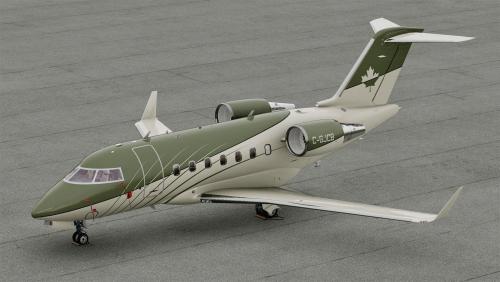
Version 1.0.0
167 downloads
This is a livery for the Hot Start Challenger 650. To install, extract the zip file into the "liveries" folder. You can supply your own registration, C-GJCB is not printed on the cowlings. If you enjoy my work, consider supporting me on Patreon to cover some of the horrendous Adobe-costs ;). You can find 8K versions of the liveries there.1 point -
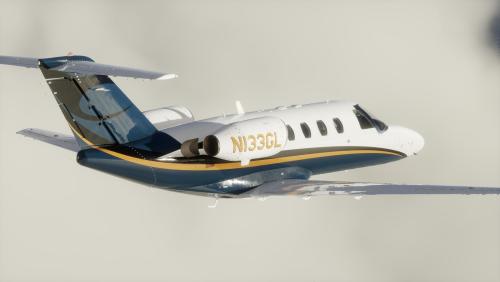
Version 1.0.0
89 downloads
Livery recreating N133GL, the first CitationJet ever delivered with MSN 525-0001, it is currently operated out of Little Rock (KLIT)1 point -
Hi @imemyself it has been a while for sure and a valid question and I have no real excuse. The last year has very much been a "foundational stabilization" year. I'm getting close enough to retirement to start eyeballing these next 6 years and how to best navigate them after the Covid ripples upended several things in my life. A year ago this time I had an opportunity with Laminar once again and I took it....the previous years since Covid were a bit rocky and I had some catching up to do, which I have mostly done over the last 12 months. I've spent sporadic moments in the year working on the 737 FMOD conversion and we're in final sound testing on that. The MU2 has taken a back seat during this time. I have recently integrated X-Plane's new weather radar and most of the known issues are fixed, which you guys won't see till 12.4 or 12.5 perhaps, so I have been chipping on it. An update absolutely will be available and it is still maintained and will be for years to come I suspect. I took the gig with Laminar to "stay in the X-Plane ecosphere" and some important personal things have transpired this year that should clear the way for more XP work. I know that's pretty hollow talk considering the last year, but I'll just wrap up by saying there are no plans for me to abandon the MU2 and I get reminded about it frequently...so the pressure is on and felt.1 point
-
I couldn't start working before 12.1 went final. Beyond this, 1 person, me, working on 2 aircraft support and 2 aircraft under development. Moreover, I'm slowly moving the code from Lua to Cpp, which I'm learning as I'm doing things. Mostly, the update is almost done, needs final touches to be ready.1 point
-
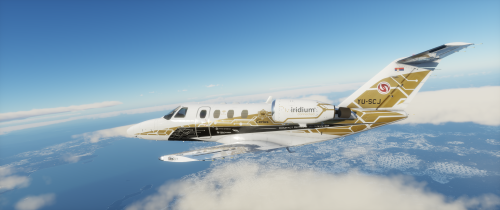
Version 1.0.0
44 downloads
This is a livery for the TorqueSim CitationJet 525, based on YU-SCJ a Citation 525 owned by Prince Aviation. The Registration is baked, so its not possible to change the registration. To install simple extract the YU-SCJ 1.0.0.zip into the "liveries" folder. Enjoy!1 point -
It's disappointing to buy an aircraft that the developer claims to be the most complete for X-Plane 11 (possibly the most expensive as well) and see that it doesn't have a working weather radar, performance calculator and other things that ALL other aircrafts have (even the freeware ones). I'm very disappointed.
 1 point
 -
Version v0.104
307 downloads
This LUA script enables random failures for the HotStart Challenger 650. Requirement: The script requires FlyWithLua: Download the correct version for your simulator. FlyWithLua for X-Plane 11: - https://forums.x-plane.org/index.php?/files/file/38445-flywithlua-ng-next-generation-edition-for-x-plane-11-win-lin-mac/ FlyWithLua for X-Plane 12: - https://forums.x-plane.org/index.php?/files/file/82888-flywithlua-ng-next-generation-plus-edition-for-x-plane-12-win-lin-mac/ Installation: - Unzip the files in [X-Plane]\Resources\plugins\FlyWithLua\Scripts Settings: (edit the lua script) -- Here you set if the failures should be default enabled or disabled when your starting up X-Plane. -- You can also enable and disable this option (for the current session) in the FlyWithLua menu. -- Set true to enable failures, false to disable. Default is true. true and false have to be written with lowercase letters. EnableFailures_WizVar = true -- Mean time between failures (MTBF) is the predicted elapsed time between inherent failures of a system during operation. -- Default is MTBF_hours = 10.0 local MTBF_hours = 10.0 -- Max failures pr session -- Default is Max_Failures = 2 local Max_Failures = 2 -- Severity 1 to 5. 1 least severe, 5 most severe. i.e. if you select 3, you will get failures from severity 1 to 3. local Severity = 5 -- Clear all failures when starting x-plane. Default is false. true and false have to be written with lowercase letters. local ClearAllFailures = false Logfile: When a failure occurs it will log the event to the logfile Wizball_CL650_Failures.log in your X-Plane root folder. example: MTBF: This graph shows a example how often you can expect a failure when you set the MTBF to 10 hours. Failures included in the script: CL650/failures/systems/ats/failed/state Auto Throttle System has failed CL650/failures/systems/ats/msd/1/failed/state Left ATS MSD has failed CL650/failures/systems/ats/msd/2/failed/state Right ATS MSD has failed CL650/failures/systems/afcs/yd/1/failed/state Yaw Damper Channel 1 has failed CL650/failures/systems/afcs/yd/2/failed/state Yaw Damper Channel 2 has failed CL650/failures/systems/elec/comp/HTR_L_WSHLD_1/failed/state Left windshield heater 1 has failed CL650/failures/systems/elec/comp/HTR_L_WSHLD_2/failed/state Left windshield heater 2 has failed CL650/failures/systems/elec/comp/R_WSHLD_1/failed/state R windshield heater 1 has failed CL650/failures/systems/elec/comp/R_WSHLD_2/failed/state R windshield heater 2 has failed CL650/failures/systems/elec/comp/HTR_R_WIND/failed/state Right window heater has failed CL650/failures/systems/elec/comp/CABIN_TEMP_SENSE/failed/state Cabin temperature sensor has failed CL650/failures/systems/elec/comp/LDG_TAXI_LTS_R_NOSE/failed/state Right nose LDG-taxi lights has failed CL650/failures/systems/elec/comp/LDG_TAXI_LTS_R_WING/failed/state Right wing LDG-taxi lights has failed CL650/failures/systems/elec/comp/HTR_L_WIND/failed/state Left window heater has failed CL650/failures/systems/elec/comp/ANTI_SKID_1/failed/state Anti-skid 1 has failed CL650/failures/systems/elec/comp/AUTO_THROTTLE/failed/state Autothrottle has failed CL650/failures/systems/elec/comp/CABIN_TEMP_CONT_AUTO/failed/state Cabin temp ctrl (auto) has failed CL650/failures/systems/elec/comp/ANTI_SKID_2/failed/state Anti-skid 2 has failed CL650/failures/systems/elec/comp/STAB_CH_1_HSTCU/failed/state Stab trim channel 1 ctrl has failed CL650/failures/systems/elec/comp/STAB_CH_2_HSTCU/failed/state Stab trim channel 2 controller has failed CL650/failures/systems/iceprot/wnd_heat/1/failed/state Left window heat has failed CL650/failures/systems/iceprot/wnd_heat/2/failed/state Left windshield heat has failed CL650/failures/systems/iceprot/wnd_heat/3/failed/state Right windshield heat has failed CL650/failures/systems/iceprot/wnd_heat/4/failed/state Right window heat has failed CL650/failures/env/birdstrike/strike/state Birdstrike that doesn't lead to any damage CL650/failures/env/smoke/baggage/state Smoke in the baggage bay CL650/failures/env/smoke/lavatory/state Smoke in the toilet CL650/failures/systems/elec/ac/gen/1/failed/state Generator 1 has failed CL650/failures/systems/elec/ac/gen/2/failed/state Generator 2 has failed CL650/failures/systems/elec/comp/HYD_PMP_3B/failed/state Hydraulic pump 3B has failed CL650/failures/systems/elec/comp/HYD_PMP_2B/failed/state Hydraulic pump 2B has failed CL650/failures/systems/elec/comp/HYD_PMP_3A/failed/state Hydraulic pump 3A has failed CL650/failures/systems/elec/comp/HYD_PMP_1B/failed/state Hydraulic pump 1B has failed CL650/failures/systems/elec/comp/FLAP_MOTOR_2/failed/state Flap motor 2 has failed CL650/failures/systems/elec/comp/FLAP_MOTOR_1/failed/state Flap motor 1 has failed CL650/failures/systems/elec/comp/HUD/failed/state Heads Up Display has failed CL650/failures/systems/hyd/1/pump/A/state Engine-driven pump 1A has failed CL650/failures/systems/hyd/1/pump/B/state AC electric pump 1B has failed CL650/failures/systems/hyd/2/pump/A/state Engine-driven pump 2A has failed CL650/failures/systems/hyd/2/pump/B/state AC electric pump 2B has failed CL650/failures/systems/hyd/3/pump/A/state AC electric pump 3A has failed CL650/failures/systems/hyd/3/pump/B/state AC electric pump 3B has failed CL650/failures/sensors/ads/pitot/3/leak_small/state Standby pitot tube is leaking pressure (inaccurate speed reading) CL650/failures/avionics/efis/hud/failed/state Heads Up Display has failed CL650/failures/systems/eng/left/compr/stall/trans/state Left engine compressor stall (transient, self-clearing) CL650/failures/systems/eng/right/compr/stall/trans/state Right engine compressor stall (transient, self-clearing) CL650/failures/systems/eng/left/oil/pump/weak/state Left engine oil pump is producing low pressure and low flow CL650/failures/systems/eng/right/oil/pump/weak/state Right engine oil pump is producing low pressure and low flow CL650/failures/env/birdstrike/windshield/state Birdstrike that leads to the left windshield's outer pane shattering CL650/failures/systems/aircond/leak/500/state Cabin is leaking pressure at ~500 ft/min CL650/failures/systems/comm/sdu/1/failed/state Satellite Data Unit 1 has failed CL650/failures/systems/comm/sdu/2/failed/state Satellite Data Unit 2 has failed CL650/failures/systems/fuel/tank/aux/leak/slow/state Auxiliary tank is leaking slowly CL650/failures/systems/fuel/tank/main/left/leak/slow/state Left main tank is leaking slowly CL650/failures/systems/fuel/tank/main/right/leak/slow/state Right main tank is leaking slowly CL650/failures/systems/fuel/tank/tail/leak/slow/state Tail tank system is leaking slowly CL650/failures/systems/hyd/1/leak_slow/state Hydraulic system 1 is leaking slowly CL650/failures/systems/hyd/2/leak_slow/state Hydraulic system 2 is leaking slowly CL650/failures/systems/hyd/3/leak_slow/state Hydraulic system 3 is leaking slowly CL650/failures/sensors/ads/pitot/1/leak_small/state ADC 1 pitot tube is leaking pressure (inaccurate speed reading) CL650/failures/sensors/ads/pitot/2/leak_small/state ADC 2 pitot tube is leaking pressure (inaccurate speed reading) CL650/failures/avionics/efis/pfd/1/failed/state PFD 1 has failed CL650/failures/avionics/efis/mfd/1/failed/state MFD 1 has failed CL650/failures/avionics/efis/mfd/2/failed/state MFD 2 has failed CL650/failures/avionics/efis/pfd/2/failed/state PFD 2 has failed CL650/failures/avionics/efis/isi/failed/state ISI has failed CL650/failures/avionics/efis/isi/pitot/state ISI pitot sensor has failed CL650/failures/avionics/efis/isi/static/state ISI static sensor has failed CL650/failures/avionics/efis/isi/att_fail/state ISI attitude indication has failed CL650/failures/avionics/efis/isi/att_drift/state ISI attitude indication is drifting randomly CL650/failures/systems/oxygen/tank/leak/slow/state Oxygen tank is leaking slowly CL650/failures/systems/eng/left/n1_vib_high/state Left engine is experiencing excessive N1 vibration CL650/failures/systems/eng/left/n2_vib_high/state Left engine is experiencing excessive N2 vibration CL650/failures/systems/eng/left/combust/flameout/trans/state Left engine combustion has flamed out (momentarily) CL650/failures/systems/eng/right/n1_vib_high/state Right engine is experiencing excessive N1 vibration CL650/failures/systems/eng/right/n2_vib_high/state Right engine is experiencing excessive N2 vibration CL650/failures/systems/eng/right/combust/flameout/trans/state Right engine combustion has flamed out (momentarily) CL650/failures/systems/aircond/leak/1000/state Cabin is leaking pressure at ~1000 ft/min CL650/failures/systems/ats/svo/1/failed/state Left ATS Servo has failed CL650/failures/systems/ats/svo/2/failed/state Right ATS Servo has failed CL650/failures/systems/elec/comp/FMS_CDU_2/failed/state CDU 2 has failed CL650/failures/systems/elec/comp/FMS_CDU_3/failed/state CDU 3 has failed CL650/failures/systems/elec/comp/FMS_CDU_1/failed/state CDU 1 has failed CL650/failures/systems/fuel/tank/aux/leak/fast/state Auxiliary tank is leaking quickly CL650/failures/systems/fuel/tank/main/left/leak/fast/state Left main tank is leaking quickly CL650/failures/systems/fuel/tank/main/right/leak/fast/state Right main tank is leaking quickly CL650/failures/systems/fuel/tank/tail/leak/fast/state Tail tank system is leaking quickly CL650/failures/systems/hyd/1/leak_fast/state Hydraulic system 1 is leaking quickly CL650/failures/systems/hyd/2/leak_fast/state Hydraulic system 2 is leaking quickly CL650/failures/systems/hyd/3/leak_fast/state Hydraulic system 3 is leaking quickly CL650/failures/systems/oxygen/tank/leak/fast/state Oxygen tank is leaking quickly CL650/failures/systems/eng/left/compr/stall/clear/state Left engine compressor stall (clearable by reducing power) CL650/failures/systems/eng/right/compr/stall/clear/state Right engine compressor stall (clearable by reducing power) CL650/failures/env/birdstrike/pitot/left/state Birdstrike that leads to the left pitot tube becoming blocked CL650/failures/env/birdstrike/pitot/right/state Birdstrike that leads to the right pitot tube becoming blocked CL650/failures/systems/aircond/leak/fast/state Cabin is leaking pressure quickly CL650/failures/systems/gear/handle/failed/state Landing gear handle failed CL650/failures/systems/gear/nose/leg/act/failed/state Nose gear leg actuator has failed CL650/failures/systems/gear/main/left/leg/act/failed/state Left gear leg actuator has failed CL650/failures/systems/gear/main/right/leg/act/failed/state Right gear leg actuator has failed CL650/failures/sensors/rss/gps/1/failed/state GPS 1 receiver has failed CL650/failures/sensors/rss/gps/2/failed/state GPS 2 receiver has failed CL650/failures/systems/eng/left/combust/flameout/perm/state Left engine combustion has flamed out (permanently) CL650/failures/systems/eng/right/combust/flameout/perm/state Right engine combustion has flamed out (permanently) CL650/failures/env/birdstrike/eng/left/state Birdstrike that leads to a non-recoverable left engine failure CL650/failures/env/birdstrike/eng/right/state Birdstrike that leads to a non-recoverable right engine failure1 point -
Likely your flaps are out. When flaps are out the plane sheds power from the utility bus to preserve power for the hydraulic pumps.1 point
-
NEVER EVER EVER EVER ask a developer for ANY status on a product you spend your money on..rookie developers do not want ANY accountability to answer questions from us measly peasants that buy their product, give them your money and do not ask questions that is their attitude. they advertise the most realistic most expensive addon missing a key features . I understand xp did not have the code at the time but they do now and to not even tell or give people a roadmap or anything then give a smart ass condescending attitude when asked is unacceptable. I lose all respect for developers with Attitude it is unnecessary. I am not singling this product MANY MANY do this.-2 points

.png.4accba7f7a324921e65fc2a809bd6b96.png)










.thumb.jpg.ede78836fe6795baf7b91e5eb2aad35e.jpg)

