

Leaderboard




Popular Content
Showing content with the highest reputation since 08/24/2026 in all areas
-

Version 1.0.0
47 downloads
This is a livery for the CIS Navajo Chieftain PA-31, inspired by D-ILCA. To install, extract the zip file into the "liveries" folder. If you enjoy my work, consider supporting me on Patreon to cover some of the horrendous Adobe-costs ;). You can find 8K versions of most of the liveries there.2 points -
No forward slash between waypoint and bearing.1 point
-
This is not the same. Your log shows the plugin causing the issue. Violation by XTLua 2.1.1 id421 point
-
Hello All, This will serve as an official announcement that we have released update version 1.9 for the CL650. All customers who have purchased the CL650 up till now have been sent an e-mail by X-Aviation with complete instructions on how to obtain your update. We have made this a very simple process! For those that purchase the CL650 from today forward, your purchased download will already be updated to version 1.9 for you. What if I didn't get the update e-mail? If you did not receive your update e-mail don't fret! X-Aviation has updated our system to allow all customers to update with ease, regardless of whether you received an e-mail for the update! Here's what to do: 1. Login to your X-Aviation account here: https://www.x-aviation.com/catalog/account_history.php 2. Find your original Challenger 650 download and re-download the file. It will download as the latest version! The following is a list of additions/fixes included: Release Highlights: Fixed various manipulators being reversed on the overhead Particle effect luminosity is incorrectly set in XP12 making them appear extremely bright Rewrote large portions of shared cockpit to allow for multi-crew, passengers, spectators and a much simpler setup process (documentation forthcoming) Engaging the yaw dampers requires holding the buttons down for a couple of seconds As we no longer utilize Gizmo, Mac ARM support is now complete and Mac users should stop running X-Plane through Rosetta if you don't have any other products which require Gizmo (the installer will point them out if you do). Improvements: 4536: Add support for rudder and steering control using only keyboard & mouse 4565: Add support for SayIntentions and custom ACARS service provider URLs 4569: Retune AP flap constants to avoid excessive altitude excursions 4573: Refactor pitch FMA mode to hold the commanded attitude more tightly 4577: Implement persistent logging of CB pop reason 4589: Add waypoint description codes introduced in ARINC 424-20 4590: Switch to reduced bank angle for hold path at FL316 not FL245 4593: Update world magnetic coefficients to 2025 4606: Implement gRPC API 4629: Workaround for weak X-Plane's aileron effectiveness at low airspeeds 4643: Switch to using nvcompress for DDS generation (better texture colors) 4649: Implement compressed normal maps for XP12 4600: Add support for new combined wheelbrake axis 4468: Stab/mach trim and yaw damper buttons must be held down to engage 4698: Expand shared cockpit to allow for multiple concurrent connections and easier setup Bugfixes: 4535: Typo in pressurization study screen tooltip 4538: Crash on XP11 when aviationweather.gov returns zero METARs for an airport 4537: Mouse yoke breaks on 3rd party airplanes if the CL650 was loaded previously 4539: Module boot time variation is producing doubled audio on startup from DCU and PSEU 4534: FAA obstacle database not decompressing correctly due to ZIP version change 4541: Remove IRU debug logging on release builds 4542: Typo in AFCS visualizer reads "Nm/s" when it should say "Nm" 4543: Deleting last leg of an airway in LEGS when preceding and following legs are discontinuities can crash 4545: AC AUTOXFER FAIL indications on MFD synoptic page should be driven directly by CAS trigger 4546: Recompute a vertical direct-to on mod exec 4547: On executing vertical direct-to, disable the NO VPATH-PILOT CMD suppression 4372: Sporadic and spurious NOT IN DATABASE messages 4551: Bad memory allocation in DCU wire-to-lamp definition parsing code 4556: CTD due to phys.c assertion in atmos_main for shared cockpit guest in X-Plane 11 4558: Harden netcode against ingesting values too large to represent as an FP16 4552: Various manipulators are reversed in latest stable release 4563: VTBS has overflowed the maximum number of SIDs (200) causing a crash when attempting to pick a SID in DEP/ARR DEPARTURE 4571: CTD due to assertion "abus_isval(tod_pause.time2tod)" failed 4574: NWS actuator shoudn't be feeding off the inboard brake hydraulic line 4582: Regression: fix for 0004495 broke AIRWAY INTERSECTION page's ability to automatically resolve the intersection 4583: earth_nav.dat parser needs to normalize whitespace before line splitting 4584: Fix heat damage on engine isn't fixing damage from engine fires 4585: DataRefTool crashes trying to immediately read our datarefs before their setup is completed 4592: FDR data incorrectly labels stick shaker signal as pilot-commanded AP disconnection signal 4595: MFD display reversion is erroneously triggering MFD XTLK flag 4607: Aircraft contrail particle effects are broken in XP12 4608: KLAX ORCKA5 produces spurious UNABLE FPLN ALT due to short leg sequence across discontinuity 4610: FCU clogged failure can cause crash due to incorrect meter_valve_rat clamping 4624: IF legs need to be stripped out when following an enroute transition that bypasses them 4493: Linux with AMD GPU without Zink is borked on latest beta build Object Fixes: Main Panels1.obj Dsus fastener positions fixed on right side panel. Object Fixes: Nose Gear Bay.obj Mesh added to fill in gaps around edges of opening. 4625: NOT ON INTERCEPT TRACK is coded completely wrong 4626: Increase XTALK FAIL message time delay to 10 seconds 4627: SBAS VPL should be ignored when flying an approach in RNP mode 4602: Anti-ice fluid on wings not visible from inside 4628: Refactor nose door implementation to properly route through relay K4GA 4631: Tie amber generator circles on the AC synoptic page to corresponding GEN OFF CAS messages 4632: Use tighter holding pattern radii at all altitudes 4636: PPOS flight plan disappears from PFDs 4 seconds after selecting PFD reversion 4638: phys subsystem still references rucsoundings 4639: Incorrect LPV vertical path construction 4640: Harden LTP and FPAP access functions to bad data 2452: FIX page symbology not showing on MFD when SEC FPLN showing on MFD 4650: NAV LTS breaker has the wrong rating 4651: Stop hard-depending on stock X-Plane commands existing 3938: Updating DIRECT-TO NEAREST AIRPORTS's MIN RWY does not require UPDATE AIRPORTS to be selected 4118: Existing waypoints should be dropped when changing flight plan via Direct-To NEAREST AIRPORTS 4369: XP11 version of ACF is missing instrument label and CB collar OBJs 4385: Updated hint images with all corrections to Jan 2024 4548: Change hint image loader to accept RGB formatted images 4503: Update "more info" links to use CL650/Study prefix 4434: Engaging AP while FLC is active should sync speed target to current speed 3141: Pressing Left LSK for RX fix (visual approach) should put pre-constructed PBD into scratchpad 4654: Pilot-defined waypoints do not properly initialize pbd.src field 4656: Stabilizer trim runaway failure cannot be interrupted by disengaging stabilizer trim 4657: Remove "CVR" failure from 24-Elec 4660: Failures.txt documentation mistakes 4570: Regression? When IF is not aligned with FAC, APPR LNV wrongly flies FAC 4661: Don't show CHECK LOC TUNING when on missed approach 4668: Attempting TTS on Arch Linux with no festival(1) binary present crashes X-Plane with SIGSEGV 4673: Along-track waypoint doesn't use the correct inbound course on direct-to leg 4674: Compute VDEV even when track angle error exceeds capture limit 4675: Retuned ISI attitude finding to produce less pitch error while in hold 4670: Avionics should default to inches of mercury rather than hPa 4684: Implement missing failures 4695: Retune XP12 cabin lighting 4696: Harden the AIRAC parser against invalid altitude constraints causing a crash 4710: Crash on XP12.4.1 due to hard limits on not querying datarefs from background threads 4711: FCC 1B/2A status study screens are mislabeled 4712: LDU channel label in failure description is incorrect 4715: X-Plane 12.4 requires instances to be created from pre-flightloop callbacks 4720: Triggering auto-FO checklists crashes on X-Plane 12.4.1 4722: X-Plane 12.4.1 breaks popup panels due to XPLMFindCommand being invoked from background thread 4778: Reloading while in a hold pattern will reset the hold pattern state and perform hold entry again, 4779: Implement a HOLD DEBUG screen, 4768: Regression: with a lot of crosswind at high altitude, hold pattern tracking gets confused on the outbound leg 4771: Add data ref to indicate shared cockpit role of user 4520: In shared cockpit throttle control is susceptible to jittering 4810: Readjust panel lighting levels to match XP12.3 and later changes 4140: Generator transfers trip off stab & mach trim Enjoy these latest updates, and stay tuned to the forum as we continually announce the latest happenings.1 point
-
Version 1.0.3
47 downloads
Landing Monitor XP12 – Version 1.0.3 Landing Monitor XP12 is a complete landing-analysis tool for X-Plane 12, designed to provide detailed touchdown, flare and rollout feedback after every flight. The plugin records the final approach from approximately 50 ft radio altitude, analyses the pilot’s longitudinal control input, detects the pre-flare and flare phases, identifies the landing runway, measures centerline performance and calculates a detailed Landing Score. It is intended for flight-simulation analysis and training. Main Features Real-Time Flight Data A configurable compact HUD displays: Total, longitudinal, lateral and vertical acceleration Maximum total acceleration IAS, TAS and groundspeed Pitch, roll, angle of attack and crab angle Thrust, drag, lift and aircraft weight Lift-to-weight and thrust-to-drag ratios Landing Monitor status Current script version Every item can be enabled or disabled independently. Detailed Touchdown Analysis After landing, the plugin records and displays: Landing rate Peak G Vertical impact energy Touchdown IAS and groundspeed Pitch, roll and angle of attack Crab angle Heading and track error Headwind and crosswind components Bounce count Runway and airport identification Distance from the runway threshold Signed centerline deviation in metres and feet Landing Score and Landing Quality Peak G is captured during the first 0.75 seconds following initial contact. Relative Flare and Pre-Flare Detection Version 1.0.3 introduces a fully relative flare-detection system based only on the filtered longitudinal joystick-deflection curve. The algorithm does not require a fixed joystick percentage and does not use pitch, vertical speed or angle of attack to validate the flare. FLARE is selected from the first ascending control-input phase reaching more than 80% of the maximum filtered joystick deflection recorded during that landing. PRE-FLARE is selected from the last earlier ascending phase reaching more than 50% of the same maximum. A relative slope check refines the effective beginning of the flare and prevents a long, nearly flat control-input section from placing the marker too early. This relative method allows the detector to adapt to aircraft requiring very different control-input amplitudes. Flare & Rollout Analysis Graphs The analysis window provides synchronized graphs for: Vertical speed to touchdown Filtered longitudinal joystick deflection Aircraft pitch Radio altitude Lateral deviation during rollout The graphs include clearly identified: PRE-FLARE marker FLARE marker TOUCHDOWN marker Airport and runway Detection thresholds and phase information Vertical speed and joystick data stop at touchdown, while pitch and radio-altimeter data continue for two additional seconds. Rollout deviation continues until 30 kt or until a runway exit is detected. Accurate Runway Selection The runway database respects the priority order defined in scenery_packs.ini. For each airport, the first enabled scenery providing physical runway data is retained, while lower-priority duplicate definitions are ignored. At touchdown, the plugin uses a geographic runway index and performs exact geometry calculations on no more than 24 nearby candidates. This avoids scanning the complete global runway database during landing and helps ensure that custom-airport geometry is used correctly. Revised Landing Score The Version 1.0.3 Landing Score is based on four categories: Centerline deviation: 30 points Flare or pre-flare score distance: 25 points Wind-aware crab angle: 20 points Peak G: 25 points Full centerline credit is awarded inside ±1 metre. The accepted crab-angle range changes according to the crosswind component: Crosswind below 5 kt: ±1° Crosswind from 5 to 15 kt: ±2° Crosswind above 15 kt: ±3° Landing Quality is based on Peak G rather than vertical speed. Landing rate remains displayed and logged but does not affect the score. Automatic Post-Landing Display When enabled, applying at least 50% parking brake after a finalized landing automatically opens: Landing Monitor Flare & Rollout Analysis The trigger reads two parking-brake DataRefs, stores the detected state and retries the deferred window-opening request until both windows are confirmed. The automatic display can be disabled in Settings without disabling monitoring, scoring, graph recording or CSV export. Independent Windows and Persistent Settings Three windows are controlled independently: Compact Real-Time HUD Landing Monitor Flare & Rollout Analysis All windows remain closed when X-Plane or FlyWithLua starts. Monitoring continues in the background. Display choices, HUD position, custom coordinates, CSV separator and the automatic parking-brake option are saved between sessions. Automatic CSV Logging Each completed landing is automatically saved to a per-aircraft CSV file. Version 1.0.3 uses: LandingLog_v9_<separator>_<aircraft>.csv The log includes touchdown data, runway and wind information, flare and pre-flare measurements, score-distance information, Peak-G-based Landing Quality and the final Landing Score. Requirements X-Plane 12 FlyWithLua NG A supported 64-bit operating system Write permission in the FlyWithLua Scripts folder Installation Close X-Plane 12. Copy: LandingMonitorFlareAnalysis_XP12_v1.0.3.lua into: X-Plane 12/Resources/plugins/FlyWithLua/Scripts/ Remove or archive previous Landing Monitor Lua versions. Start X-Plane. Open the FlyWithLua menu to access the Landing Monitor windows, settings and commands. When updating from an older version, the runway cache may be rebuilt automatically. Rebuild the runway database manually after changing scenery_packs.ini or installing a new airport scenery. What Is New in Version 1.0.3 New relative FLARE and PRE-FLARE detection Filtered joystick-deflection analysis Complete approach history retained below approximately 50 ft Effective flare-onset refinement using relative slope PRE-FLARE measurements and score-distance calculation Scenery-priority runway selection Version 2 runway cache Geographic runway index and limited local candidate search Peak-G-based Landing Quality Revised Landing Score Wind-aware crab-angle tolerance Full centerline credit inside ±1 metre Simplified filtered-joystick graph Script-version labels in all main windows Improved parking-brake automatic window opening Updated LandingLog_v9 CSV format Important Notice Landing Monitor XP12 is a flight-simulation analysis tool. It is not certified avionics and must not be used for real-world flight operations, aircraft maintenance or regulatory compliance.1 point -
Version 1.0.1 HF2
5 downloads
VATSIM Real Data v1.0 is a compact X-Plane 12 plugin that displays live VATSIM and xPilot information directly inside the simulator, including radio status, nearby frequencies and the 10 closest aircraft. Full description VATSIM Real Data v1.0 adds a compact, customizable VATSIM information window to X-Plane 12. The plugin integrates with xPilot and displays your current connection status, callsign, nearby traffic, COM frequencies, microphone activity, SELCAL information and live VATSIM feed status. It also shows the five nearest VATSIM ATC frequencies and the ten closest aircraft, with useful flight and proximity information presented in a single readable table. Main features xPilot connection status and callsign TX and RX indicators COM1 and COM2 frequencies Active station callsigns Microphone level meter SELCAL status Five nearest VATSIM ATC frequencies Ten nearest VATSIM aircraft Aircraft callsign and type Departure and destination airports Bearing and horizontal distance Relative altitude Ground speed and altitude Reported COM1 frequency Automatic window resizing Fully configurable display from the X-Plane plugin menu Automatic settings saving Compact opaque interface designed for cockpit use Traffic proximity colors Nearby aircraft are color-coded using horizontal and vertical separation: Red: less than 3 NM and less than 1,000 ft vertical separation Amber: less than 6 NM and less than 2,000 ft vertical separation Green: all other traffic This feature is intended as a situational-awareness aid only. It is not a certified TCAS system. Customization Display options can be changed directly from: Plugins > VATSIM Real Data Sections, aircraft columns, aircraft count and frequency count can be enabled or disabled without restarting X-Plane. The window automatically adjusts its size and saves the selected settings. Installation Copy the complete folder: VatsimDataWindow into: X-Plane 12\Resources\plugins\ The final structure should be: X-Plane 12\Resources\plugins\VatsimDataWindow\64\win.xpl Restart X-Plane after installation. Requirements X-Plane 12 Windows 64-bit xPilot Internet connection for live VATSIM data Disclaimer VATSIM Real Data is an independent community plugin. It is not affiliated with, endorsed by or officially supported by VATSIM, xPilot or Laminar Research.1 point -
1 point
-

Version 1.0.0
110 downloads
This is a livery for the TorqueSim CJ525, inspired by https://www.jetphotos.com/registration/OE-FGC To install, extract the zip file into the "liveries" folder. You can change the registration using the TorqueSim tooling.1 point -

Version 1.0.0
269 downloads
This is a livery for the Hot Start Challenger 650, inspired by https://www.jetphotos.com/registration/D-AJAN To install, extract the zip file into the "liveries" folder. You can supply your own registration, D-AJAN is not printed on the cowlings.1 point -

Version 1.0.0
59 downloads
Enjoy !1 point -
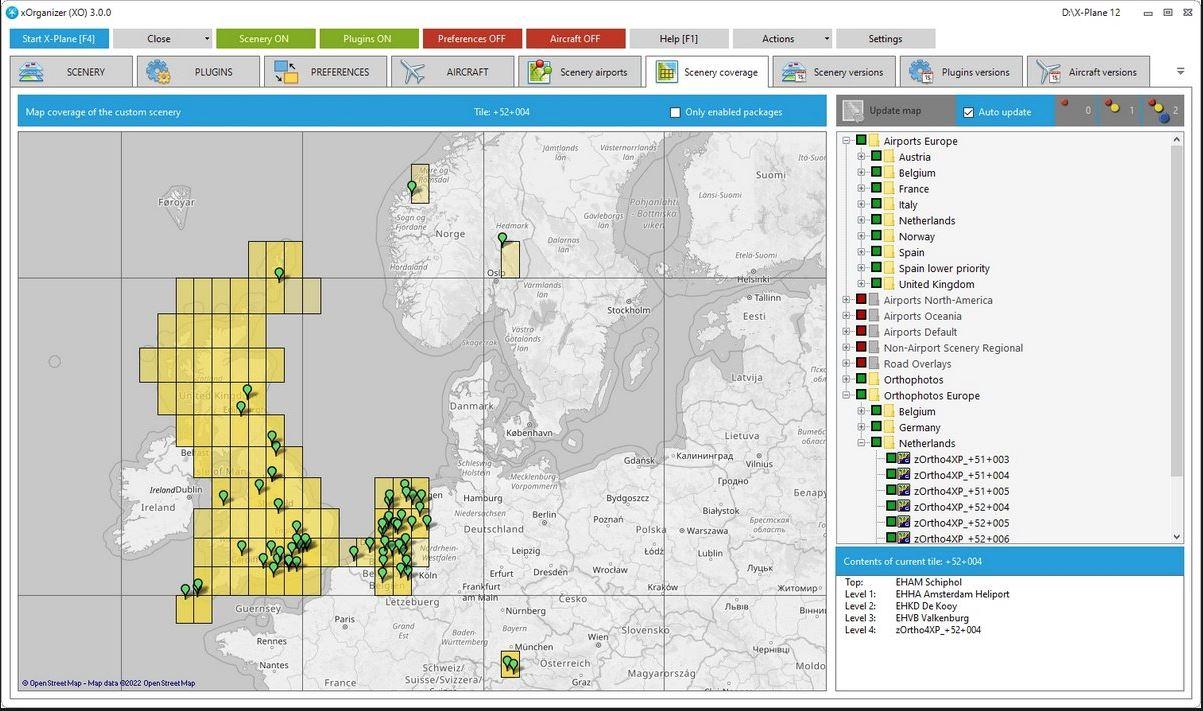 The highly popular third-party addon, xOrganizer, has now been officially released for X-Plane 12 and is readily available through the X-Plane.Org Store. xOrganizer is a software tool designed to provide accessibility and peace of mind to X-Plane users by assisting them in organizing their files. While structuring X-Plane files can be straightforward, it can present challenges for new users on their simulation journey. xOrganizer helps users overcome this roadblock by offering assistance in organizing various aspects, including the scenerypackages.ini file and ensuring that all aircraft are up to date. Beyond maintaining the proper order of scenery files, xOrganizer also features a scenery map that showcases the installed scenery packages and the package currently being utilized by X-Plane. Presented through a user-friendly interface, xOrganizer provides an overview of plugins, aircraft, and scenery, granting users the option to choose whether or not they require the assistance of the software. Furthermore, the tool offers customization options, enabling users to tailor their experience for added convenience and accessibility. A comprehensive feature list can be found on their store page. For those interested in upgrading or purchasing xOrganizer, the product is available on the X-Plane.Org Store. Existing v2 customers can check their account page for a discount code that can be applied during checkout, providing an incentive for their continued support and upgrade to the latest version.1 point
 -
CrewPackXP - Crew Callouts View File **Updated 01/04/2022** CrewPackXP is a FlyWithLUA utility designed to add some crew communications for aircraft in X-Plane 11. This includes basic callouts, and in some cases assistance from the PNF in high workload phases of flight. Settings can be adjusted to enable or disable the whole plugin, or just certain features of each aircraft. Flight Factor 757 / 767: - Virtual FO to pre-flight aircraft - Take-off and Landing calls by both crew members - Flight Attendant PA's - Ground Crew positioning of equipment - Virtual FO assistance with go-around procedure Hot Start Challenger 650: - Virtual FO to pre-flight aircraft - Take-off and Landing calls by both crew members Source Code https://github.com/N1K340/CrewPackXP/tree/main/src Documentation http://crewpackxp.readthedocs.io/ Changelog New features and bug fixes are listed in the change log. Installation Copy the Scripts and Modules folders into the main folder of FlyWithLUA: > X-Plane 11 > Resources > plugins > FlyWithLua Once enabled, the First Officer should announce his entry to the cockpit roughly 15 seconds after loading in. CrewPackXP settings can be accessed via the X-Plane menu bar: > Plugins > FlyWithLua > FlyWithLua Macros > Crew Pack Settings Prerequisite This plugin uses the FlyWithLUA plugin to interface with X-Plane. It is available freely from [X-Plane.org](https://forums.x-plane.org/index.php?/files/file/38445-flywithlua-ng-next-generation-edition-for-x-plane-11-win-lin-mac/) Luna INI Parser (LIP) is included as an additional plugin module for use with FlyWithLua. This module allows for the saving and reading of settings data within LUA. It has been included in this package under the MIT Licence offered by creator Carreras Nicholas. This is a common plugin; it may already exist in your modules folder causing a prompt to overwrite. Usage The CrewPackXP functions run autonomously based on in sim events, provided the aircraft is enabled within the CrewPackXP settings. Refer to each aircraft's entry in the manual for details on settings and features available. Disclaimer / Feedback This package is to be distributed as Freeware only under the GPL v3 license. This is the first time I have coded a plugin, any feedback is welcome. Bug reports, please include the x-plane log.txt file in the main x-plane folder for the flight in question. Acknowledgements Carreras Nicholas - Luna INI Parser (LIP) 'Togfox' - FSE HUD 'X-Friese' - FlyWithLUA Plugin 'mkultra44' - Documentation proofing Current Script Versions - Flight Factor 767 - 1.4 - Hot Start CL650 - 1.4 Submitter N1K Submitted 02/11/2022 Category Plugins and Utilities1 point
-
Reposted from Saso "I have found the cause for the blinking of screens. The issue is being caused by the reflection detail. Due to a bug, we keep resizing some backing buffers when X-Plane calls us while drawing the reflection. As a temporary workaround, you can set reflection detail to "Minimal".1 point
-
This could be a bug in the AMD drivers. We'll need to do more investigating. In the meantime, have you tried using X-Plane in full screen mode? If the problem persists in full screen mode, try Windowed mode. I know it may seem like a pain, but this may be the only workaround for it for now.1 point
-
I didn't see any other posts with this reference. I've been looking online for this and finally found it, it's like the Holy Grail. I'm not aware of any copyright issues, i.e. it's on Google Docs, so I assume it's legitimate. Enjoy!… https://docs.google.com/file/d/0B06WSw8-Y2wHdXBwY085S0dMOG8/edit1 point


