Leaderboard


Popular Content
Showing content with the highest reputation since 05/15/2026 in all areas
-
I'm not sure why I feel compelled to give an update today....probably because I'm optimistic about the future and I'm "coming out of the fog". The fog in this case is "X-Plane Developer Documentation", which I've been crafting for over 2 years now and getting close to deploying for a soft-launch/preview/feedback/evolve phase. What end-customers probably don't see, is that there is a major rework going on within X-Plane....the kind where we (Laminar) say to ourselves, "we need to plan and retool for the next 10-15 years". X-Plane has been stretching old tech for a long time....and a deep introspection and plan had to happen. Being that I've been around since 1999, and have worked for Laminar in the past, I thought I might could help ....and in doing so, protect IXEG/Togasim's future in the process, but at the cost of taking time away from overhauling my own products and giving that time to Laminar for the remodeling effort. So my part in the Laminar overhaul, is in the simplest terms to "train developers" how to make awesome add-ons for X-Plane....doing so through better documentation and tutorials...and make development a lot more fun and satisfying for folks who want to try it. Developing is a fun hobby...if we can remove the pain and friction of having to hunt for sparse information. You may recall a major challenge I've had with my products was converting all my source code from Gimzo Lua to C++ so we could be less dependent on 3rd party tech. This is like building a RV-7 experimental airplane...and then saying, "I want to turn my RV-7 into an RV-8". I mean....better to start form scratch. Another reason I'm optimistic is because of AI. In the last week, we have successfully used AI to convert my MU-2 source code from Lua to C++.....BUT....this is incremental, not just a 100% compatibility swap, there are some fringe functionalities we are still working through...and in addition, we are learning how to better use AI along the way and of course we have to check ..every....single....corner of the code to make sure it works. Further, we have to 100% understand what AI did in the conversion. As of today, I'm quite excited about getting back to developing add-ons and participating in helping others improve their add-ons. AI is really making quite the change for the better, and a lot of the initiatives we've been working on internally are fast approaching internal testing and getting closer to making their way to the community. So as far as my own add-ons go.....we are steadily working through this conversion from Lua to C++ and starting to see some quite impressive success. It won't look much different to end-users obviously, but for our part, this is a major, major milestone. Mind you once this AI conversion is done and we have the workflow.....coding will no longer be the long straw in aircraft development. We will be able to focus on 3D quality and systems accuracy and not get burdened down in compilation and coding syntax and the physical time lost to typing. It really is an exciting time, and I know its been a bit of a burden having to wait for AI to grow up to enable this point. First up will be the MU2....probably around late September or October if our current success is any indicator. ....it will be our prototype test case for leveraging AI. Then we'll take that experience and expertise and apply it the 733 and get it ready for another decade of service....and with no upgrade charge to existing customers. On the one hand, I'm bummed its taken this long, and on the other, I really couldn't see any other path, as annoying as its been. This is just the nature of technology evolution...and taking the time to retool was the wiser and more prudent path for long term sustainability. Ben Russell's Gizmo Lua opened the door for incredible products and enabled really creative folks to execute their visions and for this I am very grateful. As with anything in life though, it comes in seasons and we need to look to the next one. -tkyler4 points
-
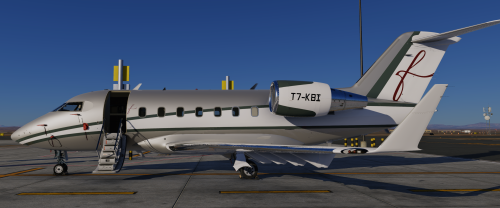
Version 1.0.0
35 downloads
This livery is inspired by the real Challenger 605 T7-KBI operated by FalconLuxe at OMDW. This one is my first livery to be uploaded so feel free to point out any issues in my dms on Discord "#beriev_be200"2 points -
I have to agree with the above statements. I have several planes rotting in the hanger because of updates promised and never delivered. The Challenger 650 desperately needs the weather radar to function and properly. It appears that the plane was made for X-Plane 11 originally and changed to woke with X-plane 12. Laminar Research has made giant strides is the improvement of the Flight Simulator and I truly believe it should the plane developer to bring that experience to their customers. Laminar has created a real time weather with cloud condition for your flight route. The Weather Radar is not just a color changing screen to look at, but critical flight data to avoid dangerous weather ahead. Would you really get on a commercial flight knowing the plane did not have radar heading into sever weather. Yes, this aircraft is very much in need of updates. Not become complacent with your thinking I'm good and so is my plane. Since the CL650 has no Weather Radar maybe a price reduction to $70 US Dollars is needed. Laminar is working overtime on their planes. UPDATE NEEDED: The cabin switch (Mics Lts) on the overhead panel does nothing. What is this switch for? The anti ice switch for the Wing works backwards. To move the switch down you must direct the switch up. Therefore, to move the switch up you need to direct the switch down.2 points
-
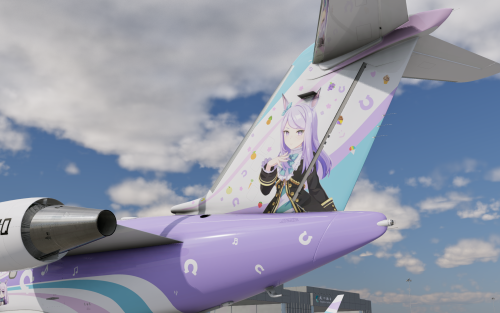
Version 1.0.0 + Internal
15 downloads
Copyright Cygames and relevant artists. Non-Profit, Do not sell. UmaMusume is a famous anime based on real racing horse stories.1 point -

Version 1.0.0
164 downloads
hi, this is x-plane 9's piper PA46 malibu converted for x plane 11 it includes: 5 liveries with a white one to make your own a fully working 3D cockpit a pretty detailed cabin hope you enjoy1 point -
Thanks for the update, and I'm eagerly awaiting all the new features. New things are always welcome.1 point
-
A bug triggered by noisy hardware. Will be resolved in next update. Workaround is to add a dead zone to Yaw axis.1 point
-
I looked at the Log.txt file and was able to resolve, thanks for your reply.1 point
-
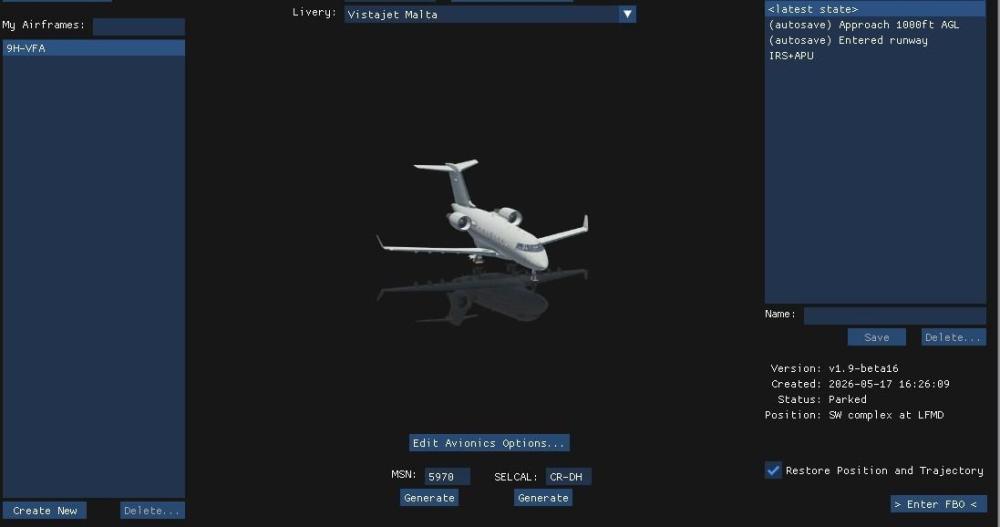
Create a (Or more) situation of your choice, IRS aligned, APU running, pax on board, some fuel, doors closed ....... You can now start from here . Just untick restore position and trajectory to start from any place.
 1 point
 -
To get rid of raindrop marks on windscreen, got to the aircraft folder, you will need to do this for all 3 variants, Normall Aircraft/X-Aviation/Saab 340. Objects folder, find the " Rain.obj " file, open with a text editor. Delete everything after, IDX10 41082 41080 41082 41083 41084 41085 41086 41084 41086 41087, thats the last row, so should be # wiper2 down, delete and than save. Youll have clean glass1 point
-
View File Falcon Luxe T7-KBI Hotstart Challenger 650 This livery is inspired by the real Challenger 605 T7-KBI operated by FalconLuxe at OMDW. This one is my first livery to be uploaded so feel free to point out any issues in my dms on Discord "#beriev_be200" Submitter Nicolas1222 Submitted 05/21/2026 Category Hot Start Challenger 6501 point
-
So whats going to need fixing for xp12. After saving plane as Xp12 and updating engine to xp12 ver. New things would break. 1. Engines will need reworking, as now engines are affected by load, Had to tweak starter to get R engine to start but shuts down on load.Idle tweak i think 2. Weight and balance will need Passenger and cargo added in plane maker. Working on it. 3. All lighting will need make over, no lighting works after dark, not even instruments. 4. All the rain textures will need tweaking, and yes its a simple fix to get rid of them. Let you know what to do when im happy. Once i get engines working will take for test flight, and if ok from developer ill list changes in planemaker, but it will be on you, no support from developer. 5. Also need to test navigation as well. 6. Also will have to check pressurization, being lots of changes, thats why xp12 updates take so long Missing all the good turboprops1 point
-
I believe I found the problem: my pedal had a faulty potentiometer for the right brake, which was causing slight brake commands without my input. I read that in version 1.9 any small movement in the rudder above 290 knots causes the yaw damper to disengage, the aircraft starts to oscillate its wings until it becomes uncontrollable, the autopilot disengages, and the aircraft dives. I bought a new pedal and apparently the problem was solved. Anyway, thank you for your attention.1 point
-
I use ASXP for weather on XP11.1 point
-
If possible, I would like a link to revert to the previous version of XP11 because I had a great product and now it's full of terrible bugs.1 point
-
Using your logic, as long as you do not charge for the x-plane 12 TBM update the promise is not broken. If your argument is correct, Hot Start has an infinite amount of time to release the update. There is an implied promise that the update will be released in a reasonable period of time. A year might be considered reasonable, 3 1/2 years is not. X-plane 12 was released on 12/17/2022. On 12/20/2022 one of the principals at Hot Start published a live stream of the TBM actually flying in X-plane 12. In that stream he said the update was going to be a lot of work, it migh take a month or two. It is very likely that stream had a positive effect on the TBM sales. In the 3 1/2 years since that stream there has not been one single piece of concrete evidence that any work at all has been done on the update (a couple of photos on discord is not concrete evidence).1 point
-
Here is a quote from an administrator at the Hot Start Discord server: "XP11 is long past EOL, it’s time to move on" X-Aviation sold me the TBM with the promise " Purchase today, X-Plane 12 update will be free!" That line is still on the X-Aviation website. If the underlying software, x-plane 11, is "EOL" so is the TBM. You guys made a commercial promise that you did not deliver on. Shameful!1 point
-
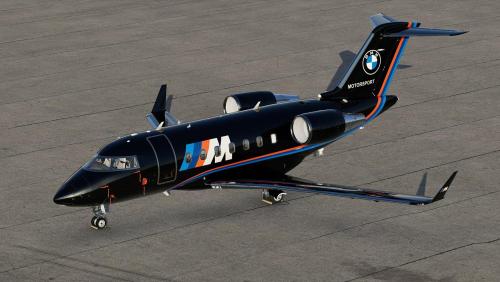
Version 1.0.0
32 downloads
This is a fictional livery for the Hot Start Challenger 650, inspired by Edelweiss from the Hot Start Discord. To install, extract the zip file into the "liveries" folder. You can supply your own registration. If you enjoy my work, consider supporting me on Patreon to cover some of the horrendous Adobe-costs ;). You can find 8K versions of the liveries there.1 point -
Has there been any announcement on when the weather radar will be available to use in the Challenger 650?1 point
-
In my experience, a lack of updates indicates product end of life and has very little to do with code stability unless the code is quite basic, which it is not in this case.1 point
-
It doesn't warrant an update? I think it absolutely does. Other aircraft have had an operational weather radar for some time now, but it's been missing from the CL650 - one of the most expensive aircraft addons available. I rarely fly the CL650 now because it is missing Wx Radar. It's a great aircraft, but incomplete since it's missing critical functionality. I routinely receive updates for other expensive aircraft addons ive purchased, but not a single update has been released for the CL650 and I've owned it for 5 months now.1 point
-
The plane cannot seat 18 passengers.1 point
-
The Challenger can be hard work on the approach and landing, but when it all comes together it's very rewarding. All the beta testers had difficulty learning how to land, it's all part of the fun. On approach be aware that unlike aircraft like the 737, the pitch response to power is reversed, that means a power increase will see the aircraft pitch down for a moment. This can lead to an oscillation developing, so be sure to fly the pitch attitude accurately. If you find you're wobbling up and down, aim to make smooth power changes, and remember the HUD flight path vector is useful tool, but can get you into trouble too. A useful check is 0.6 on the AoA index on approach. If it's higher than that, you're too slow. Remember Vref +5, and check your weights on the approach ref page. For the landing flare, lift the nose to to arrest the rate of descent, starting at just below 40 ft. Make a smooth power reduction and fly the aircraft onto the runway. The pitch attitude in the flare is around 3 degrees, but look at the end of the runway, not the HUD! You'll have plenty of time for butter later, so for now put the aircraft down positively in the touchdown zone. If you go butter hunting, you'll only find little bounces - ask me how I know! Once you've landed, extend the flight spoilers (the ground spoilers are automatic, but the flight spoilers need to be raised by pulling the lever), use the reversers and you're down. And stay away from that HLIS button, it'll trick you into making your landings worse!1 point
-
It was never correct for the sim anyway.1 point
-
The suggestion is just to have the full 22K engines, with options to derate to 20k and 18.5k1 point
-
In a long conversation with BBA yesterday we learned that BBA advises to equalize left and right mains BEFORE departure using the L (usually) to AUX pumps, even if the difference is lower that the limit of 400 lbs. This in order to avoid CAS fuel imbalance messages after departure which could be triggered by banking and 'sloshing' in the tanks1 point
-
800 lbs is a significant imbalance so I’m not surprised it took a while. “To Aux” isn’t a pump-driven transfer, purely gravity.1 point
-
As I understand it, the engines never suspend consumption from the mains--they feed *only* from the main tanks, never directly from the aux tanks. Though the collector tanks are physically located in the aux tank, they remain functional components of the main tank system, in that they only receive fuel from the mains. As long as a main tank is below 93% full, the aux tank feeds the main tank to maintain the level at 93%. Once a main drops to 93%, the main quantity will remain constant and the aux level will drop. It will appear that the engines are burning from the aux tank, but in reality the engines are burning from the mains and that fuel is being simultaneously replaced in the main tank from the aux tank ejector xfer pumps. Regards Bob1 point
-
-1 points
-
Thanks!-1 points
-
Sometimes that's what's required to keep a stable product. Luckily, the 650 is very stable and doesn't need such frequent updates. Lack of updates isn't really a differentiator in this case.-1 points
-
Did I just really spent 120 bucks on an airplane without a perf calculator??? What's all these bells and whistles worth if I can't even plan review my performance... Is there an external tool, maybe? Regards-1 points
-
You know, since as long as I can remember, aircraft that I usually fly, have offered an ability to "shorten" or even completely eliminate in some lengthy procedures, the wait time, like the alignment time of the IRS. I find it VERY annoying to request a simbrief download and then have to twiddle my thumbs for 10 minutes. Realism you say... well F realism, at the very least you could offer an option to make this the time it actually takes, and given any other simbrief download I've seen that time is virtually instantaneous. SO, if you have customers that get their yaya's by staring at a screen for 5 or 10 minutes then more power to them... me, I just want to load the damn plan and simulate what I actually care about, you know... FLYING.-2 points