



Litjan
-
Posts
5,718 -
Joined
-
Last visited
-
Days Won
424
Content Type
Profiles
Forums
Latest X-Plane & Community News
Events
Downloads
Store
Everything posted by Litjan
-
Hi Tim, every report helps - and it´s always good to know about these things to keep our eyes open for stuff like this. We naturally concentrate on stuff that is reproducable or being reported by many people - these are the easier and more important "bug-targets". But we still like about the odd stuff that happens, so thanks! Jan
-
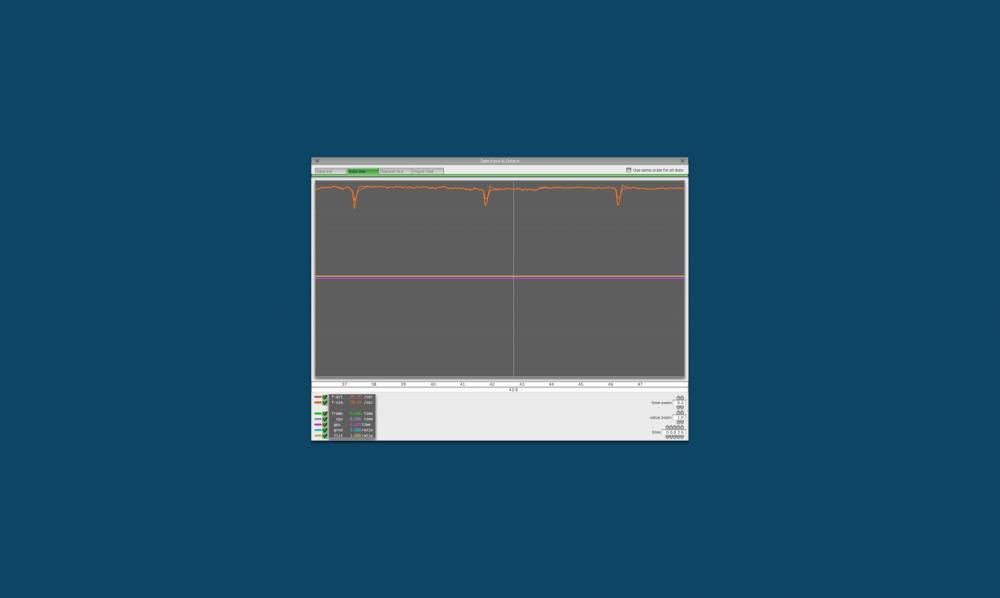
Yeah, we are pretty much not able to do anything about this. I, for example, always have what some may call "micro-stutters" when flying X-Plane, even when using default planes. You can see the sim pause ever so slightly when loading in new trees, buildings, or other scenery objects. I have frame-rates of >50 mostly, and you can "feel" the dip to 30s when this happens. We do have some calculations running every few seconds, and this will also drop your framerate down a bit every few seconds. I guess everyone has a different sensibility when it comes to this, and also possibly your system setup (number of background tasks, memory speed, texture resolution, etc...) could have an effect on that. It is on our long-term list to spread out background calculation a bit more - but for now I can only suggest trying to tweak your system load (look for background, memory intensive processes). Sorry for not having more immediate help available, Jan Here you can see the graphical display of my framerate, sitting in EGLL: I have a base framerate of 40 fps, and every 4.5s my framerate dips to 30. I don´t really perceive this as stuttering on my machine, though...
-
Well, if you are VRAM limited (trying to show more textures than can fit into your GPU´s memory), then yes, a new GPU with more VRAM will help. But so would probably a lower tier GPU (if it had more VRAM)... Jan
-
Correct - and usually a modern GPU is yawning and stretching it´s arms while rendering X-Plane - while the CPU is huffing and puffing. The whole simulator is still woefully CPU-bound, even though the team at Laminar has added a lot of stuff for the GPU to do (HDR, for example). However XP10 is still pretty much a legacy, single-core-use simulator that will largely depend on your single-CPU performance in most cases. When I upgraded from a GTX 770 to a 970 I have not gained a single frame per second... Jan
-
 Thanks a lot, Jojo!
 -
This is what we read in your post above - now english is not my first language (and it is neither for Morten), and maybe you ment something else - but to me this does not jibe at all with: So please forgive us when we get defensive when we THINK that someone says that he has zero interest in our product because it doesn´t offer all lighting when not in HDR mode. We put a lot of effort and time into this plane, more than we will ever get even remotely reimbursed for monetarily, so it DOES hurt to read something like this. Jan
-
VNAV lost during descent 1.0.4 ( To be confirmed )
Litjan replied to cmbaviator's topic in Bug Reports
Oh, don´t be sorry - I am here anyway . But yeah, go ahead and watch a few of those and it should answer quite a few questions you have! Easier than me explaining everything here in the forums . Jan -
VNAV lost during descent 1.0.4 ( To be confirmed )
Litjan replied to cmbaviator's topic in Bug Reports
User error - you need to regain control of your thrust levers as mentioned and shown on the tutorial videos. Please watch them for how to do that. Jan -
I think the debug output was broken (to some extent) in 1.0.4... Jan
-
This is not (yet) implemented. Jan
-
When the overspeed protection kicks in, it will try to "nail" the speed to just below the maximum speed. So if you have set 150, but are almost busting the speed limit of 195, the speed cursor will "jump" to the new speed - and the autothrottle will work to maintain this new, higher speed. You need to dial the speed down to 15 kts below this to get out of the overspeed protection and regain control... Jan
-
Understand you perfectly, and yes, that can be a factor as even a very subtle slope may have a big effect on acceleration at these low powersettings... Thanks, Jan
-
Thanks for getting back on that, Tim! Yeah, we haven´t really fiddled with the instrument instructions - we figured that anyone trying to fly a 737 would be familiar with the basics of those . However, I agree that for the sake of polish we should get these in tune - I will add it to the list (though it goes towards the bottom end of it...) Thanks again, Jan
-
Thanks for the report - everything working as expected - except for the speed going to 34458 kts . Will add to list, Jan
-
Thanks for getting back on that - it sounds like an overspeed protection kicking in (blinking 8 symbol) - but this should limit the speed to 195 if you are on flaps 15, not 222... Next time it happens, can you try to dial the speed down to max speed minus 15 (this gets the autothrottle out of reversion mode) and see if this helps? So in this case you´d have to change it down to at least 180. Thanks, Jan
-
VNAV lost during descent 1.0.4 ( To be confirmed )
Litjan replied to cmbaviator's topic in Bug Reports
It´s smart enough to first disengage VNAV -
Hi lanman, thanks for the rundown on your status with 1.0.4 - it is easy to loose track how everyone is doing in between the updates, so it´s good for us to know what is still not working for you! Most of your points are on our list - however the "autopilot getting stuck at 222" is something that really grabs my attention and I would like to find out why. Could you tell me what flap setting this happened at? Thanks, Jan
- 9 replies
-
- 1
-

-
- ixeg 737 hotfix
- ixeg
- (and 1 more)
-
Hi Ken, thanks for reporting back and following up! Point 8 (VOR bank angle) is noted - I think it will be easy to implement this and you saved me the trouble of hunting through the manual, thanks! And thanks again for the nice words - the no AC power case was a bit of an ugly stepchild - and implementing it was partially driven from the "equipment still available" list, my fuzzy simulator memory (while frantically finding a place to put her down) and assorted lists of electrical consumer & bus listings. Incidentially found out that there was also quite a bit of wiring difference between individual manufacturer numbers... Please absolutey keep the scrutiny up, your feedback is invaluable! Cheers, Jan
-
FMC - Direct to any next waypoint drops framerate to 0.x
Litjan replied to bigbasspic's topic in Bug Reports
Thanks for reporting back. I will state again that you removing (temporarily) all your other plugins (except gizmo and plugin admin) and rebooting X-Plane will be the only way to narrow this down. Flying with different aircraft and saying that they don´t have a problem is helpful, but only in a very limited way. I realize that this is a hassle, but short of me buying your exact same computer and buying and installing all your software in the very exact same way we won´t be able to find the problem... Jan -
VNAV lost during descent 1.0.4 ( To be confirmed )
Litjan replied to cmbaviator's topic in Bug Reports
I would put money on VNAV overspeeding (getting within 10kts of the upper speed limit) due to a steep segment. Jan -
Disengaging VNAV when changing ARR proc resets speed to .84
Litjan replied to lanmancz's topic in Bug Reports
Hi lanman, you are correct, VNAV should stay engaged in the MOD phase - I will see what we can do about this. Thanks about the .84 report - we had a couple cases where this happened that we fixed, it looks like we missed this one! Jan -
Hi Muskoka, while I fully understand your frustration, in this case I would like to point you towards Laminar Research (good luck!) - they are allowing to render a limited number of lights without HDR and the logo-lights are far down on our list. What you may see on other aircraft is a "night" texture that has the glow-cast baked into the texture... or they don´t have a large number of exterior lights, and can preserve one for the logo lights (IXEG: 2 Wheel wells, 1 Taxi, 2 Turnoff, 2 inboard landing, 2 outboard landing, 2 wing illumination, 2 logo lights = 13 total) Jan
-
Remedy: Remove other plugins, test and report which plugin causes crash. Jan
-
Hi, we are investigating some subtle differences between published bearings and bearings we have in the simulator. In the real world, a discrepancy of ca. 1-2 degrees would not cause much concern and is explained by old IRS magnetic variation database. In X-Plane things get a bit more difficult - especially when flying longer flights where the Mag Var changes substantially. I think we are calculating magnetic track when first loading the route (True Track + Mag Var). But for this calculation we are taking "present mag var" - there is simply no way to read the "destination mag var" easily in X-Plane, though I have some ideas (after all I am the one who supplied LR with an updated MagVar table a year ago, or so). So when you get towards the destination, you will see this discrepancy - however when flying LNAV, this should have 0 impact, because you are flying between waypoints that are fixed geometrically. Jan
-
If this happens again, please output the brake setting to your screen (go to SETTINGS, DATA INPUT & OUTPUT, pick row 14, 4th box from the left). Now you should be able to see how much (and if) your brakes are employed... Let me know if this crops up again - ideally take a short movie, showing N1, GS readout on EHSI and also report the airport, grossweight and temperature. Thanks, Jan
