



Litjan
-
Posts
5,719 -
Joined
-
Last visited
-
Days Won
424
Content Type
Profiles
Forums
Latest X-Plane & Community News
Events
Downloads
Store
Everything posted by Litjan
-

Take Command! IXEG 737 Classic v1.2 Update Released!
Litjan replied to Cameron's topic in General Discussion
This is what the reain effects look like: Cheers, Jan -
I want one of those! Very nice!
-
Hi Bob, that smacks like a problem with the Virtual Aviation MCP, then. I am not familiar with the device, so I can´t tell you about any problems or pitfalls with it. Maybe there is a dedicated support forum or you can open a new thread here that is aptly named (maybe in the cockpit builder/hardware subsection) - there are some more knowledgable people around that may have an answer on that. To make a video, you can use the built-in movie-maker in X-Plane, it saves the quicktime movie in \Output. But those movies grow quick in size... Cheers, Jan
-
Hi, first time I have heard of that problem. We don´t really have any "bend arrows" in our cockpit - you manipulate the knobs by moving the cursor until it turns into a little hand, then click to "grab", then move the mouse while holding down the clicked button. There are some instances where the default-style "turn arrows" of the old 2D cockpit we used to have "bleed through" (I don´t know why), but they don´t have any function. Cheers, Jan
-
Hi Bob, I would really have to see a short movie of that happening to let you know whats going on. I am almost certain that it is intentional (yet unexpected by you) behaviour - we have had thousands of people operate the aircraft for well over a year and this is the first time I heard anyone have that problem. There are several cases where the speedcursor will move seeminly "on its own" - what you describe sounds like its a "runaway" problem where you grab the cursor, and then loose view of it (the sim considers that as holding and not letting go) and then move the mouse wildly, maybe trying to manipulate something else - but really just moving the speed cursor "to the stops". Again, a video would say more than a 1000 words, any chance of capturing a short one for me? Cheers, Jan
-
Hi Bob, your joystick is spikey and sends commands - so the AP "thinks" you want to override it manually and disconnects (as in the real aircraft). To cure this, increase your CWS Deadband setting in the preferences menu. Cheers, Jan
-
You cant sustain 1200 at that altitude - use FL CHG or manage your climbrate carefully. Jan
-
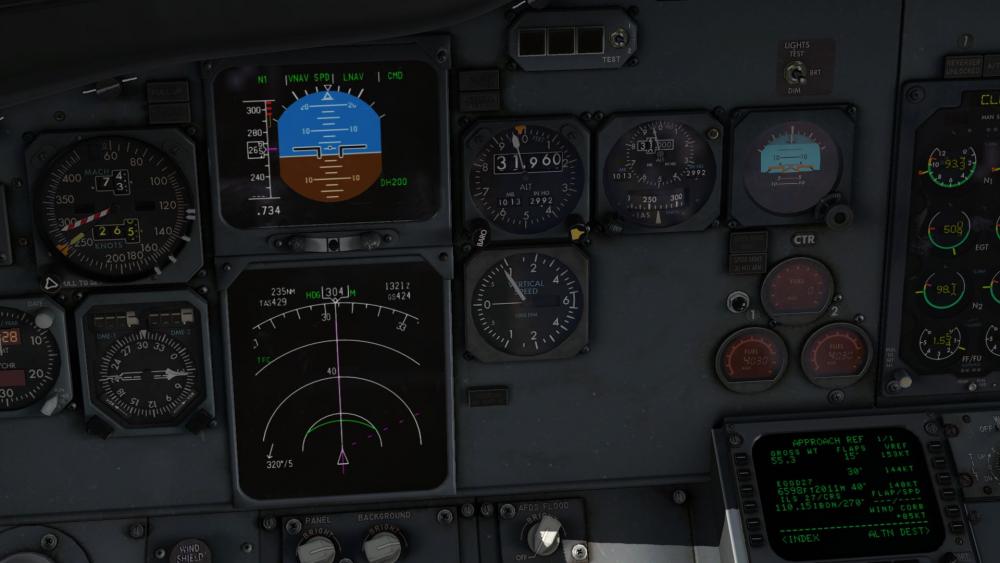
Here is a pic of my 737 climbing with ECON speed (Mach 0.73) at the same weight: My guess is that you failed to switch to MACH during the climb - eventually the IAS is equal to MMO (maximum MACH no.) and the plane will use all of its energy to "push" against the subsonic boundary and eventually stall due to MACH effects (airflow stalling). Maybe you also got too slow - this will also kill your climb rate. Jan
-
You had a grossweight of 55.6 tons - that is close to the maximum takeoff weight. The aircraft should be able to go to a maximum altitude of FL350 at that weight, so 340 should have been possible. It sounds like you didn´t manage your engines or airspeed during the climb correctly - we would need a bit more information (as Morten said) to find out why the plane stalled. Cheers, Jan
-
Did you somehow move the camera out of the window? I can only imagine this happening if X-Plane still thinks you are in "inside" view. Try clicking shift-4 or so to go to an outside view. Cheers, Jan
-
Take Command! IXEG 737 Classic v1.2 Update Released!
Litjan replied to Cameron's topic in General Discussion
Hah, maybe we can make a deal with our customers to only add wingflex and opening doors - and just leave the FMS as it is? I think Tom would go for that! -
For what it´s worth, the plane is perfectly flyable without FMS and it´s navdata, too. I suggest to take a look at the training videos we ship with the product, they describe "basic" navigation in detail. Unless you fly online, having accurate navdata is really not such a big deal. Cheers, Jan
-
Hi - "delicious" is a first, I like it! It describes the feeling of flying the real aircraft very well, too ;-) There is really no way to legally update the navdata-cycle. But buying a single update isn´t terribly expensive (ca. 10 Euros). Maybe we can negotiate with Navigraph to include a slightly newer nav-data package with one of our future updates, we well see. Cheers, Jan
-
Hi axmiha, the ability to do consecutive flights was added later in the run of our product - and it is a very complex procedure code-wise, resetting a lot of variables. It is also very hard to test, because obviously it takes a lot of time... So it is quite possible that you discovered a hidden bug in our calculation, somewhere, probably unique to your situation. We are planning to overhaul the whole VNAV calculation for a future update, especially to make the descent calculation more reliable. Therefore it would not much much sense to chase the quirk you encounter, as the whole architecture is going to change. As a workaround I recommend to "reboot" gizmo after you park. Just click the little "flash" symbol on the right pop-out menu, then set up your plane again for the next flight. As for your "turn around" mode problems, could you specify what you encounter? Cheers, Jan
-
Happy to hear that, Lee! The users having a great experience is what drives us! Cheers, Jan
-
Iirc, the effect of raindrops on the windscreen is actually derived from an X-Plane dataref that gives information about the precipitation. So we can´t get much more native that that. Cheers, Jan
-
Not having a hideable yoke is actually somewhat of a design decision: We want to replicate the experience of operating an airliner as much as possible. And finding a head position is always a compromise in the real plane, despite all ergonomic considerations by the designers. Yes, it´s easier to move your head in a real cockpit, but I think it is very managable to fly with the 3D yoke. I don´t fly with my VR headset or the TrackIR. Cheers, Jan
-
Hi, We have noticed similiar things - for some users. I have the same issue, sometimes. So far we have no idea why that would happen, the suspicion is that it has to do with the way X-Plane adjusts the lighting from bright to dim. We are still investigating. However, this problem should go away when we move the cabin lighting to HDR 3D lighting... Cheers, Jan
-
Nope.
-
Hi, your answer is in this thread: http://forums.x-pilot.com/forums/topic/13308-faq-no-cabin-llights/ In short: The cabin lights "bleed" through the cockpit door (XP bug) - so if you want the cockpit completely dark, turn them off by turning the FASTEN BELTS sign ON. Cheers, Jan
-
Standby Power Test - AC Frequency
Litjan replied to cosmic_3000's topic in 737-300 Aircraft Systems and Operation
I think you are right, I remember that discussion about the pickup point of the voltmeter we had, and it is possible that we have a bug there. I still have to get out the wiring diagrams from the AMM to check... Cheers, Jan -
solved Takeoff: Bleeds on or off? What about Anti-Ice?
Litjan replied to cosmic_3000's topic in Flight Procedures and Techniques
This may be done when the APU is supplying the packs - it is not allowed to have both APU bleed AND engine bleed on at the same time (you get the DUAL BLEED) warning EXCEPT with the engines at idle. This is to avoid the stronger engine bleed to push air into the APU (reverse flow). Turning off bleeds would accomplish the same thing as turning off packs - but you would rob yourself of the pneumatic system and couldn´t use wing anti-ice or use the engine starter (in case you wanted to restart a flamed out engine). Cheers, Jan -
Standby Power Test - AC Frequency
Litjan replied to cosmic_3000's topic in 737-300 Aircraft Systems and Operation
It looks like the standby power switch in your second shot is on OFF. This would turn the Stanby Power off, with no frequency being generated by the inverter. Move it to STBY (full left) to activate the standby power. If the switch is on AUTO (as it is normally), you would not get standby power while the plane is on the ground - it would only activate in the air (safety feature to avoid draining the battery on the ground) Cheers, Jan -
Thanks, Cris!
-
I heard that version 1.07 of Xenviro is out now - has anyone tested if the crashes are still there? Cheers, Jan

