



skiselkov
-
Posts
488 -
Joined
-
Last visited
-
Days Won
40
Content Type
Profiles
Forums
Latest X-Plane & Community News
Events
Downloads
Store
Everything posted by skiselkov
-
Disable VSync and let's see where the framerate falls. I bet it's because your sustainable framerate is somewhat below 30 fps in the TBM, which results in the driver being unable to make up its mind and jumping between 20 fps and 30 fps.
-
Message sent. We should have you up and running in Vulkan in no time.
-
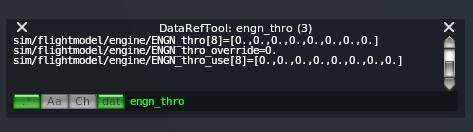
@Thedonsimmer We need to have a closer look at what's happening under the hood in your sim. Something is clearly causing control issues, either by moving the throttle on its own or preventing the binding from working. Here's how the throttle control in the TBM works: it reads the following dataref: sim/flightmodel/engine/ENGN_thro. So we will need to take a look at its exact behavior, as that's what the aircraft model is looking at as well. Please go ahead and grab this plugin: https://github.com/leecbaker/datareftool/releases/download/2020.03.24/datareftool_2020_03_24.zip and install it into your Resources/plugins. This a dataref examining tool we devs use to look at the internals of the simulator state. Then fire up the simulator and select Plugins > DataRefTool > View Datarefs. In the window there's a search box on the bottom (next to the "dat" button). Type in "engn_thro". We expect it to look something like this: Then try moving your physical throttle. You should be seeing the first field in "ENGN_thro" moving up and down. This is the "input" coming from your controls that the airplane sees. When the engine is running and propeller is unfeathered, "ENGN_thro_use" will also start following, as that's what the engine simulation is receiving. You can also check this dataref: "autothrottle_on". This should be 0. If it is 1, then something turned on X-Plane's built-in autothrottle functionality, which we do NOT want. We don't expose any buttons for that, but if a user has bound a special command like "TOGA_power" to their controls, they can still trigger it.
-
I'm aware of some issues in the enroute pathway logic. I'm debugging this and hoping to get this one finally squashed in release 1.1.13. Thanks for the patience guys.
-
@matrixca Can you check to make sure your Mac's input method is selected to plain English? I just tested some other input methods and if the characters you are trying to enter are anything other than plain latin or numbers, the text field will not show anything:

-
Something has to be capturing keyboard input. Can you post your Log.txt from within the simulator please? If you are running plugins, please try uninstalling them (except Gizmo). That window is using stock X-Plane window widget functionality to edit that text field. The field is definitely "enabled" for entry, as evidenced by the blinking cursor. So it must be something else that's "swallowing" your character inputs. Perhaps if your Mac input method is selected to something other than plain English?
-
Just regular Windows task manager. Obviously when X-Plane freezes, you can't really interact with anything in the sim anymore
-
@dtmmd When it hangs up, can we get a shot of Task Manager to try and see if X-Plane is attempting some CPU operations?
-
Just out curiosity, can you try changing the livery you are loading to anything other then "Default"? Also, when it hangs up, can we get a shot of Task Manager to try and see if X-Plane is attempting some CPU operations? Trying to figure out if it's actually doing something when it's hung up, or it's just sitting there deadlocked on some resource.
-
Rather unlikely, but you can quickly test by loading up at an airport that's a far away from anything as possible: PMDY (Midway). Try doing some circuits around there and seeing if it still crashes.
-
Pretty sure you're being hit by buggy AI aircraft and the AI ATC system crashing (I can see you have 6 AI aircraft loaded in your log). Recommend you disable those. A sporadic/random crash after a few minutes of running is typically caused by the ATC system giving an AI aircraft a bad instruction, which then somehow ends up with the AI aircraft hitting a corner case in the ATC system.
-
Interesting, haven't seen this issue before. Can you tell me what airport you were at and which approach you were doing + at what point the transition occurred for you? I'd like to recreate this and take a look at the AP mode switching in detail. When you were in GPS it should immediately lock on the LOC mode, but maybe there's something busted for some specific approach.
-
Glad you're enjoying the plane. All of the sidebar options are accessible from the Plugins menu, which should be available via your VR controller. So under Plugins > TBM900. Moreover, both chocks and GPU can be set & unset via clickspots right at the appropriate location on the aircraft model. Simply get out of the cockpit and come up to the GPU door on the left-hand side of the nose, click the door and that connects the GPU. Similarly, walk up to either one of the main landing gear and you should have a clickspot right over where the chocks are to place & remove them:
-
This is a configurable feature on our implementation. I just checked and our default behavior is the correct one. You changed it in the settings menu. The option is "Roll Scale Fixed". You want it set to "Yes."
-
Yes, unsurprisingly, when you fly the aircraft nearly empty and at high power, it wants to climb a lot. Not really sure how you would expect it to behave. However, I think you are misunderstanding fundamentally how pitch trim works. You don't trim to a nose attitude, you trim to a speed. The aircraft is pretty well trimmed at around 115 - 120 knots with the trim in the takeoff band (notice, it's a band, a range, not a single spot - move closer to DN for only the forward seats being occupied and closer to UP for also back seats being occupied). Your nose attitude is a function of excess thrust available. At 115 knots and nearly empty, you may very well need to pitch up to 20 degrees to soak up all the excess thrust. If you want a shallower climb, you need to either: reduce power, or increase speed (<- this is requires a trim a change!) Even step 1 can require a slight trim change, because the aerodynamic model also considers induced wind speed over the elevator from prop wash. In short, there is no such thing as hands-off perfect stability. The takeoff trim is simply there to make sure that on rotation, you will not experience excessive forces on the yoke. It's there to get you "into the ballpark." It doesn't mean you can let go of the controls and have the nose remain eternally nailed to a virtual point in the sky. When flying at the very low weights you are (single occupant + 1/2 fuel), you will almost never get into positive AoA except right at liftoff. The reason you are seeing the aircraft have a slight tendency to roll right at high speeds almost irrespective of power is because we are simulating a fixed aileron trim tab (which is located on the right aileron, only the left aileron trim tab is controllable from the cockpit). At high speeds, the fixed aileron trim tab becomes more effective, resulting in a slight right torque on the fuselage. Again, there is no perfectly balanced point. At low airspeed, engine torque will dominate and at high speeds, fixed aileron trim will dominate. The aircraft is tuned to fly mostly roll-neutral at betwee 60-100% TRQ between approximately 170 - 210 knots. Anything outside of these two bands might require some aileron trim adjustments, or control pressures. In this video you can see the effects that airspeed has on the aileron position.
-
@Claus87 That's an X-Plane crash, not something we caused: 0:00:21.612 E/SYS: THREAD FATAL ASSERT: PING-FILE ERROR! <- crash due to a texture load error 0:00:21.612 E/SYS: THREAD FATAL ASSERT: setjmp(png_ptr->jmpbuf 0:00:21.612 E/SYS: THREAD FATAL ASSERT: Aircraft/X-Aviation/TBM-900/objects/CP_Top.png
-
When you use the MFD mark T/O mark, you'll end up almost perfectly in trim:
-
Please don't second-guess how built the plane by looking at the raw dataref output. T/O trim doesn't mean "center trim". That is a deliberate decision. The real aircraft doesn't have a "center trim" button, so neither does the model. That is a normal tendency with high power and negative angle-of-attack, which is a common state in cruise. On a clockwise turning propeller, you will encounter a left-yawing tendency at positive AoA and a right-yawing tendency at negative AoA.
-
@Claus87 Your machine's real-time clock seems to be somewhat erratically skipping back-and-forth. I've built an experimental version of the GPWS code and I'd like to ask you to give it a try. The ZIP is attached. Unpack in the plane under "plugins" (move the old "OpenGPWS" out of there and back it up somewhere). OpenGPWS.zip
-
This is definitely a bug in our code. It's being triggered when LOC mode is armed without a localizer being received. As a temporary workaround, make sure you are receiving the localizer before arming LOC mode. We will have a fix for this in the next build.
-
Can you please post the Log.txt generated by the simulator while attempting to load the plane? Any time you post a support request, the log file is a key piece of information we need to even begin the process. Please be a bit more specific. What did you try and what did or didn't work?
-
Apologies for this, the server infrastructure that supports shared airframe functionality has a fault that is causing this message. We'll get this fixed and let you know.
-
Must be a livelock somewhere in the multi-threaded charts UI renderer. I'll investigate. Thank you for the report.
-
@ilankrt Ignore those messages about drivers. You have a Mac. You don't update your drivers manually, Apple manages drivers for you inside of macOS.
-
I'm afraid this one's not one of ours. It was caused by some other plugin doing something related to "DownloadAirportFiles". I can't tell you which plugin it was, except that it wasn't us. The filename "mac.xpl" is a non-specific plugin name, which means the plugin doesn't use modern v3 fat packages (otherwise you'd see the exact plugin name there, which in the case of the TBM would be "systems.xpl").

