All Activity
- Yesterday
-
 Chancoolguy joined the community
 -
 Shouko6 joined the community
 -
 Pietrogramma1 joined the community
 -

IXEG 737 Classic for X-Plane 12 Announcement
Cameron replied to Cameron's topic in General Discussion
Made up stories from a dramatic streamer. Nothing new. -

IXEG 737 Classic for X-Plane 12 Announcement
Splash replied to Cameron's topic in General Discussion
NO, this stream was not particular to IXEG but in the stream he that talked about how IXEG abandoned the project. -
 What I found was that once the engines are running, then you can activate the mode. That doesn't make a ton of sense to me....I have observed some voltage datarefs begin tied to the engine RPMs...but can't speak to as if there's some connection between voltage and the mode...that's philipp's territory. I do know that Philipp has spent a ton of time fiddling with electrics and he also writes the code for autopilot behavior. If he shows up at FSExpo, I plan to get some clarifications on how its supposed to work and how he designed things. He may have a perfectly plausible explanation. But if you start the engines...then everything does seem to work as expected.
 -
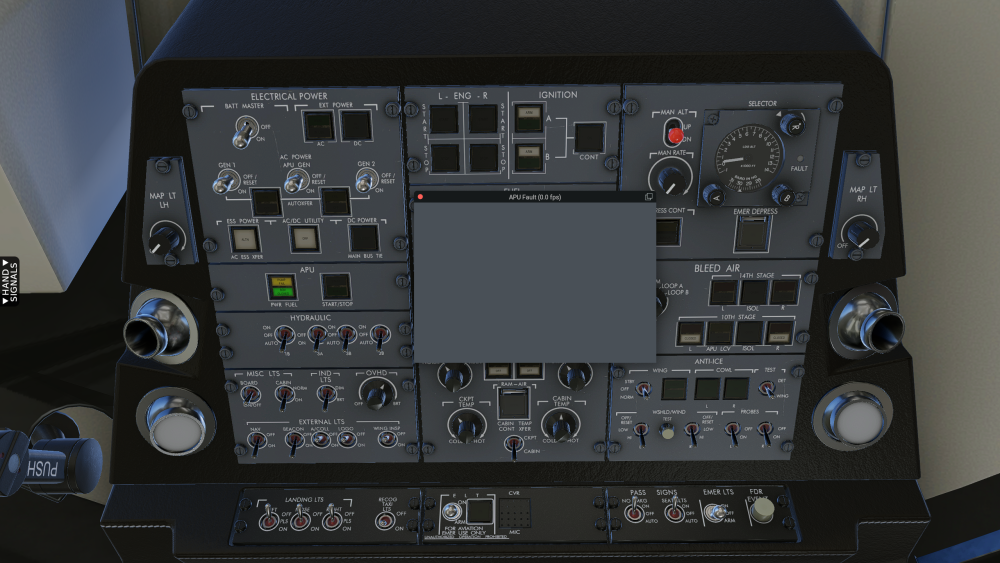
How do I correct that?
-
 BRP joined the community
 - Last week
-
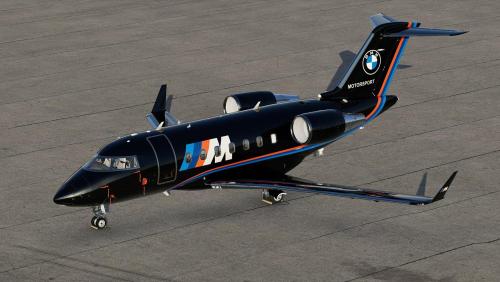
View File D-ABMW Hot Start Challenger 650 This is a fictional livery for the Hot Start Challenger 650, inspired by Edelweiss from the Hot Start Discord. To install, extract the zip file into the "liveries" folder. You can supply your own registration. If you enjoy my work, consider supporting me on Patreon to cover some of the horrendous Adobe-costs ;). You can find 8K versions of the liveries there. Submitter pilotdeviation Submitted 05/01/2026 Category Hot Start Challenger 650
-
Version 1.0.0
17 downloads
This is a fictional livery for the Hot Start Challenger 650, inspired by Edelweiss from the Hot Start Discord. To install, extract the zip file into the "liveries" folder. You can supply your own registration. If you enjoy my work, consider supporting me on Patreon to cover some of the horrendous Adobe-costs ;). You can find 8K versions of the liveries there. -
 Noctavi joined the community
 -
 DivingDauntless joined the community
 -
 eghehghen joined the community
 -
I hope the update will give us much brighter illumination of the instruments. Otherwise this is among my favorite planes on XP12.4
-
 The Moo can give you same Headache, for sure. It's not a "Easy to Handle" Plane and that's why I like it. And you have to fly it by Numbers like a Jet. I did a short Check with GPU connected. After Engine Start and disconnection of the GPU, Generators ON and all other Settings from the List, the AP did work too when up in the Air. Again, no AP Mode Selection when on the Ground. Did you know there was a "Around the World Trip in 25 Days" with the Moo? Very useful to become more familiar with the Plane and its Systems.
 -
Once upon a time when life was simple. But with the complexities these days. Every developer literally has to develop a save function for every plane they do. Its just not with it. And us the reason laminars dont work properly
-
quite understandable, but still a pitty
-
I removed Libradio and everything works good. No flutter on mixture or flaps.
-
We agree! Unfortunately coding such a functionality is a very big task, especially for a complex aircraft like this one. It can be done, no doubt, but at this point it is unlikely that this will be accomplished in the near term, unfortunately.
-
Since I am still practicing certain tasks e.g. handflying the aircraft on short trips without programming a route (see tutorial flight) loading the same situation again (and handle it better this time ) would be a big benefit. What do you think ?
-
An update is being worked on. Are you having the flaps and mixture problems when not using the honeycomb controller? Did you try removing libradio?
-
I also have the issue, XPlane crashes before plane loads. Waiting on a patch or information. Worked fine before the upgrade to 12.4
-

Take Command! Hot Start Challenger 650 v1.9 Update Released!
eduardo replied to Cameron's topic in Technical Support
"As we no longer utilize Gizmo, Mac ARM support is now complete and Mac users should stop running X-Plane through Rosetta..." THANK YOU VERY MUCH! -
???
-
As for the second question, try setting the mixture differently - either full rich or at/below the blue line on the FF gauge (or blue triangle when on the full ENGINE page). Reflected Reality Simulations channel explains it a bit:
-
Late reply... X-Plane is installed in a folder named Program Files on my D drive, not the C drive. Removing the libradio.plugin folder allowed the plane to load, but the flaps issue in this post remains and now the mixture doesn't work with the Honeycomb Bravo Alpha. It seems to be related to the flaps issue, as it "flutters" (for lack of better wording) the same way the flaps do. I fix was featured in that same post over a year ago, it must be a real pain to deploy updates...
-
 I realized I already owned the X-aviation Entegra (Avidyne) edition. It seems to run fine with only the Yoke and AP. No crash on loading the plane with 12.4.1. I will check the logs and report if I find anything else, but I am going to proceed with setting up G500 PFD, avidyne MFD, GTN 650/750. Trim works also, which was annoying bug on the SR22 G1000 Perspective Plus.
 -
That seemed to do the trick. Thanks.
-
 Hi! That worked! I followed your startup sequence exactly and now the AP behaves correctly. So in my case, the workaround is: no GPU battery ON inverter MAIN battery isolation NORMAL avionics OFF during startup generators ON after engine start avionics ON only after that no AP mode selected on the ground, only in the air Thank you very much for taking the time to write the full sequence. That solved it for me.
 -
I know this is a unique question. I have Realsimgear hardware for the SR22 perspective+. That is crashing now since I accidentally upgraded xplane to 12.4.1. But my aircraft has G500 TXI and a Garmin GTN 650/750. I bought the G500 PFD and the Avidyne MFD, GTN 650/750 hardware but havent made the switch because of the fidelity of the perspective+. I will make the switch since perspective+ is broken (I dont have an xplane backup sadly -- something I will fix going forward) but I don't know if the entegra edition also crashes xplane. Thanks!
-
Try enabling the "Zink plugin bridge" in X-Plane's Graphics settings. And if still an issue upload your Log.txt from the simulator's install directory, please.
-
I'm new to the Hotstart 650. I'm having a number of issues, but first things first.... When I am seated in the cockpit, APU running, all the screens (MFD, PFD, CDU, etc) are blank. I can click on them to see that they are actually on, but they don't show up in the overall cockpit view. My XPlane 12 install is from Steam (v12.4.2) and the recently-purchased Hotstart 650 is v1.9.