All Activity
- Past hour
-
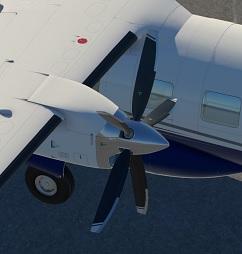
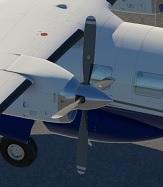
I'm using the 4-Blade Version. I made a mistake in my previous post (I've now corrected it). Using Emergency Stop: - 4-Blade Version - it works fine (i.e., the propeller feathers) - 5-Blade Version - it works fine for me too I tested it with XP11 and XP12.
- Today
-
 sauceaudio joined the community
 -
And did it Feather on Emergency Stop? Mine did not. Only the 4-Blade Version did.
-
 fjajosfdkrewrew joined the community
 -
I use 4-Blade Version ;-)
-
 coffeeabagail joined the community
 -
 lolokasha joined the community
 -
Looks like the 5-Blade Version has a Bug. It never Feathered. Not on normal Shutdown and not with the Emergency Stop.
-
 durachela48 joined the community
 -
 Rubkaie1 joined the community
 -
As rosseloh said, you can still choose the Payload from the Standard Menu when you choose your Plane for the Flight. Click on the Customize Button below the Airplanes Icon. That's the Way for many X-Plane Airplanes. The MU-2's Preference is for a Quick and Dirty Fuel Fill up at the Moment.
- Yesterday
-
You can still set the payload using the standard X-Plane weight and balance menu, but it doesn't have payload stations mapped so it's just "payload" with no actual differentiation between types or location in the cabin (and thus effect on CG).
-
Thanks for responding. I've never seen anything like this before that an aircraft can't set a payload. Could you please @meierzwo elaborate what's the "Customize Function"? this aircraft is not brand new to lack such a "default" feature
-

Take Command: CitationJet 525 v1.1.0 Update Released!
Rando replied to Cameron's topic in CitationJet 525
I noticed that VR issues were not addressed such as the sizing of the cockpit. "I also can't seem to sit up in the cockpit without my head sticking out the ceiling or the window. It is as if the cockpit is not sized correctly," when flying in VR. Will this VR issues be addressed or is there a workaround? -
Payload is Fuel only at the Moment. No PAX or Baggage. You can fill the Outer, Inner and Main Tank from the Pref Menu. But only Full. For other Fuel Loads than Full, you have to use the Customize Function were you choose your Plane. For Development Status, tkyler has just updated the Status:
-

Current status and updates planned?
tkyler replied to imemyself's topic in Mitsubishi Marquise MU-2 v2
zzz....oh man...just woke up after a 18 month hibernation! Seriously....Nothing is forgotten, only life has happened. Here's a quick summary: Spent last 18-24 months in a significant life transition as I approach and prepare for retirement. Lots of loose ends to tie up and leave in the past. I now work full time for Laminar, a big change...and I have been positioning myself to stay in X-Plane work exclusively for the future. I'm wrapping up a 2-year private contract for the BETA ALIA production aircraft (which will be in X-Plane). I'll complete that work next month. Gizmo based code in all my products is nearing end of life and had complicated the update process due to the volume of code to rewrite......however AI has enabled a path to relearn concepts & rewrite the code as its become "X-Plane SDK aware" in the last year...This reduces the effort drastically and is a major catalyst. No fees for future updates on the MU2 or IXEG when they eventually go out. Updates will always be free for existing customers. They've earned that. After ALIA delivery, I'll return to push an update to the MU2 with the Gizmo code-base....I won't get OCD....I'll just push what I have, which is a good amount. After MU2 update, I begin code rewrites to serve as my future code platform for the MU2, IXEG and the forth-coming 717. This is foundational and absolutely required to guarantee long term compatibility for these products. Those aircraft will be the only three products I will maintain into retirement and beyond. That's the highlights. This gap in work has been all about my focus and preparation to sustain myself after retirement, and stay within the X-Plane ecosphere in the process. -
 amir_b747 joined the community
 -
HI, Just got this aircraft, and I could only find the fuel setting, but no way to add the normal payload, pax and baggage, not even available on the Mitsubishi pref window. How to set the weight please?
-
 averdung joined the community
 -
It's out.
-
This will serve as an official announcement that we have released the Version 1.1.0 update for the Take Command! CitationJet 525. All customers who have purchased the CitationJet 525 up till now have been sent an e-mail by X-Aviation with complete instructions on how to obtain your update. We have made this a very simple process! For those that purchase the CitationJet 525 from today forward, your purchased download will already be updated to version 1.1.0 for you. What if I didn't get the update e-mail? If you did not receive your update e-mail don't fret! X-Aviation has updated our system to allow all customers to update with ease, regardless of whether you received an e-mail for the update! Here's what to do: 1. Login to your X-Aviation account here: https://www.x-aviation.com/catalog/account_history.php 2. Find your original Take Command! CitationJet 525 download and re-download the file. It will download as the latest version! The following is a list of additions/fixes included: New Features: Integrated weather radar featuring the RDR-2000! Many thanks to Amy Parent and the Laminar team for such an amazing addition to X-Plane. Library and code adjustments throughout to fully support X-Plane 12.4 Updated and improved FMOD sound pack Improved and tweaked objects, textures, and animations throughout Bug Fixes and Improvements: Latest UNS-1 version (v1.22) Fix crash when the last airport in the flight plan is on a FM leg. Fix dates incorrectly formatted (month off by one after april, #72). Fix distance computation of arc (AF, RF) legs. Fix times displayed with 60 minutes past the hour (XX:60) in some situations. PVOR now pre-fills inbound track for runways picked from list. Fix PVOR using true runway heading rather than magnetic. Fix bad localizer front course parsing leading to off-course CF legs. Fix VOR and LOC database declination not used for CF legs computation. Fix standby resume failing to restore flight plan when using “radial/radial” custom waypoints (#76). Latest version of libradio to fix X-Plane 12.4+ compatibility Adjusted base system library with ordering fixes Replace deprecated dataref usage Adjusted particle system dynamics Migrate to new X-Plane chock system, fix rolling away on ground Fixed missing altitude minimum alerter, 500ft Improved accuracy of EHSI color schema Fix buggy DME behavior for speed/time, with improved alpha/beta filtering Transponder code, flaps, and fuel persistence Improve custom tail system handling with missing fonts Fix bus for flood light Add nose and aft cargo lights Fix handling for COM1 to be usable with EMER battery Flood light correct electrical bus As always, thanks for being a customer with X-Aviation. We appreciate your feedback and support! Enjoy these latest updates, and stay tuned to the forum as we continually announce the latest happenings.
- Last week
-
 nfsl joined the community
 -
 suptni joined the community
 -

Current status and updates planned?
Altimutater replied to imemyself's topic in Mitsubishi Marquise MU-2 v2
I can't find the source any more, but I adjusted my MU-2 payload settings in Planemaker some time ago according to what someone posted on these forums. This is what my payload settings are now, and I don't think I've made subsequent changes, so take this with a pinch of salt, make suitable backups, and good luck!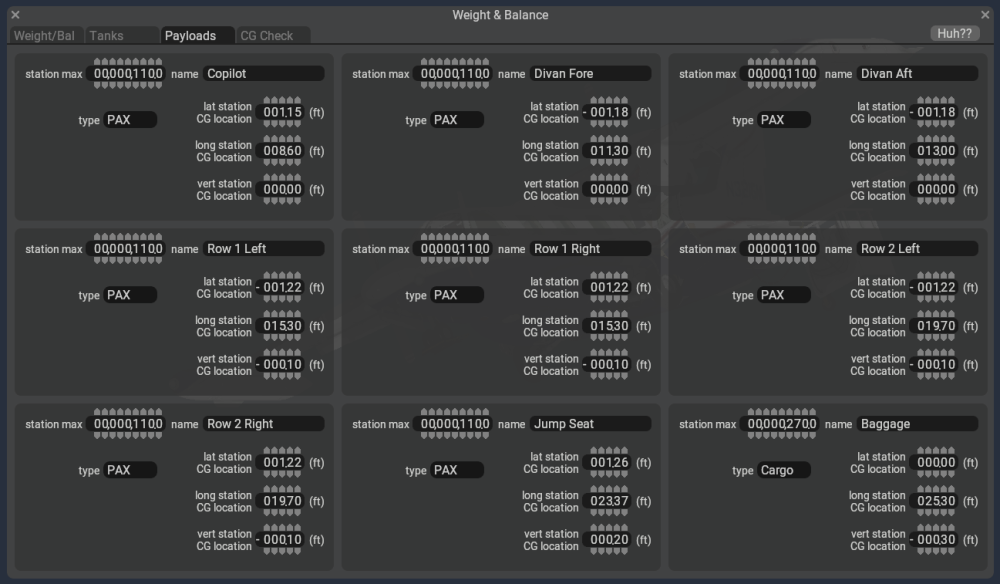
-
Challenger 650 Aircraft Flight Manuals
Altimutater reviewed Anthony615's file in Hot Start Challenger 650
-
It appears you are using the X-Plane 12.4 beta. There will be an update coming with fixes for 12.4. The error message indicated is a warning that has no bearing on use of the product (just an old dataref being read by the plugin) Regarding the GTN, on the screen freeze, that is likely an issue with RXP itself. Regarding the GNS, do any of the other buttons work, or is still always just showing the GNS load screen?
-
Currently the shipping config files use the primary bus as the default. This was due to compatibility issues with RealityXP. We don't currently ship any TDS configs ourselves for the Islanders. The X-Plane avionics dataref is set by us based on the state of the switch & power to the bus, so if TDS can read that, then it should be good to use.
-
Thanks for the report, I've got this logged!
-
The Garmin G500 (note, not the newer Garmin G500 TXi, which is an entirely different piece of avionics) does not have any autopilot mode indicators. It'll show the flight director, but the mode indication is something that would be indicated separately. Commonly G500 avionics equipped aircraft would either use a remote autopilot annunciator panel (GI 285 or similar) or an autopilot head unit that contains one bundled (such as the GMC605) -- or non Garmin APs such as Bendix-King or similar that have their own either internal or external mode annunciators.
-
as of v2.0.2: "Toggle brakes maximum" always works to set and release the parking brake. - if you have the "Wheelbrake" axis assigned, it is the only thing which will control the brakes - differential braking is not possible - otherwise, if you have "Rudder Controls Differential Braking" enabled, it will control differential braking - any rudder input will proportionately brake that wheel, and the "sensitivity" scales the proportion. 1 means full left rudder = 25% left brake, 4 means 100% left brake. The "Hold left/right brake" commands won't work and nor will the left/right brake axises as Goran's said. "Hold brakes regular/maximum" will work but with a gradual fade-in over a second or two. "Toggle brakes regular effort" works normally and instantly. - with "Rudder Controls Differential Braking" disabled you can use left/right brake axises and also the "Hold left/right brake" commands, but they also have the gradual fade-in effect. It took a frustrating hour or so to figure it all out but now I (no toe brakes, normally a single wheelbrake axis on the stick) am very happy with the "Rudder controls..." setup and looking forward to slinging four tonnes of cargo and appreciating the ortho scenery
-
Good news! wish you guys best of luck
-

CTD when new TDS GTNXi plug-in is installed
antonvla replied to Matchstick's topic in Beechcraft Sundowner C23 v2
May I ask How did you install the TDS with it??? Just bought it and id love to but the GTN on board! -
is there any developer out there who could make me a C172SP with: GTN 750 GI-275 AI HSI GFC 500 Autopilot GMA 342 Radios I would be happy to pay. I can get plane with G5 or GTN750 but not both. I have been away from XP11 for about 5 years so maybe I have missed previous conversation or add ons around this but I can't find anything