



Goran_M
-
Posts
5,658 -
Joined
-
Days Won
235
Content Type
Profiles
Forums
Latest X-Plane & Community News
Events
Downloads
Store
Everything posted by Goran_M
-
The red button is at the bottom of the Audio Panel.
-
Before starting the sim, disconnect your warthog hardware completely and then restart the sim to see if the problem persists. If it keeps happening, please post your log.txt file. If it stops moving with hardware disconnected, the problem lies in some kind of button or lever assignment in your hardware. If the throttle moves forward when it's on the right side of the "h" pattern, you have something assigned to your mixture controls by default (We've seen this before).
-
Check all hardware assignments and any scripts you might have running that control the throttle or mixture.
-
Confirmed bug in the charts code. It'll be addressed in the next update. In the meantime, avoid using the keypad entry into the charts name. Please use the scroll knob to select either departure or destination airport (via the MENU option>Show Departure Airport) and similar should work.
-
That’s what I thought you were seeing. Please change your Windows UI scaling to 100%. Your password field is hidden due to the larger scaling.
-
Can you post a screenshot of what you are seeing?
-
Do you have any kind of failures set in the default X-Plane menu?
-
We'll take a look
-
Works fine on this end. Did you adjust your curves at all? This may have had an effect. Also, check control stiffening.
-
Yes please. De-activate the GTN and Skunkworks. Please post back the results.
-
Are you running the GTN with the TBM?
-
The crashes will happen with AI enabled. Either within X-Plane itself or 3rd party. Again, please disable it until we figure out a way around it.
-
I can't really see anything wrong in the log. Does it happen to the same chart or does it happen to random charts? Can you try again at the same airport? Am I correct in assuming you can't get out of that page or screen after the freeze, and you also cannot select anything else?
-
Do you have "accelerated wear" checked in the maintenance manager?
-

Blue channel of right wing nml file does not load
Goran_M replied to BadPilotAmmoneon's topic in TBM 900
I've taken a look and after a lot of digging, trying to figure out what was going on, it appears the normal map is fine. It's the obj file that is the problem. I'll add the fix in the next update, but in the meantime, this can be done manually with a very small edit to the Wing_Right.obj file. Back up first! Open the file with any text editor. The header (section at the top of the file) is missing the "NORMAL_METALNESS" line. Make the edit to ensure the header looks like the image below. (Do not change anything else) Let me know if this fixes what you need.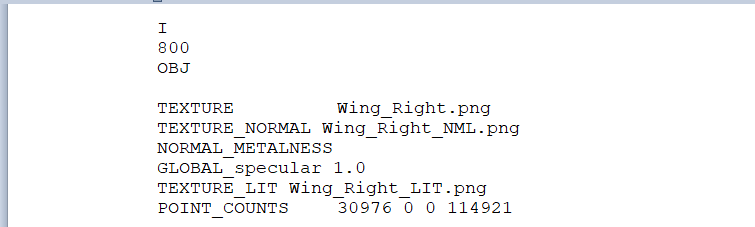
-
What an unusual crash. However, it's not the TBM causing it, although it looks like it got caught up in the middle of it and maybe had a part in it. I know it references the TBM just before the backtrace, due to the TBM reading the terrain and scenery data, but it looks like it was flying over corrupt scenery (underlined, enlarged and italicized). 0:32:27.810 I/DSF: Warning for missing scenery file: +26-096 0:32:27.857 I/DSF: Warning for missing scenery file: +27-096 0:32:28.094 I/SCN: DSF load time: 203266 for file Custom Scenery/Global Forests/Earth nav data/+20-100/+28-096.dsf (0 tris, 0 skipped for 0.0 m^2) 0:32:28.192 I/SCN: DSF load time: 96178 for file Custom Scenery/Global Airports/Earth nav data/+20-100/+28-096.dsf (0 tris, 0 skipped for 0.0 m^2) 0:32:28.251 I/SCN: DSF load time: 5659 for file Custom Scenery/EXT_texas_lights/Earth nav data/+20-100/+28-096.dsf (0 tris, 0 skipped for 0.0 m^2) 0:32:28.538 I/SCN: DSF load time: 268950 for file G:\Ortho4XP1.3\yOrtho4XP_Overlays/Earth nav data/+20-100/+28-096.dsf (0 tris, 0 skipped for 0.0 m^2) 0:32:30.798 I/SCN: DSF load time: 2215221 for file Custom Scenery/zOrtho4XP_+28-096/Earth nav data/+20-100/+28-096.dsf (206724 tris, 16 skipped for -6.4 m^2) Then the crash was actually caused by a graphics issue that had something to do with the scenery (the gpu driver going crazy). 0 00007FFEB2BD7D60 C:\WINDOWS\System32\DriverStore\FileRepository\nvddi.inf_amd64_27303a6ab0e36ec9\nvoglv64.dll+0000000000C67D60 () 1 00007FFEB2C9E3E3 C:\WINDOWS\System32\DriverStore\FileRepository\nvddi.inf_amd64_27303a6ab0e36ec9\nvoglv64.dll+0000000000D2E3E3 () 2 00007FFEB2C8F6C7 C:\WINDOWS\System32\DriverStore\FileRepository\nvddi.inf_amd64_27303a6ab0e36ec9\nvoglv64.dll+0000000000D1F6C7 () 3 00007FFEB2C90A05 C:\WINDOWS\System32\DriverStore\FileRepository\nvddi.inf_amd64_27303a6ab0e36ec9\nvoglv64.dll+0000000000D20A05 () 4 00007FFEB282308A C:\WINDOWS\System32\DriverStore\FileRepository\nvddi.inf_amd64_27303a6ab0e36ec9\nvoglv64.dll+00000000008B308A () 5 00007FFEB28116DC C:\WINDOWS\System32\DriverStore\FileRepository\nvddi.inf_amd64_27303a6ab0e36ec9\nvoglv64.dll+00000000008A16DC () 6 00007FFEB2812FBF C:\WINDOWS\System32\DriverStore\FileRepository\nvddi.inf_amd64_27303a6ab0e36ec9\nvoglv64.dll+00000000008A2FBF () 7 00007FFEB2812CBA C:\WINDOWS\System32\DriverStore\FileRepository\nvddi.inf_amd64_27303a6ab0e36ec9\nvoglv64.dll+00000000008A2CBA () 8 00007FFEB2A90C98 C:\WINDOWS\System32\DriverStore\FileRepository\nvddi.inf_amd64_27303a6ab0e36ec9\nvoglv64.dll+0000000000B20C98 () Then finally Windows itself crashing X-Plane. 9 00007FFF39187BD4 C:\WINDOWS\System32\KERNEL32.DLL+0000000000017BD4 () 10 00007FFF3A64CED1 C:\WINDOWS\SYSTEM32\ntdll.dll+000000000006CED1 () If you can fly over the same area again, with the TBM, and it crashes again, it's almost definitely the scenery. If this happens, try moving the scenery out of your custom scenery folder, and trying to fly over it again. If it doesn't crash, then it's a 100% certainty the scenery is the cause. (Hope this makes sense).
-
Make sure you have HDR turned on.
-
That’s interesting. I’ll make a note of that.
-
For this latest update, we used the experimental flight model.
-
activation Multiple Networked PC SIM using TBM Activation nightmare.
Goran_M replied to FRed Baron's topic in TBM 900
Might get you to send a support ticket to X-Aviation. Activations are handled there. http://www.x-aviation.com/catalog/contact_us.php -
Exception handler errors, like the one you posted, are caused by AI traffic. Please disable AI traffic for now, until we figure out why it’s happening.
-
Do you have HDR enabled?
-
activation Multiple Networked PC SIM using TBM Activation nightmare.
Goran_M replied to FRed Baron's topic in TBM 900
I’ve sent a link to this post to Cameron. He deals with activations. -
It looks like you have some kind of AI traffic running. Try turning it off. We’re working on a fix for this, but it’s not easy considering X-Plane doesn’t give us an idea on what’s causing it. To update, just redownload the installer in your X-aviation account, and run it. It will uninstall the old version and install the new one.
-
If you can’t activate it, it’s usually because of a password or firewall issue. I’m not sure why removing plugins solved the issue, but if it did, then ok.
