Litjan
-
Posts
5,720 -
Joined
-
Last visited
-
Days Won
424
Content Type
Profiles
Forums
Latest X-Plane & Community News
Events
Downloads
Store
Everything posted by Litjan
-

Videos from IXEG 737 pdf tutorials unavailable
Litjan replied to FlyingV's topic in General Discussion
Hi there, I just checked - you are right, I can´t call the up, either... I will try to find out why that is! Welcome back to flying the 737, Jan Edit: In the meantime, here are some more videos I made about our 737, like what the "recent" updates brought and also some further system explanations... https://www.youtube.com/playlist?list=PLGRsg_6rB1D6f7lKjdw5r9P99swJtryhQ -
Hello and thanks for the nice words! The FD in TOGA mode will only work if both FD switches are on. This is the same as in the real aircraft. Make sure you turn the correct one on first (left if you are sitting in the left seat) - this will light up the little MA lights (master) and determine which flight control computer is master and references the on-site VHF nav radio. For example if the left FCC is Master and you tune the ILS on the right NAV radio, you can not engage the APP mode. The red gear lights are part of the gear warning...I don´t recall the EXACT logic off the top of my head, but if power is idle (and flaps not up?) the lights will come on. Cheers, Jan
-
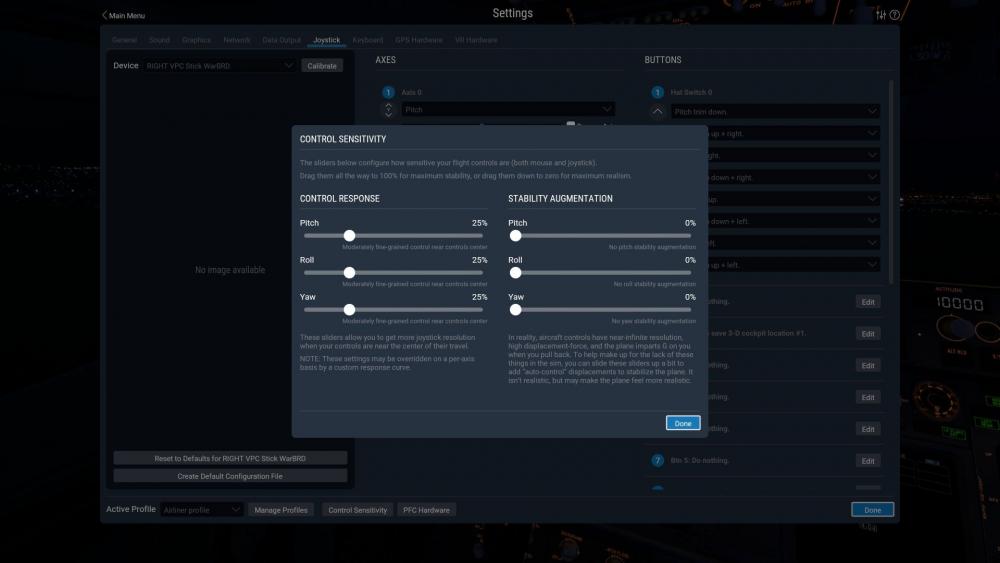
Hi, this is what I have set up and what we recommend for the 737:
-
Yes, that should be the case. Let´s take a look at the log.txt, then - it should show what part of the vrconfig.txt is creating a problem in your case. Cheers, Jan
-
Three simple questions (strange flap "pawls" and 2 other questions) ;-)
Litjan replied to Bulva's topic in General Discussion
Hi, 1.) These are "special" detents - when you fly a go-around, you will retract your flaps to 15 for a normal approach and to 1 for a single-engine approach. The gates make it impossible to move the levers past these detents "by accident". A safety feature. 2.) There is - but you need a second crew member in the cockpit to say it (just like in real life). There is no automatic callout. Maybe ask your wife, or your brother... ;-) 3.) That is correct - we are thinking about implementing something for the avitab that allows reading the checklist (you can also manually add that .png into the avitab folder and access it there). Cheers, Jan -
Hmm - are you running the latest version of the IXEG 737? It is 1.33 - and a lot was done in the latest version to improve the VR experience. If you do run the latest version, please attach your log.txt file (found in the root X-Plane folder) here and I can take a look what X-Plane is complaining about with regard to the VRconfig file. Thanks, Jan
-
Glad you got it to work and thanks for sharing your findings. This may help others with the same problem immensely! Cheers, Jan
-
Good morning! Interesting - there is no obvious "smoking gun" in your log.txt, but you are running quite a few plug ins that are historically kown to be very invasive and weak in compatibility...especially when not updated to their latest version. I personally doubt that Windows 11 is the problem. I would suggest the following: Move all of your plugins (except for the ones needed to run X-Plane and Gizmo) out of your plugins folder. Just move them, don´t delete them (so you can move them back in one by one). Also move any Custom scenery you downloaded...basically we want to have a "Vanilla" X-Plane with just the IXEG installed. Run X-Plane this way and see if the IXEG 733 works fine. If it doesn´t, make sure to update all drivers, but I suspect it will. Then move all plugins back one by one (or in batches) until the crash returns. Once you have found the conflicting plugin, make sure you run the latest version of that plugin and try again. If that doesn´t help, we can further investigate why we crash in conjunction with said plugin. Thanks for your help! Cheers, Jan
-
Hi NeoLux, this is pretty unusual - can you describe further what you experience? What kind of crash is it, a blue screen, crash to desktop? Can you attach your Log.txt so we can see if there are any error messages? The majority of problems are from incompatible plugins or other add-ons, but X-Plane can also crash from memory exhaustion. Windows 11 is still in beta, so it might also play a role in this incompatibility... Cheers, Jan
-
I agree that this would be nice to have! I can´t imagine that it would be too much work...I will put it on the list! Ideally this would be an option in Avitab (like most other options as well)...it should be possible to use all options while in VR! Cheers, Jan
-
Are you running HDR? It is required for all lighting to show up properly.
-
There is a position on the switch for the position lights that is labeled "ON BAT" - this means that the external position lights will be powered off the HOT BATTERY bus, even if the battery switch is off. The intention is to make the aircraft being lighted (to avoid other vehicles crashing into it) when it is parked on very dark areas. Best regards, Jan
-
No
-
Just bought it. Happy! Not entirely satisfied...
Litjan replied to Megaerik's topic in General Discussion
I recommend using FL CHG as the descent mode for now - V/S for smaller altitude changes. You can also use the "descent calculation" table I provide to view in the avitab, or in an external viewer. It will give you a ballpark figure for range vs altitude in an idle-power descent. Cheers, Jan -
Just bought it. Happy! Not entirely satisfied...
Litjan replied to Megaerik's topic in General Discussion
The spoilers in flight should only be deployed to the FLT position - above that "buffeting may occur", says Boeing. One of the skills in flying a jet airliner (and especially the 737) is to plan your descent so you don´t need the speedbrake. It is a mean of "destroying energy", so a good pilot will rather start the descent earlier...and save fuel that way. Think of it as approaching a red light. A smart driver will get off the gas and coast when he sees a red light, not speed up to it and then hit the brakes last second. Cheers, Jan -
Just bought it. Happy! Not entirely satisfied...
Litjan replied to Megaerik's topic in General Discussion
Thanks for the nice offer! Currently the development is halted because Tom (the other team member) is tasked with a lot of work for Laminar Research and the upcoming XP12... no idea when development on our 737 will continue, but we have a long list of things that we still want to add. I am personally already flying version 1.34 with a lot of "small" fixes...but we do want to get some big ones into the next update (whenever that will come). Anything else we can help with in the interim, please just ask! (Also make sure you watch the videos on my channel here: ) https://www.youtube.com/playlist?list=PLGRsg_6rB1D6f7lKjdw5r9P99swJtryhQ Cheers, Jan -
Just bought it. Happy! Not entirely satisfied...
Litjan replied to Megaerik's topic in General Discussion
Hi Megaerik, your observations are for the most part correct. There are some deeper FMS functions that have not been modeled (most glaring a well working VNAV PTH mode and the HOLD function) and some things are only working from one side (like WXR radar, EGPWS terrain, POS INIT). Here some remarks on things that are working as they should, though: 4.) The bank angle selector has no effect during LNAV in the real aircraft (although the bank angle is not as steep at cruising speeds/level as it is in our aircraft) 6.) This works as it does on the real aircraft. Arming the A/T while a F/D or A/P pitch mode is active will also activate the SPD mode of the autothrottle. 8.) The real aircraft does accelerate on the ground with engines in idle. Speedbrake performance also matches the real aircraft (i.e. very poor, about 30% increase in sinkrate) 9.) The PROGRESS page is still WIP and does show some data that is not correct yet. We know that there are still a lot of things missing, but you may also notice that a lot of things are working and modeled deeply, so I hope that you can enjoy whats there for now. Cheers, Jan -
Climbing/Cruising/Descending Fluctuations With AP Engaged
Litjan replied to MatthewMarshall's topic in General Discussion
Hi, maybe not uninstall XPUIPIC but you can disable it (in the plugins dropdown menu)... I would just like to know if it is the problem, or something else. Try to fly in "manually set" weather and select the CAVOK option to try. You can also try to tape a video of it happening and post it here (maybe a youtube link?) so I can take a look, this might give me a hint. Cheers, Jan -
Climbing/Cruising/Descending Fluctuations With AP Engaged
Litjan replied to MatthewMarshall's topic in General Discussion
Hi Matthew, I would try without XPUIPC first to rule out some interference with that. The only other reasons could be noise joysticks (sending erroneous signals), turbulence (check weather settings) or performance problems (trying to fly too high for the current weight, etc.). Cheers, Jan -
Hi Robert, this is really strange! I run on Windows, but the functionality regarding the views and commands should be the same. It sounds like something went wrong with your installation or activation of the software - especially since you can´t even see the ixeg/733/... custom commands. The name for the custom command is ixeg/733/toggle_main_menu - if you type "main menu" into the search bar for commands you should be able to find it. If not...I would suggest reinstalling the plane and possibly troubleshooting your system for read/write access rights problems or the like (not sure how this works on Mac) Here is what the menu looks like, the only problem we ever had was with people running multi-monitor setups...for those we provided the custom command (it only works if the regular way of "bumping" the left screen edge is disabled in the preferences menu).

-
IXEG 737 No Sound After Xbox Controller Disconnects
Litjan replied to westoneichner's topic in General Discussion
Nope, there are at least two! -
Go to tab "Standard" then "Viewpoint" then set the long arm, lat arm and vert arm of the "pilot's viewpoint". Let me know if you need further help finding it! Cheers, Jan
-
Hi, it is offset (to the right) on purpose - this allows you to view engine instruments and also see more of the EHSI. I do not understand why it would make taxiing and parking more difficult - real 737 pilots do not align the taxiway centerline with the center of the EADI or any other "reference point" in the cockit...but I know that this is a habit that some simulator pilots develop . In the real plane it does not work because your head moves around too much, but in a fixed position with a 2D monitor it may. You can judge "offset" from a straight line by judging the appearant tilt - if the line appears to be vertical, you are aligned with it - if it seems to "lean left" you are offset to the left. However - to each his own - if you want to adjust the viewpoint you can load the plane in planemaker and adjust the - tada - viewpoint . Happy landings, Jan
-
Yes, and the blurry spot above it is the overpressure relief valve that opens to keep maximum differential pressure at 9.something psi, iirc.
-
Welcome to my world! And thanks for the very nice words, of course. I agree - when I got reactivated after a few months of being at home due to Covid I found that its not so much "pushing AP buttons" that I got rusty with - it was the instrument scan! And this is something that you can only really practice by flying manually - even following the FD isn´t really cutting it, because you will invariably concentrate on centering the needles...which any 6 year-old can probably do better than me . Cheers, Jan