Litjan
-
Posts
5,720 -
Joined
-
Last visited
-
Days Won
424
Content Type
Profiles
Forums
Latest X-Plane & Community News
Events
Downloads
Store
Everything posted by Litjan
-

Autopilot Vertical Speed selector stuck
Litjan replied to AppleM1's topic in 737-300 Aircraft Systems and Operation
Hi, that is a known bug that Tom fixed already for the next release (whenever that will be ). Here is what happens: Currently the V/S scrollwheel is coded to have a limited number of revolutions up or down. So you can roll it down for maybe -10.000 feet...then it gets stuck. Whenever you select another mode, the number on the display gets reset to 0000 - so it is hard to see that you maybe already almost "used up" your "rolling down" number. So one trick is to select another mode, then roll your V/S scrollwheel the "other way"...this frees up additional revolutions in the other direction. Think of a string attached inside...once you are at the limit, you can´t turn it further anymore. But rolling the other way will loosen up the string again. Sorry for the inconvenience, Jan -
TCAS would not activate
Litjan replied to luiz_monza's topic in 737-300 Aircraft Systems and Operation
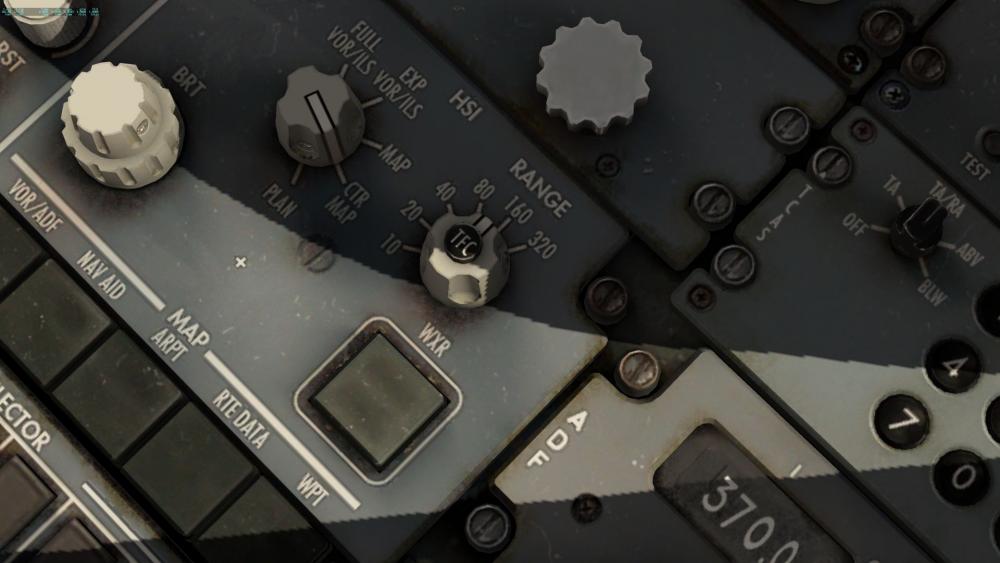
Hi Luiz, to see traffic on your navigation display (ND) you need to be in a mode that displays navigational data (i.e. NOT FULL VOR/ILS or PLAN modes) - and you need to set up your transponder to be active, and also TCAS to at least TA. In addition you need to click on the TFC button that is on top of your map range display, check out these two pics: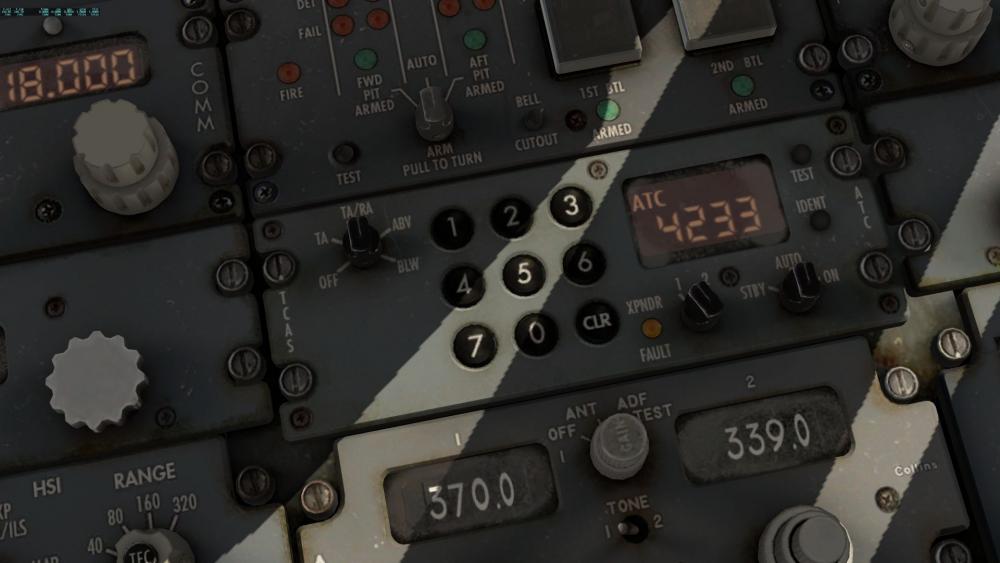
-
welcome to my life...
-
So far it is either both or none - I think having it either right or left would be possible, but this is an unusual configuration because normally both pilots would have an EFB...or neither. Cheers, Jan
-
Oh, that is a new one! Does it happen before you touch down (during flight) or afterwards? There are three electrical trim inputs working the elevator - the pilots trim switches on the yoke, the autopilot trim and the speed trim (we do not model Mach trim). To further troubleshoot what is happening to you would need either a better explanation (state of flight-director/autopilot, engaged modes) or even better some screenshots or (the best) a short movie. I am sure we can find out what is going on. Cheers, Jan
-
What are these green vectors on my ND?
Litjan replied to kingsnugget's topic in 737-300 Aircraft Systems and Operation
In addition - the bearing lines for ADF 1 and 2 (they are superimposed on the picture) will always point to "90 degree relative bearing" - i.e. to the right - when they receive no signal. Opposed to the VOR receiver the ADF receivers have no logic to discern wether they receive a strong enough signal. So it is up to the pilot to determine if the indication of "90 degree to the right" is a valid QDM or simply means "no reception". Cheers, Jan -
I think it is mainly a modeling/animation thing that is not trivial - especially on these "plug type" pressure resistant doors that move in complex ways during their operation.
-
No ETA other than "sooner than never", sorry!
-
Like Cameron said - bump your mouse against the left side of the screen, then select "preferences" - here you can set up individual sound volume, for example make aviation fans more quiet. Note that some sound settings will also influence the sound setting for other default aircraft, so you may have to set them back to the desired level when flying those again. Cheers, Jan
-
Yes, of course we did!! No, not really...it is a side-effect of how we grab the weather data from X-Plane. And like Cameron said - no plans to sync native FMS with ours. The plan is (still) to add the missing features (better VNAV descents, holdings). The native FMS is getting better all the time and will get another upgrade for XP12, but what we are looking for is to replicate the exact 737 classic experience, a "generic" FMS, no matter how well done, will not be able to achieve that. Cheers, Jan
-
Hi ur35f, yes - and this problem is already fixed for the next build - but I don´t know when we will get around to publishing it because we have some other fixes for it that we want to include. For now please pretend that it the panel is INOP - it is possible to fly with this according to the MEL (I have actually done so in real life once, you have to confirm the position of the slats "visually"). Cheers, Jan
-
Digital icao ixeg 737 does not see them in fmc
Litjan replied to jenijek's topic in 737-300 Aircraft Systems and Operation
Yes, the original FMC only accepts "4 characters" as DEST (or ORIG) entry...so I guess this limits what we can realistically do. You can always navigate to your smallish airport by making a conditional waypoint in the FMS (radial/distance from a known waypoint or by entering geographical coordinates) to help you find it. Cheers, Jan -
Digital icao ixeg 737 does not see them in fmc
Litjan replied to jenijek's topic in 737-300 Aircraft Systems and Operation
The regular FMS of the 737 (and most airliners) will not find small airports or show them if the runway is below a certain dimension. For the IXEG 737 we relaxed this a little and also read the information for the default airports - but if there is a new airport added to X-Plane (or a new navdatabase) then the IXEG 737 will not see the small airports in that database. -
Yep. we know - no estimate as for "when" for now, though. Various ideas floating around (avitab, new menu system that works in VR, more "mappable" commands, etc.) Its not forgotten! Cheers, Jan
-
Thanks for the report - iirc we adjusted radio volume (especially the navaid-morse ident) to be more audible, it was very quiet in the early versions. It is possible that we have overdone this. I filed a bug report to adjust the volume a bit down. Cheers, Jan
-
Oh, excellent find! I will see what we can do to also make the cockpit look good on "high" texture settings. I am not a 3D/texture wizard, but Tom may have an idea why this happens. Thanks for the patience and reporting back - and the kind words, of course! Cheers, Jan
-
Hmm, that looks strange, indeed! Are you running the latest drivers for your graphics card? Also, just for troubleshooting, try to change the texture resolution and anti-aliasing setting to see if that changes anything? Thanks, Jan
-
Font problems - how is this product even usable?
Litjan replied to kholt's topic in General Discussion
So I sleep for 8 hours and this is what I wake up to :-/ I believe that you have a problem with the font - I sometimes run X-Plane on my 4K monitor in 1920x1080 and get a distinct visual downgrade besides the resolution, a fuzzyness, so to say. If I run at anything but full fractions of 4K it gets even worse. I outlined that we know about the readability problems of the menues in 4K and explained why we did not cater to 4K at the time we developed those menues...in addition to mentioning our plans to enhance this in the future. It is your right as a customer to be upset about it or not be satisfied with it - as Cameron said (and you can verify this by searching this forum dating back many years) - this is not a widespread problem (i.e. only one or two complaints about it) and therefore does not warrant an emergency fix from our side. We will get to it when we get to it. Sorry for not being able to offer another solution, Jan -
Font problems - how is this product even usable?
Litjan replied to kholt's topic in General Discussion
Hi Keith, I already replied to your problem on avsim as well. I know that the font is a bit small on 4k - but it is not hard to read on my screen at all. I use 4K as well, and while I wish the font was bigger (and the boxes a bit more easy to hit with the mouse), it still is absolutely possible for me to do so. I believe that changing the font to something odd like 2560x1440 might have cause the pixels to get blurry - it is always best to change resolution to a full fraction of the native resolution (i.e. for a 4K monitor you would need to drop to 1920x1080), otherwise pixels will get cut off. Let me know if this helps - and we are definitely planning to make the menus work better in 4K! Cheers, Jan -
You are right, it is unlikely - but maybe there is some errant axis assigned to throttle? Try to land without using reverse thrust (yes, it is against procedure, but it is possible to fly the 737 with reversers inop) - just to check if that is the problem?
-
The spoilers get "autostowed" if any thrust lever gets advanced past a certain point (this guarantees that they will be stowed in case of a go-around). Make sure that this is not triggered in your case by some axis assigned to "throttle"?
-
Hi, first - pilots are trained to always trigger the ground spoilers upon touchdown and in case of a rejected takeoff manually - just as a safeguard in case the automation doesn´t work. We always prided ourselves to yank the lever back before the automation could get to it. The correct procedure for the takeoff is to leave the speedbrake lever in the stowed position. When reversers are triggered (like for an RTO), the spoilers will deploy automatically. The correct procedure for the landing is to set the lever to ARM (and observe the green ARM light) - this will deploy the spoilers when the wheels spin up into the FLT position and then to full GROUND deploy when the strut compresses. If this does not work (like in an aquaplaning scenario) and the pilot forgets to yank it manually - the reversers will deploy the spoilers (like in the takeoff scenario). Cheers, Jan
-
Well, I am holding up the flag in it!
-
Hi Lerno1, we are using the default autobrake system for the 737 - it is very close, but not completely the same as the real logic. Especially the fact that it can be disarmed by accident very quickly and will not engage unless all wheels are on the ground. So if you feel that the autobrake is not working well enough for you (I checked deceleration values against the real 737 autobrake, and they are very accurate) make sure that the autobrake is really working. You can check by displaying the DATA OUT values for "gear and brakes". Another possibility is that you set the runway to be "wet" in the environmental setup by accident...and then have temperatures set to below freezing which will in fact turn the we runway to an icy one with very bad braking coefficients. Cheers, Jan
-
Videos from IXEG 737 pdf tutorials unavailable
Litjan replied to FlyingV's topic in General Discussion
If worse comes to worst I could take this as an opportunity to redo them...maybe with XP12 .