



skiselkov
-
Posts
491 -
Joined
-
Last visited
-
Days Won
40
Content Type
Profiles
Forums
Latest X-Plane & Community News
Events
Downloads
Store
Everything posted by skiselkov
-
I think there is a background task going on where the avionics is downloading the obstacle database from the FAA. It can take a couple of minutes, especially on slow connections. If you try to quit out of the airplane during that process (or when it attempts to do a reload as you hit Yes/No on that flight recovery screen), it needs to wait for that download to complete. Can you try giving it 5-10 minutes?
-
@Carsten Sorry to hear you are having trouble. The grey background is a "flight recovery" screen - it happens when the TBM detects that the sim crashed on the last run and lets you put the aircraft back to where it was to continue the flight. However, it should show a little Yes/No question dialog in the center of the screen. Are you by any chance running a multi-monitor setup? If so, there might be an issue that the dialog is being shown off-screen (if the screen layout is sufficiently complicated, it can have trouble figuring out where the "center" of the entire desktop is). A quick workaround would be to switch X-Plane temporarily into windowed mode, load up the TBM and pick "No" from the flight recovery dialog, and then switch it back into multi-monitor mode as you would normally want to use. If this helps, can you please also describe the way you have your screens set up? I can try implementing a fix in future versions so it properly detects your monitor setup and shows the window dialog on the main monitor.
-
Correct, this is not implemented ATM. I want to reimplement the entire TMR/REF page using custom code at some point, but that is not on the immediate agenda.
-
These are harmless. It's just the navaid parsing code complaining about some formatting errors in the navaid files, but these can be safely ignored. They have nothing whatsoever to do with any crashes you might have experienced.
-
You should use rudder trim to remove any sideslip (keep the slip indicator centered). With the yaw damper on, this is taken care of automatically. Any remaining rolling tendencies can be fixed by either small amounts of aileron trim, or by use of the yoke. All aircraft have inherent rolling tendencies, especially those with a single nose-mounted engine. There will be slight differential fuel and payload weight between left and right, random air currents, engine torque and aileron trim effectiveness changes with airspeed, etc. Don't assume that you can take your hands off the controls and have the aircraft remain flying perfectly straight indefinitely. This is not the case in the simulator, nor is it the case IRL.
-
This looks like some AV software acting up. NtProtectVirtualMemory is an internal NT kernel call and some AV software tends to hook into it to try and access process memory. In most cases that I've seen online, restarting the machine a couple of times helps. Alternatively, you can try disabling the AV software and seeing if that helps.
-
@sd_flyer Going to need some more context. How and when did this crash happen? Can it be reproduced? Have you tested without extra plugins loaded? Is it specific to a particular scenery?
-
Bug has been fixed, expect it in the next build.
-
Thanks for the report. I'll try to repro and fix this.
-
landing gear warning always on almost idle, also when too high or fast
skiselkov replied to Mindyourstep's topic in TBM 900
The landing gear warning is simply triggered by placing the throttle to idle.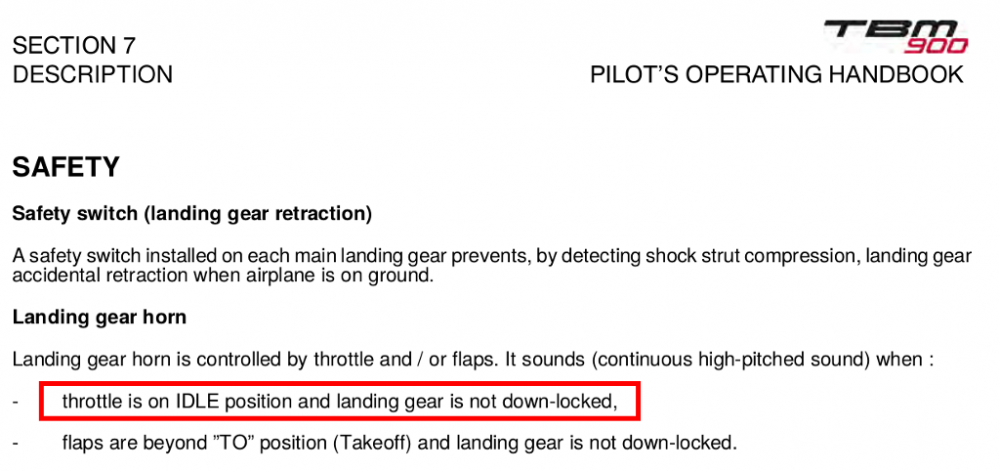
-
Thanks for reporting this. I completely forgot we do custom rendering for all the arrows in the tutorial mode. I'll extend the renderer there to support VR as well, now that I know how to do it
-
While the battery test itself shouldn't reset the engine temps, performing maintenance does reset the engine temps. That's quite by design. Just not the battery test.
-
@cromsan Please always provide the Log.txt from the simulator when filing a support request. That message "connection failed, see log.txt" means we need to see what's in there!
-
Unable to download component TBM 900: File not found
skiselkov replied to Mario Donick's topic in TBM 900
I absolutely want to get this implemented, yes! -
Unable to download component TBM 900: File not found
skiselkov replied to Mario Donick's topic in TBM 900
@dirkdej There are a couple of lights above the pilot's and copilot's head. The buttons are are a bit hard to see (they're unfortunately black on a black background) but that should give you a lot more ambient light in the cockpit. -
@Shafs64 Did you check you have rain enabled in Plugins > TBM900 > Configure visual effects?
-
Please update your GPU driver. You are running a fairly old version and it has helped other users with such an old version before.
-
Graphics glitch in 1.1.6, windows and outside view shaking
skiselkov replied to citronboll's topic in TBM 900
@citronboll It looks like the rain effect can't make up its mind, turning on and off again every other frame. I did a bunch of work in the rain effect recently and would be interested to see if it resolves the issue for you. I'm going to send you a beta build. -
@cpuwolf More context please. I googled for the issue and some folks have been recommending updating the display driver. Are you running an AMD GPU?
-
@Eirik350 I believe we have a fix for this thing. Should be available in a day or so, but let me also send you a beta pre-build, just to verify it.
-
Due to a mishap in the construction of the installer, yesterday we had accidentally packaged up the old version, but it got labeled as "1.1.6" in the file name. This has now been corrected. Please go to your X-Aviation.com account and download the installer again. It will now correctly download version 1.1.6. Thank you for your patience!
-
This appears to be a case of the airplane trying to bring up the "Flight recovery" screen. There should be a floating window somewhere asking for a yes/no if you want to continue your previous flight. It seems that on your specific monitor setup it's having trouble centering the popup window. For the time being, the easiest solution is to temporarily make X-Plane run in windowed mode on a single monitor, load the TBM and click Yes/No on that flight recovery window and then put X-Plane back into multi-monitor mode. What is the geometric layout of the bottom monitor? I'll need this info to see if I can somehow patch the window centering code to make the window appear even in your particular multi-monitor setup.
-
Yeah this is a bug in the stock G1000. I will report it to Laminar so they can fix it for every aircraft, instead of working around their bugs just for the TBM.
-
Yeah it's definitely the avionics_on dataref. I'll be adding an override into the plane's code to make sure the dataref is set right and it will also detect when something external is messing with it.
-
No problem at all.

