



Goran_M
-
Posts
5,646 -
Joined
-
Days Won
231
Content Type
Profiles
Forums
Latest X-Plane & Community News
Events
Downloads
Store
Everything posted by Goran_M
-
Looks like a missing scenery file.

-
The next update will have a fix. In the meantime, the workaround is what we suggest you use.
-
-
You'll need to map your hardware to the specific TBM commands. There is very little default functions going on under the hood, and you, very likely, mapped your hardware to some kind of command that cuts fuel.
-
Hell of an introduction for your very first post.
-

Can I get a invite for the hot start discord
Goran_M replied to mike10's topic in General Discussion
https://discord.gg/qfSU3v -
That's definitely something for the developers of xswiftbus to look into. The backtrace points to xswiftbus, and this is indicating it is not compatible with X-Plane.
-
Loving TBM 900 - but could someone invite me to Discord?
Goran_M replied to aps808er's topic in General Discussion
https://discord.gg/GKe4WX -
https://forums.x-pilot.com/forums/topic/18326-tbm-900-ils-localizer-has-dissapeared/ https://forums.x-pilot.com/forums/topic/18158-issues-with-1150b10/?page=2&tab=comments#comment-152687
-
With those specs, you won't have a problem. We made the TBM before the 20xx series of GPU's were even out.
-
We've seen people make comparisons in performance between the TBM and the Zibo, and stating "If you can run the Zibo, you can run the TBM".
-
It's been a while since I fired up the TBM, and I very rarely, if ever, fly for "fun", but I could take another look. But even if it shows what it shows in these images, it remains a problem on Laminar's end, as we use the default G1000 moving map. Edit: Just took another look. I stand corrected, but the reason I could see the aircraft in the first place was because I wasn't zoomed in as much. I can see the wings protruding from the sides of the taxiway.
-
Anything to do with the moving map is Laminar's area. You'll need to report this to them. I haven't seen this happen on my install. Do you have some kind of plugin like reshade that could change the saturation?
-
We use the X-Plane AIRAC. To taxi, you need to go into BETA, which is to the left side, between flight idle and reverse.
-
The 580 isn't that old. mid 2017 if memory serves. Have you tried removing all 3rd party plugins and trying again?
-
Make sure "Start with engines running" is unchecked when you load the TBM Also, the TBM uses the X-Plane 11.50 AIRAC. But There is a bug with that navdata, so to avoid issues, use the X-Plane 11 AIRAC.
-
And this would happen if you tried to calibrate your hardware with the TBM loaded and the engine off. The maintenance manager will reveal what, if anything, is wrong.
-
Check failures and the maintenance manager. Make sure all X-Plane default failures are set to "always working"
-
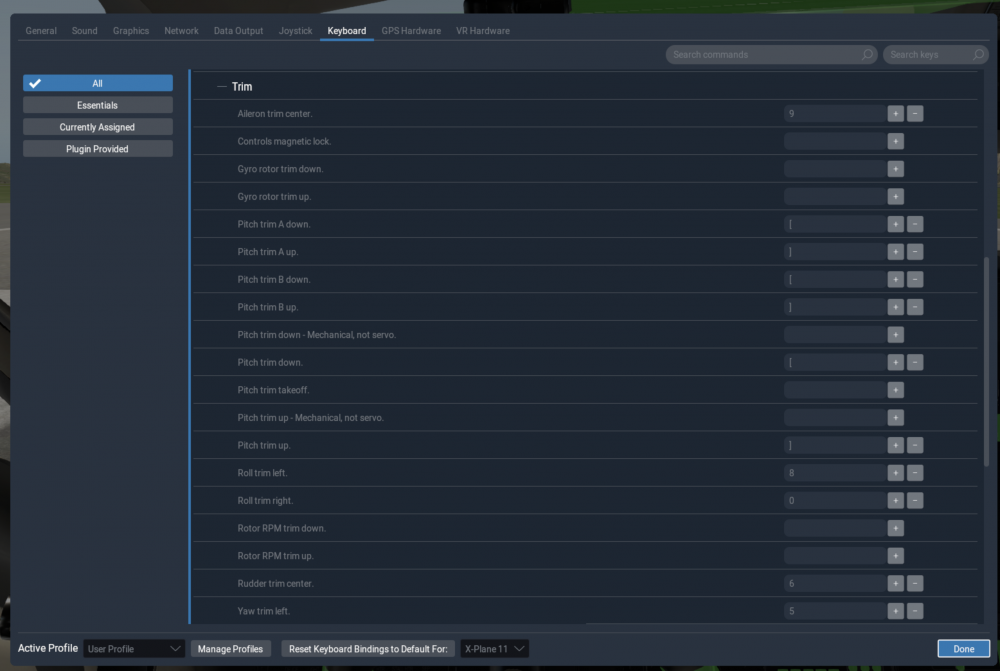
You can assign trim up and down to any part of the hardware you like in the TBM commands list.
-
Try removing all 3PD plugins and test again.
-
This is almost definitely a GPU problem. Are you perhaps running an AMD GPU?
-
Do you have any plugins that could be interfering with the state folder? Any kind of hardware that could be controlling switch positions? This is not a bug we're aware of, so it's safe to say this is isolated to your system.
-
Try removing the contents of the Resources/Output/TBM900/state folder, then reload the sim.
-
Is that the log file from an actual crash?
-
This is definitely something in your configuration. There is nothing that we've done that will prevent you from setting preset views. Make sure you don't have anything assigned to any hardwire, or any plugins that could be controlling your views.


