Goran_M
-
Posts
5,657 -
Joined
-
Days Won
235
Content Type
Profiles
Forums
Latest X-Plane & Community News
Events
Downloads
Store
Everything posted by Goran_M
-

Unable to download component TBM 900: File not found
Goran_M replied to Mario Donick's topic in TBM 900
A component error is due to running an older installer. Are you sure you are running the new installer? The zip file should be named TBM_900_v1.1.13.zip -
Cannot reproduce. Can you post a Gizmolog.txt and log.txt file?
-
Yes, it will work in Vulkan.
-
We'll look into this over the next few hours. Can confirm. Noted and this will be looked at. EDIT: Just did another test. With the Saab running, the tiller doesn't move, but the nose wheel does steer with hardware, once the aircraft park brakes are off. We'll look at the tiller issue.
-
We have individual AND a common manipulator for the CL's. So yes, you can map your hardware individually or using 1 axis. What happens if you use the mouse on the tiller? Do you have hydraulics pressurized?
-
You can map both condition levers to 1 axis using a common manipulator that is now implemented. Make sure the steering tiller is unlocked and mapped correctly. The naming of all the commands has been changed for this update. We understand this may be an inconvenience to those with hardware assignments, and we apologize for this.
-
Cameron has mystical powers.
-
This right here is likely the cause of your FPS issues. The TBM uses some hi resolution textures, and is very likely overloading your GPU. My suggestion is, while flying online, to reduce the texture quality. I know it's not ideal, but you're trying to squeeze something out of your GPU that simply isn't there. Another possible cause is what Ben posted below.
-
Unable to reproduce on my end. If you remove the ground handling plugin, does the sound go away?
-
Next step is to isolate the plug in causing you problems. Add plugins back, one at a time, and loading the TBM each time, to see which one is causing the crash. Then we can determine is if it's something for us to address, or something for the developer of the plugin to address.
-
Set a button or keystroke to "Toggle thrust reverse". That will bring it back to Taxi/Ground Idle
-
Best thing you can try, that is, pretty much failsafe, is to install a fresh, clean copy of X-Plane, and then install the TBM. If the TBM works in a clean copy of X-Plane, that's a sure fire indicator that there is something wrong with your original installation of X-Plane. The problem with xOrganiser is it doesn't prevent plugins from loading. It just disables them after they load.
-
That would be very unusual, as the TBM uses the default G1000 for creating flight plans. I'll note this one down, just in case.
-
The fuel prediction is a Laminar bug, and they have been made aware of it.
-
I'll note down your suggestions, but I cannot promise anything.
-
@docpan Many thanks for all you have done with smartcopilot. Of course, real life is more important than hobby life, but hopefully you can return some time in the future. If not, we wish you all the best.
-
If you want to add the GTN, that is entirely your choice, although we advise against it. But to offer support on something we never took into account, could have unpredictable results. So if something DOES go wrong, and you need support, please mention that you have added the GTN. If you don't mention it, then we'll be chasing bugs without knowing something has been added to the TBM. It will save us a lot of headaches if we know what has been done. As far as the flight plan, I'm not sure what is going on with that. I just tested on my end, and deleting a flight plan works fine. I'm not familiar with the workings of the GTN, but it might be possible that some files were left behind and is somehow creating issues with the TBM. Make sure all traces of the GTN are removed from the TBM. If they are, then a reinstall of the TBM might be needed.
-
We thought about that, and the problem is, if it were a checkbox in a menu, that would mean people who wanted to enable or disable chocks, or access the maintenance manager, they would have to open a side menu, to access the checkbox, and then to enable the clickspots/menu items for the different maintenance items by checking or unchecking a checkbox. The automatic method was used to make it easier for everyone. It's all done for you. You could always just not put the covers back on. With regards to the doors, and I say this all due respect, but is it really a problem to do 2 mouse clicks to close and then lock the door? In saying that, we've made this aircraft to simulate real world ops, as if you were really owning it. When you park an aircraft, all these things are done. Scenario's were never planned. I stand corrected. When the aircraft starts moving, the side menu slides out of view. When it stops, it will come back out.
-
It's getting looked into. Whatever it is, will be sorted out for the next update.
-
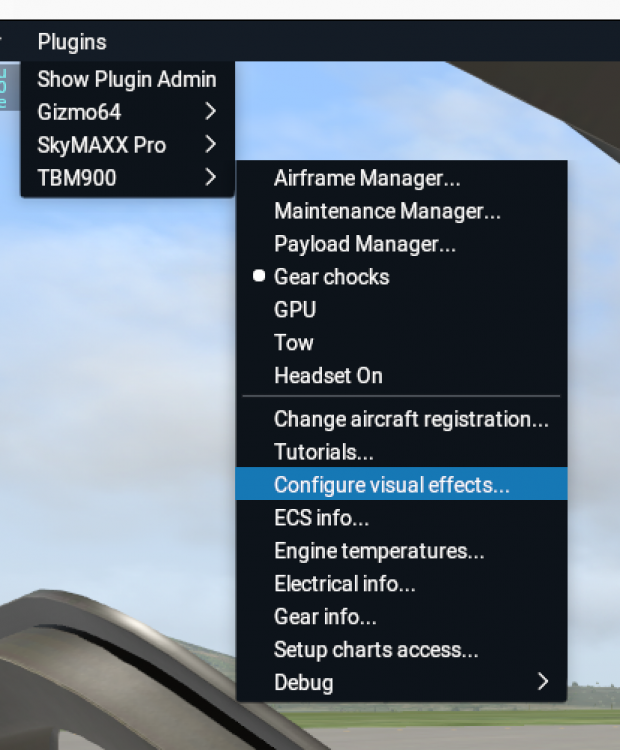
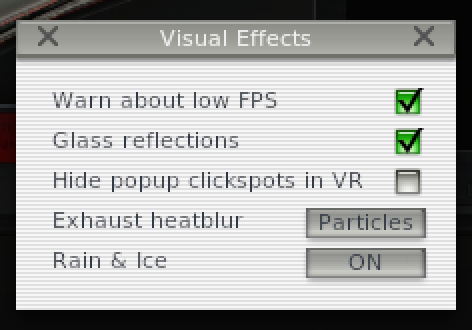
I'm going to show you what I have on a Mac, but note, on a Mac, the settings are "ON" and "OFF" under the Rain & Ice section. Under Windows/Vulkan, you will have a LOW setting.
-
It's on the list for the next update.
-
It hides as soon as the park brakes are turned off
-
FYI, we offer no guarantees with any mods that interfere with the navigation of the TBM. This will void all official support.
-
On VR or Track IR, simply move your head up to the overhead. Without VR or Track IR, I use the right mouse button and drag my view up, or assign a preset view using CTRL [numpad number]. You could also pull the view back by pressing the comma key, and move it forward by pressing the period key, without adjusting FOV