Coop
-
Posts
1,693 -
Joined
-
Last visited
-
Days Won
67
Content Type
Profiles
Forums
Latest X-Plane & Community News
Events
Downloads
Store
Everything posted by Coop
-
Let me know how that goes
-
Redownload the installer for updates
-
You can try temporarily removing these files from the "objects" folder, let me know if this works: glass_ext.obj glass_int.obj glass.obj
-
@Yorkshire It could be 1 of two things: The xgs landing speed plugin is installed, only the newest version seems to not prevent our plugin from loading, so please make sure you are on the latest version of that If that doesn't work, try removing xgs entirely and see if that isolates the issue If those don't, it could be a missing Visual C++ redistributable (less likely) https://torquesim.atlassian.net/servicedesk/customer/portal/1/topic/b6d622a0-61d2-4ce0-9ccb-205f4b5ecbc1/article/128188431 has instructions to get the latest version
-
Talked with one of our other devs, we have an idea that could be it, though we aren't sure. Can you go into the TorqueSim BN-2 Islander/objects/ folder and rename the "PPL" folder to "zPPL" This will force the people objects to never load, we are wondering if there is something going on with those objects causing the FPS tank.
-

Fantastic Aircraft with just a few small issues
Coop replied to Twotonemurphy's topic in BN-2B Piston Islander
Thanks for the kind words! FMOD update should be rolling out real soon -
Can you make sure the Cockpit lights knob is turned completely off and the Cabin lights switch is turned off too?
-
The switches return to be where you left them. If you want to disable this setting, you can change our settings.cfg file in TorqueSim BN-2 Islander/plugins/is_systems/settings. You can set "disablePersist" to 1.
-
This sounds like our plugin isn't loading, can you share your log.txt file so we can diagnose?
-
The aircraft itself won't use that much VRAM, with scenery it can easily skyrocket. This is just a step for debugging in the process to figure out what is going on, as we can't replicate this issue
-
The HSI course needs to be adjusted manually to match the GPS course.
-
READY for release. Switches, starting, flying
Coop replied to AlyMac's topic in BN-2B Piston Islander
Regarding the engine switches, make sure that the External/Starter Isolation switch is turned on, that is the most typical thing that would prevent the starters from their operation. This system is described on page 2-4 of the manual. Regarding the external covers, there is a bug preventing their logic from working, this will be fixed ASAP. To hide/show them this can be done through the sidebar menu; if you hover your mouse on the left edge of the screen, the tab to open the menu will show. We will make sure to get this documented in the manual. -
You can try this out, it should help based on your texture settings:
-
TorqueSim BN-2 Islander 2K Texture Pack View File Here is the 2K texture pack for the TorqueSim BN-2 Islander! For those who have high VRAM usage, this should help for performance Included is: "objects" folder, this can replace the files of the same name in your objects folder to make them 2K resolution "liveries" folder, this contains 2K versions of the default liveries, you can replace your default liveries with the attached Submitter Coop Submitted 04/26/2020 Category Liveries Livery For https://www.x-aviation.com/catalog/product_info.php/torquesim-islander-p-177 X-Plane Version(s) X-Plane 11
-

Version 1.0.0
150 downloads
Here is the 2K texture pack for the TorqueSim BN-2 Islander! For those who have high VRAM usage, this should help for performance Included is: "objects" folder, this can replace the files of the same name in your objects folder to make them 2K resolution "liveries" folder, this contains 2K versions of the default liveries, you can replace your default liveries with the attached -
@dresoccer4 What is the displayed VRAM usage in X-Plane graphics settings?
-
Maybe! It is a convenient tablet, I think it would be nice to have it put in for sure!
-
@dresoccer4 Can you try at PMDY (airport in the middle of nowhere in the Pacific) to see if it might be related to scenery and isolate it to the plane. Once there if you turn off all the lights (exterior and panel) if that helps at all?
-
Nope, all you need to do is download the patch file from here: http://afms.im/G5Wiki (Just add the files inside the download for the BN-2 Islander to the Islander folder in Aircraft/X-Aviation Let me know if anything comes up!
-
I imagine it would be the GTN taking over the GNS controls
-
That is quite odd. One idea I have, it might be the prop disc. Can you check to see if it only happens if the propeller is in the view?
-
Glad to hear it, great!
-
Interesting, can you share your log.txt file? Are you on 11.41 or 11.50?
-
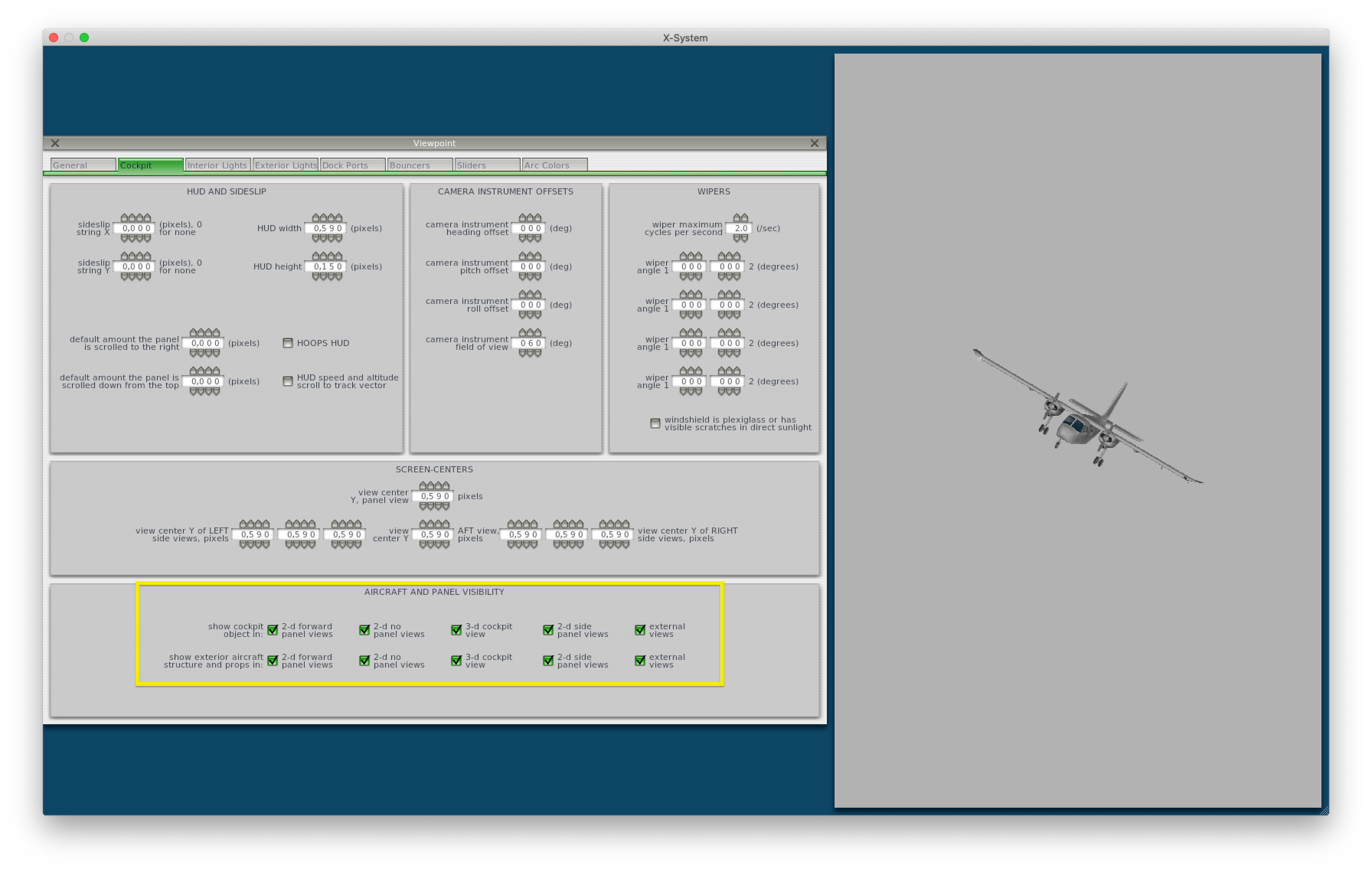
In Plane Maker -> Viewpoint -> Cockpit, you can adjust these settings to choose where to show which objects (make sure to match both the top and bottom row) I will file an issue on this to see if we have a reason they are all checked; if we don't then we will get it fixed in one of the coming updates.

-
This is most likely due to VRAM usage, we are working on a 2K texture pack mod that should roll out over the next few days which should improve VRAM usage and performance. In the meantime, lowering the X-Plane texture settings should help.