



Coop
-
Posts
1,693 -
Joined
-
Last visited
-
Days Won
67
Content Type
Profiles
Forums
Latest X-Plane & Community News
Events
Downloads
Store
Everything posted by Coop
-

Not again! Plugin is asking for email and password
Coop replied to x-cirrus's topic in G1000 SR22 Series
Gizmo should be saving the license file for 14 days. In Gizmo preferences within X-Plane, you can make sure these 2 main boxes are checked: This also sounds like there is potentially the folder marked as read-only or something that prevents Gizmo from saving the license file to disk. @Cameron might have a better idea for debugging?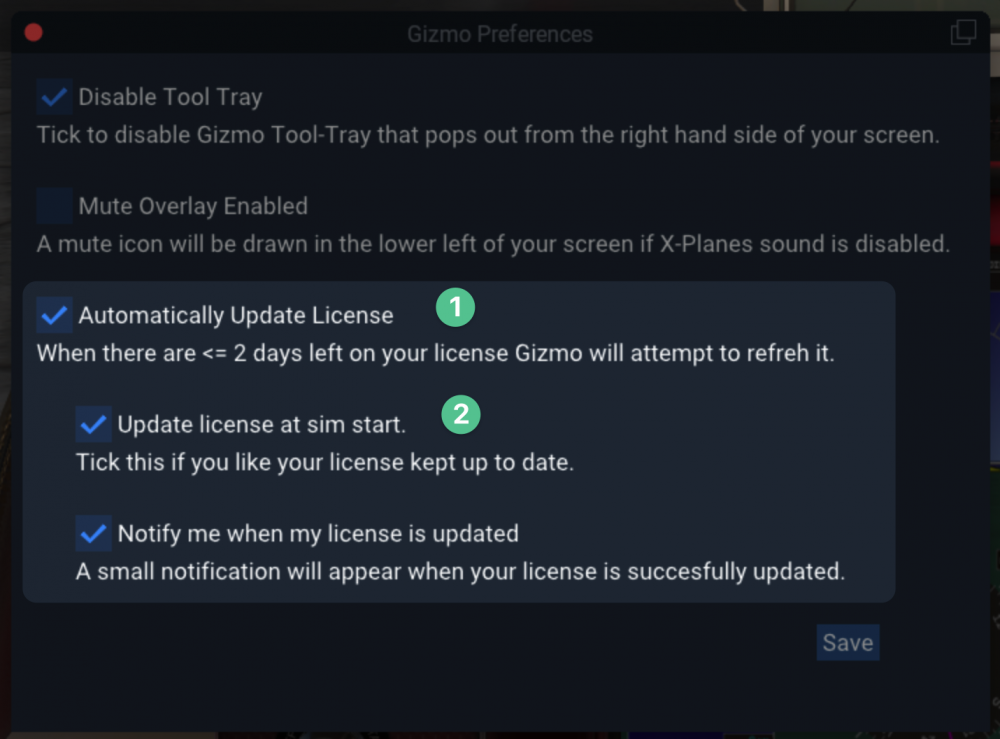
-
In high ambient temperatures, the system has the potential to not function (air bubbles can form in the fluid lines). Additionally, if you are running on battery, low voltages can prevent the system from functioning. These are the most likely culprits, I am not seeing any replicable issues with the TKS system on my end.
-
There is also a bug in X-Plane's Metal pipeline on Mac devices that leads to slow panel parsing. We've reported this to LR, but there isn't anything we can do about it in the meantime.
-
Under the maintenance tab in the SR22 menu, you can try running TKS system maintenance. It will output a maintenance log file to X-Plane 11/Output/SR22/logbook
-
Changing Registration causing persistent ALT 2 failure.
Coop replied to DarrenHowie's topic in G1000 SR22 Series
Hi Darren, None of the livery generation code touches the Alternator 2 logic, so imagine this is some coincidence in testing. The Alternator 2 on the SR22 needs a few requirements to be met to engage: The Essential bus must be powered to engage the field protection circuit. (This can be powered by Bat 1, Bat 2, or Alt 1) The RPM must be relatively high, due to the circuitry of the setup (>~1500-1750 rpm) There is a timeout on the warning, so I am guessing it only gets noticed after running the livery generator due to the time it takes. -
We've seen this happen a bit. We have a fix to prevent this from happening that we have sent off to the store and should be released soon!
-
 Looks great!! Thanks for sharing
 -
Hi Neil, I am not seeing the G5 plugin installed into the aircraft from the log. Running the included G5 Aircraft Installer application (located in the main directory of your X-Plane 11 install), and then directing it to the location you have the PA28 (Aircraft/Extra Aircraft/JF_PA28_Arrow_v1.7/JF_PA28_Arrow/) should get it working.
-
@Bravo Pilot This sounds like the plugin isn't loading as well (as the plugin is responsible for hiding the pilot object when in an inside view), the instructions posted before should help:
-
Hi Neil, In order to debug what is going on, we will need you to send us a copy of the X-Plane log.txt file. You can find a guide to get this file here: How to find the X-Plane log.txt file?
-
The M20 has specific install instructions, which can be found at the bottom of the page here: https://afmsim.com/g5/
-
Is the starter cranking the engine and it isn't catching, or is that also not working?
-
SOLVED - C712 + REP + AFM + SimAcoutics FMOD experience issue
Coop replied to tbissett's topic in G5 Instruments
As the Aircraft .ACF file name is different, X-Plane probably isn't finding the proper FMOD .snd file. Try duplicating and naming the SimAcoustics .snd file (located inside the Aircraft/X-Aviation/Cessna 172SP G5/fmod folder) to be Cessna_172SP_G5.snd. -
Yeah, it appears that somehow the X-Plane autopilot got confused on the proper course - not sure how this happened in this situation. I would recommend in this case hitting the direct to button or using heading adjust to manually get it back on course.
-
This sounds like the plugin isn't loading, so you can follow the steps provided here: https://support.torquesim.com/hc/en-us/articles/360057635513-Steps-to-resolve-plugins-not-loading-Error-Code-126- If that doesn't get the issue fixed, can you send your log file? (Instructions on that here: https://support.torquesim.com/hc/en-us/articles/360057635413-How-to-find-the-X-Plane-log-txt-file-
-
Hi Rob, I am not sure why there is flickering, I would guess that is either some sort of conflict with Air Manager or a driver bug that updating the GPU drivers could fix, as this seems to be an isolated issue. The customized G1000s do not work with the Air Manager popups, as those only read the default X1000, not our customized displays.
-
The M20 collection is getting a complete overhaul and a new 3D inside and out. This new aircraft will be significantly discounted for existing owners.
-
I haven't seen that one before. I am guessing there is a conflict with a different plugin you have on your machine. You can try going through those and temporarily removing them to find the culprit.
-
This is most likely due to a combination of two things: Flooding the engine. Prime the engine only for ~2 seconds. Anything >3 seconds can start flooding the engine which makes the starts very difficult Use less throttle. The throttle needs 1/4" of throttle on the real plane. Most X-Plane throttles have much, much less travel than the real aircraft's throttle. This might mean you need to use 1/8" or less of throttle to accurately depict the throttle setting.
-
How to switch on the Avitab tablet in the Torque Sim SR22
Coop replied to Bakerz82's topic in G1000 SR22 Series
It should be powered on by default. You can try the Avitab default 2D popup and turning it on there to see if that fixes it? -
Yes, it is being worked on currently
-
How to switch on the Avitab tablet in the Torque Sim SR22
Coop replied to Bakerz82's topic in G1000 SR22 Series
@Bakerz82Do you have the Avitab plugin installed? -
Honeycomb Yoke: no reaction on some Switches
Coop replied to homobellum's topic in G1000 SR22 Series
@RequestDeniedThe afm category will only show when the SR22 is currently loaded in-sim. If you are accessing from the main sim menu before loading the plane, X-Plane won't pick up our commands. -
Something seems to be messed up with the install. Can you delete the files inside the X-Plane 11/Output/SR22 folder? This will reset the engine and physics model to new.
-
@Tomatl Most likely the engine is being flooded, I would recommend trying a flooded start procedure. If you check the "start with engines running" option in the X-Plane main menu, the aircraft should start with the engine running.


