



Coop
-
Posts
1,693 -
Joined
-
Last visited
-
Days Won
67
Content Type
Profiles
Forums
Latest X-Plane & Community News
Events
Downloads
Store
Everything posted by Coop
-
Yes. The integration steps are described here: https://afms.im/G5Wiki Setting the Red/Yellow/Green arc locations can be done with a provided Adobe Illustrator file. If you don't have Illustrator, you can send an email to support@afmsim.com with the range you need on the arcs and we can provide the file.
-
It appears that your graphic drivers are either out of date or the graphics card does not support the necessary rendering calls (it appears that you do not have a graphics card installed based on the log file, that only integrated graphics are being used). Please try updating your graphics drivers to the most recent version.
-
This is due to how X-Plane handles 3rd party windows (versus their own). We are writing a config-file based library which will allow setting specific screen coordinates to render to, but until we have that working, attached is a hot fix. Inside the zip you fill find g1000_nobezel.png inside. Replace the file with the same name inside X-Plane 11/Aircraft/X-Aviation/M20 Collection/M20R Ovation III/plugins/m20_systems/resources/g1000/data (and same for M20TN Acclaim folder). This is simply a transparent image that is resized so the proportions should act better. I haven't tested with emuteq G1000s before, only with RSG G1000s, so the display resolution may be different on these screens (RSG is 1024x786). You can try resizing the attached image if you still experience the cropped effect on the G1000. g1000_nobezel.png.zip
-
Perfect, thanks for letting me know!
-
The lighting system is being reworked with the texture/3d overhaul update, which is WIP.
-
This appears if you have had your machine logged in on X-Plane to a different X-Aviation user before.
-
To open the G1000 without bezels, custom commands need to be called due to the drawing of custom elements on the G1000. The commands can be set to joystick or keyboard shortcuts using the X-Plane Keyboard/Joystick settings window to set commands. The commands are: afm/m20r/cmd/popup/PFD_NOBEZEL and afm/m20r/cmd/popup/MFD_NOBEZEL
-
The G1000 mapping functionality uses the default G1000
-
Working on getting a fix out for this. We have wrapped in some other bug fixes as well, going through testing now.
-
That looks like something with the way a firewall/antivirus is configured. If the installer is blocked from the internet, it can't download the files.
-
That sounds like the directory you selected was not the X-Plane folder, but I am sure @Cameron will be able to help more.
-
This shouldn't happen - it is not replicable on my end. Does the standard G1000 functionality return to the other aircraft after restarting the simulator?
-

Strange prop graphic issue and no throttle lever reaction
Coop replied to TomSebas's topic in Pocket Rocket
It looks like your Microsoft Visual C++ Redistributables are out of date, please install the latest 2015/2017/2019 x64 redistributable from Microsoft's website here: https://support.microsoft.com/en-us/help/2977003/the-latest-supported-visual-c-downloads (For convenience, this is the download link provided on the webpage: https://aka.ms/vs/16/release/vc_redist.x64.exe) This should get the plane up and running with the install of this and a reboot of the computer. -
Strange prop graphic issue and no throttle lever reaction
Coop replied to TomSebas's topic in Pocket Rocket
Hi, it looks like the plugin that runs aircraft systems is not loading. Please provide the file “log.txt” in the X-Plane directory after loading the aircraft. -
Pocket Rocket "Wasabi Yellow" Livery View File This is the "Wasabi Yellow" Livery for the Pocket Rocket. If you don't have the Pocket Rocket, you can get it here. Livery created by Steaven of TorqueSim. Submitter Coop Submitted 10/24/2019 Category General Aviation Livery For https://torques.im/prxa X-Plane Version(s) X-Plane 11
-
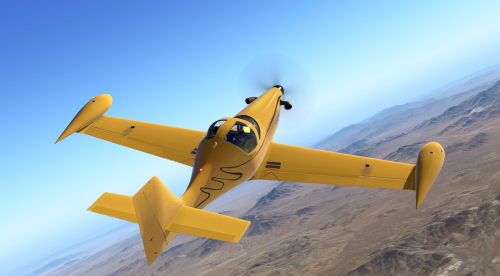
Version 1.0.0
61 downloads
This is the "Wasabi Yellow" Livery for the Pocket Rocket. If you don't have the Pocket Rocket, you can get it here. Livery created by Steaven of TorqueSim. -
Pocket Rocket "Wasabi" Livery View File This is the "Wasabi" Livery for the Pocket Rocket. If you don't have the Pocket Rocket, you can get it here. Livery created by Steaven of TorqueSim. Submitter Coop Submitted 10/24/2019 Category General Aviation Livery For https://torques.im/prxa X-Plane Version(s) X-Plane 11
-

Version 1.0.0
65 downloads
This is the "Wasabi" Livery for the Pocket Rocket. If you don't have the Pocket Rocket, you can get it here. Livery created by Steaven of TorqueSim.-
- 1
-

-
- torquesim
- pocket rocket
- (and 3 more)
-
The ammeter on the main page shows amperage that is drawn from the battery, not the Gen, so seeing 0 after the alternator has been on and the battery is charged makes sense. That is quite odd if that is the case, I will see what X-Plane is doing that causes the lights to put such a strain on the Gen.
-
That is odd, what version of X-Plane?
-
Thanks for the log, that is odd - I will check that out.
-
I am not sure, this bug has not been seen yet. Please provide a log.txt from when this happens so I can take a look. Thanks!
-
The SVS database can not be updated as it is based on X-Plane included data. Sometimes runways can be off vertically due to runway elevation being different between the default X-Plane mesh and an airport's custom mesh.
-
Fixed it, sorry about that!
- 7 replies
-
- 1
-
-
- pocket rocket
- torquesim
- (and 3 more)
-
Pocket Rocket causes X-Plane to crash upon loading.
Coop replied to Abond1121's topic in Pocket Rocket
Glad to hear it! Let me know what you find.