



skiselkov
-
Posts
491 -
Joined
-
Last visited
-
Days Won
40
Content Type
Profiles
Forums
Latest X-Plane & Community News
Events
Downloads
Store
Everything posted by skiselkov
-
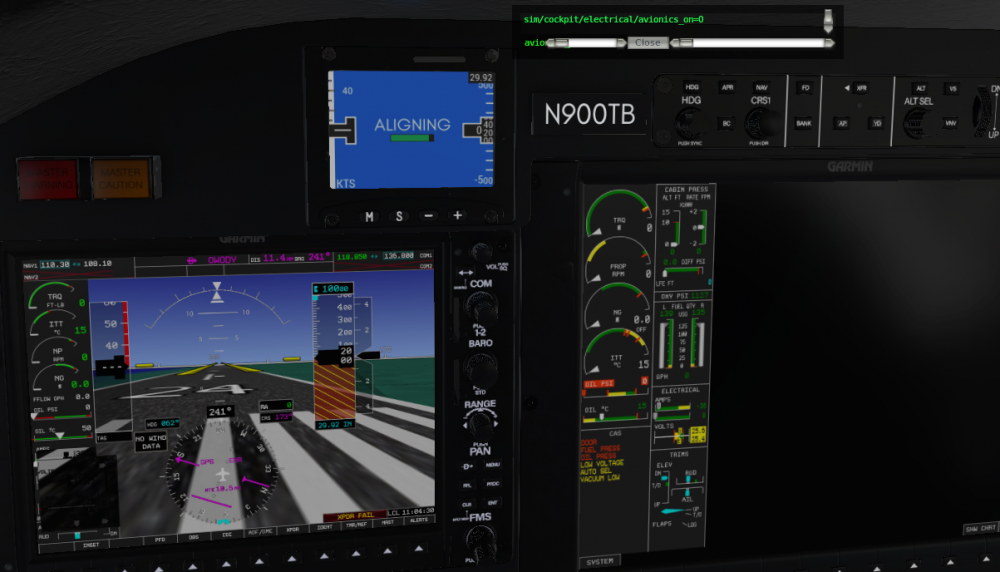
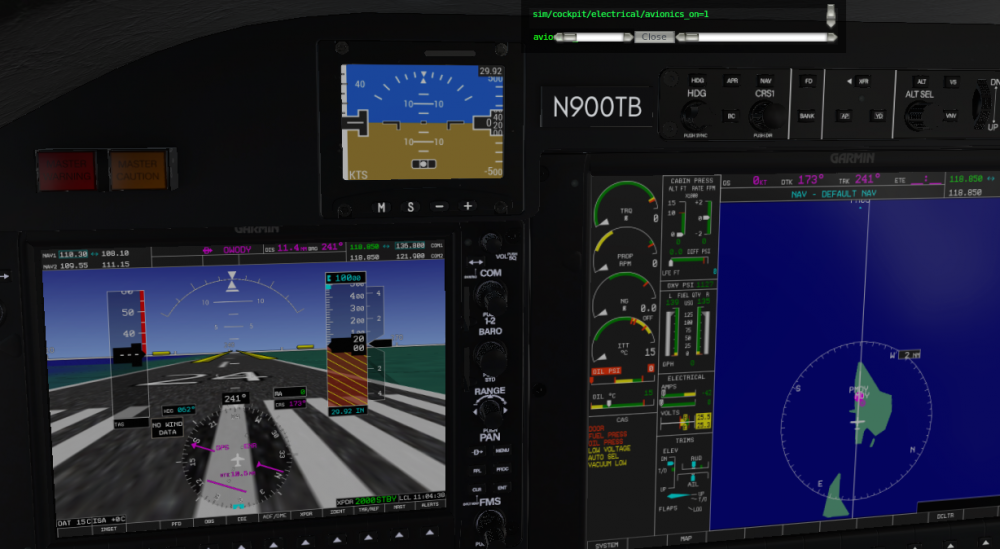
@HamSammich Are you running any kind of hardware switch panel (e.g. Saitek) that has an avionics master? This kind of look is a clear indication that something is messing with the G1000 datarefs underneath. If you do, try disconnecting that and testing to see if it has an impact. Avionics dataref off: Avionics dataref on:
-
@Jakob Ludwig I'm afraid we're still trying to figure that one out. It's "Gizmo related" in the broad sense that it has something to do with licensing (which involves products talking to Gizmo), but I can't say anything with certainty beyond that. I'm sorry we can't give you a more concrete answer beyond that. Rest assured, I'll be screaming it from the rooftops once we have a fix in hand.
-
Thank you, great pictures! I'll get in touch for the rest of the stuff. Just kinda tied up in other work right now.
-
This is a known messup in the X-Plane 11.30 engine model. They changed some constants and that messes up how the engine behaves during start. We've got a completely custom engine model on the chopping block and that'll resolve all of the startup, peak ITT, cruise power and NG issues. If you wouldn't mind sending me some of your ETM data from the G1000 data card, that'd help me get a more complete picture of the fleet. So far, all the data we have is sourced from one airplane, and a set of one can have various biases or quirks existing in only that one unit. As part of the new engine model, I'll be reimplementing the manual override lever. If you could forward me some scans of the testing procedure, that'd help figuring out the exact behavioral model. We don't have the audio samples for the warning. If you could record those, that'd help a lot. Interesting, staring at ETM data I have I can confirm that the NP seems to climb with TAS. Never noticed this trend. Will implement. Could you send us pictures of the modified stall flapper & boot for the built-in AoA indicator? It's easy to make it a toggle in a settings menu, so you'll be able to switch between the G1000-integrated AoA and the addon unit. The more info you give us, the more accurately we can model it. Thanks for the data, I'll use it to retune the reverse power settings. I didn't have ETM data for the reserve mode, so I just kinda eyeballed it until the testers stopped complaining. Having hard data on this will help a lot.
-
Quick question: were you trying to click&drag the course knob, or use your mouse wheel? We are using stock X-Plane manipulators and I've noticed an odd behavior in the CRS knob at times. When I click & drag and I have a wide FOV with if the camera is sufficiently far away and off-axis from the knob, it sometimes only moves by a single degree, no matter how much I drag. Then all I needed to do is right click and reposition my view by a few pixels and suddenly the manipulator came alive. This is squarely a bug in X-Plane's handling of manipulators and short of writing a completely new manipulator set, we can't really do much about it. (I mean we can report it to LR, but something tells me this is the kind of issue that they've heard about before...)
-
Although I could resolve the issue on my test machine (where the issue was reproducible) and we've had beta users reporting it fixed as well, there is some chance we might have missed some corner cases, or some other factor that might apply specifically to your setup. We'll keep at it and try to figure out what the matter is.
-
@CYUL900 Should be available shortly, we were doing some hotfixing. Give it 10 minutes.
-
Apologies, completely missed that attachment. I'll have a fix for you shortly.
-
Please attach your Log.txt @dirkdej It's probably some missing library, and it should be listed in the log, so that makes it easy to figure out.
-
Failures via Instructor Operating Station IOS ?
skiselkov replied to CDNCAVOK's topic in General Discussion
You can trigger failures using the IOS, sure, but you won't be able to see the few custom ones we have (things like fuel leaks, etc.). -
This is unfortunately a limitation with the stock G1000 integration. We can't quite freely organize the page groups and need to work within the confines of the stock avionics. As for the airport info page, that is a feature request that should be submitted to Laminar, as it's them who controls the contents of that page (this page isn't customized by us).
-
@Greaser Please make sure you have stock X-Plane scenery, or hd-mesh-scenery installed underneath any ortho tiles generated via Ortho4XP. Ortho4XP doesn't include a DEM (Digital Elevation Map) segment in the generated DSFs, which is what the synthetic vision needs to construct its terrain view (and also the GPWS and WXR read this to determine the terrain shape).
-
I believe I've got this understood and figured out. It seems to be a libstdc++ incompatibility between Ubuntu (which I build & test on) and Debian. Fix is on the way to the reporter to verify the problem has been addressed.
-
What framerates are you seeing on the TBM900?
skiselkov replied to skiselkov's topic in General Discussion
Thank you @giaco and @Ricardo Pallavidino! -
If you are running on XP11.30b5, then that's an issue that got introduced in beta 5. They changed the way monitor coordinates are represented, which confuses the sidebar window positioning code. Waiting on their response to see if they'll revert it back to the old behavior, or we'll simply have to re-implement that piece for XP11.30 and later.
-
This seems to have been a crash in the underlying X-Plane avionics code when it was constructing the STAR. The Log doesn't contain any stack frames from our code, so this likely wasn't caused by us.
-
@Pawel D. Very nicely explained. I'll just add that for LOC-only approaches, you wouldn't use APR, only "NAV". "NAV" is basically the roll mode, "APR" in addition also arms the GS pitch mode. So for localizer-only approaches, only use "NAV" and leave "APR" off. Little trick for achieving a constant-angle descent on a non-precision approach: Stabilize your airspeed. De-select any active pitch mode (e.g. when in VS, push the "VS" key again to de-activate the mode). This reverts the aircraft into pitch-hold mode. Use the UP<-->DN scroll wheel on the AP panel to manually adjust the pitch the autopilot will hold. Fine tune the pitch until the green FPV marker sits over the desired glidepath angle.
-
The "before starting engine" checklist calls for the avionics to be OFF for most of the checklist. It wouldn't really make sense to have it in the G1000, if you need to have the G1000 off to complete the checklist.
-
They've changed the behavior of the XPLMGetAllMonitorBoundsGlobal function in Beta 5 and flipped the way it represents the top and bottom screen coordinates. This is what's messing up our window positioning. I'm hesitant to go change our code, because who knows if they won't revert it back to the older behavior in Beta 6.
-
They've changed the behavior of the XPLMGetAllMonitorBoundsGlobal function in Beta 5 and flipped the way it represents the top and bottom screen coordinates. This is what's messing up our window positioning. I'm hesitant to go change our code, because who knows if they won't revert it back to the older behavior in Beta 6.
-
That's a Laminar G1000 "quirk" of sorts. When zooming out past the 37NM range ring, the MFD switches map projections and needs to redraw the underlying map. While it does this, any further commands are ignored. This is not something we can fix, unfortunately.
-
You have enabled DISPLAY BACKUP mode (this mode is used in case the MFD or PFD fails - it compresses all information onto a single screen and makes all screens display the same image). You should be able to get out of the mode by pressing the red button on the bottom of the intercom panel to the left of the PFD. Aileron and rudder trim indications aren't available in backup mode, only elevator trim.
-
Did you perform any maintenance? That resets component temperatures to a zero state to simulate the aircraft having been sat in a hangar for a long time while maintenance was being performed. The earlier checklist bug - we're aware of it. It's a background rendering issue, where the checkmark isn't drawn quickly enough until the cursor leaves that subwindow and it stops being redrawn. If you scrolled up again, it would refresh itself and the checkmark would appear. We'll get it sorted soon.
-
Manually entered holds aren't supported by the underlying Laminar G1000 yet (it was absent from real G1000 software for a surprisingly long time as well). Until Laminar implement this feature, please use the following procedure to flying manual holds instead:
-
We use X-Plane itself to determine when icing occurs, so if it's not showing icing, that's something you need to either take up with FSGRW or Laminar. In any case, X-Plane internal conditions to get icing accumulation are approximately: Precipitation present (the more, the stronger the ice buildup). OAT between -5C and -20C. Any warmer or colder and you won't get ice accumulation.


