All Activity
- Today
-
 Archi233242 joined the community
 -
 AlbeZuc89 joined the community
 -
 Dream2Fly joined the community
 -
 Sipatti joined the community
 -
 user78575353 joined the community
 -
 sergey22222 joined the community
 -
Before I start mucking around with symlinks and scenery_packs.ini, has anybody tried these products in XP12, and (if so) were there any problems?
-
There is a desire to achieve this. When it happens is a whole other story. Not anytime in the immediate future.
-
 LilTQ22 joined the community
 -
CTD on v2.0.3 with X-Plane 12.0.9-rc-5 after Engine 2 Start
LilTQ22 replied to fmachanda's topic in Douglas DC-3 v2
I get this message on launching x plane. The program shuts down as soon as I close the dialogue box so no opportunity to adjust any settings. How do I fix it? -
Hmmm okay. I actually thought about buying the Citatio Jet 525 as well, but getting no reation at all here is a bit discouraging...
-
 indrani joined the community
 -
I got bored this morning. A complete reinstallation and registration from the Islander solved the black screen problem. I have reloaded XP11 several times with Islanders, MU-2s and even the C172 and it has worked every time. Although the topic about ORBX CTDs was on XP12 I downloaded the temporary OpenGPWS files and substituted all instances on my fleet. It worked perfectly, I can now fly around the UK without a CTD. Given the date of the topic I expected that the update had been applied to new downloads, but no worries, it all works now.
-
As of v1.0.3 the C525 will play the flap lever and throttle cutoff gate sounds even if the controls can't move, for example pressing "Flaps Up" when the flaps are already up or trying to move the throttles from cutoff to idle with the control lock engaged. Someone on Discord found out it's a really simple fix - they're all fmod sounds, and the triggers are defined in [C525]/fmod/CJ525.snd, which is a text file. We can change the triggers from the command being activated to the control actually moving. Find your C525 aircraft folder, and the fmod subfolder within it Make a copy of CJ525.snd, save it as CJ525.sndbak Edit CJ525.snd with a text editor Search for `EVENT_NAME /Buttons/Flaps_UP` - you'll find two "Sound Attachments" for triggering the flaps up and flaps down sound effects. They're linked directly to the flaps up / flaps down commands Change the two attachments to the following - making the trigger be the flap handle dataref changing: BEGIN_SOUND_ATTACHMENT EVENT_NAME /Buttons/Flaps_UP VEH_XYZ 0.0513 0.67952 -3.5634 EVENT_START_COND DELTA=afm/cj/controls/flaps < 0 END_SOUND_ATTACHMENT BEGIN_SOUND_ATTACHMENT EVENT_NAME /Buttons/Flaps_DN VEH_XYZ 0.0513 0.67952 -3.5634 EVENT_START_COND DELTA=afm/cj/controls/flaps > 0 END_SOUND_ATTACHMENT Likewise search for `EVENT_NAME /Controls/Throttle_gate_L` to find the four attachments for the throttle cutoff gates Change the four attachments to this - which filters on both the dataref changing and the control lock being disengaged: BEGIN_SOUND_ATTACHMENT EVENT_NAME /Controls/Throttle_gate_L VEH_XYZ -0.02 0.00 -3.6948 EVENT_START_COND DELTA=afm/cj/controls/l_cutoff > 0 EVENT_START_COND afm/cj/f/levers/control_lock == 0 END_SOUND_ATTACHMENT BEGIN_SOUND_ATTACHMENT EVENT_NAME /Controls/Throttle_gate_R VEH_XYZ -0.02 0.00 -3.6948 EVENT_START_COND DELTA=afm/cj/controls/l_cutoff < 0 EVENT_START_COND afm/cj/f/levers/control_lock == 0 END_SOUND_ATTACHMENT BEGIN_SOUND_ATTACHMENT EVENT_NAME /Controls/Throttle_gate_L VEH_XYZ -0.02 0.00 -3.6948 EVENT_START_COND DELTA=afm/cj/controls/r_cutoff > 0 EVENT_START_COND afm/cj/f/levers/control_lock == 0 END_SOUND_ATTACHMENT BEGIN_SOUND_ATTACHMENT EVENT_NAME /Controls/Throttle_gate_R VEH_XYZ -0.02 0.00 -3.6948 EVENT_START_COND DELTA=afm/cj/controls/r_cutoff < 0 EVENT_START_COND afm/cj/f/levers/control_lock == 0 END_SOUND_ATTACHMENT Any issues, replace your modified CJ525.snd and with the backup you made... but there shouldn't be issues I'll update the thread title when v1.1 comes out, either to show it's fixed or show it applies to v1.1 also.
-
Hello. Is there a planned upgrade to the Ixeg B737-200 to allow X-Plane 12 users on Mac OS X (with Apple chips) to avoid launching X-Plane with Rosetta?
-
 fsxdata joined the community
 -
I bought the G500 suite this morning, and only had time to quickly load XP11 with the MU2, set baro units and turn off auto-zoom. Both sides of the display were fine. I went to fly this evening and first off had a CTD trying to start a flight in the UK with ORBX scenery. That won't show up in the log because I restarted XP11 at the same airport I had used earlier in the day, and this time it started OK but then just black screens on the G500. There was a quick flash of something on the unit, but much too quick to read. I switched to the GNS MU2, which worked fine, and then back to the G500 version. Still black. I even checked all the CBs just in case, and reset faults within XP11. I then switched to the Islander at the same airport, still black screens. At that point I gave up. Log file attached, any ideas or solutions welcome. Log.txt
- Yesterday
-
Is there some sort of support system for the Torquesim products?
-
It is in the main folder or aircraft folder. Then just copy the plug-in in the plane folder u wish to use it.
- Last week
-
Update: I have had no crashes since removing Traffic Global, when they were previously a frequent occurrence, so there is a problem somewhere related to that. Whether it’s TG directly or how it interacts with this aircraft I don’t know.
-
Yes, I believe so. It looks like there’s a ridge at the top of the runway that seems to trigger these warnings unless you go over it at reduced speed. I think most of these issues, bar the loading issue, are mesh related. Shame because the default X-Plane airport has many problems and visually this payware one looks great. It has been relayed to the developer. I'm still not sure whether any tyre was actually blown, because like I said the aircraft landed fine.
-
-

A problem I've found with the new Bonanza A36 and the G5
diamonddriller replied to diamonddriller's topic in G5 Instruments
Thank you both. Always good to know it's not only me with these minor annoyances -
Please post Log.txt from X-Plane after the issue appears.
-
There's no special procedure, just run the installer as normal.
-
Ground spoilers deploying in flight when thrust levers retarded to flight idle. Only solution is to disarm them. Searched the posts, but don’t see this issue mentioned. Thank you for any help.
-
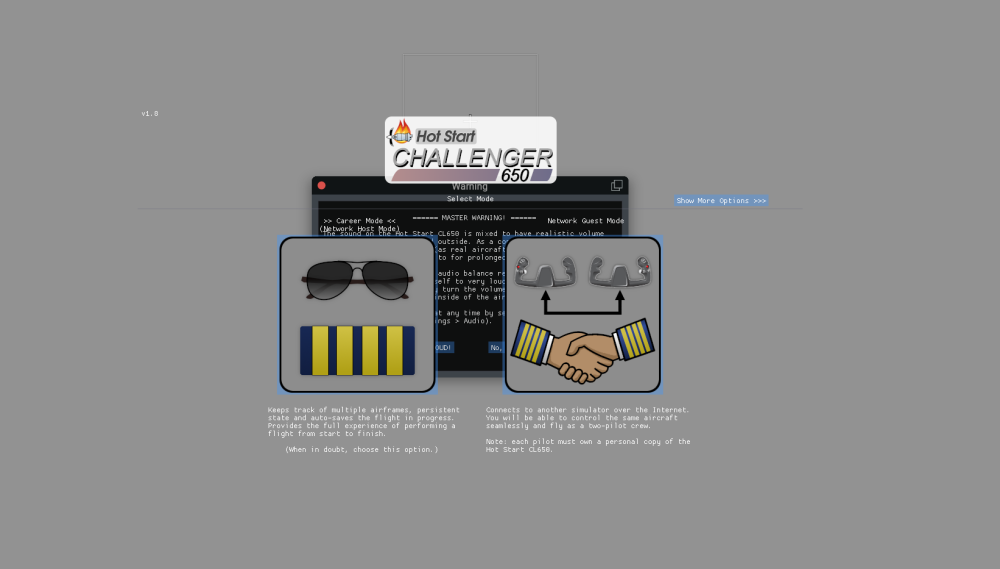
The Challenger 650 is showing as an aircraft on my list of aircraft, however, once I go to load a flight with the Challenger specifically, it does not fully load. This is what I see. Once I select an option, it will not load up any further. Does anyone have any suggestions on what to do? Very new and not well versed with computers/sims.
-
I have recently upgraded my computer. I am aware that the Challenger 650 software activation is computer specific. I was wondering if you could point me to the link/advise procedure of downloading the product on to new computer. Thanks in advance, Kind Regards, Peter
-
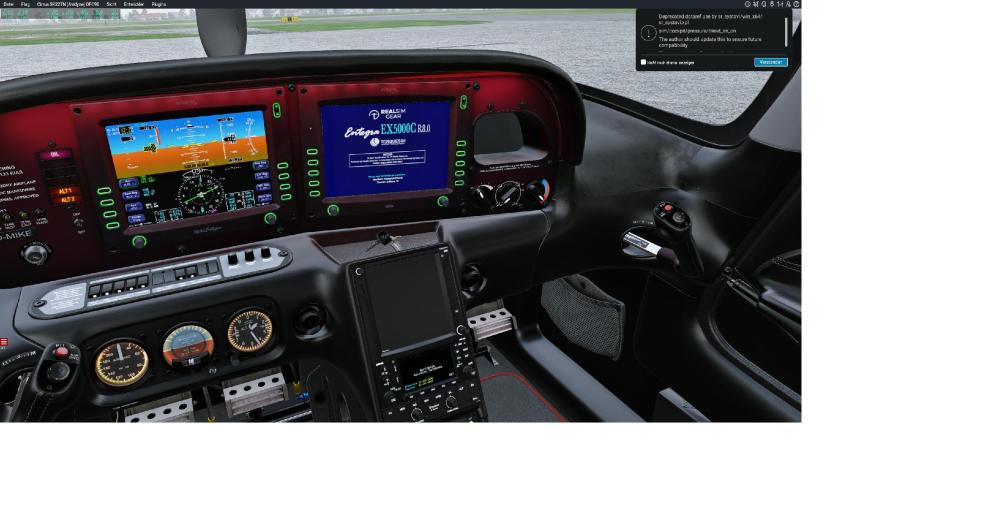
And another error... ;-) Please refer to the screenshot.
-
Yes. But the log says it’s a 12900K. A consumer CPU from 2021.
-
The 2013 and 2019 Mac Pro's offered Xeon processors. As for the issue, I can't say I've ever come across a CTD like this, but it's been a long time since I've seen an Intel based Mac, let alone a Xeon. It's very possible (and likely) to be the cause.
-
Create a new airframe each time. Or save a custom "panel" state for how you want it to start, and load into that.
- 1 reply
-
- 1
-

-

Plugin Crash - Current XP-12 Beta - libradio.plugin
Pils replied to AlpineWarren's topic in CitationJet 525
-
And X-Plane misidentified the Xeon processor? Or is it really a Hackintosh?