All Activity
- Past hour
-
It is being designed to operate as the real one, yes.
-
Yep, it is.
-
NEVER EVER EVER EVER ask a developer for ANY status on a product you spend your money on..rookie developers do not want ANY accountability to answer questions from us measly peasants that buy their product, give them your money and do not ask questions that is their attitude. they advertise the most realistic most expensive addon missing a key features . I understand xp did not have the code at the time but they do now and to not even tell or give people a roadmap or anything then give a smart ass condescending attitude when asked is unacceptable. I lose all respect for developers with Attitude it is unnecessary. I am not singling this product MANY MANY do this.
-
 emsrodriguez joined the community
 -
I'm sorry but hes right. Don't convince me that out of the box integration in 5 ACF is worth it 50USD. You don't touch in others peoples work and you know it you just simple put a custom 3D panel on top of their avionics just like the rxp gtn 750. Maybe if you guys want that approach maybe you should lower the price then. Have you thinked why others avionics have a enormous compatibility and yours don't its not worth it for devs to integrate price related maybe. Hey but its just my opinion
- Today
-
 67676776 joined the community
 -

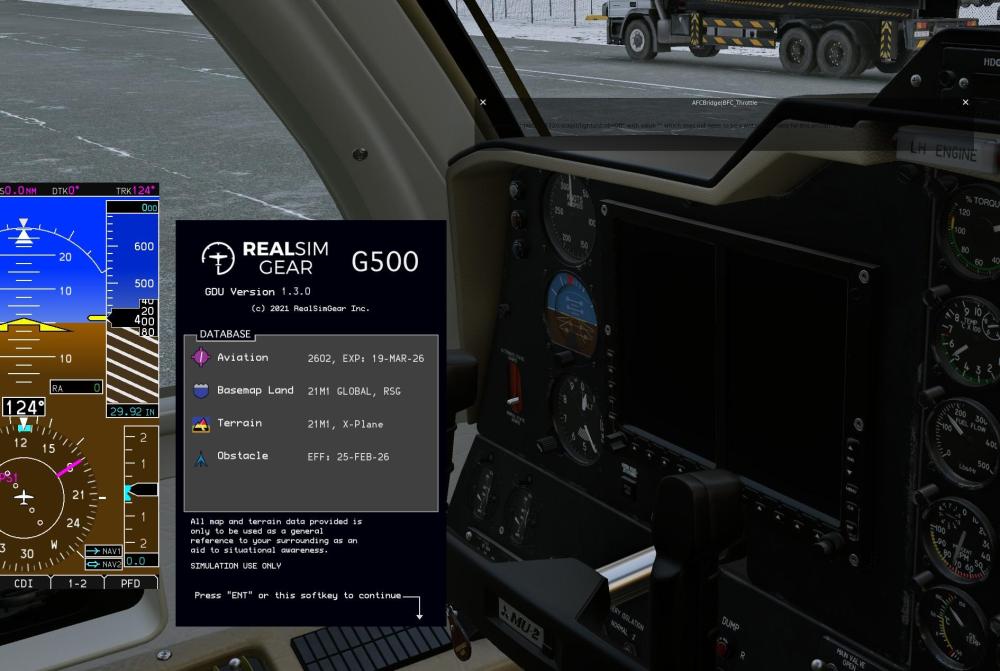
(SOLVED) G500 invisible in MU-2 panel
torfih replied to torfih's topic in Mitsubishi Marquise MU-2 v2
Happy to report, reinstalled the MU-2 and everything is fine. Let me add that this add-on is amazing, many thanks to the developer, his long term support is exemplary. -
Any Ideas? G500 works 100% in all other aircraft. Pop-ups work fine in the MU-2 but is invisible in the 3D panel view.
-
 tizianofabrisssss joined the community
 -
 Noam2504 joined the community
 -
Am I correct in assuming that the weather radar for the Challenger is being designed from scratch to be as true to life as possible?
-
 RichardSchneide joined the community
 -
 alxndr joined the community
 -
The GNS always shows the load screen in the cockpit. The pop out works though. The GTN works in every other aircraft without any issues. Do you have an ETA for the update? SInce XP 12.4 final, the aircraft has severe stutters, or rather periodical hangs in the sim. The plugin admin performance screen shows extreme spikes, even surpassing the XP percentage when the hangs appear.
-
 saifsm joined the community
 -
 simpilot727 joined the community
 -

Current status and updates planned?
imemyself replied to imemyself's topic in Mitsubishi Marquise MU-2 v2
Nice, glad to hear about the future updates and support, and congrats on your upcoming retirement! -
 Just tried navigating in the Cessna C172SP G500 and had almost zero success navigating from CYVR Rwy 26L to CZBB Rwy 31 RNAV approach. Four main problems: 1.) It can track the heading via the HDG bug but it is out of alignment by maybe 100 degrees. 2.) The S-Tec Like autopilot wasn't tracking waypoints in NAV mode. Going direct to the first waypoint of the approach didn't work at all on the first try. On the second try it did, but then messed up going to the second waypoint in the approach -- went the opposite direction instead. 3.) The G500 flight plan panel wasn't showing the approach part of the flight plan. Behaves a lot like the CRS is wrong. 4.) In the log.txt one can see a bizillion messages resembling "2026-02-24 20:52:59 OpenGPWS[png.c:70]: Cannot open file F:\X-Plane 12\Resources\bitmaps\Earth Orbit Textures\+40-240-nrm.png: No such file or directory" from OpenGPWS. So, there are some complications here, since there is a Laminar GNS 530 nav unit, a Laminar S-Tec Like autopilot, and a G500 that need to integrate, but it seems they are not sharing data or are sharing incorrectly. Does navigation with this setup work for anyone? The second log.txt below is "the second try" flight, which involved exiting X-Plane 12 and restarting again at CYVR. Ended up landing at a different airport than my original destination of CZBB. Log.txt Log.txt
 -
 bravojuliettango joined the community
 -
I had a similar CTD issue with the Challenger before, and it turned out to be a plugin conflict. Did you check your add-ons?
- Yesterday
-
whatever i choose 4K or 8K version,the landing gear just disappear,how to deal with it!!!
-
You may (probably did ) miss this posting in Discord, a few days ago: Hi. I know 1.1 does not cure the problem with the 530s. You said we need to wait till 1.1.1 So, I just moved libradio out, and the GNSs work with VORs and ILSs perfectly! However, what am I missing, as the NAV, autopilot, etc. work OK? I know the radios won't sound so realistic, but what else won't work? Or, won't work as well??? I'm on a Mac, so the GTN750s don't matter. Will the FMS work properly without libradio? Worth an "ask" in this forum. I don't want to get involved with spending time preparing for flights that wouldn't work without libradio. Obviously, if Saso or Laminar do come up with a fix soon, it would be reassuring.
- Last week
-
You can't use the vr mouse cursor to hold the key in the start position; it just springs right back to the left. I also could not find a way to "rotate" the start key using the VR controller (Quest 3). It highlights, but no way to twist it to the right. So how do you start the engine while in VR?
-

Warning box appears after X-plane 12 upgrade
Gilandred replied to OrcaFlight's topic in Entegra SR22 Series
Look a bit higher in the error message (attached). This dataref appears to be used by the aircraft, and now the aircraft no longer works because it is deprecated. Batteries won't turn on, nor can you use the load manager. I don't think this is a Laminar issue. EDIT: A reinstall of the aircraft appears to have fixed it. I still get the error message, but I'm able to use load manager and turn on battery power.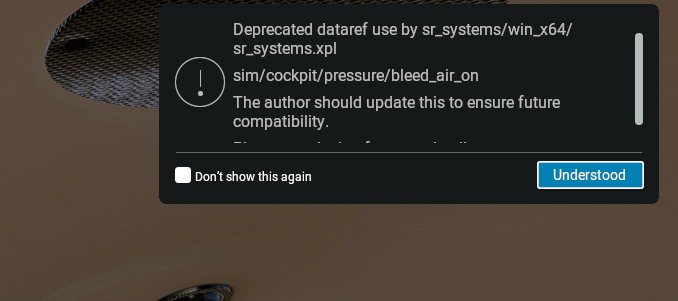
-
Yes
-

Take Command: CitationJet 525 v1.1.0 Update Released!
FlyBry replied to Cameron's topic in CitationJet 525
Likewise, there are several other place where lower case "GTNXi" is used, which is causing the other buttons and decoder knobs on the bezel to not work. Also the counter clockwise on the outer knob of the left unit (after the above case sensitive fix) does not work. TDS/GTNXI/FMS_OUTER_CW_1 TDS/GTNXI/FMS_INNER_CCW_1 (the bold part should be OUTER) -
Before i open Xplane?
-
I was also stuck on this... found the solution! You can send "con" (constant) values to the MIDI controls (I think that's the right terminology) - same cc values as for reading the encoders i.e. 1-8 and 51-58 0 is all left LEDs lit, 64 is centre LED lit, 127 is all right LEDs lit, and if you give values greater than 127 it loops round e.g. 128 = 0 mapping_out [ # Layer A, first encoder, light all the left LEDs { ch = 11, cc = 1, type = "con", data_2 = 0 }, # Layer A, fourth encoder, light half the left LEDs { ch = 11, cc = 4, type = "con", data_2 = 31 }, # Layer B, second encoder, light just the top LED { ch = 11, cc = 52, type = "con", data_2 = 64 }, # Layer B, eight encoder, light all the right LEDs { ch = 11, cc = 58, type = "con", data_2 = 127 }, ] No doubt they could also be driven by dataref values...
-

F/O stops being audible after a while in X-Plane 12.4.0
dcolson replied to dcolson's topic in Technical Support
Did another flight over an hour, carefully listened to audio the entire time, made sure it never disconnected, and sure enough everything worked? So I guess that must have been it. Thank you for the assistance! -

Take Command: CitationJet 525 v1.1.0 Update Released!
GolfCharlieTango replied to Cameron's topic in CitationJet 525
Setting the radar alt to 0 solved the minimum call out, at least for me. Now if I could just figure out the volume issue with the pass briefings Thanks for the help, much appreciated -

F/O stops being audible after a while in X-Plane 12.4.0
Pils replied to dcolson's topic in Technical Support
Even a momentary disconnect according to Windows (presumably) is enough. Maybe try wired (default) audio to see if that's the issue? -
F/O stops being audible after a while in X-Plane 12.4.0
dcolson replied to dcolson's topic in Technical Support
Yes, I'm using a wireless headset, though it never went to sleep during the flight, as I was actively flying and hearing audio from the game otherwise the whole time -
F/O stops being audible after a while in X-Plane 12.4.0
Pils replied to dcolson's topic in Technical Support
Are you using a bluetooth headset or similar? Something that goes to “sleep” after a time? Once the F/O’s audio device is “lost” it won’t come back without a restart of the flight session. -
Had my first flight on X-plane 12.4, and initially during preflight I had to pause and go attend to something else, came back an hour later and the F/O no longer had any audio. The system worked fine and I could step through the checklist, but could not hear him. Audio settings all checked and volumes were correct. I restated the sim, and then continued my preflight. About an hour into the flight, just as I started the descent checklist, again, no audio (only for F/O). I finished the flight without his support sadly. Hoping there is a dumb fix I am missing?