FYG001
-
Posts
182 -
Joined
-
Last visited
-
Days Won
16
Content Type
Profiles
Forums
Latest X-Plane & Community News
Events
Downloads
Store
Everything posted by FYG001
-
Here is to refuel from non-persistent mode (which is the mode I always use) SELECT Ground services-> refuel -> internal panel and, Ground services -> refuel -> refuel truck I put one window above the other and energize the internal panel, and set in Preset the required quantity in USG on the 'Fuel truck'. And press ENTER on the truck panel seems to be necessary to have the fuel truck stop at the preset quantity. LBS to USG Handy rule of thumb to convert lbs to usg is to divide by 10, divide by two and add to the first value. E.g. 1500 lbs uplift required : 150 + 75 = 225 USG
-
Incredible!
-
On a recent flight into ELLX I had an 'EFIS MISCOMP HDG', with the left rose being approx 15 degrees off when on the LOC. for RWY 06 It is impressive that Hotstart simulates this. The FCOM 1 advizes the following with this message: (1) Flight instruments and Integrated Standby Instrument..........................Cross-check (2) Reversionary panel, IRS switch.......................................... Select to reliable alternate source. As I was visual I continued the APP so I did not get round to switching to teh reliable source, but I would not be surprise if Hotstart had also this correctly modelled
-
Right Pils, changed that into 4 cores. Luckily no effect on the FPS. Actually with my definitely less than stellar rig I get decent frames on the Challenger. Usually 40-ish, when going 'heads down' up to 55. So the aircraft is definitely flyable on such a rig.
-

Vatsim: 200-300 feet off although realistic temp effects are off
FYG001 replied to Floater's topic in Flying the Challenger
I was online with VATSIM in NW EUR yesterday as well, also using ASXP, and no complaints from ATC on level /altitude. -
I found this one really helpful, not intimidating in terms of length nor detail. Once you've watched this one you will be able to get your aircraft to the RWY in no time. When proficient with this, you can dive into much more detail with the FAAV videos.
-
Log.txt
-
Indeed, our flight Planning software (PPS) to my knowledge only allows for a fixed speed schedule, not a variable one.
-
Speed Select and Altitude Select knobs operation
FYG001 replied to jcjimmy's topic in Flying the Challenger
Hi Pils, this is the setup: Simple Logic mouse, two buttons, single scroll wheel Clicking and holding right button gives free look Clicking and holding right button, AND scrolling gives free look AND zoom in and out Clicking and holding right button over an FCP button, AND scrolling moves that setting quickly, compared to single clicks. Drawback is that as soon as you move a little bit away from the button, you're in the previous free look zoom mode Clicking and holding LEFT button AND scrolling over an FCP button does nothing, contrary to e.g. the Aerobask Phenom 300 Hope this makes it a bit more clear? -
Speed Select and Altitude Select knobs operation
FYG001 replied to jcjimmy's topic in Flying the Challenger
Hi Pils, - SOLVED - it is the RIGHT hand mouse button you need to hold, NOT the left hand button. Silly -
Speed Select and Altitude Select knobs operation
FYG001 replied to jcjimmy's topic in Flying the Challenger
Anyone can help me with this please? So I have scroll mouse button zooms in and out, does not move up or down HDG, ALT & SPD knobs. Question of binding? -
[Closed] ATS 'Retard' function not modelled??
FYG001 replied to marts747's topic in Systems and Tech
In our company SOP has ATS OFF at 100FT AGL -
It was my STMA PC-12 cklst.txt that kept interfering. Removed that one and all is clear now
-
Speed Select and Altitude Select knobs operation
FYG001 replied to jcjimmy's topic in Flying the Challenger
Sorry scrolling zomes view in and out, no acceleration with scroll. -
[Filed 2772] 3x CTD when selecting DIR REMBA WPT
FYG001 replied to FYG001's topic in Crash To Desktop
Unfortunately, also the 5th flight ended with a CTD. Different departure point, different FPL, no REMBA, stable in cruise since 5 mins, no manipulations, approx 40 FPS. STrange, as all previous flights I did with the CL60 went flawless. Log.txt -
[Filed 2772] 3x CTD when selecting DIR REMBA WPT
FYG001 replied to FYG001's topic in Crash To Desktop
Thanks Oisin650, Appears to be linked to this specific FPL, a departure on a different FPL not containing REMBA produced no CTD -
And unfortunately another one, just downloaded the FPL, going through PERF when CTD, no special action. Same FPL EBAW ELLX including REMBA WPT Log.txt
-
Speed Select and Altitude Select knobs operation
FYG001 replied to jcjimmy's topic in Flying the Challenger
Sorry, does not work for me. Click and hold. Only click. Have to click several hundred times during a flight to move ALTS , HDG and SPD -
3 times in a row CTD when selecting DIR REMBA WPT in the LEGS page Log.txt
-
Speed Select and Altitude Select knobs operation
FYG001 replied to jcjimmy's topic in Flying the Challenger
Or activate the SCROLL function, and linear to how FAST you scroll. Being cleared from say 3000ft to say FL380 takes an enormous amount of clicks. Or am I missing something? -
That worked (space bar bound), thanks. One last question remaining: when going through the check list items, I have a second (female) voice coming through which sounds suspiciously like the lady from X checklist, but babbling nonsense. There is obviously no X checklist for the CL650 downloaded, so how come? Disable this plug in?
-
The plane is sold with a 4000NM range but can't make that. We count on 3600 tops. That is a very close call to go west on the NAT, especially with an early descend into Boshwash. Also on paper the aircraft takes 20 000 lbs, we see in real life this is typically max 19 000 lbs.
-
Requesting Passengers or Jenny knocking on the door if it's closed
FYG001 replied to Noksi's topic in Flying the Challenger
In our company standard policy is that the CPT waits for the esteemed customers in the FBO, and then walks them to the aircraft. All the while the FO stays in or around the aircraft. On arrival reverse procedure. Slightly different than in the airline world... -
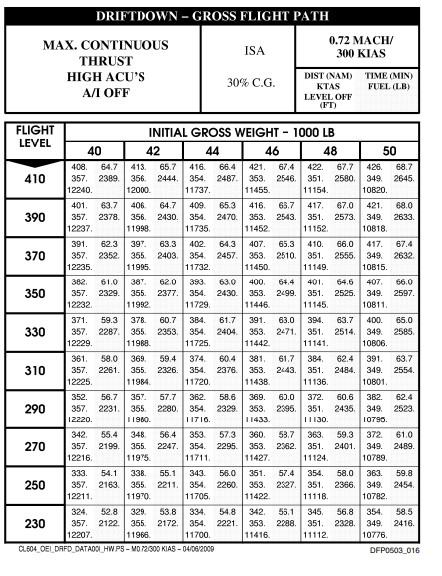
And for those needing the figures, here they are
-
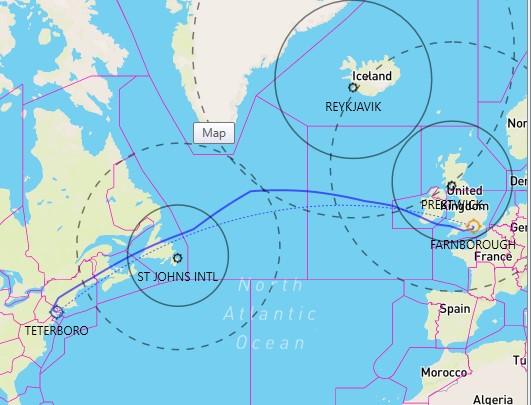
To complete further the above, we use 358 KT TAS for our OEI on the CL650. With a 120 mins 'approval' this gives you a circle of 716NM around adequate airports. On the NAT this gives the following on a typical EGLF KTEB flight. Note that we had to manually drag the route further north than optimum to stay within the 120 mins circles of EGPK BIKF and CYYT. Would one of those have been below minimums, the flight planning would have to be more 'creative'.