_svg.png.5cb3bdf06cd666599edf50d1ee7b3a52.png)

Pils
-
Posts
2,356 -
Joined
-
Days Won
55
Content Type
Profiles
Forums
Latest X-Plane & Community News
Events
Downloads
Store
Everything posted by Pils
-
Yes, you did. The Hoppie network is required but the Hoppie desktop client isn’t. The CL-650, as most sim addons, will connect to Hoppie directly.
-

Arming NAV when HDG mode is presently in effect
Pils replied to KirkR's topic in Flying the Challenger
I always arm NAV on the ground when flying an RNAV departure, no reason not to really. -
The CL-650 is fully capable. But I’m unsure which ARTCCs, if any, on Vatsim are offering en route CPDLC. My understanding is there may be some facilities that will sign into Hoppie and offer PDC via ACARS, but it’s going to be controller-dependent, hit and miss. You’ll have to check their controller info every time to see (or just try it, I guess). To be sure none of it works like real life FAA CPDLC.
-
Arming NAV when HDG mode is presently in effect
Pils replied to KirkR's topic in Flying the Challenger
0 ft. -
Arming NAV when HDG mode is presently in effect
Pils replied to KirkR's topic in Flying the Challenger
Are you on a course to intercept the nav track? -
Yes. Voice ATIS isn’t reliably available on Vatsim, even if the relevant ATIS station is online.
-
Bind Knobs and Buttons to the Realsimgear GCU47X?
Pils replied to Rhinozherous's topic in Hardware Interfacing
I believe so. Should be possible to map some functions. There’s commands for basically everything in the 650 cockpit. -
In a Mu-2?
-
The joys of having accurate/realistic behaviour/state in your own systems/code and having to “dumb it down” for X-Plane’s.
-
No need to suspect, their code is open source: https://github.com/xpilot-project/xpilot/blob/3ac66d40fcf00f7b5b33912ec0849457c2c10f81/client/src/simulator/xplane_adapter.cpp#L486
-
Starting Second Engine Shuts Down First Engine
Pils replied to DaveVanB's topic in Mitsubishi Marquise MU-2 v2
There is no detent in the axis as far as X-Plane (joystick interface) is concerned. The position of the “detent” is the 0% point for the axis, below that is a simple on/off button. -
- 1 reply
-
- 2
-

-
Trim rocker switch animation inverted and inop
Pils replied to daemotron's topic in Mitsubishi Marquise MU-2 v2
My thoughts exactly; despite the naming, there’s nothing better in the default commands that I know of. -
Trim rocker switch animation inverted and inop
Pils replied to daemotron's topic in Mitsubishi Marquise MU-2 v2
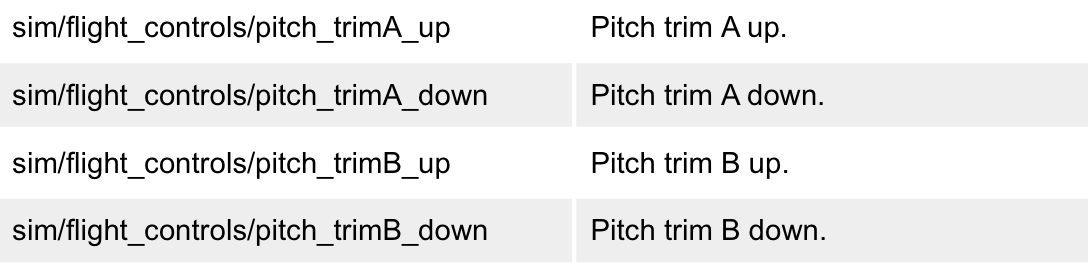
IMO, you should add the A/B commands because (a) that’s what’s in the 3D model (so each channel should be animated individually); and, (b) that’s the default binding on the Honeycomb Alpha hardware (which has physically split switches). -
Trim rocker switch animation inverted and inop
Pils replied to daemotron's topic in Mitsubishi Marquise MU-2 v2
This is probably what a lot of people will use because it’s what’s in the default profile for the Honeycomb.
-
Have you looked in the documentation directory?
- 2 replies
-
- 2
-
-
- challenger 650
- challenger
- (and 4 more)
-
Trim rocker switch animation inverted and inop
Pils replied to daemotron's topic in Mitsubishi Marquise MU-2 v2
Probably so a single electrical short can’t cause a trim runaway. -
The button on the side of the throttles is the TO/GA button not the ATS disconnect button; you initiated a go-around. The light on the top of the fuselage being broken is a known issue and will be fixed in the next update. However, make sure you have HDR enabled for the Visual Effects setting.
-
That helps, thanks. But now we know that we need to know exactly what the flight plan looked like, as it sound like it crashed while determining the Lat/Lon of the intercept point.
-
Please provide details of exactly what was entered prior to the crash. Thanks.
-
Mitsubishi MU-2 Version 2.0 Release Announcement!
Pils replied to Cameron's topic in Mitsubishi MU-2 v2
-
100% sure the breaker at CB1-M2 is in? Maybe try cycling it out and on again.
-
Technically there isn’t a “checklist” for the go-around, there is a automated procedure performed by the virtual first officer. We put this in precisely because the G/A is a high workload phase, especially if attempted single pilot in the sim. The automation is there so you can concentrate on hand flying the initial stages of the G/A, which is the required procedure according to the AFM (if I recall correctly). The automation is active after the TO/GA button is pushed, and can be advanced using the same command as the actual checklists. We highly encourage its use! I believe after the procedure has been completed the next actuation of the command will bring up the Quick Return checklist and one can continue on normally from there. But I’m not 100% on that. Check out Foxtrot Alpha Aviation on YouTube, they might have one. But I’ve also passed the suggestion onto @Graeme_77.
-
You’ll need to provide more information. What do you see and what actions are you taking and what are the results, preferably with screenshots? Also you need to post the Log.txt from X-Plane.
-
Nose wheel steering tiller - best practice to control
Pils replied to KirkR's topic in Systems and Tech
Do you have a spare axis on the throttle instead? A lot of people use twist grip on their joystick if you have one.