Goran_M
-
Posts
5,658 -
Joined
-
Days Won
235
Content Type
Profiles
Forums
Latest X-Plane & Community News
Events
Downloads
Store
Everything posted by Goran_M
-
Can you confirm you have a "state" folder? The log is telling me it's not there, and can't write to it.
-
The data in the official manuals, I would say, matches nearly 100% to the real world data.
-

Nose over and straight into ground after disconnecting autopilot
Goran_M replied to Gregg Seipp's topic in TBM 900
Perhaps ask toto in the discord what his thoughts on it are. I can safely say it's not something that is fixable in flight, but I'm guessing there must be some way to avoid it. -
It looks like something is overwriting your AP commands. Can you double check all your assignments, and perhaps try removing flywithlua for the time being, then test again. Make sure all failures in the default X-Plane failures section are set to "always working". Check your maintenance manager, and make sure everything is green there.
-
Nose over and straight into ground after disconnecting autopilot
Goran_M replied to Gregg Seipp's topic in TBM 900
Good question. The cases I've seen are because the aircraft did a tail strike the flight before, and it damaged the trim linkages without the person knowing. So the next time they took it up, it was a catastrophic failure. I can't say I've seen everything in good working order, suddenly failing, which is why your situation appears to be a unique one, unless the trims got damaged on some kind of bad terrain tile in the scenery you were in. This has also happened before. Just make sure that when you load the first time, the aircraft doesn't "drop" onto the scenery ( a sign of bad terrain) and you don't pop any wheelies. It's definitely not a common occurrence. -
Nose over and straight into ground after disconnecting autopilot
Goran_M replied to Gregg Seipp's topic in TBM 900
I've seen it before. Unless the autopilot is on, If the trims fail, they will force the nose down. I'm not saying for certain this is what happened, but it certainly looks that way. -
I forwarded your issue to Saso, and he's going to get in touch with you
-
Nose over and straight into ground after disconnecting autopilot
Goran_M replied to Gregg Seipp's topic in TBM 900
It looks like your trims failed. (Unless something happened to your calibration, which is unlikely.) Did you check your maintenance manager pre-flight? It's entirely possible the trim system was in a worn state, and the autopilot finally wore it down to an unrecoverable state. -
Can you post your log.txt file? Are you using 11.41 or 11.50?
-
It looks like the TBM is crashing the sim because it's reading some corrupted terrain data through the GPWS. Does it crash at other areas or just the area you're in?
-
If you really want to nail this down, I'd strongly suggest you remove all plugins (except Gizmo...if you want to keep trying the TBM) out of the plugins folder. Your 3rd party plugins could very well have unpredictable results on 11.50 at this time. You have plenty of VRAM, so I would say the stuttering is your CPU trying to perform all the calculations being asked of it by your plugins. Also, the TBM is not fully supported in 11.50, so it could be the TBM as well. Feel free to experiment, but have the expectation that things won't go smoothly with 3rd party add ons.
-
I can see a couple of things, but first, can you load up the sim, set it up at the airport that is giving you stutters, and then post a screenshot of your Graphics settings? I'll be able to narrow it down.
-
We don't really do support for add ons in an X-Plane beta, but I can take a look at a log.txt and see if something sticks out.
-
The airways in the flight plan are built using the default G1000 code. ie. Always been there. V speeds require far more calculation on Saso's part, due to having to take into account several factors and implementing a boat load of more math. Making it compatible with Vulkan/Metal is taking priority at this time. As for your other comments. Taking the yaw away? We had people screaming for it to be reduced, as it was deemed too unrealistic and exaggerated. We consulted a TBM pilot and engineer and we received feedback, which was implemented. Some people don't like it, and some people do. What can I say...we can't make everyone happy. Absolutely no texture resolution was sacrificed in exchange for improving framerates. Framerate improvement came from further code optimisation. I don't think I've seen anyone ask for WORSE framerates and higher texture resolution. The whole point of a TBM 900 is to actually make it less difficult to fly than, say, a TBM 850, by way of more automation and less clutter on the panel. It's supposed to be easier.
-
X-Plane 11/Output/preferences
-
Does the joystick show up in your hardware calibration screen?
-
I'm suspecting something in the script is interfering with the joystick. There is nothing special associated with the controlling of the aircraft, so I doubt it's something associated with the TBM. Have you tried temporarily disabling or removing flywithlua, and then testing it again?
-
Without access to your computer, there is nothing more I can do. Something on your end is definitely preventing the install. We've had many people download the new update and install it, as you may have already seen in the forums, and they have had no issues. You can try installing on a laptop or some other secondary device you own, or, if you choose to, ask for a refund from X-Aviation support. As a last resort, are you perhaps trying to install it on some kind of virtual machine?
-
An update just came out. Did you try that yet?
-
-
Support is very limited on X-Plane beta's, but this looks like an OpenGL issue. The best I can do right now is forward this to Saso and he'll look into it for when X-Plane gets out of beta. For now, I would recommend to staying with 11.41 with the TBM.
-
Not that one. It simply reads log.txt.
-
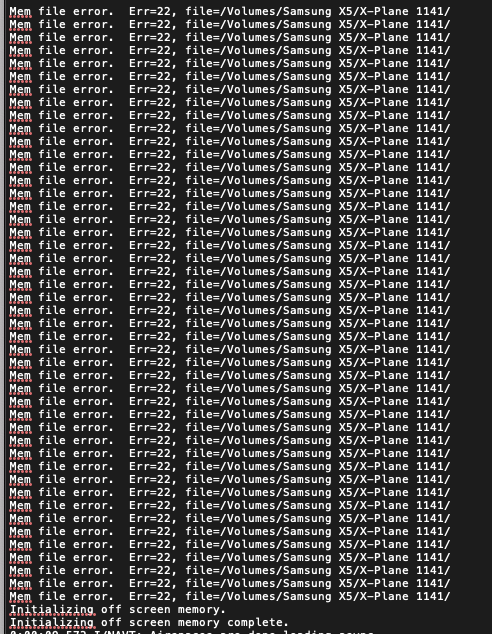
Could you post your log.txt file (found in the root X-Plane folder.)
-
This section of your log has me very concerned, as it appears to be a hardware issue (specifically, RAM). I can't say for sure. I've referred this to Saso, and maybe he can make more sense out of it. Someone will post back soon.