



Goran_M
-
Posts
5,646 -
Joined
-
Days Won
231
Content Type
Profiles
Forums
Latest X-Plane & Community News
Events
Downloads
Store
Everything posted by Goran_M
-

SAAB 340 not level in flight, please help!
Goran_M replied to buspelle's topic in General Discussion
There is an update for XP10. This is version 1.42, and will be out at the same time as the 1.5 update. -
SAAB 340 not level in flight, please help!
Goran_M replied to buspelle's topic in General Discussion
Happy to see you enjoying it. The update has been ready for a little while, but with new updates to X-Plane, we had to wait on a new version of Gizmo. A few, small bugs were found, which Ben has been hard at work on getting fixed. Once Gizmo is bug free, X-Aviation can get it packaged and out to everyone. -
SAAB 340 not level in flight, please help!
Goran_M replied to buspelle's topic in General Discussion
Many apologies for this. This was a flight model issue I found while making the update to XP11 and has been fixed. I have no idea how it happened. The fix will be included in the V1.5 update. -
Not yet. It's in line to be packaged by X-Aviation
-
Please don't use CRS 2. This is causing your crash. An update is being prepared that will fix the crash. Until then, please only use CRS 1
-
Wow! 2 years already!? To move the instruments, you'll need the original 3D mesh. However, I still haven't abandoned the project. ;)
-
I'm going to step in here and speak for my company, and to clear up a few things. I ask that you do not take offence to anything that is said in this post. I'm just going to keep it blunt and to the point. Leading Edge Simulations consists of exactly 2 people. Jim Gregory and myself. Cameron is our publisher and our go to person for support...in MOST cases. If support is needed in these forums, regarding code, flight model issues, texture issues, then Jim or myself will see to those issues and make sure they are fixed. Ben Russell is the author of Gizmo...the coding language Jim uses to code all the systems in our add ons. He has his own business relationship with X-Aviation. We also have a business arrangement with Ben, but for obvious reasons, that will remain private. There are absolutely no issues between myself and Cameron/X-Aviation. Cameron, along with being the publisher of our products, is also a friend of mine. Has been since 2009. The Saab IS ready, and you will get the update as soon as it has been packaged. We spent several months getting it ready and working, and we are not about to discard it. We do apologize for the delay, but there were unforeseen circumstances that have come up that has delayed it's release. One thing I will not accept is that we...LES...cannot take criticisms. We listen to all criticisms, but not all criticisms are correct. Finally, as for the Saab update, once we submit all files, that's the last we see of the product. We move on to the next job. Speaking for us, we don't contact Cameron and hurry him up. If it takes an unusually long amount of time, we might ask if there is a hold up...in which case, Cameron himself explained the problem. Other than that, it's simply on to the next project. We've been in the X-Plane community for about a decade. Ben and Cameron, longer than that. Let's just try to get along and be friendly.
-
No. This is only a compatibility update to get the XP10 version working in XP11. V2, the dedicated XP11 version, will have the VR goodies.
-
Thank you, gentlemen. The patience is definitely appreciated. I will, however, change the policy we have on announcements. We'll keep everyone informed on projects that are in the works (for the most part), but if an update is ready, I will only let people know about it when it is, literally, 24-48 hours away from going into the store. This is not a decision based on what has happened here. It's just in general, and probably best for everyone involved.
-
" Its like "already got there money now they can wait" Sorry but you just lost me as customer. " You said that, right? That was directly copied and pasted. Why would you even remotely THINK we would operate like this?? If we wanted money, we would charge people for ALL updates. (I like the smiley face emoji, btw. Nice touch in a topic I find far from funny.)
-
That's completely out of line and totally uncalled for. As Cameron already mentioned, we made this update for free. No strings attached. You bought a fully functioning product, that works in X-Plane 10. And, we believe, you got excellent value for money. This update took us a few months to finish. And it had many stressful moments. Please, let go of this sense of entitlement, and just exercise a little bit of patience.
-
It's moving forward. Slowly, but surely. I actually spoke to Cameron yesterday, and asked him what was involved in making an installer for the Saab, and his response was something to the effect of "An installer for an update like this is a nightmare!" I'm guessing it's because of the 3 different variants and all the liveries. Those were the factors that caused so many headaches when we first put it out. It's getting closer. When we know for sure, we'll make a post about it.
-
This is a Jim question, and he wasn't available for a couple of days. He should be around tomorrow, and I'll ask him to jump in here.
-
I can't access your GizmoLog.txt file. For some weird reason, it's giving me an error. But I'll start by asking if you received ANY error messages via the Gizmo console (A grey box that appears with any red messages in it. Usually among a bunch of other text)?
-
Conflict between DC-3/Gizmo plugin and PMDG DC-6 Plugin
Goran_M replied to JPS's topic in Douglas DC-3 (no longer in use)
That's definitely not something we can easily look in to. The DC-6 was never intended to work in XP11, so for us to work around THAT, is perhaps asking a bit too much. I'm sure Ben and Jim might attempt something, but to be honest, I wouldn't hold my breath for this one. -
The update is finished and all files have been sent to X-Aviation. You will be notified when the update is in your account.
-
Yeah, we'll get a change log put together.
-
Just a quick note about the update to XP11. The update is done, but as with most add ons, some final testing remains to be done. Just last night, I got some feedback that the aircraft is oscillating at higher altitudes under autopilot control, so that will need to be looked at. This shouldn't take very long. Some small details will always be looked at prior to release, because we want it to be as complete, and bug free as possible. I'm working on it today (Christmas Eve), and I'll try to get it all done and dusted as quickly as I can. Hopefully today. All that is left, as far as we can tell, are flight model adjustments (if there are any more after this autopilot oscillation issue). I was also working on the glass yesterday, trying to get it looking more "PBR"ish. Took a few tries, but I got it to how I wanted it. Old XP10 glass was looking very frosty in XP11, and it had to be fixed. That's all for now. I'll do what I can to get the flight model fixed before tonight. Then Cameron will get it out to you all as soon as he can, so we can move forward onto the DC3 and Saab V2. Here's a few screen grabs of the cockpit showing the new glass
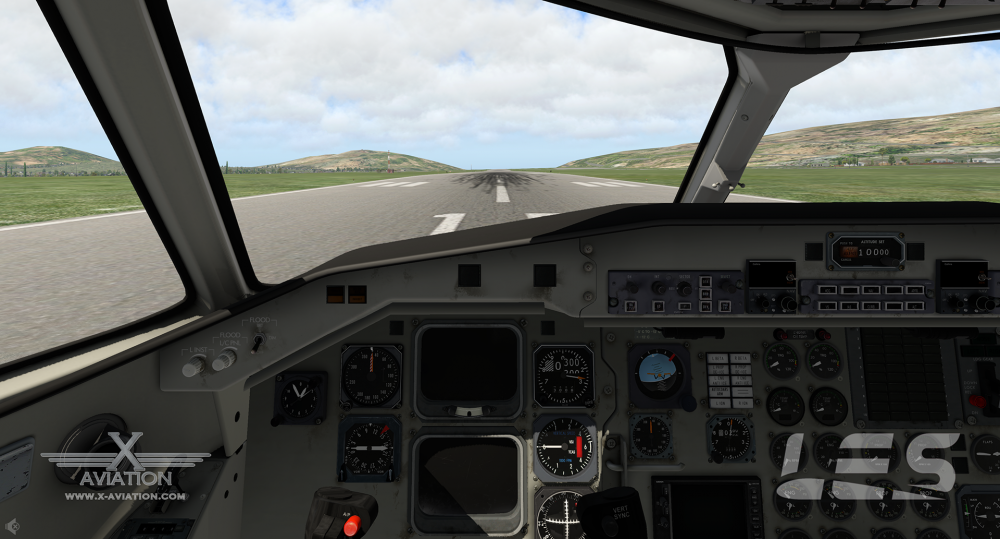
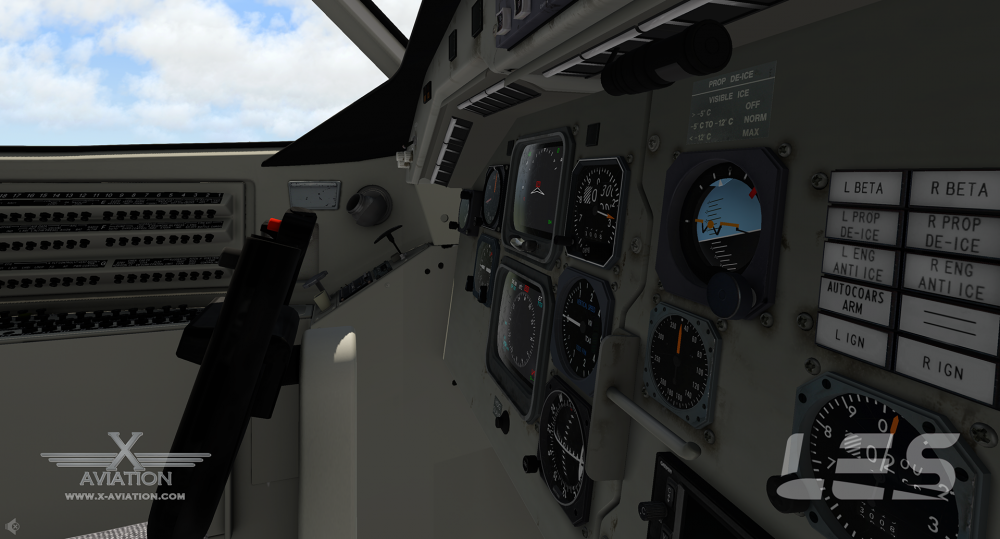
-
I just got done with 1.5 less than 12 hours ago. Might do a little more testing and fine tune 1 more thing, but as far as we're concerned, it's definitely ready for XP11. All files have been uploaded, and all that's left is for Cameron to package and ship.
-
Might want to try the IXEG forums for that one.
-
Too early to tell. We're looking at moving into the jet field after the Citation and V2 of the Saab. We'll get the current batch of projects out and then take a look at the state of things.
-
Much appreciated, Sovik. It's definitely a tough one to figure out, but we're working on it. I can't throw any blame towards Laminar. They've given us a fantastic sim, that's advanced by leaps and bounds over 2 versions. So I'm prepared to do a little extra work if it means we get a fantastic sim.
-
Saab I'm working on 1.5 as I type this. V2 is several months off. Its almost an entirely new aircraft. Citation will follow the Saab. Unfortunately, no ETA as of this post, but I don't think it will be far after the Saab.
-
Will take a look today and get back to you.
-
Well, this one has me stumped. Same settings in X Plane per aircraft. Same texture resolution. Same check box ticked, but different appearance. This one is a mystery. I'll investigate further and get back to you, but I can't think of anything else that could be affecting this.


