



Goran_M
-
Posts
5,657 -
Joined
-
Days Won
235
Content Type
Profiles
Forums
Latest X-Plane & Community News
Events
Downloads
Store
Everything posted by Goran_M
-
If it's what I think it is, I've seen this happen to a heli as well. It starts bouncing and the bouncing gets bigger and bigger. I think it's an X-Plane bug or some other plug in is causing it. If you're in the X-Plane 11 facebook group, this link should show you the same thing. It's only visible if you're in the group, though. https://www.facebook.com/nawfal.emad.5/videos/2144449429153733/
-
The switch pressurizes the system. If you don't pressurize the system, you won't get oxygen through the masks when putting them on, and a blackout will occur.
-
Please post your log.txt
-
Nice. Love that kind of music
-
The "start with engines running" option is being overridden with code.
-
You'll lose your fuel faster, too. Accurately coded.
-
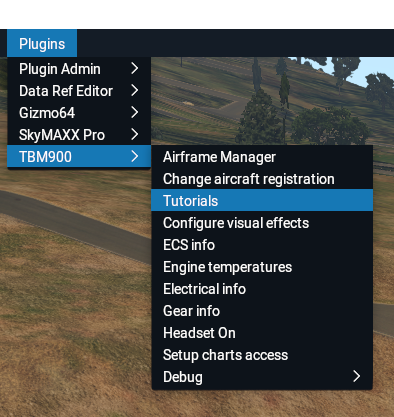
1.---- 2. I'm not sure of any plans to add an autostart option. But, once you get the hang of it, it takes less than a minute to go from cold and dark to taxi.
-
We're aware of some people experiencing this and are looking into it.
-
It shouldn't be heavy on fps. We've tested it against the default C172, and it runs, on average, 10% slower than that aircraft. A lot of optimizations have already been done. Could you list what plugins you have running in the background? Do you have any hi res ortho loaded? Also, submitting a log.txt will give us an idea on what's going on in the background.
-
I'm just curious, why wouldn't you want to upgrade to XP11? With Black Friday, X-Plane is only $40 on Steam.
-
Please post your Log.txt file if it crashes again.
-
Tested, and failed to reproduce. I'll ask around, though
-
This is a known issue that occurred recently, and is going to be fixed in an upcoming update.
-
In windowed mode, it should definitely work. Are you running your sim at default resolution while in windowed mode?
-
Married developers are broke.
-
The only workaround for now is to run X Plane in windowed mode, until 11.3 is out of beta.
-
https://discord.gg/YtPcVc
-
There are countless plugins out there that can cause a myriad of problems. Many for free, and some are payware. Orthoscenery can have corrupt tile data. X-Plane could have a problem that needs to be addressed. It wouldn't be the first time. When you buy an Operating System, it's NEVER bug free on release. Yet the hardware recommendations are adhered to. You're asking for a perfect, problem free add on, out of the box, and that's simply never going to happen under any development team.
-
James, I'm going to address your post as logically and fairly as possible. So forgive me if I come across as blunt or confronting. The TBM has undergone continuous testing for about a year. It was streamed, constantly, for many months, with very few issues, and whatever issues were found, were quickly addressed. Whereas it is true you are not the only one experiencing SOME teething problems, you are most certainly in the minority. In saying this, I'm going to address each of your points. Upon release, there were some more issues discovered thanks to the community, but we released an update PER DAY for about a week, that addressed these problems. We are certainly not sitting back, doing nothing to address the problems. This is a very complex add on, and with complexity comes problems due to the immense variety of PC configurations out there. -Saying the TBM affects X Plane to an "unusable level" is very hard to believe, and you don't really give anyone much to go on. What kind of hardware are you using? What are your graphics settings? How long does it take for the TBM to get to an unusable level? -The crashes you are experiencing is happening to a small percentage of people. It's certainly not a common problem, but it has been acknowledged and a solution is being worked on. We understand the frustration you are experiencing, but we can only do so much. In the grand scheme of things, and after reading your comment about waiting more than a reasonable amount of time, other developers usually push out 1 update every 6 months. So I'd say we're doing better than average. I can appreciate you taking time out and testing the TBM in a clean installation, but it would have been far more helpful if you PM'ed either myself or Toto, and submitted any findings and/or log files. Coupled with your hardware specs, we may have narrowed it down to something fixable. Personally, I would be very interested in looking over your log file from a clean x plane installation, because I have 3 installations of X-Plane (Non beta w/plugins, non beta/without plugins and Beta without plugins). Again, I can appreciate your frustration, but we haven't left anybody in the lurch. Software is always going to be unpredictable. There are bugs in every single piece of software on the market. Nothing works flawlessly out of the box. Yes, it is a premium price, but we have made every effort to accommodate every single person who has had issues...to the point where we have invited all our customers to the Hot Start discord and asked them to DM any log files or bug reports to us so we can have a look. In closing, it would have been much more helpful if you could provide details of your crashes, as well as a log.txt file (found in your x plane root folder). The log file tells us everything, but sometimes it's advantageous to get extra information, such as the circumstances surrounding the crash (location, what you were doing, time of day, etc...) We apologize for the frustration, but I can assure you, the problems you are having (except for the missing side bar in full screen mode, which is a Laminar bug and the slow down in fps, which we think is a part of the synthetic vision code) are experienced by a small group of people. Saying it suffers from "MAJOR problems" is quite misleading. If you say it's giving YOU major problems, that's a fairer statement.
-
Gizmo powers several X-Aviation add ons. It is a scripting language, similar to SASL, which is used in x-plane.org add ons, that allows developers to code systems more quickly than conventional means. It is also a DRM that secures developers add ons from piracy. It will not slow down your system in any way, and if you are not using an add on that depends on it, it will sit there, doing nothing. There really is no need to remove it. If you choose to remove it, that is up to you.
-
Gizmo is for activation. Please do not remove it.
-
You're clicking the VS wheel behind the panel. It's an issue I'm aware of and will be fixed in the new cockpit object. If you enable the click regions visibility, you'll see it. Oversight on my part.
-
It definitely could be that. Could you also check your monitors scaling, and try setting it to 100%. Strange that custom resolution didn't work. It's worked for most other systems. If none of the above works, then, for the time being, you'll need to go into windowed mode for anything to do with the side bar. It will get fixed when 11.3 is out of beta.
-
I've seen this happen only a hand full of times. And it's always at an airport that has 3rd party scenery. Not really 100% sure why it's happening, but we can look at it and see what we can come up with. I have an idea or 2.


