



amyinorbit
-
Posts
46 -
Joined
-
Last visited
-
Days Won
1
Content Type
Profiles
Forums
Latest X-Plane & Community News
Events
Downloads
Store
Everything posted by amyinorbit
-
 More than happy to help!
 -
As highlighted by @RP31, Cowl Anti-Ice must be on, and 2 minutes must have elapsed, for the Supplemental Ground Wing Anti ice test to complete.
-
Hi! I'm not familiar with the plugin itself, but I believe this is due to the aircraft using a fully custom electrical system, and therefore not setting the expected data refs to indicate the avionics are powered. This has been logged and is being worked on
-
Could you please create a separate post, and add more data? We can't do much of anything without a log and screenshots of the issue Thanks!
-
Hi Ed! Thanks for the report. I believe your issue was that you entered "5000A" -- "at or above 5000ft". Therefore, the VNAV solver starts at your most restrictive constraint (the @2100ft one for CF27), then projects the 3° profile back. 5000A doesn't require the solver to put you at 5000ft, but anywhere above that, so it won't show in the VNAV window, because VNAV is not aiming for 5000ft, just checking that whatever profile it comes up with passes SUM above 5000ft. If you want to make sure that VNAV gets to SUM at 5000ft, you can just enter "5000" as the constraint, and once you do so it will show up in the VNAV window. I hope that makes sense!
-
Hello! Thanks for the reports -- that's noted, the team will take a look.
-
[ACK] Bit of PFD and ATS panel displayed on oxygen panel
amyinorbit replied to dlrk's topic in Technical Support
Hello! Thanks for the report, it’s a known bug. The team is working on it -
This procedure is explained in the FMS primer. You can select the secondary database by click LSK3L, then make it the active one by clicking LSK2L. (please note your custom NavdataPro database seems to be out of date by one cycle now)
-
Hello! Sorry that's happening, could you check what your X-Plane volume sliders are showing?
-
The aircraft developer can't really create a workaround for that, that's an issue within the driver. I'm dev on the FJS Q400 and the "fix" we have is more of a placebo, it works in some cases but makes things worse in others. I know it's not a satisfying answer, I'm sorry for that, but until AMD decides to do something about it there's not much for the team to do.
-
Options for what? The navdata provided by Aerosoft should work as it is when you install it to X-Plane\Custom Data. As for charts, Aerosoft does not provide an API similar to Navigraph's, but you can still use FAA and AutoRouter charts (you can log into these services in the Challenger 650 settings window)
-
[SOLVED] Cant engage ATS after changing the N1 limit in FMS
amyinorbit replied to jcmc1405's topic in Technical Support
You can bind it in the joystick settings, search for “at_disc”. That’s used for disconnecting the ATS, and pressing it will also clear ATS fail messages. -
[SOLVED] Cant engage ATS after changing the N1 limit in FMS
amyinorbit replied to jcmc1405's topic in Technical Support
Is the ATS displayed showing FAIL? If so, you’ll need to click the ATS disengage button, then it should be able to engage again -
Awesome! For future reference:
-
The real aircraft doesn’t have that, and neither does the simulated FMS. PAX and their luggage aren’t usually weighed IRL, but you can usually give the FMS the number of passengers you gave the FBO and am average weight.
-
Nose wheel steering only controls the nose wheel up to 55 degrees of deflection. When steering is not engaged, the nose wheel can castor up to 99 degrees each side. If the nose wheel is deflected further when the “NOSE STEER” switch is set to ARM, it will not engage and the CAS will display an amber “STEERING INOP” message. In order to recover nose wheel steering, the nose wheel must first be brought back within 55 degree deflection. This can be achieved by taxiing forward a bit. Steering can then be engage by cycling the NOSE STEER switch to the OFF position, then back into the ARM position.
-
READY for release. Switches, starting, flying
amyinorbit replied to AlyMac's topic in BN-2B Piston Islander
@AlyMacHere's an Oscar Papa repaint! Did two versions ('80s with the black belly, and '90s with the black stripe). Hope it lives up to the original! Wouldn't have known about those lovely liveries without seeing your post, thanks!! -
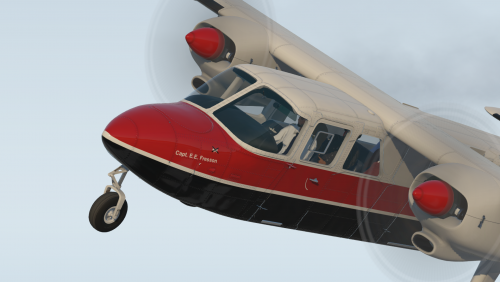
BN-2B - Vintage Loganair (G-BJOP) View File Fly the Scottish isles in style! Includes the '80s and '90s paint schemes for G-BJOP, ex-Loganair Islander (now registered to Hebridean Air Services as G-HEBR). Includes some light custom weathering, and the score mark added after an unfortunate encounter with a sheep on the '80s livery. I recommend using this with the "Backcountry" interior mod available here (Loganair's current Islanders have dark grey panels) Due to the limited amount of photographs available for this plane, I had to tweak some things and wing it a bit in some places -- let me know if there's anything that should be changed! Submitter amyinorbit Submitted 02/10/2021 Category General Aviation Livery For https://www.x-aviation.com/catalog/product_info.php/torquesim-islander-p-177 X-Plane Version(s) X-Plane 11
-
Version 1.0.0
56 downloads
Fly the Scottish isles in style! Includes the '80s and '90s paint schemes for G-BJOP, ex-Loganair Islander (now registered to Hebridean Air Services as G-HEBR). Includes some light custom weathering, and the score mark added after an unfortunate encounter with a sheep on the '80s livery. I recommend using this with the "Backcountry" interior mod available here (Loganair's current Islanders have dark grey panels) Due to the limited amount of photographs available for this plane, I had to tweak some things and wing it a bit in some places -- let me know if there's anything that should be changed! -
READY for release. Switches, starting, flying
amyinorbit replied to AlyMac's topic in BN-2B Piston Islander
This thread is quite old, but I've started trying to make that livery -- do you have any photos of Oscar Papa that could be useful? Failing that, do you know what the name if the plane is (on the nose, "Capt. <something>, OBE")?


