



tkyler
-
Posts
2,827 -
Joined
-
Last visited
-
Days Won
620
Content Type
Profiles
Forums
Latest X-Plane & Community News
Events
Downloads
Store
Everything posted by tkyler
-
 I did look into this; however, I have a Apple Mac M1 with ARM architecture and librain isn't built for this processor and I'm not equipped to do so unfortunately. X-Plane 12 will include the effect by default so most folks are looking towards V12 as the future of this kind of thing......though I know this doesn't help on V11, sorry. I don't have plans to integrate it into V11 unless librain magically falls into my lap, compiled for my processor.
 -
would that preference include being able to set the flaps in any position between the limits of your axis? Because that I probably would not do because of the flap pulsing between 5-20 degrees. If however, you're looking for "tolerance zones" in your axis travel that can be mapped to the 4 discrete positions...and that you feel you could "hit by feel" since you don't have detents...that may be doable.
-
Starting Second Engine Shuts Down First Engine
tkyler replied to DaveVanB's topic in Mitsubishi Marquise MU-2 v2
We have to clarify terms Dave. Have you read the docs on Engine and Prop Operation? Unsure what you mean by 'minimum power', i.e. "where are the levers"? There's really no such thing as "reverse" on the TPE-331 per se. Its only "alpha" and "beta" Reverse is just "beta mode with negative thrust due to the prop angle set via the power levers" I present to you this video. Note how fast he's taxiing and his power levers are at the very edge of reverse pitch and still the thing moves quick. When he moves the prop levers forward to increase RPM...he actually applies a bit more beta/revese input to keep from accelerating more...since BETA is essentially a 'fixed-pitch prop' condition and increasing the RPM in BETA will increase thrust. So to answer your question, the setting you can tinker with to get less thrust is the power levers Bring those suckers back into reverse and slow that guy down because putting them at ground idle..(which his levers are below in the video)...can really get you moving! Now for those using a single paddle joystick with no detent and toggling between beta/alpha where you move the joystick paddle forward to get the animated lever to move backwards....its actually normal to taxi in this condition, i.e. move your joystick throttle forward to slow down (animated lever moves back) and vice versa, etc. the -
So the mouse wheel is set to change the trim by ".03" units per mouse wheel event...so it should take roughly 67 mouse wheel events....but it gets trickier;...the "number of events" per mouse wheel 'click' is generally set via your scrollwheel settings in your OS. So for example, if I set my scroll wheel settings to 'fast' in my OS, then each scroll wheel 'click' will result in multiple 'scroll events'...more than 1:1....so one click of the scroll wheel may generate 10 events....x 0.03...will cause the trim wheel to move 10x as much. The solution is to change your mousewheel sensitivity....and if you can change it "per application" even better. Changing our "delta" of the mouse wheel just isn't practical because everybody sets their mouse sensitivites to differing values, so I went with a very middle of the road value that's demonstrated to work well across a wide variety of use cases.
-
Could be...I override the brightness ratios to get the "double flash" on the strobes and generally separate the "target" (which depends on power) from the "animated brightness", (which doesn't depend on power)...and the target should go to zero with any loss of power. I'll try to recreate this one anyhow to see if the code has some hole in it here. Thx. -TomK
-
Trim rocker switch animation inverted and inop
tkyler replied to daemotron's topic in Mitsubishi Marquise MU-2 v2
Well..each side of the trim switches in the Moo application do not represent A/B 'channels' in the context of dual channel autopilot/trim systems like we have in the IXEG; however, it certainly doesn't hurt to map all of the avail pitch commands to this simple system since there's nothing else to map them too. I'll squeeze this in. Thx. -
Avitab mount missing in 5 blade glass version
tkyler replied to daemotron's topic in Mitsubishi Marquise MU-2 v2
maybe someone stole it? JK...on the list. thx daemotron...you're a great asset to improving the Moo! -TomK- 1 reply
-
- 1
-

-
Starting Second Engine Shuts Down First Engine
tkyler replied to DaveVanB's topic in Mitsubishi Marquise MU-2 v2
Glad you had some success Dave, but this one troubles me just the same. I have never seen this issue....but then again, its easy for me to get into the same habits when starting the engines 1000 times. In no case should what you observed have happen. I'm going to try to recreate this one (anybody else also?) by trying differing lever positions during start. I don't like this one at all because it makes no sense to me just yet. (most bugs don't anyhow) Perhaps a quick test though if you have time?? try and repeat it, same way...right engine first. but before starting the left engine (and seeing the problem), try moving the right condition lever foward...either half-way towards full RPM or all the way to full RPM, doesn't matter, just get the right condition lever away from the taxi position.....and see if the left engine starts without killing the right engine then. -
HSI distance readout not working in GPS mode
tkyler replied to jfwharton's topic in Mitsubishi Marquise MU-2 v2
the HSI LED display uses "DME" for its distance readout. DME is a terrestrial, radio based transmitter, generally co-located with VORs (but not always) and ILS transmitting systems and hence why you'll only see distance when tuned into those transmitter frequencies. DME is not part of the GPS system at all and so will not display on the HSI. This is simply a classic case of putting a GPS in a 40+ year old panel -
Trim rocker switch animation inverted and inop
tkyler replied to daemotron's topic in Mitsubishi Marquise MU-2 v2
so the animation of the yoke trim switches are squarely mapped to the 'sim/flight_controls/pitch_trim_up' (and down) commands only atm. The 'command begin' event animates them up and the 'command end' event animates them back. Those are the default x-plane "electric powered pitch control" datarefs. So any other trim up/down commmand won't animate the yoke trim switches unless I override those additional commands also...which is certainly doable. feedback.....Should I add other up/down trim commands to the list? and if so, which ones? and the reasoning behind? (all of em probably I open to flexible use cases. The trim wheel, (being mechanically linked to the trim tab) is animated with the flight control itself..they don't move separately (or shouldn't anyhow). -
Trim rocker switch animation inverted and inop
tkyler replied to daemotron's topic in Mitsubishi Marquise MU-2 v2
I should have known better daemotron...you're pretty thorough. Sorry! I can see that issue in your video, but not reproducing it on my end on the 4B_OEM variant with the 'sim/flight_controls/pitch_trim_up / ....trim_down' commands ([ and ]). Those are all working with both mouse manip and keystroke/hardware mapped commands. I assume those are the default commands you're referring to also? -
Starting Second Engine Shuts Down First Engine
tkyler replied to DaveVanB's topic in Mitsubishi Marquise MU-2 v2
Thx Dave. That's an odd one for sure....smells of hardware config at first sniff, but can't be sure just yet. Sorry for the barrage of questions here: 1) Are you using hardware? one paddle or two? throttles or condition levers....if so 2) What axis are you mapping them to...? throttle / prop, etc. 3) Have you made any adjustments to the response curves for those axis?..especially the condition levers. If you can repeat the process, perhaps take a screenshot of the quadrant just before you hit that second starter button. Thx -TomK -
Not yet.....when you say "flap axis"....are you assigning flaps to a constant "linear axis"...rather than a discrete command? The Moo flaps don't stop "mid travel" and use "limit switches" at the primary stops so in effect, each flap position is "flaps down a notch" in the truest sense and using an axis is a bit of a difficult paradigm as it doesn't match the actual behavior.
-
Trim rocker switch animation inverted and inop
tkyler replied to daemotron's topic in Mitsubishi Marquise MU-2 v2
BAM...that is it! I knew there was a good reason -
Are toe brakes meant to be ineffective at slow speeds ?
tkyler replied to Matchstick's topic in Mitsubishi Marquise MU-2 v2
No...this is definitely a bug on my end. ...verified. Glad you have the parking brake in the meantime till we get this updated! This is what I get for applying toe brakes during testing.....seeing the brake value go up and down and then walking away and going "ah, it works"...because I still have 1000 more things to test that day Great catch and definitely on the bug list. Thx for reporting. -TomK -
Trim rocker switch animation inverted and inop
tkyler replied to daemotron's topic in Mitsubishi Marquise MU-2 v2
Agree its a bit confusing, but still correct in a way. The UP command from X-Plane is "PITCH TRIM" up, not "switch up". So you move the switch down to "trim nose UP" and vice versa. My commands are for the switch direction of movement, not the nose direction....which is the reason I included the word "switch" in the command (for my own clarity when coding it up). I may rethink this The rocker switches will move the trim when BOTH switches are used together. This is by design and I have no clue why. Both switches must be actuated together to drive the electric pitch trim. -
Thx daemotron. You used the overhead switch to turn off the strobes first? ...and how'd you shut down BTW? RCS switches? fuel valves? condition levers? etc. Thx.
-
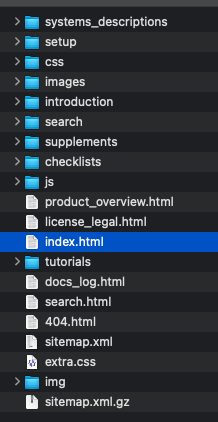
PDF Export is planned for sure, but I'm still evaluating multiple options. Some exporters did not quite work as advertised. That being said, the docs are avail as a downloadable zip file at the link below. NOTE that this download is NOT a PDF however, but simply a folder and you open the "index.html" file (in screenshow below) in your browser and you can use them offline, but still in a browser. Again, the PDF will make its way in at some point. As the docs mature, the PDF/zip file link will make its way on to the docs site. http://www.togasim.com/mu2_docs_offline.zip -TomK
-
Are toe brakes meant to be ineffective at slow speeds ?
tkyler replied to Matchstick's topic in Mitsubishi Marquise MU-2 v2
I THINK, I may have shipped with the "Brake Application Rate" preference set to 10 seconds. Check this...and then set it to 1 and see if that's more normal. Regarding the the stop/accelerate thing...haven't seen that, will do some tests. Which commands are you using for the braking? or perhaps hardware toe brakes assigned to left/right? -TomK -
What is your hardware configuration in this situation? Single paddle assigned to prop etc? left or right unfeather button etc?
-
Noted on this, added to bug list. Thank you. Regarding the click zone, This is indeed a tough philosophical discussion. I'm on the fence about hiding the manips when hardware is present. I've heard arguments both for/against. I think this will evolve into an "options" where you can choose your preference but doing so requires a bit of coding infrastructure on my end....so hopefully we'll get everyone accomodated soon. I am not terribly happy with the 'unfeather test' / condition lever situation myself...its a fight against X-Plane...I fought this more than I would have liked. The only reason I accepted it for now is its a small part of the overall experience, but I won't be happy till its perfect. -TomK
-
Altimeter setting with Honeycomb Bravo
tkyler replied to danhenri's topic in Mitsubishi Marquise MU-2 v2
Thx Daniel. What I can do is map that default command to my knob so those work. Sorry about that, so many differing use cases. I've got this on my list. The Command reference in the docs lists all the commands I utilized, so if the one you use isn't in that list, it probably won't work...as you're seeing now. I fully expect this list to grow as users like yourself point out my limited hardware setup Thx again for the input...we'll get this in to an update. -TomK -
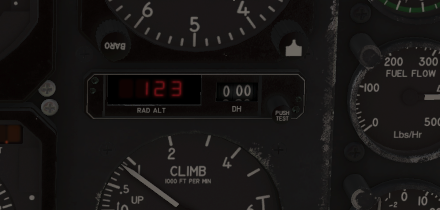
Note that it won't show over 2500' either. Reflected radar signals generally get too weak at that altitude and so the display blanks out. So on the ground and over 2500' blank....in between should show.
-
which variant? The radar alt is triggered by a wow (weight on wheels) switch. It will be blank until takeoff. You did mention that you tried it in the air though. its default XP so I wouldn't expect there to be an issues unless I missed a setting in the varient you're flying. I'll check them all just the same. its working on my end.
-
No worries daemotron....and glad you're enjoying it. Getting my bug management system and features/TODO system going. Right back at it! -TomK
