



JGregory
-
Posts
2,260 -
Joined
-
Days Won
24
Content Type
Profiles
Forums
Latest X-Plane & Community News
Events
Downloads
Store
Everything posted by JGregory
-
Generic instruments, problem with NAV1 indicator
JGregory replied to SchneiH2's topic in Aircraft Development
I suggested the use of the DataRef with "relative" because it is "in relation to the current heading" or HSI compass rose. You second screenshot shows the pointer at 90 degrees, which I believes is the default position when there is no signal to the radio. Make sure you have a NavAid tuned in that is in range. -
Generic instruments, problem with NAV1 indicator
JGregory replied to SchneiH2's topic in Aircraft Development
You should probably be using this... sim/cockpit2/radios/indicators/nav1_relative_bearing_deg -
This is a known issue that has been fixed and will be in the next update. As a workaround you can open any other aircraft that has an altitude selector and change the altitude ( to something below the Saab maximum) ... then re-open the Saab and it should be fine.
-
Did you even read the thread that I linked to? It clearly states that this was a bug, it has been fixed, and will be in the next update. So, no, the fire extinguisher DOES NOT always fail in X-Plane.
-
Question on instruments (EFIS airspeed indicator)
JGregory replied to SchneiH2's topic in Aircraft Development
My apologies, you are correct, it should be a generic pointer. -
Question on instruments (EFIS airspeed indicator)
JGregory replied to SchneiH2's topic in Aircraft Development
NO, that is NOT correct. I stated "The generic tape is what you want to use for your ASI." Start with the generic tape and follow the pics I sent as a guide. -
Please search the forums prior to posting. This bug was already reported. See this thread.
-
Question on instruments (EFIS airspeed indicator)
JGregory replied to SchneiH2's topic in Aircraft Development
The generic instruments are very powerful and quite flexible. The generic tape is what you want to use for your ASI. The best way to learn is to find other aircraft that are using generic instruments and reverse engineer what was done. I have attached two (2) textures and one (1) screenshot for you to analyze. These show the setup of the generic ASI tape in the CRJ200 that I did for X-Plane mobile. Hopefully this gives you an idea of how to create the tape that you want.

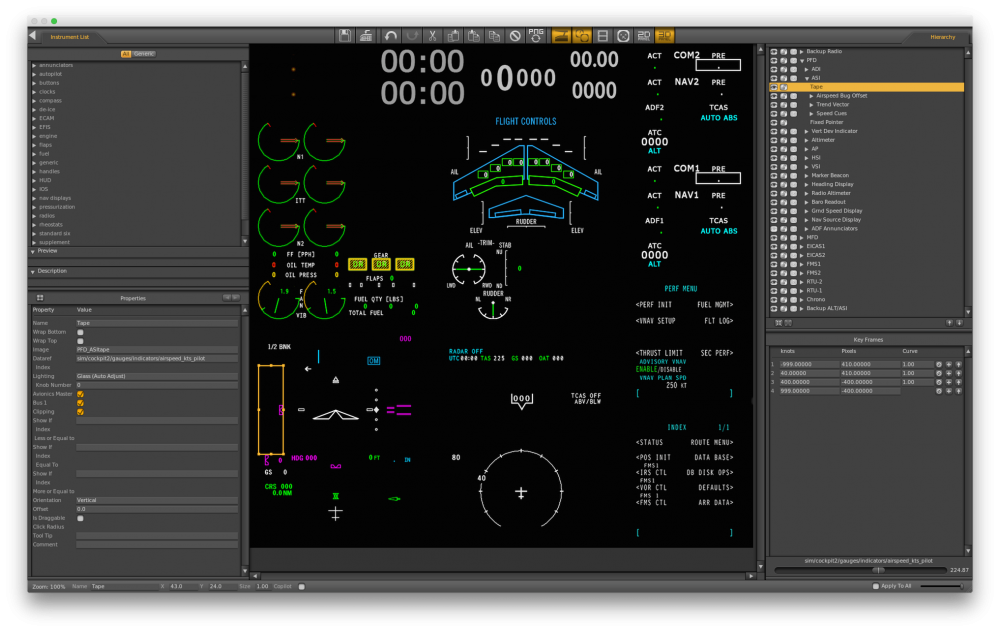
-
Question on instruments (EFIS airspeed indicator)
JGregory replied to SchneiH2's topic in Aircraft Development
Using a generic instrument would be the best way to do what you want. -
Colin, I do not see any reference in your original post about reading Ben's "thing".
-
Ben Supnik has repeatedly said that the art controls are most likely going to change over time and that they will not be announcing changes or offering support in this regard. RTH will always be susceptible to these changes. Relying on the art controls is not a wise thing to do.
-
Martn, I would just like to be clear on what your reporting. Do you simply want the vertical deviation to be displayed (similar to Glideslope)? or are you expecting VNAV functionality where the autopilot follows a vertical path? The former would be reasonable, the latter not so much.
-
10.45rc1 has been released. Download a copy ASAP to fix the throttle issues!
-
We are currently in the process of testing some of the flight model in specific circumstances. We will let you know what we find.
-
Yes, but we never give exact release dates for obvious reasons.
-
Gentlemen, I have discussed this with Laminar and they have confirmed a change was made at the time of 10.40 that is causing the issue you are all experiencing with the throttles. I have tested a new build of X-Plane with the fix and all is now working as expected. This fix will be implemented in 10.45rc1. No definite date, but it should be soon. Thanks to all who provided details to help diagnose this problem.
-
Send a message to Cameron here.
-
I thought we had fixed that. I will check into it.
-
Martin, That is correct.. the problem exists for both axes.
-
Claude, The radios were already completely revised and we added scroll wheel support some time ago. Please clarify what you are asking about.
-
Jara, We will consider making some adjustments in the ITT calculations. No Promises.
-
I don't want to make any claims until I confirm with Laminar. X-Plane is writing to a DataRef when I don't believe it should be. As of now I think this may be related to the new engine code that Austin implemented (for the PT6) back in 10.40.
-
FYI to all involved..... after researching and diagnosing the issue with the throttles, I don't believe that Matthijs' script will solve the problem. It turns out that the issue has nothing to do with the joystick axis values at all.
-
I think I have found the problem, but I need to discuss this with Laminar first. I will let you guys know as soon as I have a firm answer.


