



Goran_M
-
Posts
5,657 -
Joined
-
Days Won
235
Content Type
Profiles
Forums
Latest X-Plane & Community News
Events
Downloads
Store
Everything posted by Goran_M
-
You can't. Can I ask, for what reason?
-
Can I ask what you all have your reflections set to?
-

What kind of performance are ya'll getting and on what system specs?
Goran_M replied to Jacoba's topic in General Discussion
I would make a few adjustments. Turn down reflection detail to zero. You'll still get reflections. This is pretty much, across the board in recommendations for performance increase. Experiment with AA. I'm not too familiar with 5K retina screens and how they perform, but I understand with such a high resolution, it'll tax the GPU pretty aggressively, with that many pixels. Please correct me if I'm wrong. I would love to make a lower res texture set, and I will discuss with toto about this, and then upload as a separate option for people with performance issues. I'm currently in the middle of doing so, and will run some tests. I'm also reducing the poly count of the mesh. We'll get there. I'll address each point: I have the exact same set up. CPU, screen size and GPU. The lowest fps I get is high 20's-low 30's, in built up areas. What I would like to address is the higher the quality, the more power needed to pump out that quality. I wanted to make textures that were very clear and sharp, while still maintaining performance. And for that, I used our computers as well as the testers and streamers computers for a benchmark. All of them had smooth running TBM's on their rigs. Not meaning to appear "confronting" but comparing 1 add on to another is kind of futile. We don't really sit there and say "We have to make this run as fast as X add on". We make it according to what we can run, and what our testers and streamers can run. In saying all that, as was mentioned above, I'm working on performance increases by rescaling the textures and combining meshes. Also reducing the number of polygons in the mesh. Performance increase is definitely getting done. It just might take a couple of days. -
I'm working on performance as we type. Hopefully have something positive to show for it in a day or 2
-
It's mostly VR compatible. Yokes and rudder pedals are not VR at this time. Everything else, afaik, is good to go with VR. The weather effects will be for toto to look into. We'll address everything. But we have to prioritize. I can understand the frustration, but I simply don't appreciate being told we don't care by Cyrex, 9 hours after your original post. I'm in talks with someone who is willing to share his own personal VR mod. If all goes well, we'll publish it.
-
Guys, we're flooded with support questions, and it's hard to address everything. Saying we don't care, after already putting out 2 updates, is quite unfair and uncalled for. We need to address FPS issues, CTD's, bugs, etc... before we address weather effects (you didn't specify what's wrong with them) and VR (Already stated that it won't be in this version, but we said it was definitely coming in a later update) So, as Ben said, your patience is appreciated. We're doing the best we can, but expecting us to respond to everyone, within hours, is unreasonable.
-
What kind of performance are ya'll getting and on what system specs?
Goran_M replied to Jacoba's topic in General Discussion
Jacoba, with those specs, you will definitely have to dial it down on the TBM graphics. Performance is very hard to determine due to different factors. Someone with an OC'ed i9 9900K, 2080ti and 32GB RAM with a ton of ortho, countless plug ins, could easily get equal or worse performance than someone with an i7 7700K, 980ti and 32GB RAM with little to no plug ins and ortho. It's a combination of things. We had several testers, with a wide array of installations, have very few problems, with the exception of a few bugs during development, and all had a very smooth run when it came to performance. So MAYBE we underestimated just how much ortho and 3rd party plug ins people have. Just today, I saw someone with an incredible amount of plug ins. Couldn't believe how many plug ins some people have. Felt like I was way behind the times. In saying all that, I'm working on reducing texture size and possibly making a separate texture set for slower computers. I'll get that done asap and run a few tests, then take a meeting with toto. -
I think I saw JonFezza have this problem in a stream last night. TBM kept turning on 1 wheel. It WAS a calibration issue. He re-calibrated and it worked perfectly. Can you please re-check the calibration and that it is not assigned to multiple axis.
-
Right seat, side wall.
-
TBM 900 Release Week Day 3: Maintenance and Wear & Tear, oh my!
Goran_M replied to Cameron's topic in Socata TBM-900
Current charts can be downloaded directly into the G1000 from the FAA website (U.S) and from aerorouters (Europe...as long as you have an account). And you DO need an internet connection. They are not "built in". Navigraph implementation is being worked on for a future update. -
Engines mounted to high or different engine housings?
Goran_M replied to SinusJayCee's topic in Saab 340A
Making a new normal map with reduced gloss will change the gloss for the props. It's possible to do, but will require some trial and error. And yes, the texture for the flat section around the beacon is on the horizontal tail. (Wasn't me who textured it like that. It was the texture guy that was with us back then.) -
For now, all focus is on the TBM 900 I'm working on. I spoke to Jim yesterday, actually, about the Citation. If all goes well, it'll be better than what we already have. Unfortunately, it won't be out this year.
-
Engines mounted to high or different engine housings?
Goran_M replied to SinusJayCee's topic in Saab 340A
There is a Prop texture, but when the engines are running, the prop disc in the root folder of the Saab is what is being shown. You could make your own prop disc, but you would need to make it separate from our one. -
Thanks Dave. Much appreciated.
-
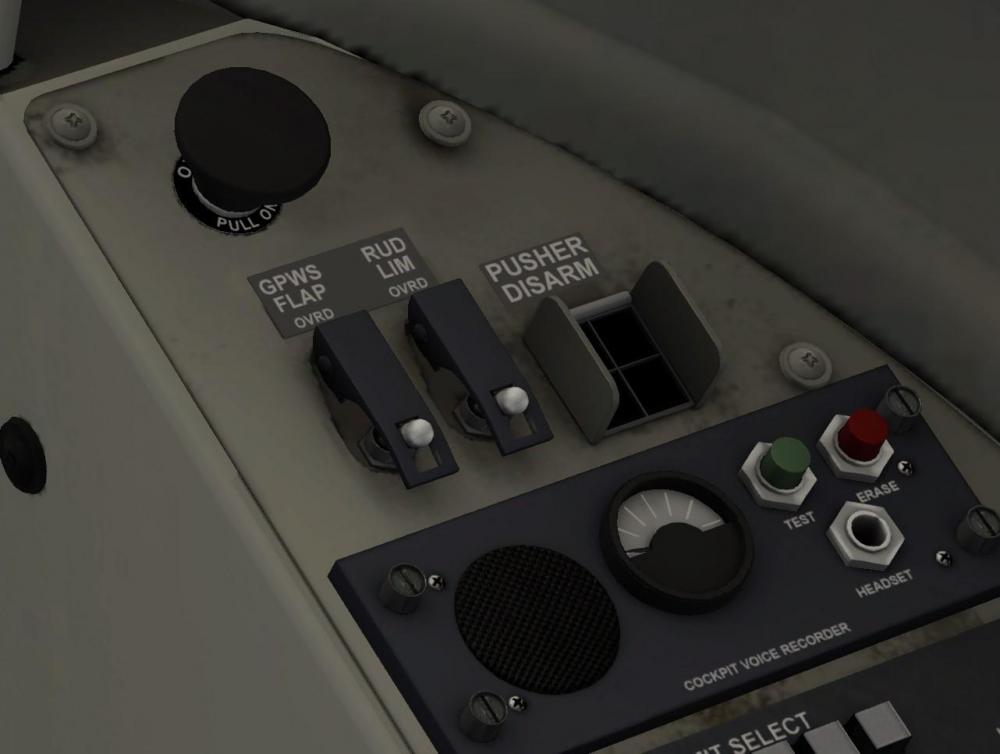
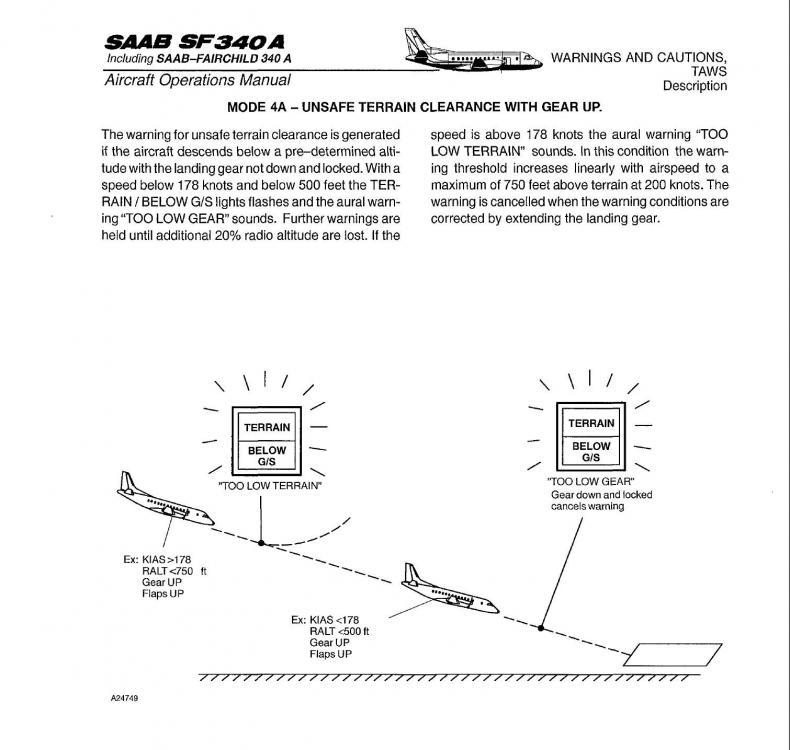
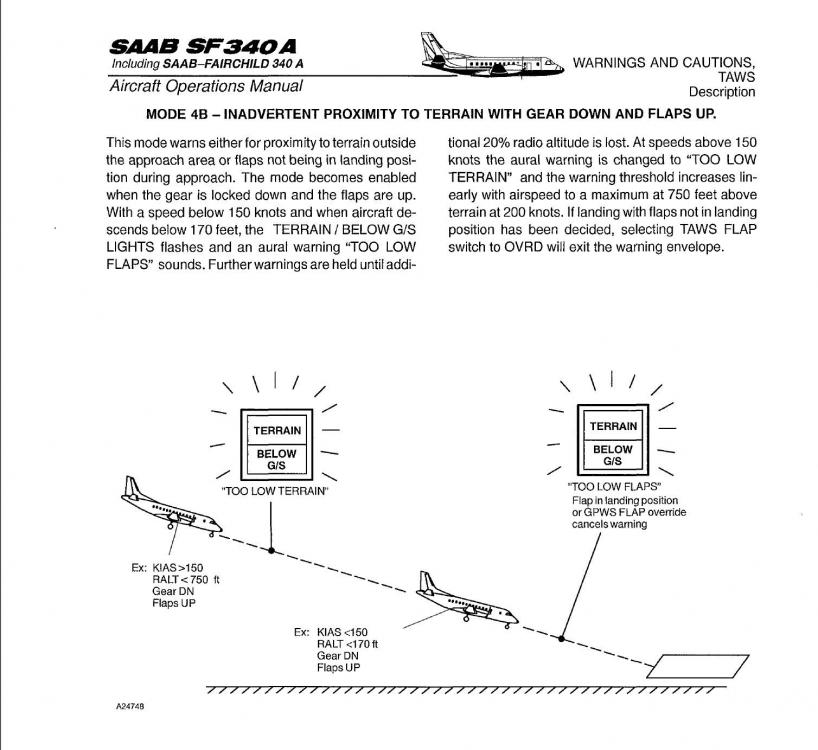
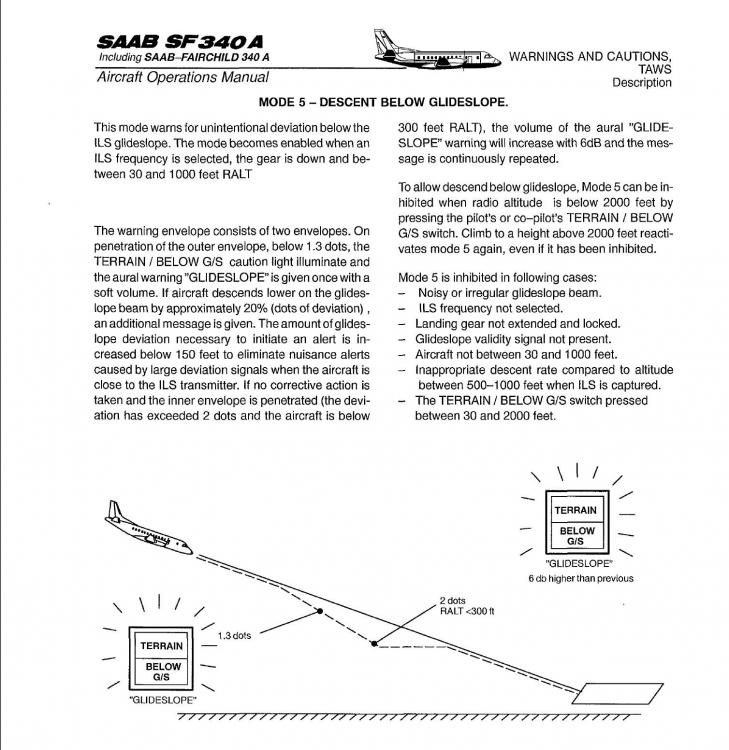
OVRD Switch
-
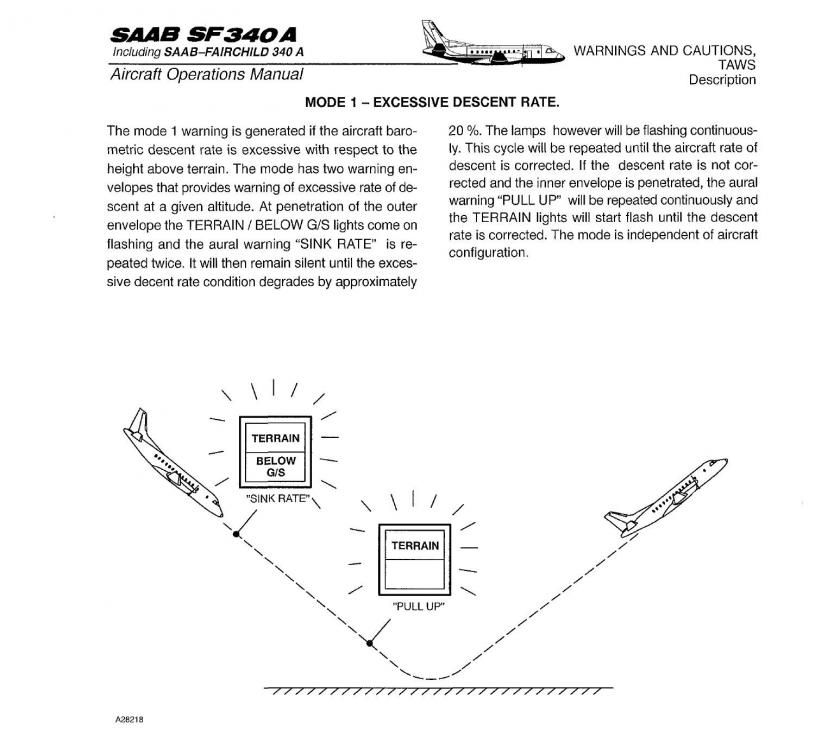
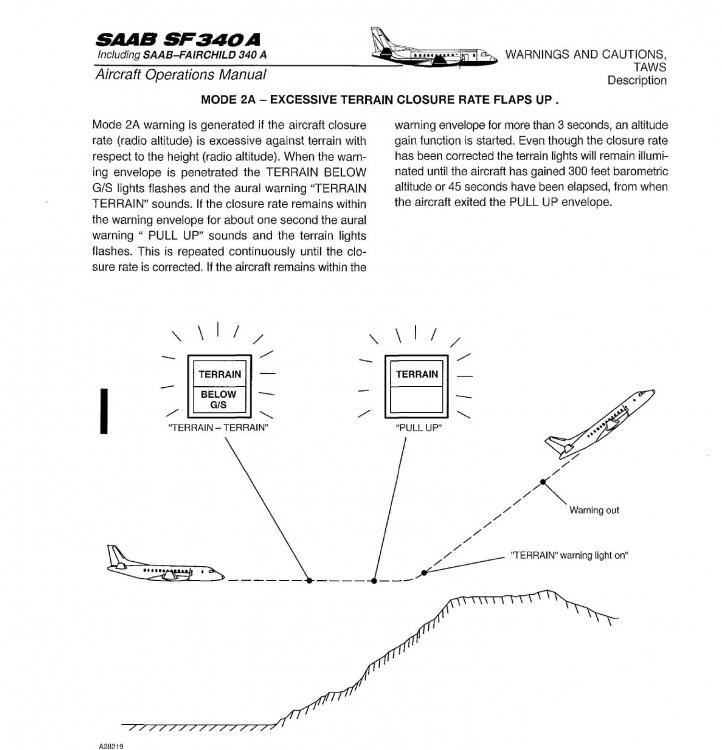
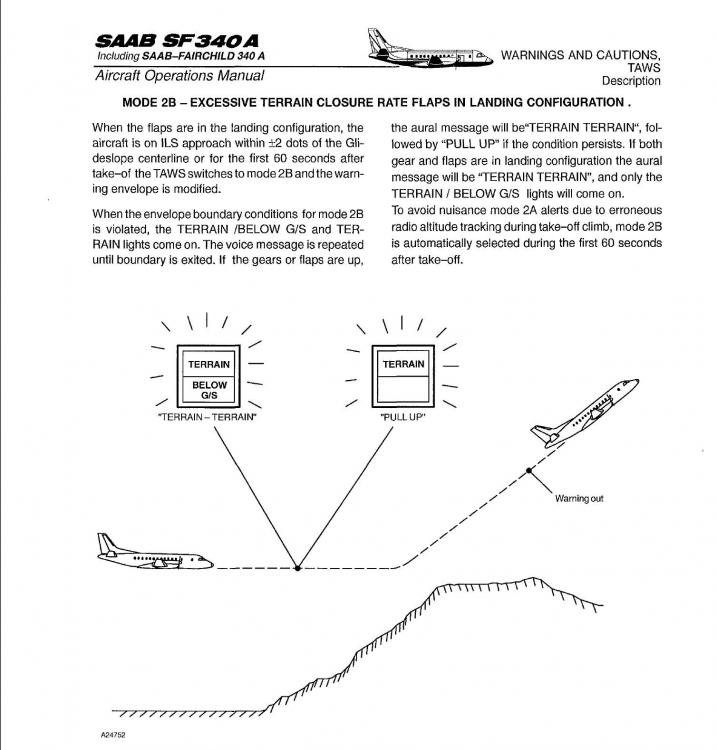
Did you meet any of these criteria...
-
Are you properly configured? Flaps are down?
-
So the plugin DEFINITELY killed the Garmin and autopilot??
-
Interesting, to say the least. Thanks for the zip. I'm not sure there's much, if anything, Jim can do on our end, as it's obviously in their code. But if it happens on other systems, we now have something to go back to our customers with. Thanks again
-
Can you please post your Log.txt and GizmoLog.txt files in here. They are found in your root X-Plane folder. Post them immediately after loading the Saab, and no other aircraft, as they get written again when you reload.
-
Sorry for the late reply. As mentioned above, it's just the stock X Plane GPS. Nothing special about it.
-
Reference speeds, used fuel, and power lever detents
Goran_M replied to SinusJayCee's topic in Saab 340A
We came across many things we questioned as to why it would be done a certain way. It's definitely a unique aircraft. -
Reference speeds, used fuel, and power lever detents
Goran_M replied to SinusJayCee's topic in Saab 340A
1. Should be in the doc's, but if they're not, I'll see if I can find them in the official documentation and maybe post them somewhere. 2. Just the way it is in the real thing. 3. During flight, the WoW (Weight on Wheels) switch, which is linked to the different areas on the throttle console, prevents the throttles from going below idle. This is a safety measure implemented by Saab. While on the ground, you can bring the levers back to GRD Idle due to the WoW switch being engaged.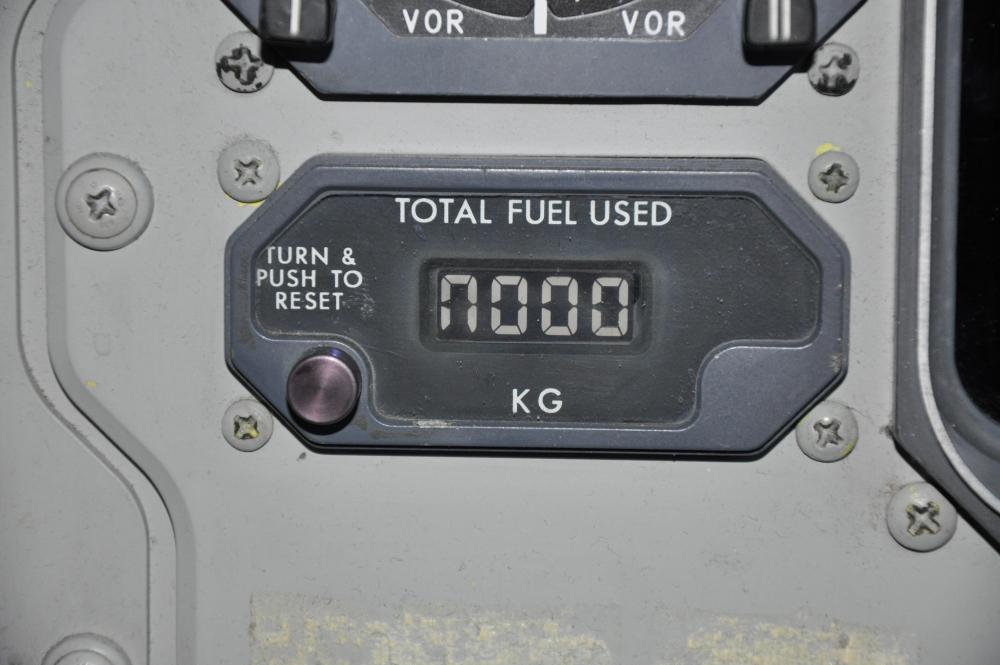
-
https://www.navigraph.com/FmsDataManualInstall.aspx
-
This has already been mentioned and we've found a few workarounds for it. We'll post something shortly.
- 1 reply
-
- 1
-


