



Goran_M
-
Posts
5,658 -
Joined
-
Days Won
235
Content Type
Profiles
Forums
Latest X-Plane & Community News
Events
Downloads
Store
Everything posted by Goran_M
-
Do you have "Accelerated Wear" checked?
-
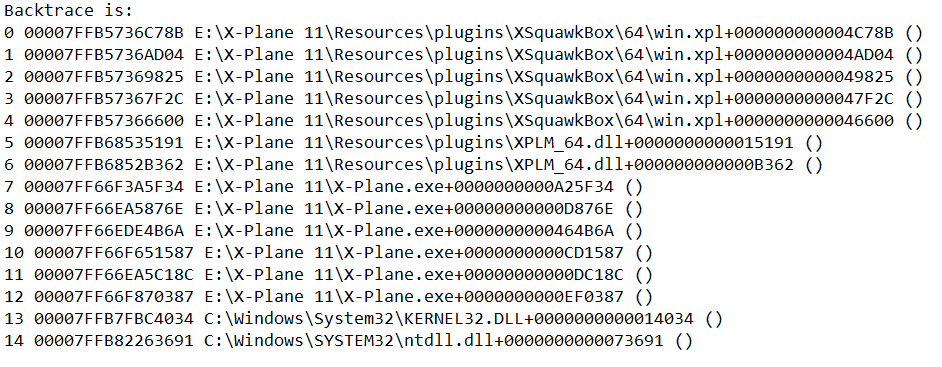
FPS drops could be anything from a system doing something to scenery getting loaded. There's always something going on. But looking at this log, and the backtrace, it looks like smart copilot just crashed the sim on you.
-
You'll need to contact Cameron at X-Aviation. http://www.x-aviation.com/catalog/contact_us.php?osCsid=e7e79b84261e2d650ab143b0f806166b
-
Can you think of anything you may have done? Have you installed it on another computer of yours and run out of activations? I'm not accusing you of anything, but did you MAYBE install a copy on a friends computer? There is nothing in the activation that has changed from 1.1.8, so this is something that has 100% happened on your end.
-
Could be just wear and tear or a random failure due to a "faulty standby alternator". These things will happen from time to time.
-
Can you post your log.txt file and a screenshot of your render settings?
-
The backtrace at the bottom of the log. From the moment of the crash (Line 14) it goes back to the origin (Line 0), with XSquawkbox going crazy up to Line 4.
-
Your Gizmo log is telling us the installer cannot find a license. Something on your end is preventing the connection to X-Aviation to retrieve the license. Wait for Ben or Cameron to come back with a reply, as they're always working on activation issues.
-
Do you have a firewall running? Even Windows Firewall.
-
Yeah, I'm afraid you'll need to, at least, use a couple of keys on the keyboard for steering. AFAIK, the reason the TBM doesn't auto co-ordinate is because the ground steering is code driven.
-
Can you post a video of what you are experiencing. I was watching a stream last night, and everything was fine, including taxi.
-
 @skiselkov
 -
It looks like xsquawkbox is causing the crash. Try removing it and try again. If it doesn’t crash, send the xsquawkbox devs this log file and ask them if they know what’s going on. Also, make sure you’re running the latest version of xsquawkbox.
-
That's the Mac's weird GPU architecture. It'll get a good look and hopefully a fix in the near future.
-
the TBM will generate errors if another plugin, or the sim itself, has some kind of conflict with it. And it could be the fault of either one. The Saab used to crash when run with xenviro. Everyone thought it was the Saab, because it only happened with the Saab. Even though we went through the code to make sure it wasn’t the Saab. Finally, the xenviro guys found out it was definitely something in xenviro conflicting with the Saab, and it was on their end. This is addressed in their next update. As far as the TBM, the exception handler has been looked at and fixes have been done. They are far less now than they used to be. But it’s obvious that in some cases, it still pops up. Saso will continue to try to nail it down, if it IS with the TBM.
-
Change your X-Aviation password to something alphanumeric. No special characters.
-
I’ve seen a link with any kind of AI and the exception handler issue. It’s hard to pinpoint when the log says “something has reinstalled our exception handler” without telling us what it is Again , I respectfully ask not to compare the TBM to other add ons. Each add on has its own code. None of which are the same.
-
Are you wanting IAS or Ground Speed?
-
Boxers or briefs?
-
AFAIK, nothing at all has been done to that. We never even messed with it from day 1.
-
Theres your problem. The installer can't recognize unusual characters. Only numbers and letters. Please change your password in your X-Aviation account and then try installing again with the new password
-
Does your password have any unusual characters in it? Anything other than numbers and letters?
-
Are you referring to using the mouse to steer the aircraft?
-
Are you installing to your root X-Plane folder? Do not install to a custom folder.
-
Check firewall and allow the installer to access x-aviation for the installer. Make sure X-Plane is not running when you're installing the TBM.