



Litjan
-
Posts
5,718 -
Joined
-
Last visited
-
Days Won
424
Content Type
Profiles
Forums
Latest X-Plane & Community News
Events
Downloads
Store
Everything posted by Litjan
-

Flight Plans for IXEG 737
Litjan replied to prdant's topic in 737-300 Aircraft Systems and Operation
Can someone chime in on this? I have never used simbrief, so I have no idea how to go about that... Thanks, Jan -
Hi Werner, while your fix may certainly get rid of the "erroneous" water spray from X-Enviro, it will also disable the spray/dust effects you would rightfully get when operating the 737 over wet or dusty surfaces. I consider it a bit of a rough remedy. I am not sure why X-enviro is having this effect - unlike "everyone" I don´t have it installed . You could also turn off your engines - this would also get rid of the effect . Cheers, Jan
-
Hmm, this is weird - have you added any Orthophotos to X-Plane? HD scenery? 32GB of memory is really a lot, so I could only see extensive use of Orthophotos really exceeding that. Cheers, Jan
-
Hi mrene, I haven´t heard of that one before - but you MAY have activated some sort of Mac feature where the mouse "jumps and sticks" to an input field or such. I don´t have a Mac myself (I am a gamer ), so I can´t really provide any further insight. Just think I heard of a feature like that in Windows... Cheers, Jan
-
Yes, I agree - we are on the brink of VR becoming useable without too many restrictions. I totally believe that it is the future and in a few years the majority of users will fly only in VR. What is still needed to make the breakthrough, in my opinion: affordable headsets, wireless, good FOV, excellent resolution, comfortable to wear for hours CPU´s to fire these headsets at a good FR without significant loss in visual quality (i.e. not pulling all sliders left) - note: Vulcan will not fix that! sensory gloves to be really able to manipulate the virtual cockpit in a realistic fashion For now it *can* be done, but there are always compromises to make - so many that still most of us prefer to use a screen, especially for airliner flight. Cheers, Jan
-
Hi Marc, we haven´t added genuine VR support to our aircraft yet. Most things work "out of the box", but there is no VR file for it. My personal rationale about this is that it is not really possible to use an airliner in VR yet (either the resolution is too low to read stuff or the framerate is too low when you run a PIMAX or the like...). Lets give it another year or two for that. In addition I think that any user serious enough to want to fly a 737 probably has hardware yoke/joystick/rudders. And my personal preference and suggestion is to use those for VR flying, too. Did you try holding the controller in another way (more centered, or tilted even more to the right) BEFORE grabbing the yoke - so that the "nullpoint" may be in a different orientation? Cheers, Jan
-
Ok, then I am out of ideas. You are the only one out of several thousand users reporting this problem, so I assume it is something unique to your setup. I would suggest removing all add-ons, third-party content and plugins and checking again with a vanilla X-Plane installation. If that runs ok, add your addons in again to find out which one is causing the problem. Other than that I have no suggestions. Cheers, Jan
-
Yes, that is what I meant. Hmm, can you try at another airport? Maybe there is something wrong with the authoring and your aircraft thinks it sits on a dusty surface - this will also cause smoke/dust like that. Jan
-
After install of IXEG 737 Classic no sound and Joystick input??
Litjan replied to Dooleybird's topic in General Discussion
Hi Dooleybird, Sorry that you are having problems with the IXEG. 1.) Make sure you set up the sound volumes in the IXEG preferences menu that pops out when you bump your mouse against the left side of the screen. You can adjust sounds that way, and may have accidentially lowered volume levels. Also note that unfortunately some sounds don´t move back up to "normal" if you have them set low on the IXEG (like the airconditioning) and then fly another aircraft in X-Plane 2.) Make sure that you have selected a valid (or make your own?) hardware profile when flying the IXEG 737. It is just the regular hardware control setup that you need to run, i.e. go to the "controls" tab in X-Plane and go from there. Let me know how it goes, Jan -
See if you have "airshow smoke" turned on? Cheers, Jan
-
Yes, I think you can set the "runway state" directly in the weather menu. So even if the sky is clear, your runway could still be wet. You may have to scroll down the settings in the weather menu to see it... Cheers, Jan
-
You have a "wet" apron - this is the default X-Plane "water spray" effect. Happy landings, Jan
-
This moderator doesn´t like the mention of the word "Airbus" or "320" at all . Cheers, Jan
-
Hi Max, unfortunately not. Sorry, Jan
-
Hi there, when we made the IXEG many moons ago, texture size was still a very important factor for many users - as it directly translates to VRAM usage and we deliberately opted to make the external textures "frugal" with regard to that. The cabin textures were more or less a "placeholder" for a better 3D cabin...which hasn´t arrived yet. I agree on the external cart sounds, would be nice to have and may be fairly easy to implement. Cheers, Jan
-
Iirc dropping the shadows down to "aircraft only" (scenery doesn´t cast shadows) would give you sharply contoured shadows in the cockpit. The shadows are "X-Plane default", there is nothing we at IXEG can do to change them. Cheers, Jan
-
Hi Mario, we heard about a similiar problem before: See if that possibly helps you as well? Cheers, Jan
-
No bashing for you, fair comment, I would say. We are aware of everything you said and we would rather have the update sooner than later. Work continues. Jan
-
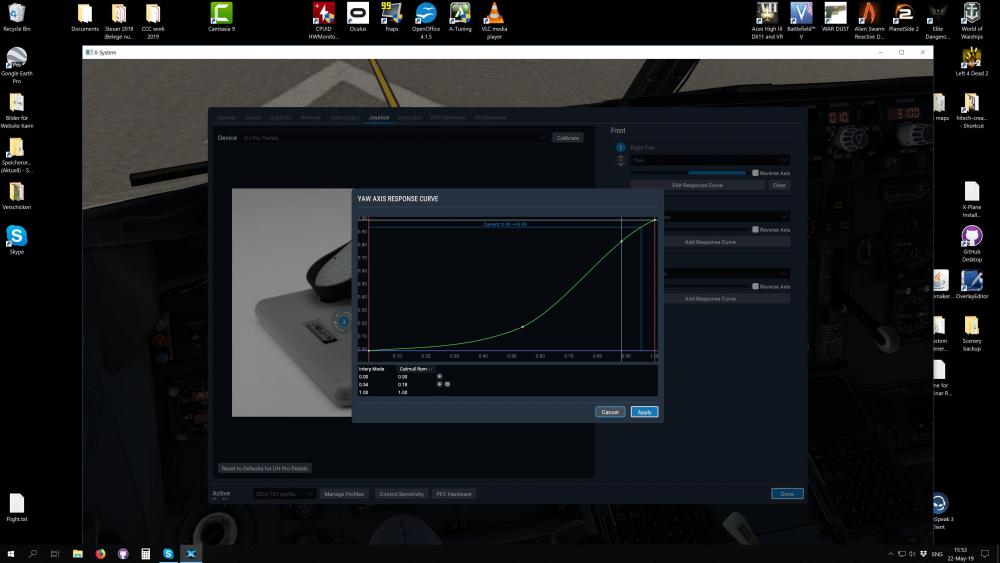
Hi again, I doublechecked on my computer - I can achieve values for the rudder of -1.0 to 1.0 on the rudder with my setup. It may be that your rudder isn´t calibrated properly if you can only achieve 0.8 and that will certainly hurt your engine-out capability. I testflew an engine failure at 46tons (130 V1, 141 V2) and was able to maintain centerline on the ground with the engine failed at 125 and then able to maintain heading once airborne with 141kts. I will try to improve the ground handling a bit during the engine failure - especially the sudden yaw onset is very hard to counter, causing too much deviation from the centerline. I may be able to convince Austin to provide a more gradual decay of thrust instead of full->0 in 1ms. Cheers, Jan
-
Hi Rich, I will doublecheck the maximum deflection I can achieve with my setup when I get back home, I am currently on the road flying through thunderstorm swept Europe . In the meantime you can check the DATA OUT display on-screen for flightcontrols. Check the maximum rudder deflection you can achieve, it should go from -1.0 to +1.0 Also make sure that you are above the "minimum control speed air" when you attempt single engine flight and also make sure that you don´t set more than maximum rated thrust. As ballpark values that should be above 115kts and not more than 90.0% N1 Cheers, Jan
-
IXEG 737 Custom commands for mapping to Joystick Buttons
Litjan replied to cantab88's topic in Hardware/Cockpit Dev
The brake system is pretty much the default X-Plane brake system, so the parking brake (full brake) is already there. Cheers, Jan -
Problem with Payload Setting in FMC & Rudder Pedals
Litjan replied to Polonsky's topic in General Discussion
Thanks for the further info - yes, the "planned fuel" could be problematic. In real life the pilots will only enter it on the ground (before the plane is refueled) to "test" if the plane is able to match restrictions during the flight. Normally no planned fuel will be entered and the automatic detection of fuel levels (fuel summation unit) will be what determines the difference between ZFW and GW. If you enter a different value into ZFW or GW boxes it will not match what the ground service panel states, obviously. This works just like on the real plane. If the plane weighs 50.000kgs and the pilot puts in 55.000 into the FMS - how would the FMS know that this is not correct? So the entered or displayed value could well differ from the ACTUAL value - if the pilot/user puts in a wrong weight. But at any rate, the simulation should not crash if you try to enter a planned fuel. Thanks, Jan -
Hi RhinoDrvr, there is no estimate for changing the units shown on the fuel flow gauges. I hope that the U.S. will see the light and switch to real physical units soon, so we don´t have to make the modification... just kidding, of course . Fixing this isn´t so easy because it involves editing and exporting the cockpit.obj which is (I am just a layman here) appearantly a bit more involved than making cold fusion happen and does involve some (black) magic and advanced astrophysics. It doesn´t help that the export scripts that were once used can´t be used with X-Plane 11 anymore, or so I have heard... It is on the list, but as I said, not idea when. Cheers and sorry, Jan
-
Problem with Payload Setting in FMC & Rudder Pedals
Litjan replied to Polonsky's topic in General Discussion
Hi Polonsky, thanks for the bug report - I haven´t seen this one yet, so it is very valuable! Just to confirm, you entered both GW and ZFW several times? Any specific order? As for the rudder pedals, yes, there was a change in the way the simulator tries to "help" people go around turns without rudder pedals - by applying the brakes. Here is a description for the fix: Needless to say is that we fix this for the next update. When the autobrake disarms after touchdown this is usually to people inadverantly applying brakes - even a tiny bit. Often rudder pedals are "spikey" and send signals inadvertantly. I have to be very careful with my Thrustmaster ProPedals myself... I alway make sure I only press with the heels when steering. Unfortunately we can´t set a "null zone" for the brakes in X-Plane. And since we use "default Laminar Research system code" for the brakes, we can´t really specify for how long and how much the user needs to apply manual braking for the autobrake to disarm... Cheers, Jan -
You are still running several plugins that could interfere with the IXEG, they are encorporated in a lot of the Custom Scenery you have. Loaded: Custom Scenery/HungaryVFR-Library/plugins/SASLFree/64/win.xpl (1-sim.com HungaryVFR-Library #4). Loaded: Custom Scenery/EDDL_JustSim_Airport_v1.1_XPL11/plugins/GroundTraffic/64/win.xpl Loaded: Custom Scenery/Aerosoft - EDDT Berlin-Tegel/plugins/xdatarefs/64/win.xpl (barbarossa.X-DataRefs_3.0a4.Aerosoft - EDDT Berlin-Tegel). I am not saying that any of these are the culprit...but they very well could be. The only way to find out is to remove them and run the IXEG without them - then see which one is the conflicting one. Also make sure your gfx drivers are up to date, of course. Let me know how this goes, Jan

