



Litjan
-
Posts
5,720 -
Joined
-
Last visited
-
Days Won
424
Content Type
Profiles
Forums
Latest X-Plane & Community News
Events
Downloads
Store
Everything posted by Litjan
-
 Hmm, no - the cost index should have nothing to do with it...could you attach your log.txt so I can check if maybe you are running some other plugin that may be interfering with this?
 -
Ok - I ran some tests on my end and I see the problem. I try to explain it: The control wheel for the Vertical speed on the real 737 can turn "without end" - infinitely. The pilot can spin and spin and spin...it will always be able to spin more. In X-Plane, the V/S wheel has a limit - it can only turn a set amount of revolutions. So if you spin it "down" until it stops - it can not spin "down" anymore. So if you select V/S and then spin down to -5000 fpm - then disengage V/S - then engage it again - you can not spin down to -5000 again, because it "hits the limit". To work around this problem you would have to "turn back" the V/S wheel while V/S is not engaged - this gives you enough "turns" again... It is a limitation of the manipulator in X-Plane...I will talk to Tom and Ben to see if we can use another manipulator of if we can work around this problem. I have opened an issue on our internal bug tracker and I will announce it once we find a solution. For now - if the wheel stops - just disengage V/S (it will go to CWS P and keep the rate), spin the wheel "back" and then engage V/S again. Thanks for bringing this to our attention (it will only happen if a user inputs large V/S values repeatedly, so no one reported this before. Cheers, Jan
-
Hello! This is a bug with the manipulator that I had once - but never again. I could not figure out what caused this. Normally you should be able to decrease the value at liberty - if the mousewheel does not work, try to "drag" with the hand by click-holding and then dragging down. Are you running X-Plane 11.50? There was a bug fix by Laminar Research that pertained to some manipulators not working right at certain angles... Let me know if you spot this behaviour again or if you can figure out what triggers it? Thank you, Jan
-
ASI needle pegged at 200IAS when starting Cold&Dark
Litjan replied to mizra108's topic in Bug Reports
Hi mizra, I can make them start at a different location - I agree that the airspeed needle should be at the last value it was when power was removed...usually zero. The plastic bugs I am not so sure about, they would also be where the last pilot left them - which is usually just where they were for the last approach. I would think that it is easier to grab and move them if they are "spread out" a bit. But if you want to move them "all" to a certain value, just grab the highest one and slide it down, it will "collect and push" all the other ones so it is just one single motion. Cheers, Jan -
Thanks for getting back to me on this! You can also enable the DATA OUTPUT field #62 (fuel weights) to readily see on screen how much fuel is in the tanks and if it is getting used. If you can find a way to reliably reproduce our 737 to not use any fuel, please let me know! We want to fix it (or sell the technology to the airlines!! ;-) Cheers, Jan
-
Hi clif, this is unusual - some observations: Fuel loading in the 737 only works through the IXEG side-pop-out menu. You can´t load fuel through X-Plane´s fuel menu. You can see the fuel loaded in that menu, though. When entering a PLAN fuel - this never changes. It is a value the pilots can input to PLAN a flight (i.e. if the real fuel wasn´t loaded yet). Don´t use the PLAN field - or if you do, eraze it afterwards (this will otherwise stay locked and never change the gross weight). Switching off the fuel pumps will not starve the engines - not in a real 737, either. The engines will keep running through suction feeding, but thrust degradation at high altitude or high powersettings may occur. Now I have to doublecheck if using a PLAN value will preclude fuel from being used - that would of course be a bug! Normally you don´t have to reboot the aircraft after a flight - you can just go on the next one. Cheers, Jan Edit: I just doublechecked - using a PLAN fuel input does not affect fuel usage on my end - on the first flight. Are you running any plugins that could be affecting this? It is the first time I have heard of this problem.
-
Oh, thank you for letting us know! It should not be this way, we will doublecheck! Happy you got it sorted out, all the best, Jan
-
Why is your folder named X-aviation - when the instruction clearly says "X-Aviation"?
-
Hmm, that is weird - are there any special (greek alphabet?) letters in the folder names? Also make sure that the folder is named IXEG 737 Classic (no underscore lines like this: IXEG_737_Classic). Also make sure the folder is Aircraft and not Aircrafts. Let me know how that goes? Cheers, Jan
-
Yes, the solve is as follows: Detected an unsupported file path. Please make sure this aircraft is installed in [your X-Plane folder]/Aircraft/X-Aviation/IXEG 737 Classic/ and restart X-Plane. In other words - your IXEG must be installed to the filepath as specified. Please doublecheck your installation folder and if necessary re-install to the correct folder. Cheers, Jan
-
Hello, not sure about the TCAS targets - nothing was really changed for that - I will have to try on my end to see if the traffic still displays. The problem with the gross weight sounds like you enter the PLAN fuel weight - it never updates because it is only used by pilots on the ground to "plan" for the flight while the fueling is not finished yet. Don´t use the PLAN fuel or at least delete the entered value so that the real fuel weight can be calculated and added to the ZFW to yield gross weight. Cheers, Jan
-
Hi Andi, you should be able to change the speed and altitude constraints for a waypoint - but the FMS may not fly the profile correctly. This will be part of our VNAV rewrite that we are working on. To change (or add) constraints to a waypoint you dont "click on the left side bottoms" in the FMC. You need to type the new constraint into the scratchpad (i.e. /250B for "be below FlightLevel 250") and then click on the right line-select key next to the waypoint you want to add this constraint to. Grüße ins Ländle, Jan
-
Pitot FAILURE Leads to OVERSPEED
Litjan replied to Torbinator's topic in Flight Procedures and Techniques
No, to my understanding you will not get ANY random failures if that box is unchecked. If you check it, you can set the MTBF, which means X-Plane will randomly fail something at an average time as set. Cheers, Jan -
11.50 Final and Experimental Flight Model?
Litjan replied to Torbinator's topic in 737-300 Aircraft Systems and Operation
Hi Torbinator, you are correct - there will be a setting in planemaker to "always force experimental flight model on". We will incorporate that in our next update - but I think you can just set the option in the .acf file yourself right now so it *should* always work. I haven´t tested this yet, but will soon. Cheers, Jan -
A lot of shortcut commands were changed/corrected/added - maybe that is causing problems for old assignments? Cheers, Jan
-
You can just see it more readily because the ground "rushing by" covers more appearant angle when you are close. If you are tracking a taxiway light with your eyes while you pass it taxiing at 30kts it you have to turn your eyes like 50 degrees in one second. If you watch the same taxiway light while flying by at 5000 feet you need to turn your eyes 0.5 degrees per second. So if you have a "stutter", the "jump" of the light is bigger when you are passing close by. Cheers, Jan
-
There is a lot of calculation going on behind the scenes when you run the IXEG 737 - and with the base simulation becoming faster and more smooth, this calculation (naturally causing lag) is becoming a bit more appearant. In the past the emphasis was on causing "less total load" on the system - so you would run some operations only every 5 seconds, instead of "every flight loop". This would allow to keep the general framerate up, and small dips did not "stick out" very much in an already fairly slow and stuttery base simulation. Now with Vulkan allowing faster and really smooth framerates, calculation delays cause these observable stutters. Ben is continuously working on evening out the load placed by these computations by improving Gizmo, and we will also have to look into our code and decided if we need to "spread out" things more to get a more smooth load - at the cost of diminishing framerate. If you look at other add-ons of comparable complexity (I am not talking a small Cessna or TBM here) you may also see either a more choppy rendering or a fairly diminished framerate compared to "default" aircraft. We strive to make things as smooth and fast as possible - but naturally we need time to adapt to the post-OpenGL situation. Cheers, Jan
-
Window Heat question: OVHT vs PWR TEST
Litjan replied to mizra108's topic in 737-300 Aircraft Systems and Operation
Hi mizra, this is indeed not portrayed in the correct direction on our 737 yet. I have had a ticket open for this for quite some time, it needs some artwork and some logic work and in 6 years no one ever noticed - except for you, good job! You are right in your description of how it should work - we currently have the OVHT test assigned to the DOWN position (it works correctly). We have no label for the PWR TEST and it is not working - but the only way to see this working in the real aircraft would be to hold it to that position and feel if the windows will heat up - after a while they should also trigger the overheat protection, especially in the summer, as the window heat is forced to full power with this switch. Cheers, Jan -
Nice!
-
Hmm, I would have to look up the logic for the FMS resetting - it could be that it needs to get airborne or past a certain speed first before the 60kts rule applies. I am not at all familiar with SimBrief, but yeah, having the .fpl file in the correct location should work! I am not sure if maybe the algorithm only checks for .fpl files once when the plane initializes? Maybe try with the "gizmo reset" trick and see if it takes the (new) .fpl then? If so then we clearly have something we need to fix! Whats interesting about the speedbrake is that on the real 737 those "end switches" sometimes were a bit "rusty" as well - so the first thing the Captain does when the horn goes off is slam the lever forward really good ;-) Cheers, Jan
-
Note that you can really comfortably read all of those through the "avitab" EFB, too - I am sure you have that installed? Cheers, Jan
-
Hi mizra, the FMC should erase the routing once the groundspeed is under 60 kts, iirc. If this doesn´t happen (I haven´t seen this not working), you can manually reset it by entering a new ORIGin in the RTE page. I have heard of the takeoff config problem before and I believe it may be related to a variable with the spoilers not resetting all the way to 0. Another indication of this is that after a replay the spoilers always "pop up", even though I make sure that I stow them before I enter replay mode. It could also be due to an axis being assigned to the speedbrake and that axis not going back all the way to 0 - although I have relaxed the requirement for that a bit in one of the last patches. Two options: Test the takeoff config warning by quickly advancing the levers when you are on the taxi-out to the runway (the engines are slow to react, so there isn´t much danger to create too much jetblast). Another option is to simply click "reboot gizmo" when you are at the stand - this will reset all systems for sure. The oxygen pressure depleting is due to "cold soak". The pressure goes down as the bottle cools off when climbing into cold air. I really can´t answer the if the stall warning should work right away - I have never tried this in the real aircraft (push right away) - they are dependent on the "stall warning computer", which may need a bit to boot up. No idea how long, though, definitely not "a few minutes". They are certainly not dependent on the IRS units, I know for sure we tested them before those were fully aligned (in fact only a few seconds after turning those on). Cheers, Jan
-
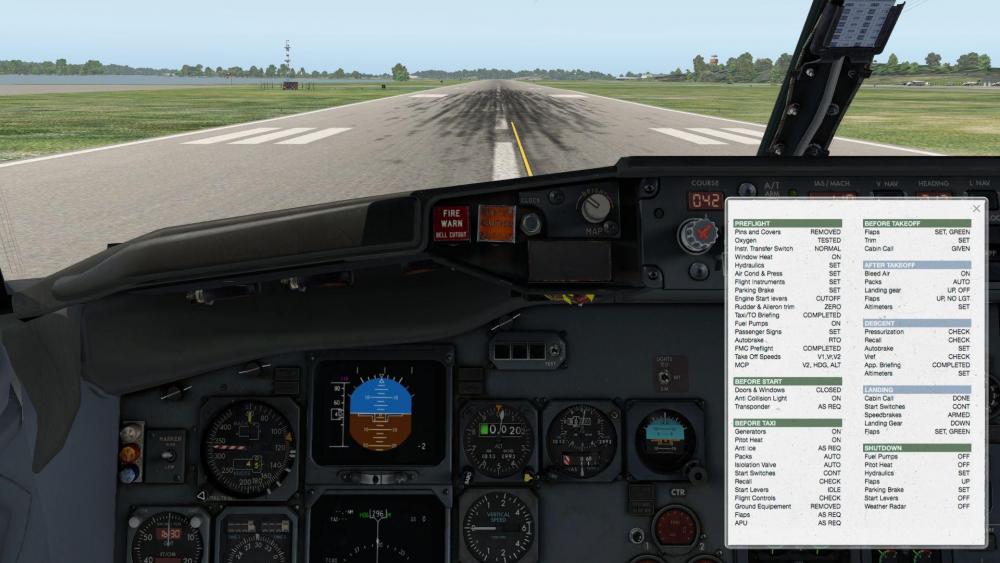
Huh, that is really weird. The checklist is a simple .png file with 1024x1024 pixels, found in the main folder of the 737. Maybe you have opened it, turned and resaved it? It should look like the pic below, clicking on it swaps the front and back... Regarding the views - we planned to remove the "preset" views, but found that some people still like and use them. They are from a time when there was no "custom views" in X-Plane. Nowadays it is much easier to set up views the way you like, then press CTRL-NUMPAD key (any number) to save a view, then the NUMPAD key (same number) to recall it. You can also map those custom views to your joystick buttons. So if the default views give you trouble, just use the default X-Plane view system. Cheers, Jan
-
There is one more thing you can try - switch off the WXR SYSTEM switch (found between the two CDUs). Some meshes have a very high count of elevation points - our weather and terrain radar scans these elevation points at regular intervals and we had reports of those causing "code slowdown" every few seconds. The other question is: What kind of framerate are you getting with OpenGL and with 11.50? Cheers, Jan
-
Wow, nice shots! Yes, I think X-Plane still contends pretty well with MSFS at night! Regarding the rudder - on the real 737 you do not need to use the rudder at all - except when taking off and landing (to track the centerline) and when you "decrab" for landing in a strong crosswind. Obviously you also need it during an engine failure - thats why the rudder is very potent, it needs to be able to offset the large assymetric thrust when an engine failed. So during "regular flight" you should not use the rudder at all, there is no need for "turn coordination", as the roll spoilers cancel any adverse yaw. That being said, the rudder shouldn´t cause you to crash, maybe your butterfly switch is set up in a way to "increase" the deflection while it is pushed down, reaching large angles very quickly? You can output the values for flightcontrol deflection as "small green numbers" on your screen if you choose the Data Output tab and click on the leftmost box for "flight control deflections" - that lets you troubleshoot problems like that. Cheers, Jan

