skiselkov
-
Posts
491 -
Joined
-
Last visited
-
Days Won
40
Content Type
Profiles
Forums
Latest X-Plane & Community News
Events
Downloads
Store
Everything posted by skiselkov
-
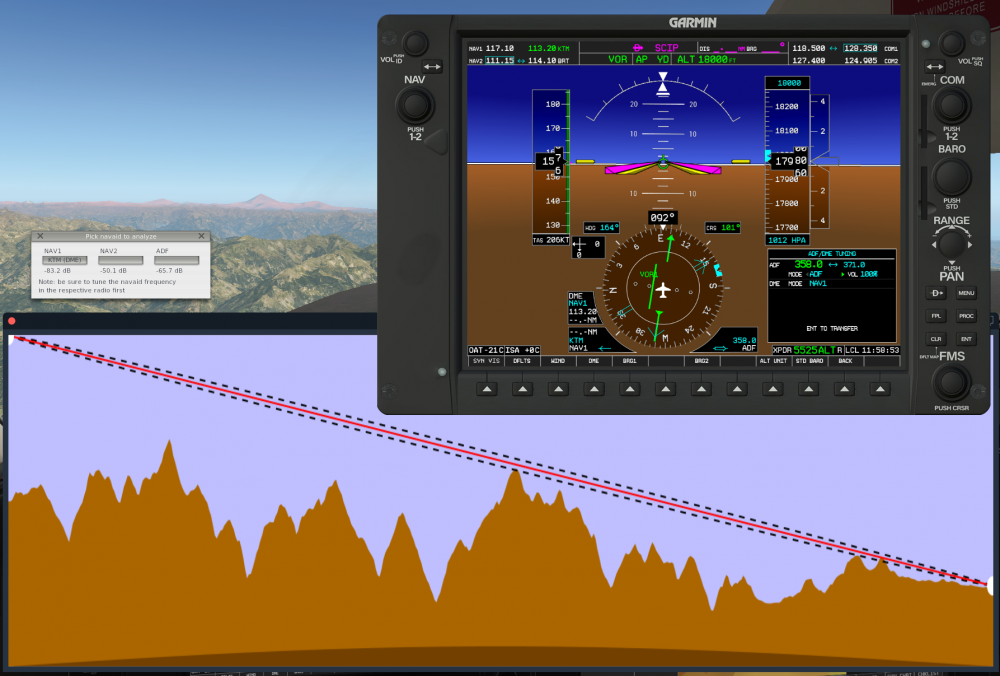
The easiest solutions are to either climb higher, pick a different navaid that's closer, or use a different method of navigation (e.g. GPS). VOR navigation in mountainous terrain is a challenge in real life too. In your case I was able to confirm that solid KTM reception at 70 miles was possible only from 19,000 ft and higher. Any lower and the mountain tops around Kathmandu start interfering with the signal considerably. If you absolutely need a lower flight altitude, you can always try to use a secondary navaid for positional triangulation (the screenshot below you can see I used VTN NDB to get a station bearing - this can be used to confirm your along-radial position).
-
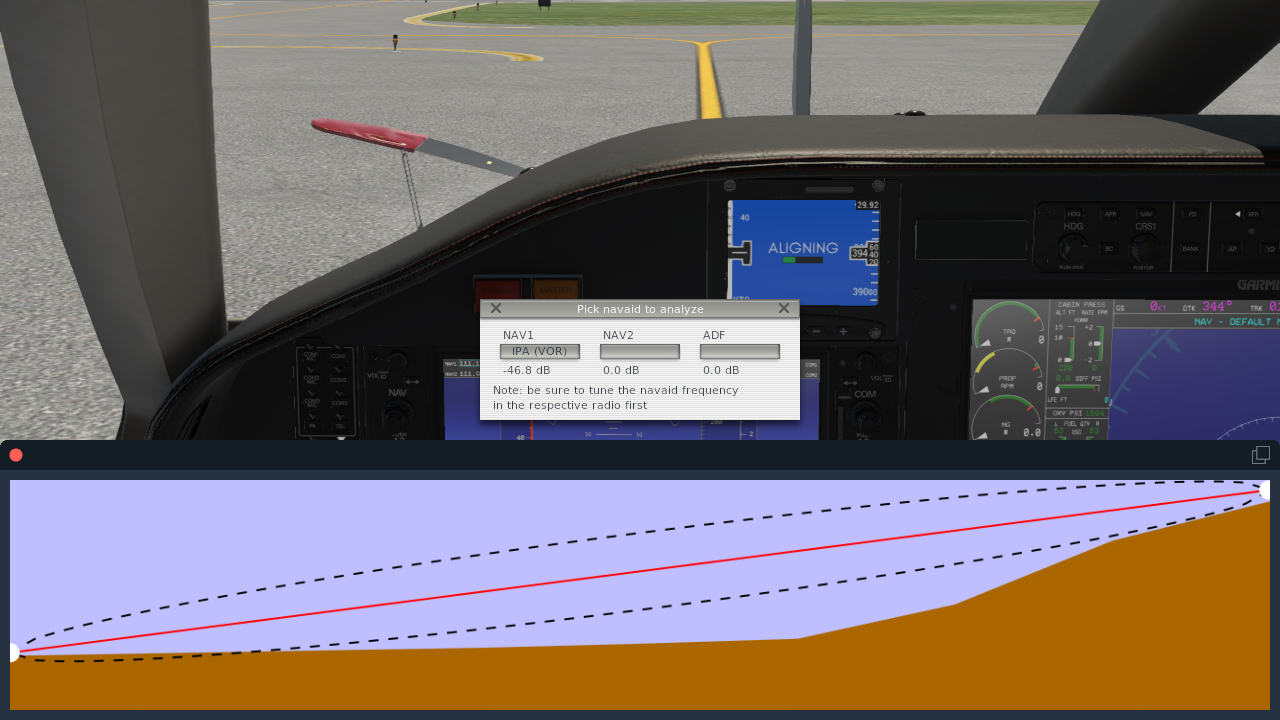
We use a custom VHF and HF navaid modeling algorithm that is not based on X-Plane's service volumes. Instead, we use the NTIA Irregular Terrain Model to estimate radio wave propagation between the navaid and the aircraft. We also properly model terrain obstruction. The reason you lost DME and could still see the VOR radial was because DME and VOR signals use different frequencies (DME is at approx 1.1 GHz, VOR at around 100 MHz) with different propagation characteristics. VOR signals are more resilient in partially masked conditions due their longer wavelengths having a greater propensity to diffract over knife-edge mountain tops. You can observe the radio model at work in real time by tuning a frequency, and from the simulator menu choosing Plugins > TBM900 > Debug > Navaid reception profile. The pick the navaid you wish to analyze from the drop down menu and the systems simulation will show you a terrain relief of the terrain along the path from you to the navaid:

-
We use standard X-Plane G1000 commands on the MFD keypad. See Resources/plugins/Commands.txt - you'll want to look for commands starting with "sim/GPS/g1000n3". Those are the commands understood by the MFD.
-
Framerate dips when panning around is indicative of texture swapping taking place. Can you provide a screenshot of GPU-Z's Sensors tab? Also, what is your texture quality set to. Did you make scenery changes between 1.0.5 and the latest version? What I suspect is that the texturing setting is set too high and with the extra load of orthophoto imagery can overflow your available VRAM, forcing the driver to swap textures in and out of VRAM on the fly, especially when panning around the scene (the driver swaps out textures that are not in view and tries to replace them with new textures that have come into view).
-
Your Mesa version appears to be quite old. Tested with Mesa 18.2.2 and the airplane loads without issues. We require at least OpenGL 4.2 compatibility in our shaders for AMD GPUs (your driver only advertises version 3.0). Here is an article that explains how to get Mesa updated: https://www.linuxslaves.com/2018/10/mesa-1822-released-how-to-install-in-ubuntu-1804.html Should be a simple matter of adding a PPA and running dist-upgrade.
-
Seems to work just fine: Also no freeze on sim exit. The freeze is indicative of a connection issue or a very slow connection. The chart loader tries to download the chart for 5 minutes before giving up - if you quit the sim during that time period, it can block on the background thread to finish.

-
Mistake in publishing, the update should have been named 1.0.9b from the start. That is by design. When the flight is complete, the passengers get off the airplane. The conditions are simple: the sim has been properly shut down (i.e. not a crash) and the aircraft is stationary.
-
We will be looking into that in the near future.
-
Build 1.0.9b should fix these issues. Found the crucial piece in the failure simulation code which was triggering too eagerly.
-
Please try in version 1.0.9b, especially check the maintenance manager. We have added a bunch of fixes to systems not displaying as broken when they are broken.
-
Unfortunately no, we do not support version downgrades. When on a programmed ILS approach, the aircraft initially flies in GPS mode, then when inbound to the final approach fix it will switch over to LOC mode and start tracking the localizer. Prior to 1.0.9b, we used to have a condition there that the horizonal deflection (HDEF) of the CDI had to be less than 2.5 dots before automatic LOC tracking on the autopilot would be enabled. That condition was causing trouble, as the G1000 would sometimes switch to LOC mode before less than full CDI needle deflection was detected (happened on very steep turns to final - around 90 degrees). So we got rid of that condition. It's not realistic, but it's the only way to work around this bug in the underlying G1000 simulation.
-
What framerates are you seeing on the TBM900?
skiselkov replied to skiselkov's topic in General Discussion
Thank you @danhenri and @fireone! -
Yes, there was a regression in 1.0.9 where we inadvertently broke persistent files created in earlier versions on Windows machines. Recreating those state files should address the issue.
-
What framerates are you seeing on the TBM900?
skiselkov replied to skiselkov's topic in General Discussion
@argonius Thank you for testing, will update the data. -
Can you please post the Log.txt from the crashed run. Unfortunately Windows Event Viewer isn't really usable, as all it says is "Crash in the TBM code, somewhere, for some reason".
-
IRL there is ambient light scattering going on inside the cockpit, which helps brighten things up quite a bit. That doesn't happen in the sim due to lighting engine limitations. So if we were to just make the surfaces color-accurate as they are IRL, they'd look unusable in the shade. We've tried to strike a balance here, but we might need a somewhat more drastic approach. We'll be looking at some more workarounds for the lighting model in the next update.
-
The fix will be out tomorrow for everybody. You will be notified via an e-mail to your X-Aviation e-mail account, and we'll also put an announcement in our Discord group.
-
What framerates are you seeing on the TBM900?
skiselkov replied to skiselkov's topic in General Discussion
Thank you for testing, appreciate the help! -
What framerates are you seeing on the TBM900?
skiselkov replied to skiselkov's topic in General Discussion
The screenshot got cut off there I'm afraid. Can you please expand it? Or just place the data pertaining to your setup into a comment. Text is OK, I can edit the spreadsheet on the first post and update it. -
What framerates are you seeing on the TBM900?
skiselkov replied to skiselkov's topic in General Discussion
I apologize, I should clarify that! Thank you for bringing it to my attention! -
What framerates are you seeing on the TBM900?
skiselkov replied to skiselkov's topic in General Discussion
Please don't disable pieces of the aircraft avionics. They are required to be loaded at the same time and changing their load state while in the aircraft can lead to unpredictable behavior and crashes. -
Thank you. I'm going to mark this issue as "solved" for the time being. If you encounter a low-fps situation in the future that you believe is caused by the aircraft, please reopen this issue and we'll take another look.
-
We will be introducing a way to reset the aircraft to Cold & Dark on an aborted flight in a future update soon. For now, you can get a clean airframe by going into the Airframe Manager and clicking "Create new airframe" (you can then delete the old one). Also, whenever a crash-to-desktop occurs, please save the Log.txt file immediately, before restarting the simulator (otherwise the log gets overwritten). The Log is invaluable in being able to figure out what's going wrong.
-
This depends a lot on your graphical quality settings in X-Plane. Having a maxed out GPU means you probably have your anti-aliasing settings set very high, or scenery shadows or some other effects that put a lot of load on the GPU. Can you screenshot your Graphics Settings screen in X-Plane? We have people with far less performant machines getting higher framerates. It's really just a matter of finding the one setting that is dragging it down. Also, can you please screenshot the "Sensors" page on a program like GPU-Z. It should something like this: The reason is that the GPU memory usage statistics in GPU-Z are much more accurate than in X-Plane (X-Plane's statistics do not account for the VRAM overhead of the avionics, which is approximately 500 - 1000 MB, so it might be a matter of simply having the texture quality settings set a bit too high).
-
Sorry to hear it's giving you trouble. Looking at the log it seems like parts of the engine are failing due to over-heating. Can you please verify that you are keeping ITT below the red mark on takeoff? This is especially important for high altitude takeoffs with the inertial separator open. The maximum continuous ITT limitation is 840 C. Can you please make a short video of your takeoff? I'm sure that'll help shed some light on what the issue is.