All Activity
- Today
-
Is there a fix entry point for the HOLD, i.e. as shown here always LETKU ? Or can I enter the ring any place convenient for my situation ? And what about the turn radius, i.e. is it a venial sin to overshoot when speed is to high ? And one more : I assume,the FIX is alway the begin or end of the leg ?

-
If your talking about xplane ATC who knows if it works, Had people say they get told to hold but never to exit
-
 First, I do not expect anything serious about the AC in XP12, as it was not designed for use in XP12. With that out the way.... I realize that all the patch is ONLY intended to do is 'new rain (but not the right procedure to clean it), fixed the GNS430 black screen and fixed the front landing gear doors.'. Not expecting much, but my question is how accurate is the flying/handling characteristics of the AC in XP12? Is the AC still a valid representation of the original release. Again, not expecting it to be so but just curious. TY.
 -
Nice work! Normally ATC will clear you for "published holds" - or they give you holding instructions consisting of a fix, an inbound course and a timing (how long in flighttime the inbound leg should be).
-

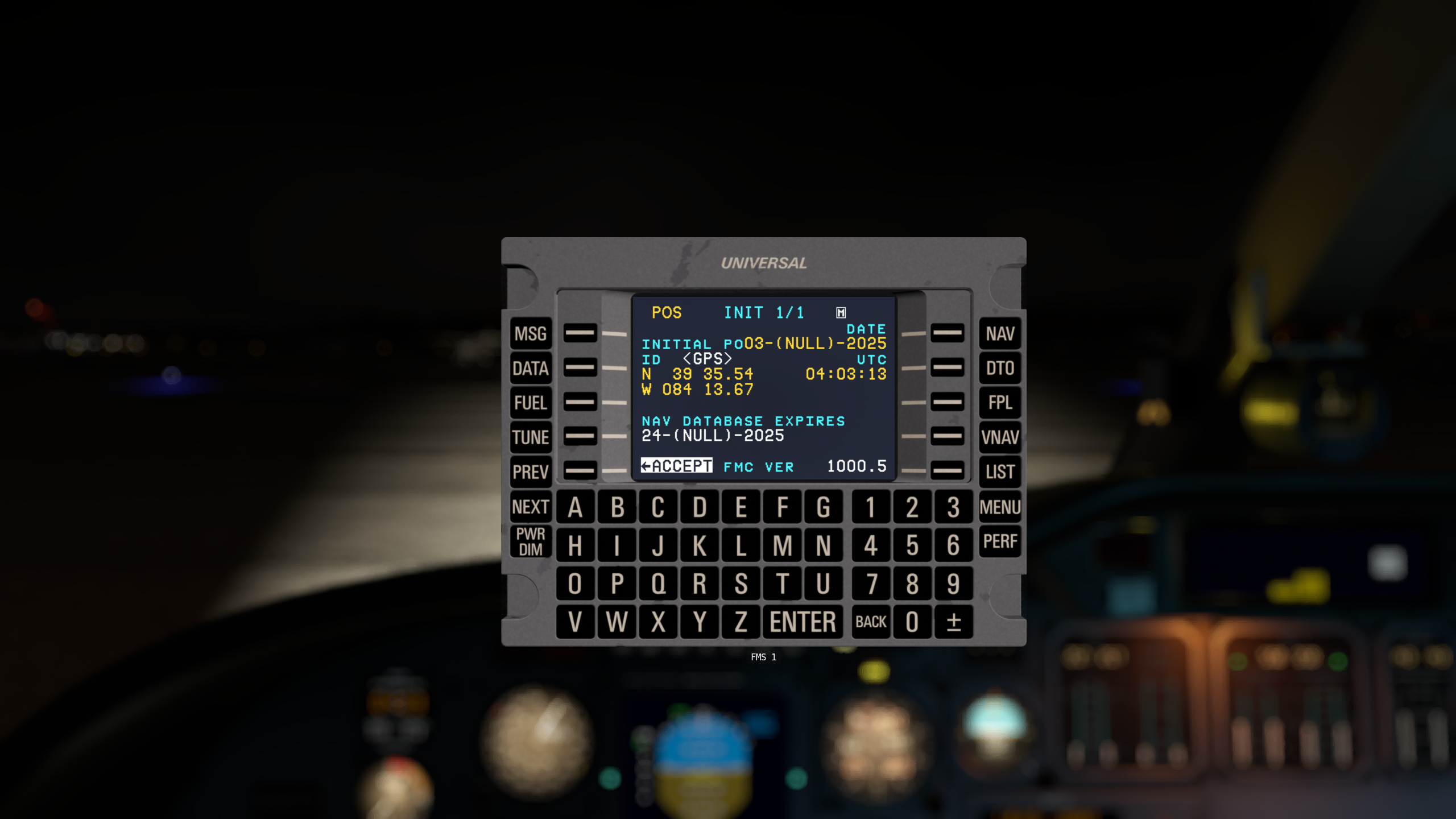
UNS-1 shows the month as NULL
UncontrolledAirSpace replied to UncontrolledAirSpace's topic in CitationJet 525
Alrighty then thank you. -

speed brakes to be constantly deployed (in Xprerealistic and Simshaker)
erarda replied to erarda's topic in Technical Support
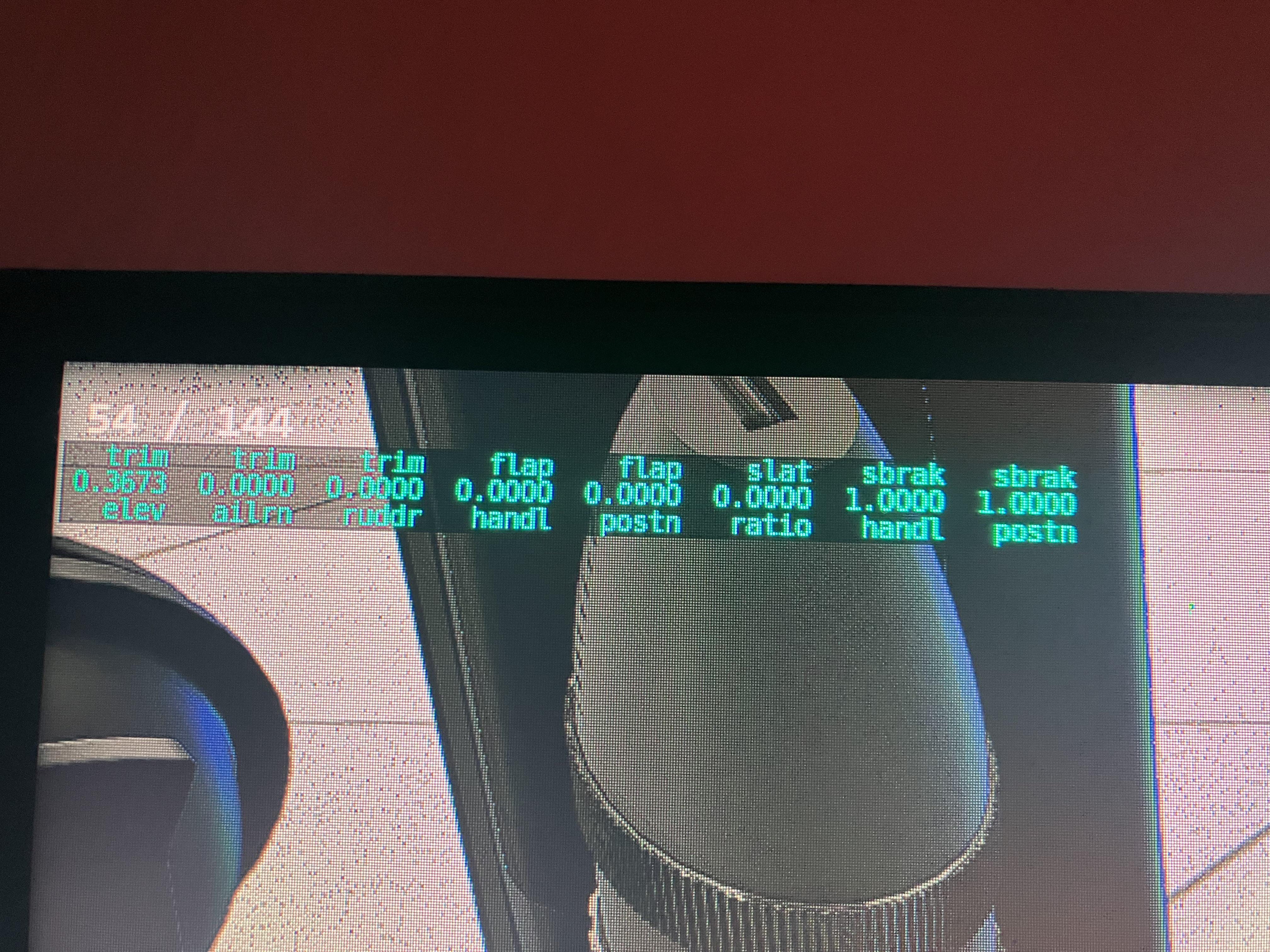
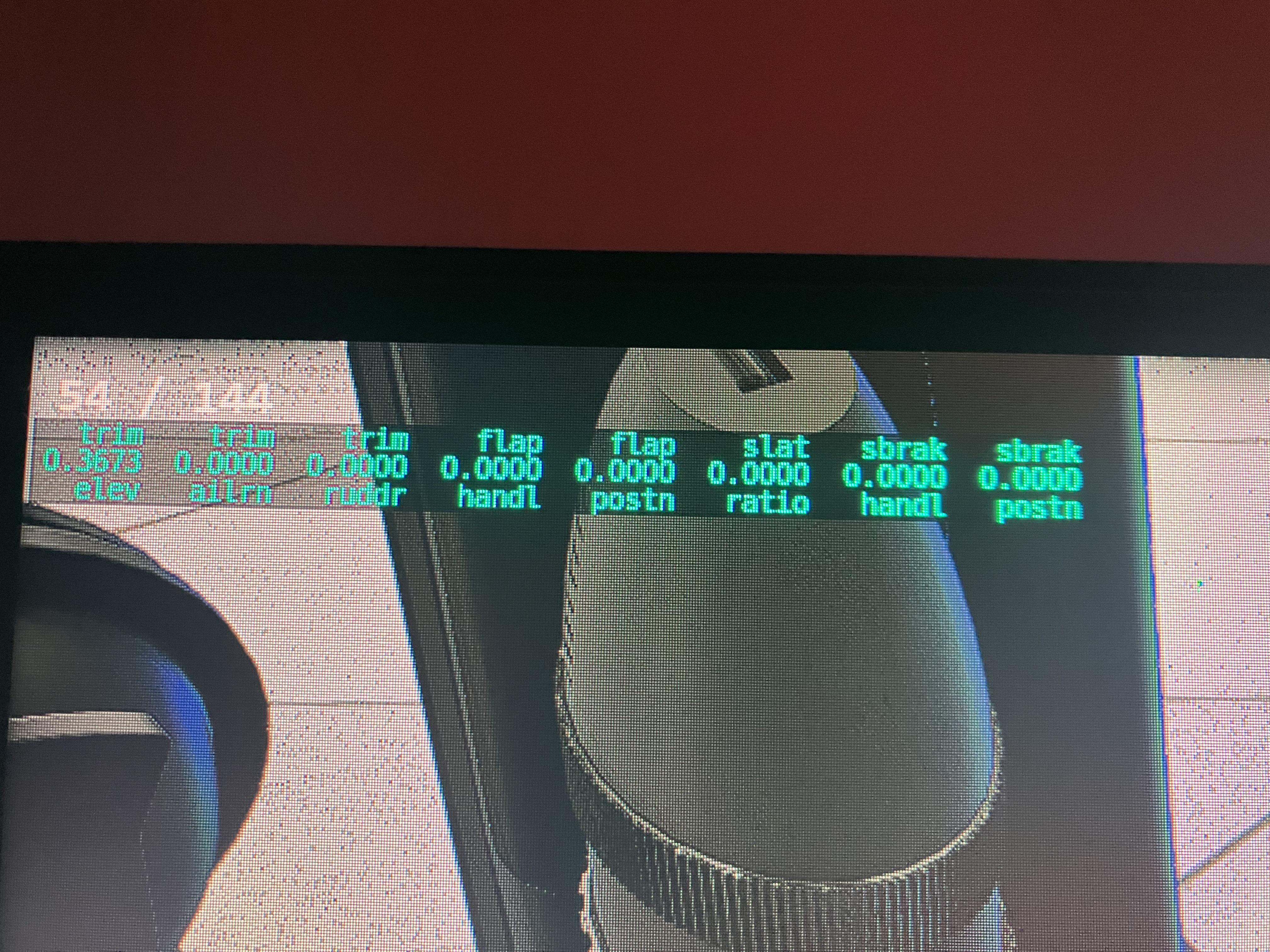
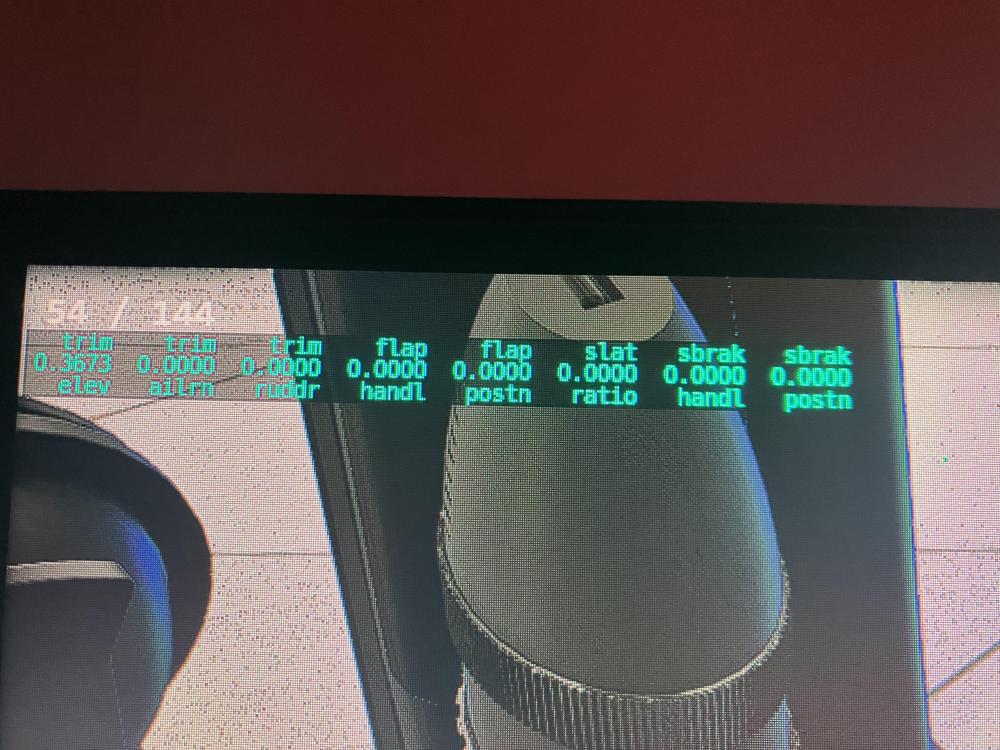
here a view of simshaker analysis with speedbrake fully retract AircraftName: CL60 EngineType: Jet Total Weight:0 lb OnGround: True SurfaceType: Concrete MaxRPM: 0 Pitch: 0 Bank: 0 EngineRPM[0]:11103 RPMPercent[0]:026% ManifoldPressure[0]:29,92PSi Vibration[0]: 0 TurbVibration[0]: 0 EngineRPM[1]:11104 RPMPercent[1]:026% ManifoldPressure[1]:29,92PSi Vibration[1]: 0 TurbVibration[1]: 0 EngineRPM[2]:00000 RPMPercent[2]:000% ManifoldPressure[2]:00,00PSi Vibration[2]: 0 TurbVibration[2]: 0 EngineRPM[3]:00000 RPMPercent[3]:000% ManifoldPressure[3]:00,00PSi Vibration[3]: 0 TurbVibration[3]: 0 PropRPM[0]:01907 RPMPercent[0]:000% PropRPM[1]:01923 RPMPercent[1]:000% PropRPM[2]:00000 RPMPercent[2]:000% PropRPM[3]:00000 RPMPercent[3]:000% PropRotationAngle: 0 EngineStarter[0]:False% EngineStarter[1]:False% EngineStarter[2]:False% EngineStarter[3]:False% APURPM:0 AfterburnerPercent:System.Int64[]% EngineRotorRPM[0]:0% EngineRotorRPM[1]:0% EngineRotorRPM[2]:0% EngineRotorRPM[3]:0% GroundSpeed:0 kts TrueAirSpeed:0,2 kts Acceleration Body X: 000,00 , Y:000,00 , Z: 000,00 feet/s Acceleration World X:000,00 , Y:000,00 , Z: 000,00 feet/s Velocity Body X:000,00 , Y:000,00 , Z: 000,00 feet/s Wind Aircraft X:000,00 , Y:000,00 , Z: 000,00 knots GForce: 1 AoA:35,3 ° AboveGroundLevel:0 feet StallAlpha:10 ° SpeedbrakesPercent[0]: 100% SpeedbrakesPercent[1]: 0% TrailingFlapsPercent[0]:0% TrailingFlapsPercent[1]:0% LeadingFlapsPercent[0]: 0% LeadingFlapsPercent[1]: 0% And now fully open SpeedbrakesPercent[0]: 0% SpeedbrakesPercent[1]: 0% TrailingFlapsPercent[0]:0% TrailingFlapsPercent[1]:0% LeadingFlapsPercent[0]: 0% LeadingFlapsPercent[1]: 0% And you have photo of the sending data by Xplane. FULLY RETRACTED FULLY DEPLOYED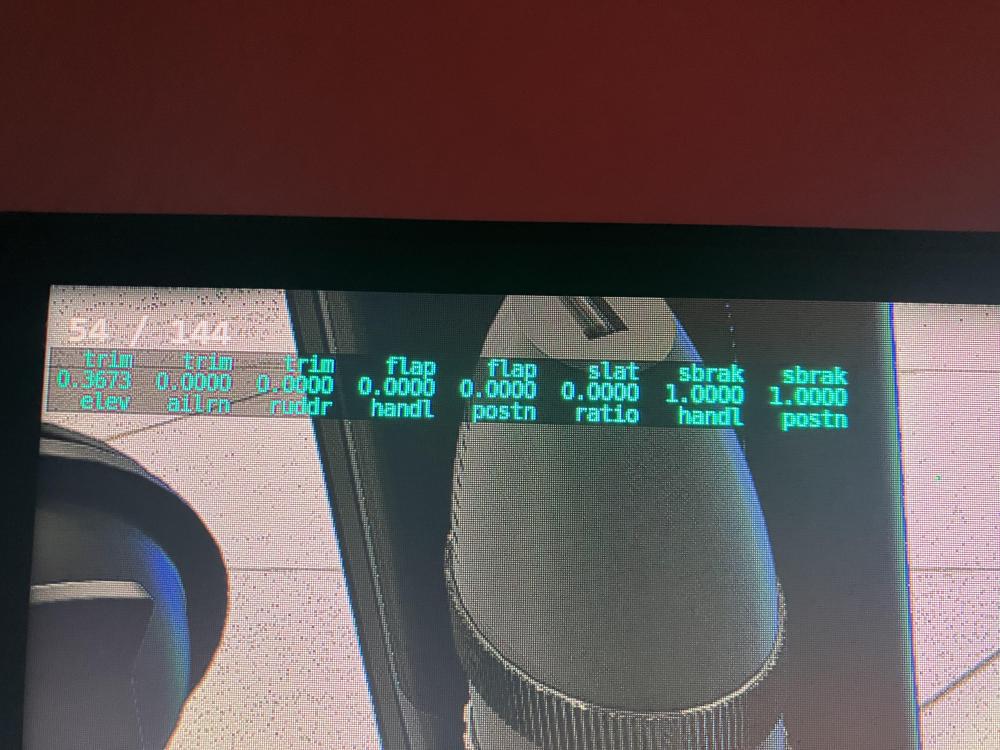
-
Bump...
-
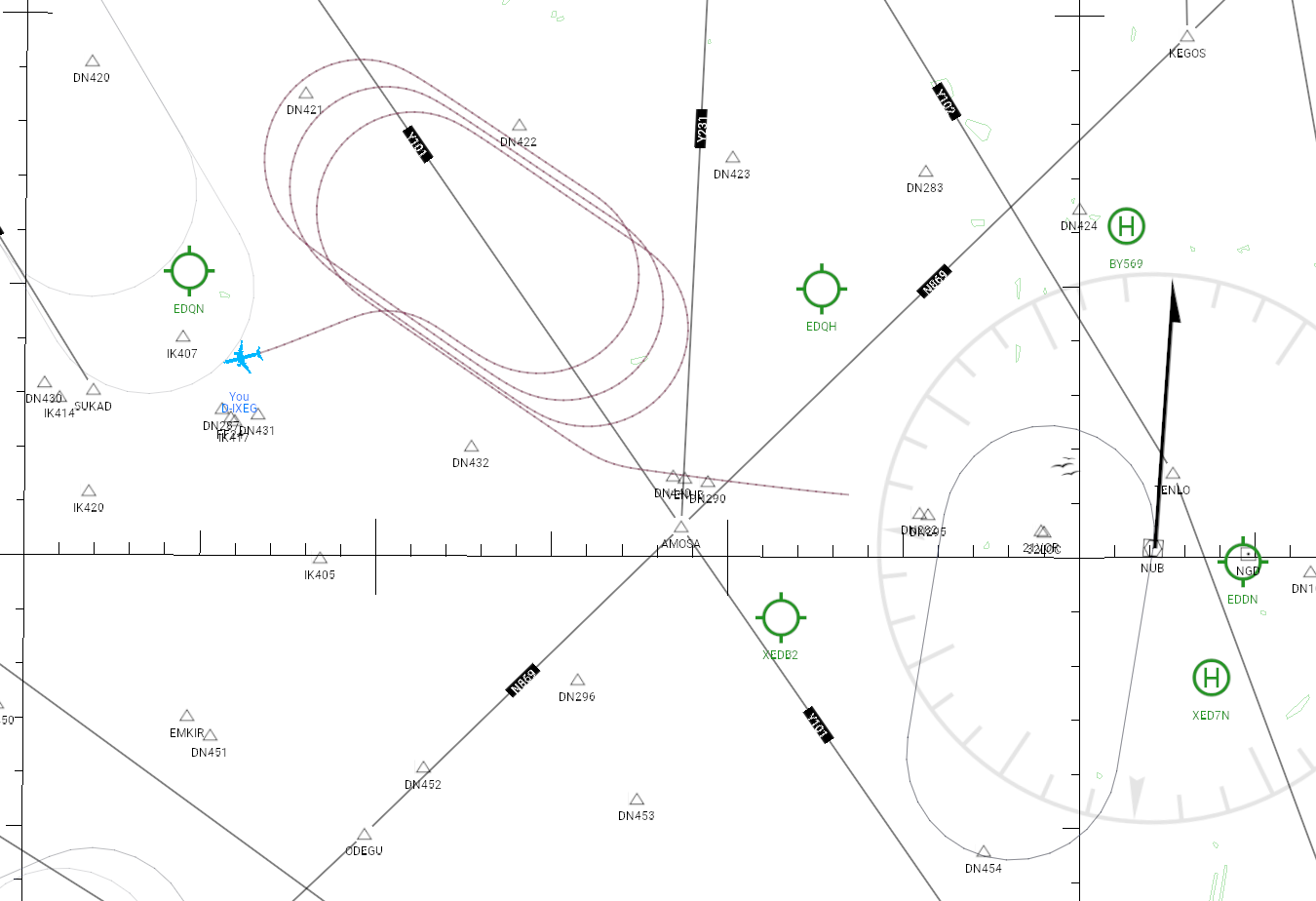
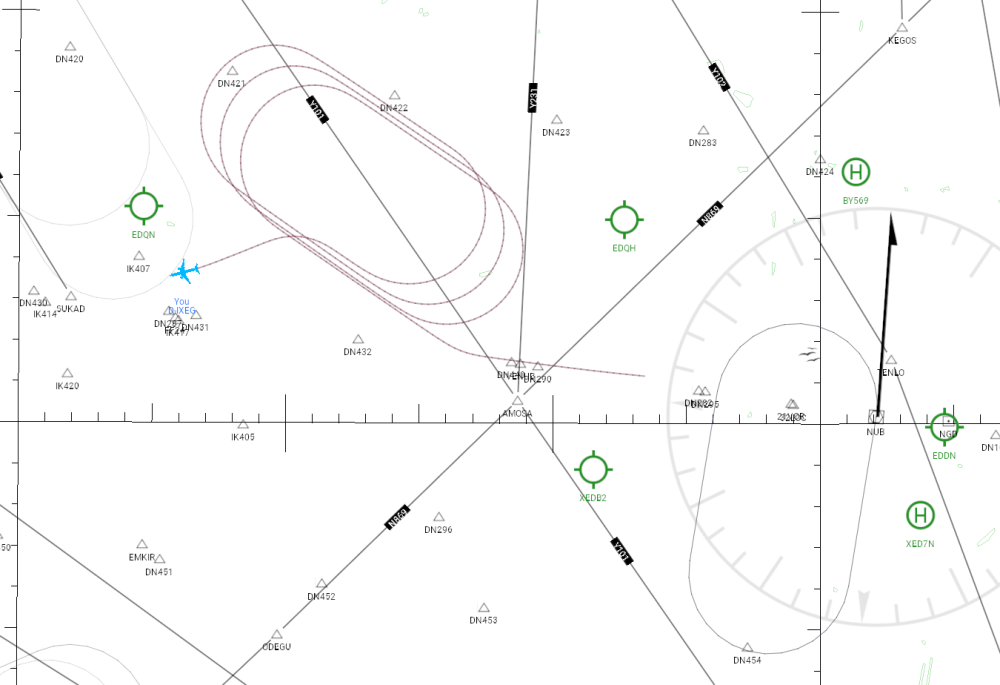
Hi all I wrote a small LUA script to fly a hold starting at any chosen point. As you can see in the picture, it already works quite well. I haven’t compensated for wind drift yet, therefore there still may be a shift. In my script, I specify the heading of the leg as well as its duration in seconds. I set the bank angle to 25 degrees. The speed is manually set to 215 knots, and I define whether the turn should be to the right or to the left. In principle I allow any reasonable altitude and of course altitude changes. The picture also shows a defined hold nearby, which seems to have a different size. Less bank angle ? Higher velocity ? So I would like to ask, what instructions does ATC issue when they clear an aircraft to hold ? And, by the way, does someone know how to write with LUA directly into the FMC scratchpad without "typing" every character via the keyboard. Thanks a lot
-
Same problem here, no DA40NG menu in X-Plane 12 menu bar. I used Plugin Manager to disable all plugins, reinstalled DA40NG and no change. What does @Rando mean my "Moving" all third party plugins? ******************* Quick feedback. Running the .exe installer for Windows resulted in Avast! giving a virus warning and sandbox. Disabled the anti-virus block and re-ran the installer and the menu appeared.
-
 mertkof75 joined the community
 -
 francois lep joined the community
 -
 AldoOrozco1 joined the community
 -
speed brakes to be constantly deployed (in Xprerealistic and Simshaker)
erarda replied to erarda's topic in Technical Support
That’s not a solution to fix the problem. there is something wrong with the code of the speedbrake. If it was only Xprealistic ok but other program use this data like simshaker or simhaptic. -
You can Google for "wmm 2025."
-

speed brakes to be constantly deployed (in Xprerealistic and Simshaker)
Pils replied to erarda's topic in Technical Support
Yea, well, don't use XPRealistic? -
No. It's just a software bug. A fix has been delivered to TorqueSim by the developer, and is awaiting release.
-
 Sugarkhan joined the community
 -

Official TorqueSim CitationJet 525 Paint Kit (interior)
fried cactus commented on Coop's file in Take Command! CitationJet 525
 Yeah for me the same:(
 -
 alstr joined the community
 -
I noticed in the log file: WARNING: the magnetic model WMM.COF is out of date. The model is valid for years 2020.0 -- 2025.0, but according to our internal clock, the year is 2025.9. Please contact Hot Start for an updated magnetic model, or download a new model file from NOAA (https://www.ngdc.noaa.gov/geomag/WMM/wmm_rdownload.shtml) I followed the link but can't see an updated model. Is there one available?
-
speed brakes to be constantly deployed (in Xprerealistic and Simshaker)
erarda replied to erarda's topic in Technical Support
and this one too -
speed brakes to be constantly deployed (in Xprerealistic and Simshaker)
erarda replied to erarda's topic in Technical Support
There is a old post about this problem here. -
 dertyy joined the community
 -
Hello everyone, Is there anything I can do on my end to fix this? For what it's worth, I'm using the latest AIRAC cycle from Navigraph.
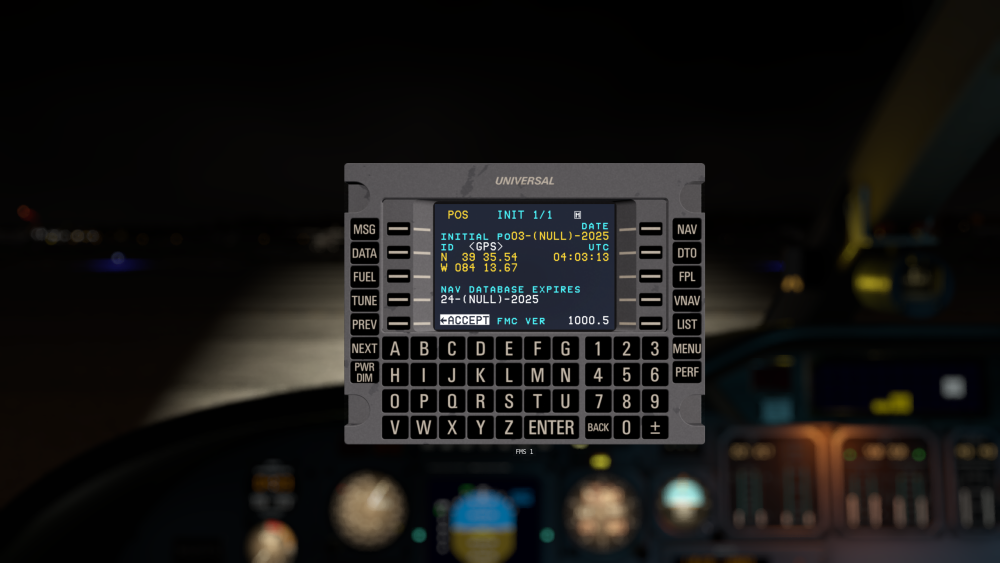
-
speed brakes to be constantly deployed (in Xprerealistic and Simshaker)
erarda replied to erarda's topic in Technical Support
Of course I will. -
 emale joined the community
 -
 GalulazLemo joined the community
 -
 ewforbess joined the community
 -
speed brakes to be constantly deployed (in Xprerealistic and Simshaker)
Pils replied to erarda's topic in Technical Support
I don't think the devs claim any compatibility (or incompatibility) with either solution. And I doubt they'll be installing them (especially as it's dubiously-supported payware). Can you provide more technical details? Such as captures from DataRefEditor? No-one else has reported these problems in 4 years since release. Thanks. -
 Kereru joined the community
 -
Thank you for your reply. One more thing, I noticed that the aircraft considers the speed brakes to be constantly deployed (in Xprerealistic and Simshaker). I think the data sent to these programs is reversed.
-
This is due to a simulator bug in 12.3, there is no known workaround. We are all waiting patiently for a fix to be released by Laminar Research. Sorry for the inconvenience.
- 1 reply
-
- 1
-

-
The aircraft must be in trim, and the button must be held down for a few moments. If you're still having trouble, please provide a video, preferably in high resolution.
- Yesterday
-
hello, here is my log file always the same thing. Best regards Anthony. Log.txt Log1.txt
-
challenger 650 When I press the AP button, the AP does not engage.