All Activity
- Past hour
-

Hot Start Challenger 650 - Sun-Air OY-LLG
Full-Flight reviewed MadProf's file in Hot Start Challenger 650
 This is absolutely stunning, the custom interior is top class as well. Kudos!
 -
 hunspotter joined the community
 -

Take Command! Hot Start Challenger 650 v1.9 Update Released!
Cameron replied to Cameron's topic in Technical Support
-
The installer monitors the products you have purchased that still utilize Gizmo. If none of these products are in need of it, you will not be presented with the option. Instead, it will simply delete Gizmo, as you no longer require it.
-
Has been resolved by support! Thanks for the great Support and Help! Sry for cluttering the forum with it!
- Today
-
Not this time for some reason. When I updated the SR22, it offered then, but the CL650 was still using it so I said no. I tried the SR22 again but it didn't offer either?
-

Take Command! Hot Start Challenger 650 v1.9 Update Released!
Jota replied to Cameron's topic in Technical Support
Hi, I downloaded the installer for the latest version, and when I enter my email address for installation, I get a message saying: "I need to specify its value..." What's happening? Thanks -
Hello I bought the Challenger a few weeks ago. To be exact at Friday 03 April. I just downloaded the 1.9 Release. When i entered the FBO i had two Login Screens for the activation. I entered my correct Credentials. I restarted X-Plane once, because i forgot Map Enhancement. The first screen with the Login was still there. I entered my credentials once more, and it told me "Account banned"? How can something like this happen? I didnt do nothing. It worked 5 minutes earlier. Can someone of the support team unban me and tell me why this happend? Kind Regards

-
-
 Balazs joined the community
 -
That is what I thought it was and when iI put an altitude in takes the input but the FDR Fail on MDF does not go off.
-
 Phoenixol joined the community
 -

Say intentions connectivity issue with v1.9
Tainomabuk replied to Tainomabuk's topic in Technical Support
ok ty. -
-
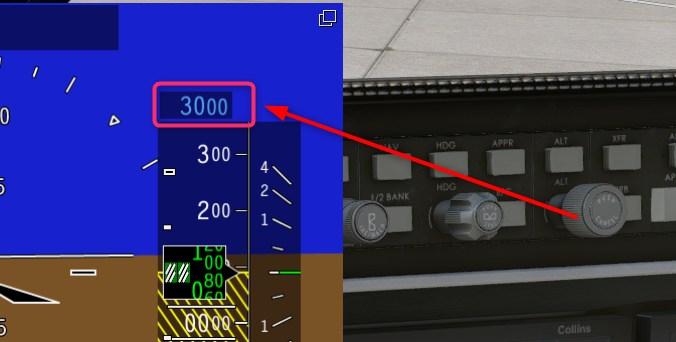
The altitude target, on the PFD.
-
Solved issue
-
Pils where is the pre-selector?
-

Challenger 650 not found with the new xplane 12 version
Pils replied to mati2124's topic in General Discussion
Please provide Log.txt from simulator. -
@FrySimulation provided an alternative method if the above doesn't work (thanks Microsoft!). Follow "Change high DPI settings for a particular app" on https://www.thewindowsclub.com/windows-scaling-issues-for-high-dpi-devices.
-

Challenger 650 not found with the new xplane 12 version
dbw11 replied to mati2124's topic in General Discussion
I've just installed 1.9 and it does not load when XP12.41 start up procedure, aircraft selection to CL650 has been made, gone through the CL650 start up selections.....and I end up with a gray screen. I check within the CL650 version info in the CL650 and other than identifying 1.9.0 there is nothing there. Please advise. Thank you. -
ATIS was deliberately not mentioned in the release notes, and is not supported at this time.
-
Put an altitude in the pre-selector.
-
Take Command! Hot Start Challenger 650 v1.9 Update Released!
Pils replied to Cameron's topic in Technical Support
Yes. -
https://www.windowscentral.com/how-adjust-display-scale-settings-windows-11 Set scaling to 100%. And text size to normal. Then reboot and try again.
-

Take Command! Hot Start Challenger 650 v1.9 Update Released!
DanielR replied to Cameron's topic in Technical Support
As this topic got unlocked again, I guess questions about the update are OK to post here. Nice update, thanks for that! When installing the new version (on Windows), will all settings, state etc. from the former installation be preserved? Generally, a note "how to perform the update" should be part of any release announcement so people can see wether it's a no-brainer (just install "over" previous version, settings preserved) or involves effort to get into a "usable state" again. Thanks! Best regards, Daniel -
updated to ver1.9 of cl650 and get VNAV sensor failure message. ECAS on MFD shows FDR fail in white. How do i clear it.
-
I can't install the new update. I run the Windows installer and am asked to enter email address. I enter my email followed by next. I get a message must enter value. Can't get any further.
-
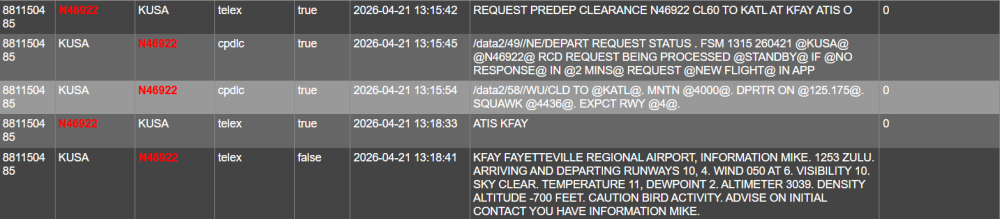
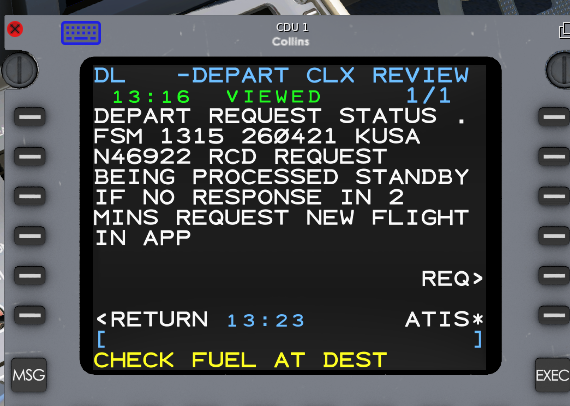
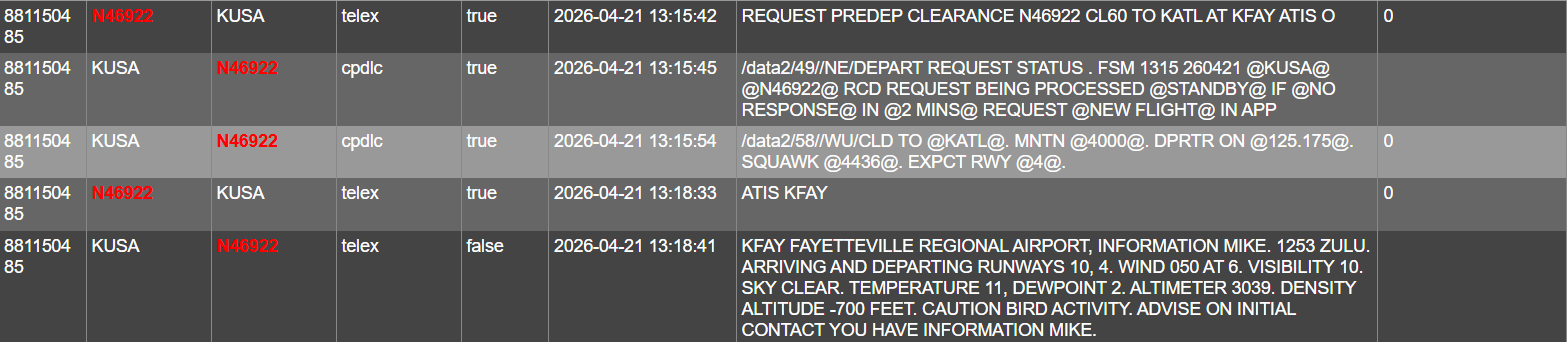
Say intentions connectivity is not operating correctly. I can log in to the network via FANS, but ATIS and Clearances never arrive. ATIS seems to still be retrieving real-world, but not ATIS from SI. The ACARS log at https://acars.sayintentions.ai/ shows the responses are being sent. I eventually received confirmation that the clearance request was received, but nothing after that. Also, it's possible to request ATIS via telex on SI, which I did through SEND MSG - CONTACT MSG, which you can see was received by SI, but the ATIS message never arrives as well. I checked FANS MSG LOG, RCVD MSGS, and ATS LOG to confirm messages are not received. Log.txt