

_svg.png.5cb3bdf06cd666599edf50d1ee7b3a52.png)

Pils
-
Posts
2,375 -
Joined
-
Days Won
57
Content Type
Profiles
Forums
Latest X-Plane & Community News
Events
Downloads
Store
Everything posted by Pils
-
 I've done some consulting with the developer, and the short answer is Yes. The avionics are not prepared to fly this by going direct to the FAF, this isn't considered a valid way to fly these kinds of RNAV LPV approaches. The final approach course alignment leg from SAGER is required. I believe one can intercept this leg along its path, and still be OK as long as the aircraft is established on the FAC a few miles before the FAF. The easiest way to do this while on a radar vectors (HDG) is to bring the SAGER waypoint on the LEGS page to the top "FROM" line. Or just fly via SAGER and keep the whole thing simple.
 -
Probably unrelated. But you’ll need to post the full log file regardless.
-
It'll chase the false localizer, behavior of which is a little unpredictable, but most times I've seen people report it'll do 360s repeatedly, maybe with some course reversals mixed in. It's not a pre-programmed response, it's naturally coming from the plane's simulation of the localizer radio signal propagation. You should guide yourself in HDG or LNAV onto an intercept of 30 degrees or less, or better yet, all the way onto the final approach course. Unlike other aircraft, because ATC says "cleared approach" doesn't mean you must/should arm APPR and/or switch to "green needles" manually. It's ok to use the FMS as long as you've switched to using the localizer passing the FAF (or if ATC explicitly say to use the localizer before that, like they often do at LAX, for example). Some more information from irl Challenger pilot and one of our consultants:
-
APU battery showed 0V, and next to it "BATT OFF"
Pils replied to RonMont's topic in Technical Support
Either it's disconnected, or it's flat. Make sure it's connected in the menu as such: If it's disconnected, connect it; if it's flat, connect the DC generator to start the APU, and the APU will charge the battery.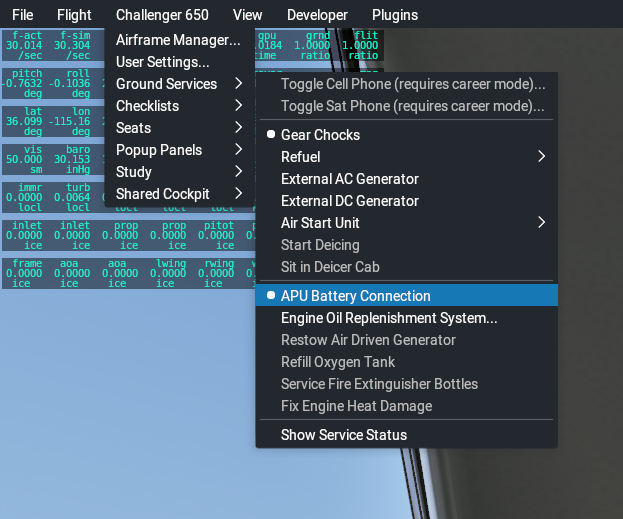
-
Two options come to mind: (1) Build you own rendering based on CDU datarefs; or, (2) Use WebFMC in cockpit builder mode.
-
What was your flight plan at the time? Looks like it was at least FRETS? This sounds like a false localizer capture, were you intercepting the approach course from an angle larger than 30 degrees?
-
Are they using the Carenado one?
-
I think it’s saying you’re in magnetic heading reference when you should be in true (north), or vice versa. Are you flying in polar regions?
-
You need to drag the switch kind of at an angle, it’s hard to describe. It’ll be made easier in the next update, in the mean time a “fix” is available on the Discord https://discord.gg/PpzJvueT
-
I don't think any such dataref exists, sorry.
-
https://discord.gg/PpzJvueT
-
Just have to use search
-
You should not.
-
Very similar, a sign in with email and password, but it’s a different plugin entirely, unrelated to Gizmo or its original developer.
-
There is, in fact, a newer version; the non-beta release version of V1.8. You should have switched like 6 months ago. But better late than never.
-
https://discord.gg/Seaj6hXUNp
-
Got a Log? Gizmo will go away soon. It's no longer being developed.
-
The manuals are often wrong in the little details, tbh. The current behaviour has been validated in a real airframe.
-
Can you be more specific? Maybe take a screenshot of which part your referring to?
-

-
Tune?
-
From the Log it looks like you may be missing H:\X-Plane 12\X-Aviation\ directory or it’s not writable by the sim (could be permissions, readonly, etc.).
-
Please provide Log.txt from XP
-
It’s on sale now. It probably won’t get cheaper any time soon.
-
Should just about be good enough for XP12!
