



Goran_M
-
Posts
5,658 -
Joined
-
Days Won
235
Content Type
Profiles
Forums
Latest X-Plane & Community News
Events
Downloads
Store
Everything posted by Goran_M
-
The only reason the TBM wouldn't work in this situation (switches not working and permanent GPU attached), from what I can see, is some kind of activation issue. Are you sure it's activated properly?
-
Closer by the day. I have to re-animate every switch, lever, guard, button, door, and also re-work almost all the manipulators. Most of the animations are done, but some things are still not working and we're trying to get those issues fixed.
-
This is usually down to Gizmo not being installed correctly or some kind of activation issue.
-
The G1000 brightness is not something we can control. That's Laminars G1000 fixed brightness.
-
You cannot use a controller to move the throttle when it is on the right side. The commands used for that side are: sim/engines/mixture_up sim/engines/mixture_down
-
It also depends on how close you are to the panel. The closer you are, the slower it goes.
-
You can left mouse click and hold the knob and drag it left or right. The speed at which you click and drag determines how fast the altitude, or any adjustment done by using the knobs, is changed.
-
This was added back in February and is deliberate. Actually, turning on the NAV OR Strobe lights will disable the wing tip beacon.
-
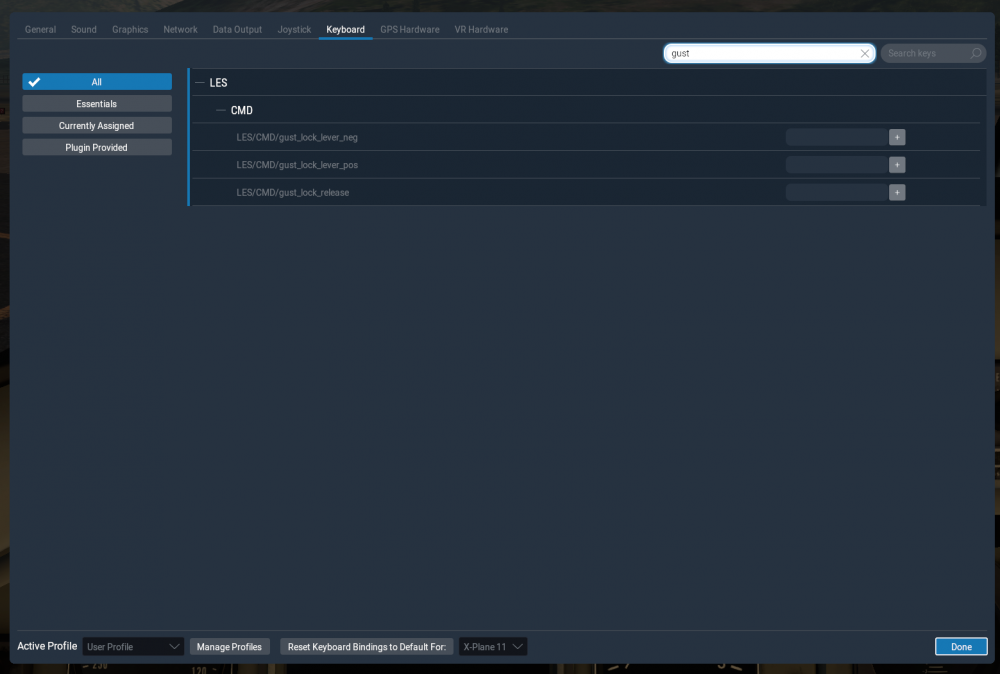
Go into your Settings/Keyboard tab. Search for "Gust" in the search field. You'll be presented with options for anything with the word "gust" in the command list. Assign a key or hardware button press for the "Gust Lock release". Last entry in the screenshot below. Add a key press or button press in the field on the right. To operate the gust lock, keep your key or button pressed for the gust lock release while operating the actual gust lock. Voila
-
Set a key press or button to release the Gust lock switch (It's spring loaded in the sim). Then while pressing that key or button, use the mouse to click and drag the gust lock.
-
Then I'll put it down to X-Plane. The best way you can tell, turn off all anti ice when you get the same conditions, and wait for the plane to stall. The weather and ice will affect the flight model to the point you will crash if ice is present. In this case, the ice SHOULD be visible on the airfoils.
-
Yes. But I was hinting at "drivers must be current to take advantage of the OpenGL that the rain and ice are using".
-
Assuming you have current GPU drivers installed, including OpenGL drivers, the code for the icing does what X-Plane tells it to do. If X-Plane says "add ice to the wings", the ice will start forming. In your case, the conditions, for whatever reason, simply weren't there. I know it seems like ice SHOULD have formed, but this comes down to the sim. Post your log.txt file, just for curiosities sake so I can see what's happening.
-
That error only occurs when X-Plane is running or hasn't been properly shut down. http://forums.x-pilot.com/forums/topic/15014-ctd/?do=findComment&comment=142406
-
When reinstalling, make sure X-Plane is not running.
-
You can safely ignore these errors.
-
Many thanks for digging into this, and for the kind comments. Hope you enjoy.
-
The only thing I can guess is that you don't have some kind of sound plugin installed, like OpenAL. But I'm stabbing in the dark.
-
The malformed data lines are nothing to be concerned about. We're still trying to nail down what is reinstalling the exception handler. X-Plane, for whatever reason, is not giving us a clue to what it is in the log file, so it comes down to a process of elimination. In the meantime, can you try turning off all AI and re-test. This is just to help us isolate what is causing the exception handler issue. In some cases it's AI.
-
That's one of the best ways to iron out problems. Once you have tested, add your plugins one at a time and test X-Plane each time. The main concern I have is the size of your log files. They are enormous, to the point of being "what the hell???"
-
Just saw this. A corrupt scenery file can easily conflict with the terrain radar in the TBM. Try removing the scenery and reload.
-
I've been involved in X-Plane for over 10 years. This is, easily, the longest log file I have ever seen. Just looking at the beginning of where the TBM is being loaded, there is a lot going wrong with the sounds. As a first step, can you try re-installing the TBM, and then removing all plugins, except Gizmo, and then try again. The VR/left eye bug was fixed for this latest version, and this is the first instance of a problem showing up in the latest update. So it it is definitely something on your end.
-
It looks like your graphics drivers crashed. Can you try reinstalling them and see if the problem continues.


