



Goran_M
-
Posts
5,658 -
Joined
-
Days Won
235
Content Type
Profiles
Forums
Latest X-Plane & Community News
Events
Downloads
Store
Everything posted by Goran_M
-
First, check the maintenance manager and make sure everything is working. If everything is in the green, try deleting your state folder and see if that fixes the issue. If not, you may need to reinstall. State folder is in X-Plane 11/Output/TBM900. If you choose to delete the state folder, you must do it with the sim shut down.
-
Do you have any external hardware that might be controlling the avionics and displays?
-
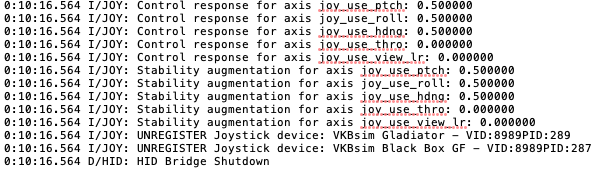
Looking at your last log file, I can see 2 issues. 1. You have some kind of uncalibrated axis, which could very well be part of the cause. And 2. You have stability augmentation enabled somewhere. Which could also be part of the problem. Regarding the other people who had a similar problem, they fixed it by getting rid of some kind of trim assignment they had on a button or axis on their hardware. Other than that, the problem seems to be isolated to your system.

-
Did you try to completely disconnect all controller hardware? This is how the problem was diagnosed in other people's configurations with the same issue. When hardware was disconnected, everything worked fine using keystrokes. Confirming the issue in the hardware.
-
You have a very unusual log file. The TBM isn't causing your crash. Do you have some kind of firewall blocking X-Plane or any of it's plugins? I can see the sim or a plugin trying to establish some kind of connection and failing each time. After many unsuccessful tries, it just shuts down in a clean exit.
-
Excellent.
-
Explains why it was such a unique problem. Thanks for letting me know.
-
We have seen this behaviour in a handful of other peoples installs, but it was because of some kind of script or rogue assignment in their hardware. In your log file, I can see a lot of plugins, some of which could be interfering with the controls. Can you remove all 3rd party plugins except Gizmo and try again. I just ran a test on my end and all controls are working fine in the latest version.
-
I've passed your log on to Saso. Either he or I will post back with any other findings.
-
You could either try that or removing all 3rd party plugins and scenery (a clean install of the sim would be best) and then just install the TBM. Then test.
-
I have asked around, and there are other cockpit builders who are not having these crashes. I was waiting for a few more people to get back to me, but so far, from the people who have gotten back to me, no crashes. Taking into consideration I don't have a cockpit, is it possible the file could be corrupt or misconfigured somehow?
-
You have a lot going on in your scenery folder. If you look towards the end of the log file, you’ll see a lot of duplicate obj’s. This looks different to your first log file. Can you try loading the TBM in a default scenery location. Preferably a small airport like SABA. Please post back if it crashes again.
-
Can you try with single display only to see if it appears? Then we may be able to diagnose further.
-
I want to try an order of things here, but one thing at a time. The first thing I see is X-Plane is installed in your Program Files folder. Could you try, just as a test, move it out of your Program Files folder and re-test. Simply copy and paste it to your desktop or another location outside of Program Files. No need to worry about registry entries. Please post back with results.
-
Nothing was changed in the controls of the aircraft in any of the updates. I'm suspecting some kind of calibration issue. Could you try unplugging your hardware and doing a test flight with your mouse. If the problem goes away, it's a certainty the problem is with your hardware. If the problem remains, then we'll diagnose further.
-
If you downloaded the log file you attached to your original post, the section I attached can be found at the bottom. If you are looking at a new log in your X-Plane folder, that gets overwritten each time you open X-Plane.
-
 The aircraft state folder is located in X-Plane 11/Output/TBM900 If the aircraft went crazy on the ground, it means you have a corrupted scenery tile. If it is a custom scenery, perhaps contact the developer and ask them to look into it.
 -
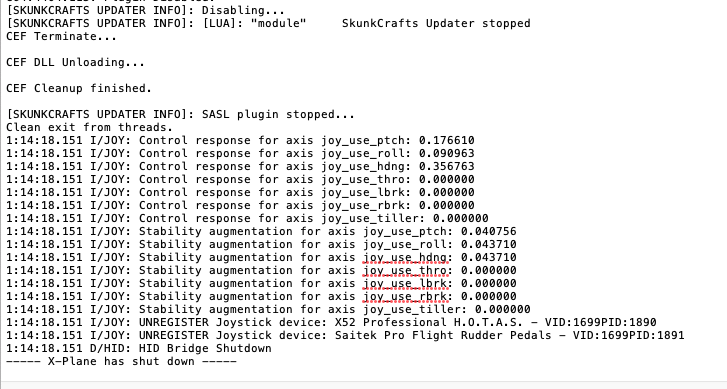
The only thing I can see happening is Skunkcrafts updater stopping and X-Plane shutting down. I see nothing here that involves the TBM. Whether it was skunkcrafts shutting down the sim or not, I'm not sure, because it shows a clean shut down of the sim.
-
You may have locked yourself out of the product. Please watch this video and see if you did the proper steps to activate the TBM.
-
Are you talking about X-Plane or the TBM?
-
You'll need to contact X-Aviation support for this one. http://www.x-aviation.com/catalog/index.php and then click on the contact link. We (the developers) are unable to help with activation issues.
-
Interesting. Ok, thanks.
-
ah, ok, now I see. Perhaps in the meantime, you could assign the steering to a couple of key strokes.
-
You don't need rudder pedals. I have an X52 without rudder pedals and the twist on the stick works just fine. Make sure you double check everything, or even better, re-assign all commands to your hardware from scratch.
-
The only thing I can think of is some kind of calibration issue. As you mentioned, the TBM turned fine with your previous hardware, so the fault is not with the TBM. Also check you do not have anything else assigned to steering, as one assignment can override the other.
