



Goran_M
-
Posts
5,646 -
Joined
-
Days Won
231
Content Type
Profiles
Forums
Latest X-Plane & Community News
Events
Downloads
Store
Everything posted by Goran_M
-
Please take a look at some twitch videos. Grau Adler is one of my favourites, and he lands the TBM smooth every single time. He’s just 1 of many. I’ve also landed it several times without issue. You’ve also seen @cpuwolf land on a dirt/grass runway in the video above.
-
Sworn to secrecy. We’ll show something soon, though. It’ll be worth the wait.
-
If I say the next project, which is a damn cool aircraft, will top the TBM, it’s de-valuing the TBM. Let’s just say it’s “different”. I can safely say the next aircraft will definitely be a head turner. To top it off, we have a pilot who flies these for a living, who’ll be helping us along with performance and handling, and he’s very active in the community. Thank you very much for that comment!
-
Check airframe/control surfaces in the maintenance manager. The TBM autopilot uses the trim tabs when flying. So if your control surfaces are not working properly, the autopilot will keep trimming until it can’t trim anymore. Hence the gradual deviation off the flight path/heading. When you disengage autopilot, it goes back to using control surfaces for control. And because they’re so far out of whack, you’ll go into an unrecoverable state.
-
Bingo. And I’ll also mention, it’s not the Citation.
-
Anyone else...?
-
I’ll take a look when I’m back home. Currently on vacation until Friday.
-
Check avionics section in the maintenance manager.
-
Don’t look for an ELT option. Look for anything related to ELT. Like electrical. Is there any damage on any page at all? Does anything need repairing.
-
It doesn’t have to be on those sections. Did you check electrical?
-
Did you check all the maintenance manager options?
-
Cameron handles activation. Also, sending more than 1 support ticket repeats the support process. Essentially, you go back to the back of the line. If you have TBM issues, post them in this forum, and include a log.txt file And I think we would also appreciate it if you refrain from using the term "very bad after sales service" All you have to do is look through these forums to see the kind of after sales service we're providing.
-
It's possible, because I've seen a common thread in that. In which case, this will boil down to a bug in the default G1000. I have ortho, but all stored on the same drive as X-Plane. I'll ask around, and see who else has ortho installed on multiple drives/partitions.
-
Yes. That switch needs to be on for trims to work.
-
Did you turn on AP Trims?
-
This is a big one. Something in the TBM or X-Camera caused Windows to go a little crazy. Can I ask you to submit this log to the Laminar guys and see if they can come up with something. This is deeper than just the TBM.
-
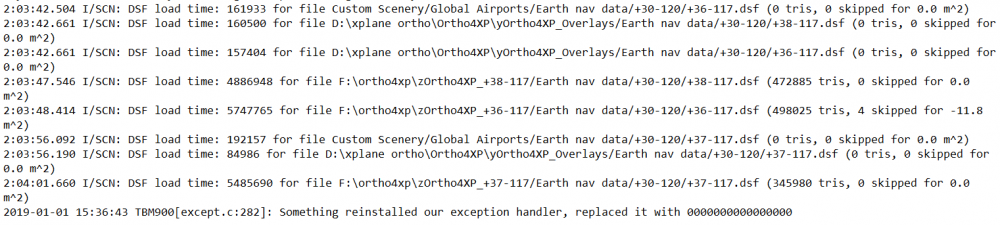
It's not a clean install. You have plugins still installed. You also have ortho scenery installed over 2 hard drives, and it looks like it might be crashing as the G1000 reads the terrain from the scenery. The crash happened as 2 separate partitions were getting accessed at the same time. This is where the 2 stutters happened.
-
If it happens again, please post your log.txt file immediately after it CTD's.
-
We've seen this happen in some situations. But not all. I haven't seen it on my system yet through the tests I've done. It could depend on certain situations, including weather. We'll run some more tests and see what we can figure out.
-
You have quite a few plugins. Can you try removing everything out of the resources/plugins folder, except Gizmo, and see if it happens again?



