



Goran_M
-
Posts
5,651 -
Joined
-
Days Won
232
Content Type
Profiles
Forums
Latest X-Plane & Community News
Events
Downloads
Store
Everything posted by Goran_M
-
Too early to tell. We're looking at moving into the jet field after the Citation and V2 of the Saab. We'll get the current batch of projects out and then take a look at the state of things.
-
Much appreciated, Sovik. It's definitely a tough one to figure out, but we're working on it. I can't throw any blame towards Laminar. They've given us a fantastic sim, that's advanced by leaps and bounds over 2 versions. So I'm prepared to do a little extra work if it means we get a fantastic sim.
-
Saab I'm working on 1.5 as I type this. V2 is several months off. Its almost an entirely new aircraft. Citation will follow the Saab. Unfortunately, no ETA as of this post, but I don't think it will be far after the Saab.
-
Will take a look today and get back to you.
-
Well, this one has me stumped. Same settings in X Plane per aircraft. Same texture resolution. Same check box ticked, but different appearance. This one is a mystery. I'll investigate further and get back to you, but I can't think of anything else that could be affecting this.
-
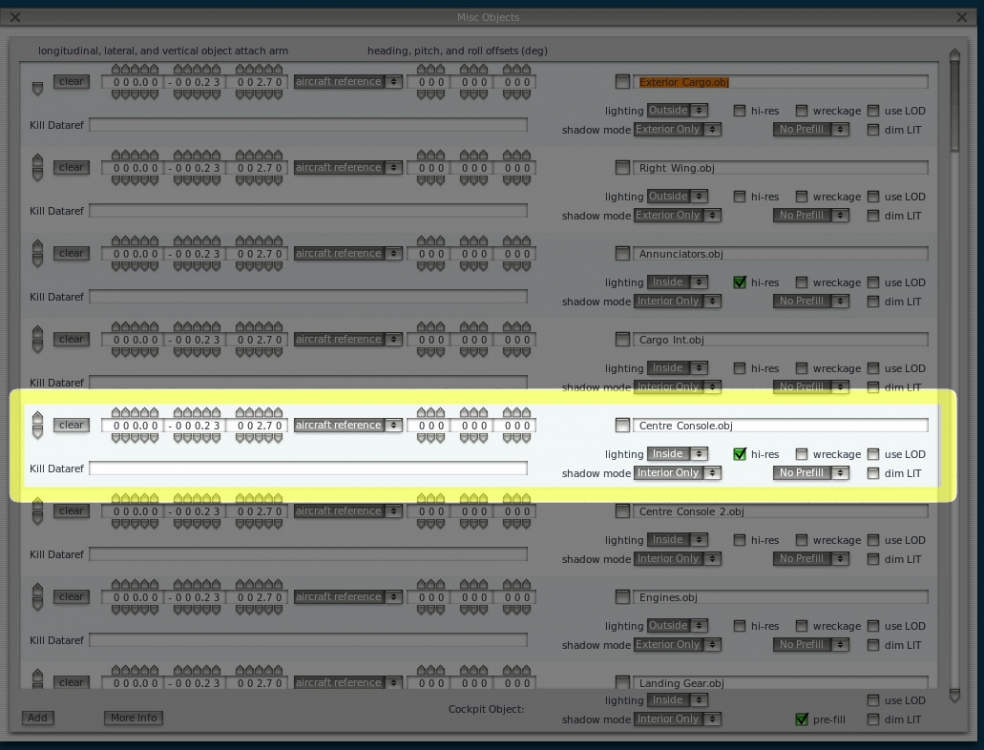
Might need you to try something here. Can you open up Planemaker, navigate to the Cargo variant of the Saab and select the "acf" file. Open that file. In the top menus, click on "Standard"/"Misc Objects". "Centre_Console" should be the 5th object down. Can you verify it has a check mark in the "hi-res" box as indicated in the screenshot below?
-
So in the objects folder of each variant, the image size is 2048 x 2048?
-
Can you verify the resolution of the "Center_Console.png" in both variants? Is the cargo variant texture size smaller than the passenger variant?
-
Just to clarify, are you saying the actual display is blurry or the text on the actual unit? A screenshot would give us a clearer picture. (no pun intended)
-
I have to go back and revisit it, but from memory, the compass rose for the RMI is a vacuum gyro.
-
Too early to say. The order of projects as it stands now... Saab update for XP11 (free) DC-3 (V2 XP11 only Paid upgrade) Saab (V2 XP11 only Paid upgrade) Citation 550 (XP11 only) After the Citation is an unknown at this point. A Saab 340B in the form of an expansion pack to the 340A is something we have lightly discussed, but nothing has been finalized.
-
I did make a mention of this in my Facebook group, and warned people to NOT update X Plane to the beta if they want to run the Saab, because of the autopilot issue. The latest update is a Release Candidate, so it is still not a stable release. I was working on an update to address the autopilot issue, and a few other things, but I can't do much until X Plane 11.10 goes final. I will continue to work on the update and try to get the autopilot fixed. The autopilot DOES work, but it's very sluggish, and often, if it turns too far, it will go beyond limits. Worst case scenario, for me, is making a completely new flight model...which I am prepared to do. But first, I need to exhaust all other options before considering that.
-
1: Did you install the Saab in your root X-Plane folder as specified by the installer? 2: Did you, in any way, change ANYTHING in the acf file within Planemaker? (This includes changing the aircraft type or category in the acf file) 3. Did you move or modify any files in the Gizmo folder? 4. Did you correctly activate the Saab?
-
As has been said before, we don't officially support XP11 yet, but let's try and straighten this out. You SHOULD get an engine start and a flight. Many people have been able to run the Saab in XP11 with very few issues. Let's start with the install location. Did you select the root X Plane folder as your install location when running the installer? Also, can you please post your GizmoLog.txt file? We'll start with those, and we can continue in the morning when I get up. (Getting very late here.)
-
The autopilot is acting very strangely in beta 8. Please revert back to 11.05 if you want things to go back to "normal".
-
Are you running Beta 8?
-
Have you tried the "Autostart" feature?
-
We (Jim and myself) were working on the free update, however, the work involved with the code is far too extensive to update for V1.5. For this reason, the code will be getting a rewrite for V2 (paid upgrade) only. I have been working on the free compatibility update for XP11, which involves new manipulators (mouse click controls) and flight model adjustments, but I've run into a problem with the autopilot in the latest beta, that is also affecting several other payware add ons. For this reason, I've stopped working on it until I hear back from Laminar, or until the next X-Plane update is out. THEN I can make a decision on whether I can work around what Laminar have done or make an entirely new flight model. The update will hopefully follow soon after that, as that is what I want to get done first. Currently, the Saab is not supported in XP11, however, if you choose to run it in XP11, DO NOT run it in the latest beta. This is where the problems are.
-
Did you engage the steering tiller before attempting a turn?
-
Kerry, The Saab DOES work (unofficially) in XP11, and as you say, there is 1 problem with the ground handling. That problem is that it slides on the ground when winds are excessive. You stated that because of that, you can no longer "fly" the aircraft. I fail to see what that 1 issue with the ground handling has to do with "flying" the aircraft. In saying that, it is not officially supported yet. Seeing as you are not on the dev team for the Saab, your statement "Don't count on anything being updated for XP11" is way out of line. There are things about the update we have not made public yet, so I would greatly appreciate it if you didn't speak for us with regards to anything related to the update development process. Lastly, "advertising" and praising a competing product in this forum is absolutely unacceptable, and I would appreciate it if you stopped doing this. If you want to vouch for another add on, do it in appropriate forums. Not mine. I hope I have made myself perfectly clear. If not, feel free to take this private and I can clarify whatever you may have a problem with.
-
It hasn't been thoroughly tested in XP11 to say it will work correctly. Many people have stated it DOES work in XP11, but we can not officially support it, so run it in XP11 at your own risk. There is an update being worked on at the moment, but it is a re-work of almost the entire aircraft and it is XP11 ONLY. It will be a payware update, and people who have purchased the original, XP10 version, will be entitled to a generous discount for the XP11 dedicated version.
-
Saving Panel States is not possible at this time. It MAY be possible in XP11, but we'll explore that with V2. The oscillations are just the aircraft rolling over uneven ground. There is an option to set terrain to follow runway. This can also be turned off, and it should give you a flat runway without oscillations. The Garmin was an after thought. It wasn't originally part of the panel, but we added it only after many people asked for some kind of navigation equipment for flying SIDS and STARS online. There are photos of Saab panels with a Garmin, sometimes a dual Garmin setup. I do have these photos, but they're buried somewhere among the other photos I have. I do want to correct you on something. The Garmin 530 is not the sole nav source. There are 2 NAV radios tied into the Autopilot NAV mode and the two EHSI's. You could very easily fly the aircraft with the Garmin turned off by using these nav radios and glass displays. A tutorial is included that shows this at length. No Garmin being used. The other questions, I'll leave for Jim to respond to.
-
Everything that is not working will be looked at. The sliding is on the list.
-
I'll have to take a look. If it isn't working correctly now, (which it should, but I WILL check), it will in the next update. And there'll be news about that very soon.
-
The issue with XEnviro is, as far as we can tell, on their end. We've already looked at any possible conflicts with XEnviro within the Saab code, and found none. I've heard from various people close to the XEnviro dev's that they are aware of the problem. No news on the update yet. XP11 is still quite young, and fixing anything while it's in beta would be futile. Once it's settled down, and stable releases start coming out, then we'll look at getting it done.


