All Activity
- Today
-
 ItsKeith01 joined the community
 -
 minosky joined the community
 -
Not a priority, no. It's a pretty small sub niche section of the market with hardware that none of the developers I know even have.
-

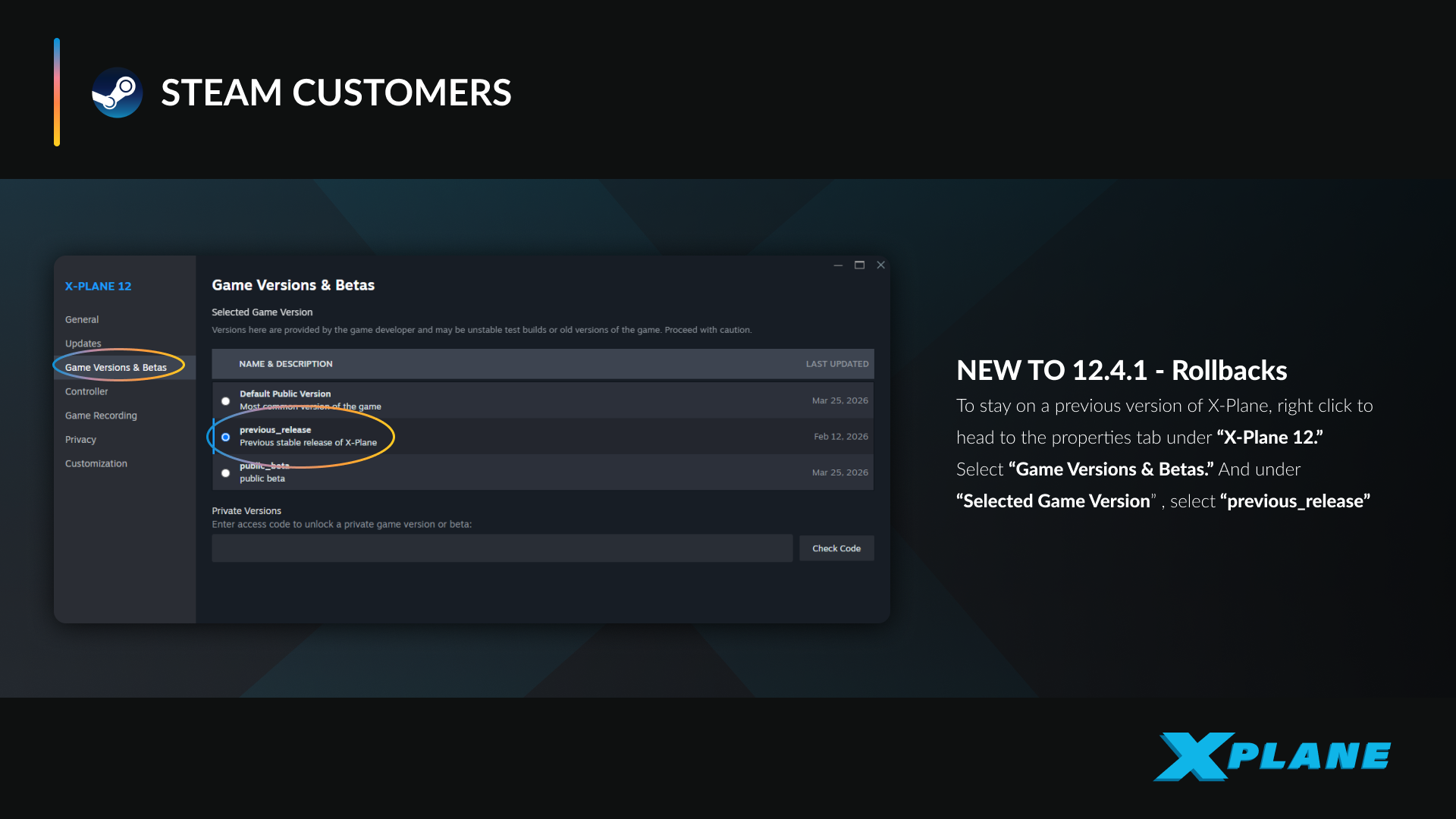
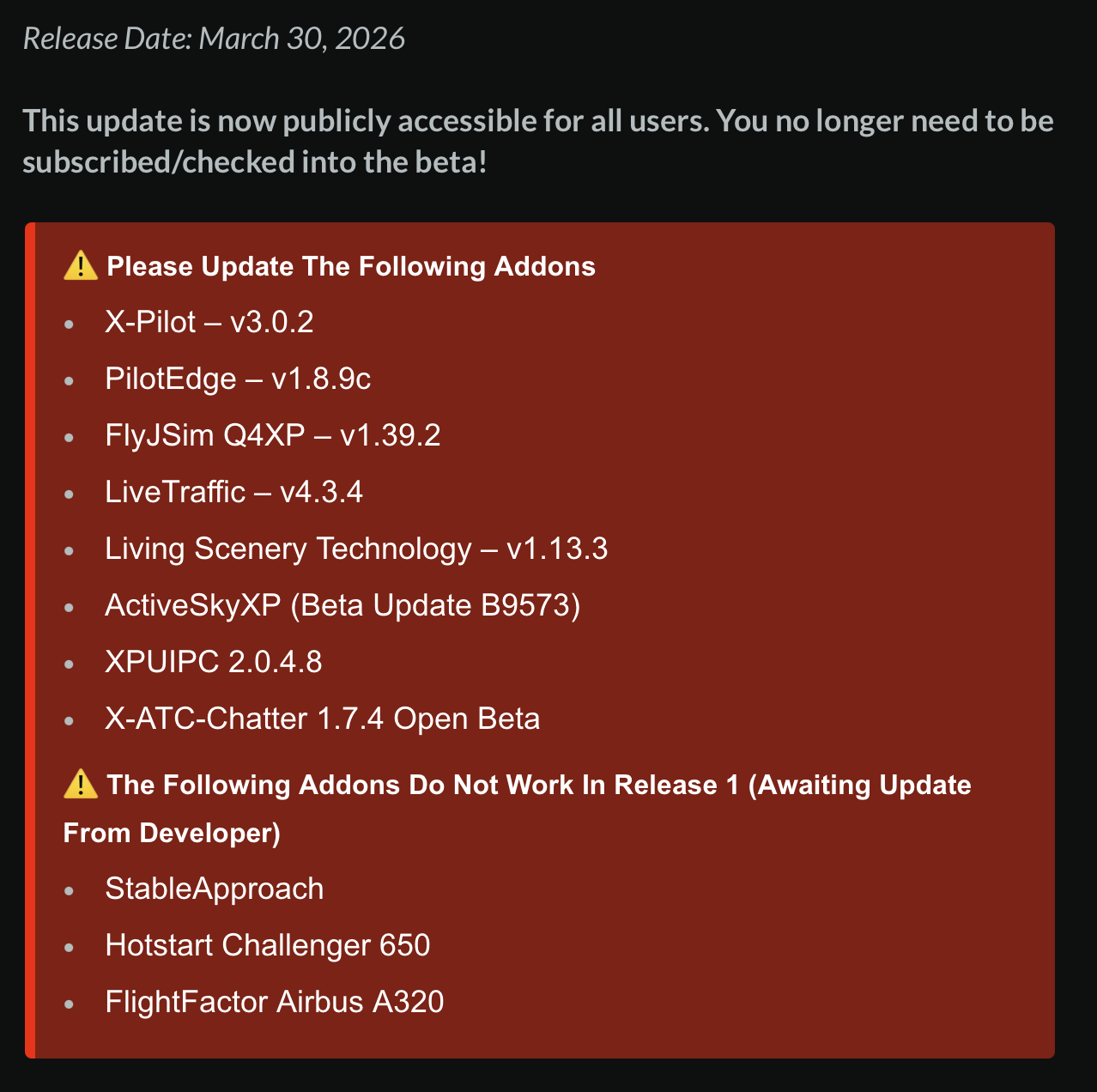
Challenger 650 is not compatible with X-Plane 12.4.1
Pils replied to alstr's topic in Crash To Desktop
-
I have noticed that there is no response to VR issues. Is VR even a concern when it comes to support with aircrafts sold on the X-Aviation site?
-
Every time I load a flight I get a CTD with 'threading violation' in the log. 2026-03-31 13:55:31 CL650[libsvs.c:4912]: libsvs(SVC): utilizing background rendering via IOSurface Threading violation calling XPLMGetDatai (/Users/administrator/.gitlab-runner/builds/5iac3Er_D/0/x-plane/design/SDK/COMMON/xplanesdk/Src/XPLM/XPLMDataAccess.cpp:327) Violation by Challenger 650 by Hot Start (hotstart.challenger650) 2026-03-31 13:55:31 CL650[except.c:120]: Caught SIGABORT: abort (0x1a049d5b0) Backtrace is: 2 libsystem_platform.dylib 0x00000001a04e1764 _sigtramp + 56 3 libsystem_pthread.dylib 0x00000001a04d7888 pthread_kill + 296 4 libsystem_c.dylib 0x00000001a03dc850 abort + 124 5 XPLM 0x000000012aba52c4 _Z26__XPLMValidateThreadSafetyPKcS0_i + 536 6 XPLM 0x000000012ab938ac XPLMGetDatai + 56 7 systems.xpl 0x000000037117028c wfETC1_DecodeImage + 130948 8 systems.xpl 0x0000000370ed55b4 XPluginReceiveMessage + 4031316 9 systems.xpl 0x0000000370edbed0 XPluginReceiveMessage + 4058224 10 systems.xpl 0x00000003711a6e78 wfETC1_DecodeImage + 355184 11 systems.xpl 0x00000003711a3840 wfETC1_DecodeImage + 341304 12 libsystem_pthread.dylib 0x00000001a04d7c08 _pthread_start + 136 13 libsystem_pthread.dylib 0x00000001a04d2ba8 thread_start + 8 --=={This application has crashed!}==-- In the X-Plane release notes it acknowledges that the Challenger 650 is not compatible: https://www.x-plane.com/kb/x-plane-12-4-1-release-notes/
-
 flylon joined the community
 -
Hi, I have a variety of noob questions relating to ATS I was hoping someone could shed some light on to help me further understand this wonderful aircraft. 1. I've encountered a few scenarios, usually on approach, where ATS fails and I can't reconnect it. I want to better understand the reasons for this. I'm assuming it's because the aircraft can no longer maintain the speed selected, or because of some manual intervention. How can I rectify it? 2. I also want to clarify the colour of the speed on the PFD. Is this correct; Pink - ATS active and following speed in VNAV setup; Blue with ATS illuminated - speed set at number dialled in by speed knob; Blue with ATS not illuminated - ATS disengaged, power set by throttle position. Sometimes I'm not sure whether ATS is active or not. 3. What is the meaning of the throttle sliders that appear in the bottom right hand corner of the screen, indicating that they should be moved to the position shown? 4. Sometimes when climbing out with a heavy fuel load the speed plateaus at around 200kts and then starts to fall backwards. ATS fails here also as the aircraft appears to be climbing too steeply to meet the speed asked of it (presumably partly answering my first question). I usually set speed to 231 before takeoff then after the packs transition engage VNAV climb at 250 kts. What is the best procedure here? (I am sure the real world detail is much more complex than can be distilled here but a general overview is helpful). Thanks.
-
That is what I thought. Since I created a new airframe it has actually stopped. So the old airframe must have become weirdly corrupt or something.
-
 funchoza joined the community
 -
 Tokolosh3 joined the community
 -
 GrandDorito joined the community
 -
Please don’t post whole log spams, rather attach the txt file to the post. Regardless: https://support.x-aviation.com/knowledgebase.php?article=7
-
https://discord.gg/kq8bNNrw8
-
 oh my ok yes I decided to run it again after months of it not installed.... yes I am in the beta too
 -
 EverettB joined the community
 - Yesterday
-
Hi, just got the MU-21 with the Garmin 500 and when I click a button of the autopilot it flashes green and also the flight director flashes but nothing happens. Also, the default GPS doesnt want to work with the RXP 750 integration. I'm looking for solutions in order to fly this bird for once. Thanks!!
-
Hi all, Would someone be willing to share an active invite to the discord server? Regards, acceleraptor
-
 acceleraptor joined the community
 -

HotStart Challenger 650 Crash on X-Plane 12.4.1
Cameron replied to LexLufix's topic in Crash To Desktop
https://support.x-aviation.com/knowledgebase.php?article=7 Also:
-
https://support.x-aviation.com/knowledgebase.php?article=7
- 1 reply
-
- 2
-

-
Laminar released the current stable version of X-Plane 12.4.1 today on which the current version TorqueSim Sr22 crashes with the error "Threading violation calling XPLMGetDatad". X-Plane 12.4.0 worked fine. I hope this gets fixed soon as there is no way of getting an older X-Plane version on new installations. Log.txt
- 1 reply
-
- 1
-
-
 sibbby joined the community
 -
Laminar released the current stable version of X-Plane 12.4.1 today on which the current version 1.8 of HotStart Challenger 650 crashes with the error "Threading violation calling XPLMGetDatad". Loading the TorqueSim SR-22 crashes with the same error. The release notes of X-Plane even state the issue. I hope this gets fixed soon as there is no way of getting an older X-Plane version on new installations.
- 1 reply
-
- 1
-
-
 1297L joined the community
 -
 Do you have x-plane 12.4.1 ? I have the same problem since laminar released 12.4.1 today. Yesterday it ran fine.
 -
heres my information pertaining to it <ed: log spam>
-

Booting the G1000 crashes the Sim.
fingertrouble replied to fingertrouble's topic in G1000 SR22 Series
Wow, I must say Cameron was right. I switched back to XP version 12.4.0 and all my SR22s are working like a dream. Thanks. -

IXEG 737 Classic for X-Plane 12 Announcement
SeaHawk14 replied to Cameron's topic in General Discussion
Hi - I'm curious, is that comment based on anything in particular? Or is it an assumption? - Last week
-
Is Challenger Compatible with X-Plane 12.4.1 Beta 2?
Cameron replied to kdub's topic in Technical Support
It's being worked on. -
Same and I believe it's an Aircraft issues given the below: ThreadingViolation calling XPLMGetDatad (...XPLMDataAccess.cpp:401) Violation by Cirrus SR22TN by TorqueSim and RealSimGear (torquesim.sr22.gp.retail) Log.txt
-

Is Challenger Compatible with X-Plane 12.4.1 Beta 2?
IanAl63 replied to kdub's topic in Technical Support
I wish the developers would also work on the MAC OS version so that it no longer needs X-Plane to run in Rosetta. The latest versions of XP12 are optimised to get the best out of our MACs and lose fps when used in Rosetta. I've contacted X-Aviation's support a few times as it only needs to be run in Rosetta due to the Gizmo64.plugin but I get no response to my ticket which is poor support for a very expensive product.... not moaning about the price as worth every penny, but a pain downgrading XP12 to Rosetta just to fly this plane, which I rarely do now. -
Sound is getting updated to fmod. Current problem is known for some not all. Fewer people working on it so will take time.
-
Couldn't find much information online about audio issues with either the Motherboard or CPU, Updated my audio drivers but alas, no luck. I will update my BIOS some time over the weekend and see if that was an issue. After that im not sure what to do. The plane is great in all other ways - but this audio issue is really hampering it, I will let you know when I have more info, but I am not really sure what to do next.
-
Well, it seems you are completely right with it being a thing on my end. Tried it on my macbook, and my spouse's windows laptop - both of which are working fine. Id be curious to know what OP's computer specs were as it might be an issue with a specific hardware (for me an I5-12600kf and an msi b760m mobo) those two would be the culprits of a hardware audio problem, now time to see if these have any known issues with openAL.