All Activity
- Today
-
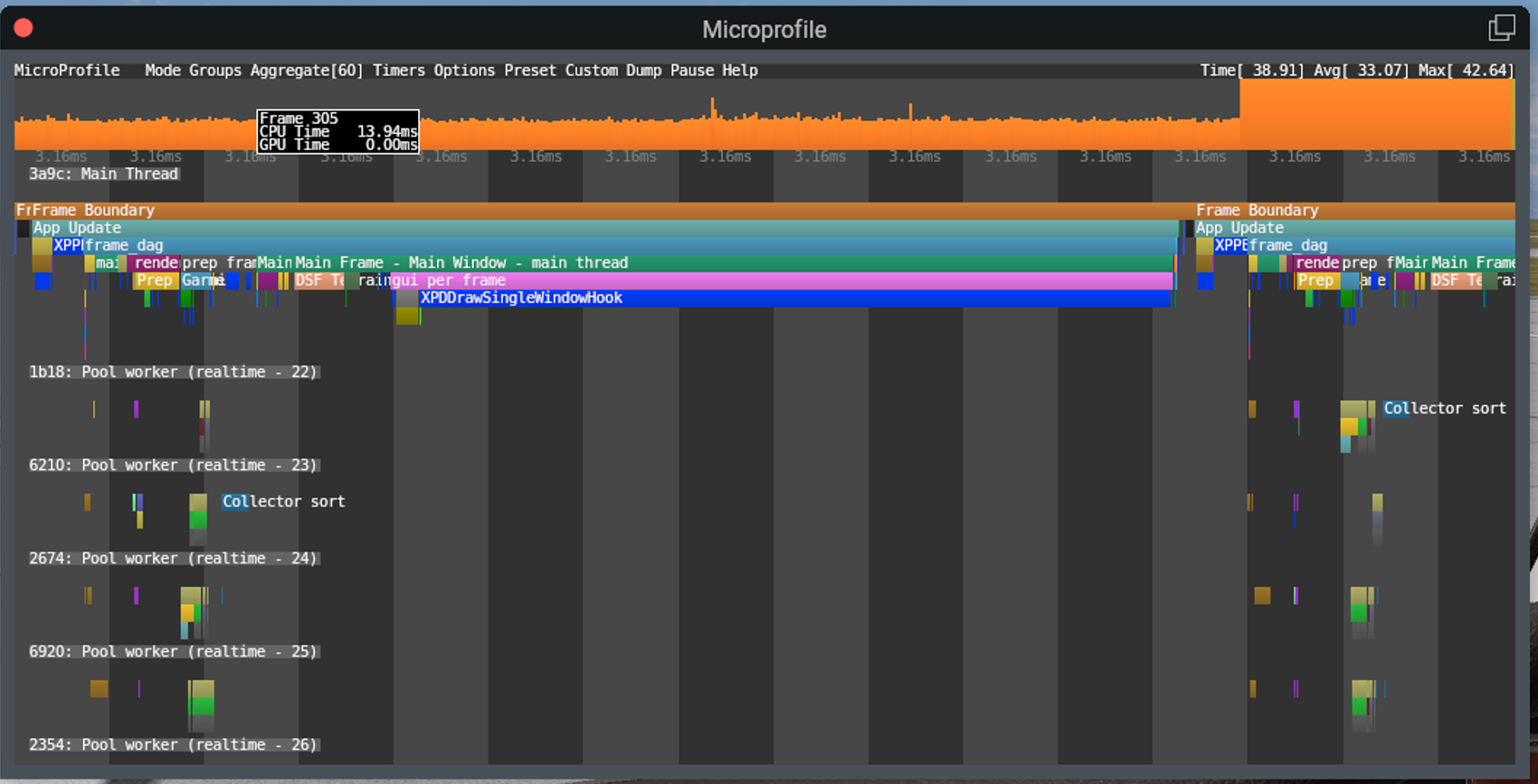
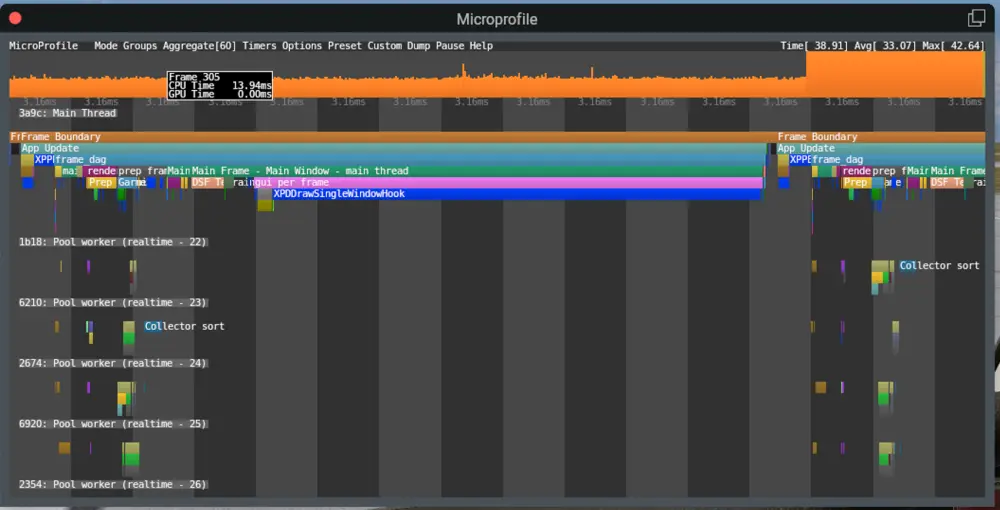
Hi there, I've owned several products from the X-Aviation store for a few years and have recently installed some again since Gizmo is now on the way out. I have some observations and feedback regarding the user experience of the newer plugin. With the IXEG having not received an update in a number of years, it's understandable that it still depends on Gizmo. However, the installer of the CitationJet 525 (downloaded the latest installer as of 27th Feb 2026) automatically removes Gizmo which isn't a great user experience as any updates that run through the installer will knock out Gizmo, requiring manual intervention every time. Process: Install IXEG 737 Verify that Gizmo64.plugin exists under Resources\plugins Install C525 Observe that Resources\plugins\Gizmo64.plugin is automatically removed (no prompt or confirmation) Can this behaviour be removed from the installer or at least have the user prompted as to whether they wish to remove Gizmo64? The second point around the X-Aviation plugin is that it comes with a massive performance hit when the activation window is opened. Here's a screenshot from X-Plane's microprofiler which shows that an overwhelming majority of the frame time is spent on XPDDrawSingleWindowHook. This reduces my FPS from 120FPS to a whopping ~25FPS The obvious solution is to close the activation window once all is activated. However, as Gizmo64 was quite a problematic plugin in that it would cause problems for many SASL and XLua based aircraft, I thought it best to raise this too in case there's any downstream impact later into the flight. I've never seen a plugin cause such a reduction in FPS by drawing a UI.
-
 ColinM9991 joined the community
 -
 boeingfan joined the community
 -
All Circuit Breakers are in? Reset all Failures? With Avionics on, a preselected HDG Mode should stay on. I think, you have a mismatch in your Keyboard or Joystick Settings. I use the Bravo Quadrant and the AP Command for the Push Button is "Servos Toggle". It looks like there is a conflict with the Settings. Start with a complete new Joystick Profile, assign it to the Moo and reset the Settings in this Profile for Joystick and Keyboard to Default. It's always a good Idea, to leave the Default XP Joystick Profile untouched or only assigned with a few Basic Settings for the Flight Controls and copy them to a new Profile. It's a bunch of work but you will have a clean Profile for any Plane and a changing for one Plane did not effect others.
-
@Jabari Checking in to see if you still want this resolved.
-

No Sound and Stuck Fuel Tank Selector
Goran_M replied to lawson-stone's topic in Beechcraft Sundowner C23 v2
Your log confirms what Cameron mentioned. The Sundowner C23 v2 uses Gizmo for its systems. Gizmo64 is an x86_64 binary, and your M2 Mac needs Rosetta to run it. Without it, Gizmo64 fails to load entirely, and that's why you're getting no sound and non-functional cockpit controls like the fuel selector. The aircraft shell loads, but none of the underlying logic is running. Regarding the crash when trying to run X-Plane under Rosetta, try the following: 1. Open Terminal (Applications > Utilities > Terminal) 2. Paste this command and hit Enter: softwareupdate --install-rosetta 3. Let it complete, even if your Mac says Rosetta is already installed. This forces a clean install. 4. Right-click on X-Plane 12.app, select "Get Info", and check the box for "Open using Rosetta" 5. Launch X-Plane That's the cleanest solution I can suggest for the time being. Running X-Plane under Rosetta has no negative effect on X-Plane itself or any other add-ons. If X-Plane still crashes under Rosetta after that, the crash would be on Laminar's end rather than ours, and I'd recommend reporting it to them through their bug reporter. But in most cases, step 1 resolves the issue when Rosetta wasn't properly installed to begin with. I'll be looking at converting the code to run natively under ARM in the near future, which will eliminate the Rosetta requirement altogether. - Yesterday
-
 LukeG joined the community
 -
 yugjuiuo joined the community
 -

No Sound and Stuck Fuel Tank Selector
lawson-stone replied to lawson-stone's topic in Beechcraft Sundowner C23 v2
I apologize for that! Here is the file. Log.txt -
Trying to simply fly HDG mode. Standby is stuck on at all times. If I hit HDG mode it flashes "ON" but immediately turns off. If I hold STANDBY all lights in the AP select panel light up. If I hit AP button (with TURN knob in the center detent), only the YD ENGAGE lamp lights. I also tried hitting HDG before engaging AP with no luck. I guess next step is uninstall and re-install?
-
No Sound and Stuck Fuel Tank Selector
Goran_M replied to lawson-stone's topic in Beechcraft Sundowner C23 v2
I'll be happy to help you, but you'll need to upload a log file. What you attached is a MacOS alias/bookmark file. -
 anastasiostetradis joined the community
 -
And what Mode are you trying to fly with the AP? With the GPS Radio Stack (I don't use the OEM Version): Set the Heading Bug to the Direction you are flying, hit the HDG Button at the AP Mode Panel (plus ALT) and then switch on the AP. What happened now? What happened when you moving the Heading Bug to a new Direction? You should be now in Heading and Altitude Mode. If you want to follow a Flight Plan set or loaded into the Garmin, hit the NAV Button. Following the Magenta Line with GPS. Set CDI in the Garmin to GPS and and switch GPS on with the Switch in Front of you.
-

Current status and updates planned?
Jeff2122 replied to imemyself's topic in Mitsubishi Marquise MU-2 v2
Retirement is grand! I really have to push myself to do anything computer related these days. Hope you can do better than I... -
I purchased the Marquise for XP12 a while back but have just gotten around to trying to fly it. Flying in 5 blade OEM mode. (though I have the same problem with all acf versions) I swear I am following the manual, but cannot get the AP to engage. In flight (or on the ground), engines running, inverter on, the TURN knob is centered (in the detent), the left radio switch is on, MASTER SWITCH normal and the aircraft is flying healthy, but when I hit the AP button on the center console, the YD ENGAGE light comes on, but the AP ENGAGE just doesn't. It makes me sad. Does anyone have any idea what I've missed?
-
I just "revived" my MU-2 after quite some time now. Flying the GNS variant + TDS GTNXi (+ SBAS-Receiver enabled via Plane Maker and HSI needle autosync GTN setting). Is great fun again! ILS+RNP approaches simply work with this config. Of course the MU will benefit from any improvements yet to come. but as a thumbs up: It's already (and still) great fun on XP12 even in its currently somewhat orphaned state!!
-
 semka2358 joined the community
 -
 Brandon12138 joined the community
 - Last week
-
No Sound and Stuck Fuel Tank Selector
lawson-stone replied to lawson-stone's topic in Beechcraft Sundowner C23 v2
Just tried it and I get a crash to the desktop. I think this is the end of the line for me with this add-on. I have no other app that requires Rosetta, and no other add-on plane for XP12 that requires Rosetts, except for this one. It's just too much hassle. Every time I upgrade XP I have to re-enter my credentials for the Musketeer, sometimes also for the G500. It's just too finicky. I love it when it works, but I really don't want to be a software engineer. I want to fly the plane. -
No Sound and Stuck Fuel Tank Selector
lawson-stone replied to lawson-stone's topic in Beechcraft Sundowner C23 v2
I'll give that a try. I had been running it without Rosetta for some time, don't know why all of a sudden this happens. But I'll check it out. -
I usually set the nav 1 for the actual approach and nav 2 for an eventual go around. Thus, always I have discordance between both PFD. No way to avoid this advice.
-

No Sound and Stuck Fuel Tank Selector
Cameron replied to lawson-stone's topic in Beechcraft Sundowner C23 v2
If you're on Mac you probably aren't running X-Plane under Rosetta. It's required for this product. -
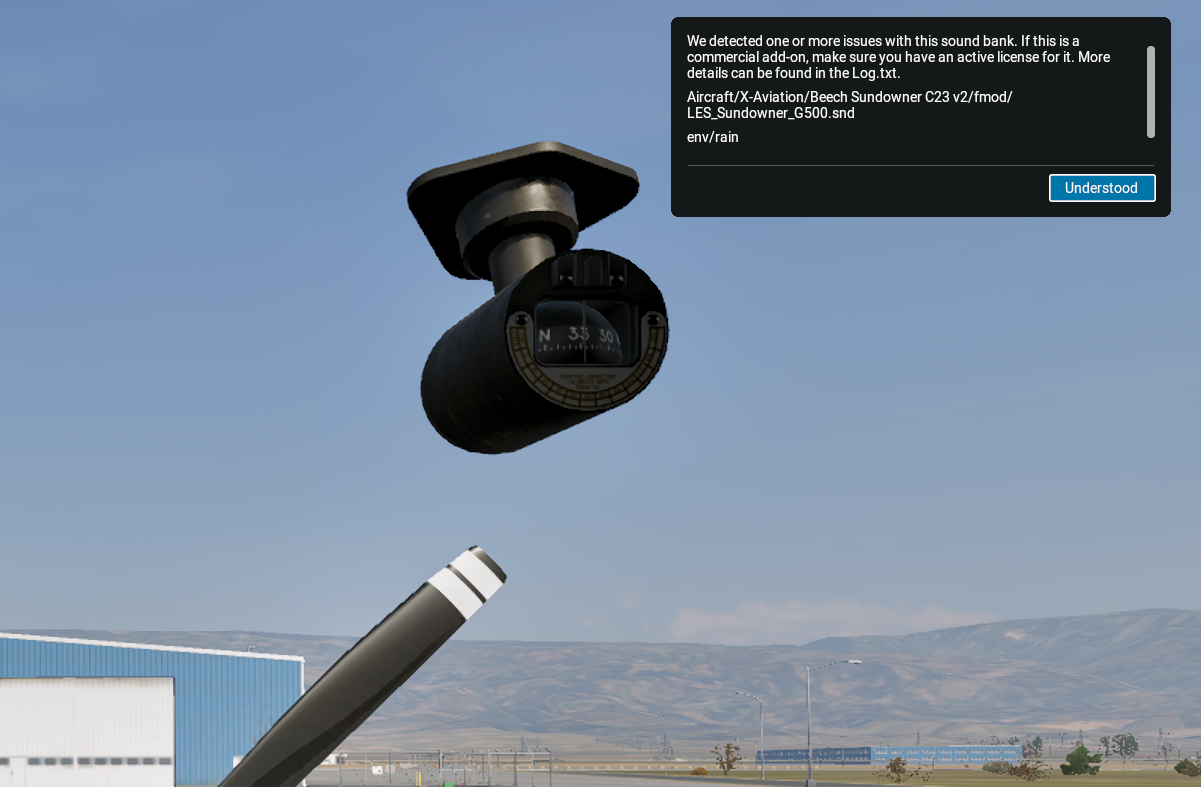
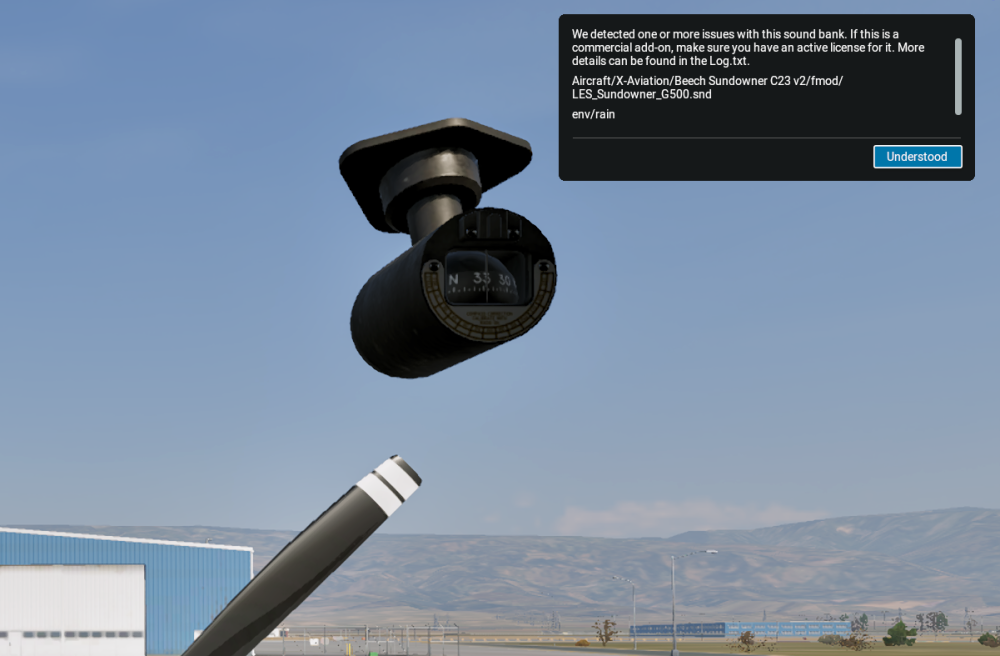
Recently I have started getting an error message when opening the Sundowner relating to sound. I've attached a screenshot below. IN addition, I am unable to move the fuel tank switch and it remains in the "off" position. I've also uploaded a log.txt file below from starting up through the error message, then quitting. Log.txt
-

(SOLVED) G500 invisible in MU-2 panel
Qwark replied to torfih's topic in Mitsubishi Marquise MU-2 v2
I found that the MU-2 GLASS (+ G500) needs BOTH the Gizmo and the X-Aviation DRM plugins installed / enabled. I use xOrganizer and had the X-Aviation plugin disabled (as the MU-2 is Gizmo still). In that case there is no error message, but the G500 simply stays dark. So, reinstall of course installs fresh (and "enabled") copies of those plugins, but it should not be needed if you just make sure both Gizmo and X-Aviation plugins are enabled at runtime. -
You obviously haven't been to our discord where we answer countless questions. The 2 most common ones? When is the 650 update coming out and when is the TBM update coming out. Both questions are always politely answered. Your comment is out of line and not true.
-
It is being designed to operate as the real one, yes.
-
Yep, it is.
-
NEVER EVER EVER EVER ask a developer for ANY status on a product you spend your money on..rookie developers do not want ANY accountability to answer questions from us measly peasants that buy their product, give them your money and do not ask questions that is their attitude. they advertise the most realistic most expensive addon missing a key features . I understand xp did not have the code at the time but they do now and to not even tell or give people a roadmap or anything then give a smart ass condescending attitude when asked is unacceptable. I lose all respect for developers with Attitude it is unnecessary. I am not singling this product MANY MANY do this.
-
I'm sorry but hes right. Don't convince me that out of the box integration in 5 ACF is worth it 50USD. You don't touch in others peoples work and you know it you just simple put a custom 3D panel on top of their avionics just like the rxp gtn 750. Maybe if you guys want that approach maybe you should lower the price then. Have you thinked why others avionics have a enormous compatibility and yours don't its not worth it for devs to integrate price related maybe. Hey but its just my opinion
-

(SOLVED) G500 invisible in MU-2 panel
torfih replied to torfih's topic in Mitsubishi Marquise MU-2 v2
Happy to report, reinstalled the MU-2 and everything is fine. Let me add that this add-on is amazing, many thanks to the developer, his long term support is exemplary. -
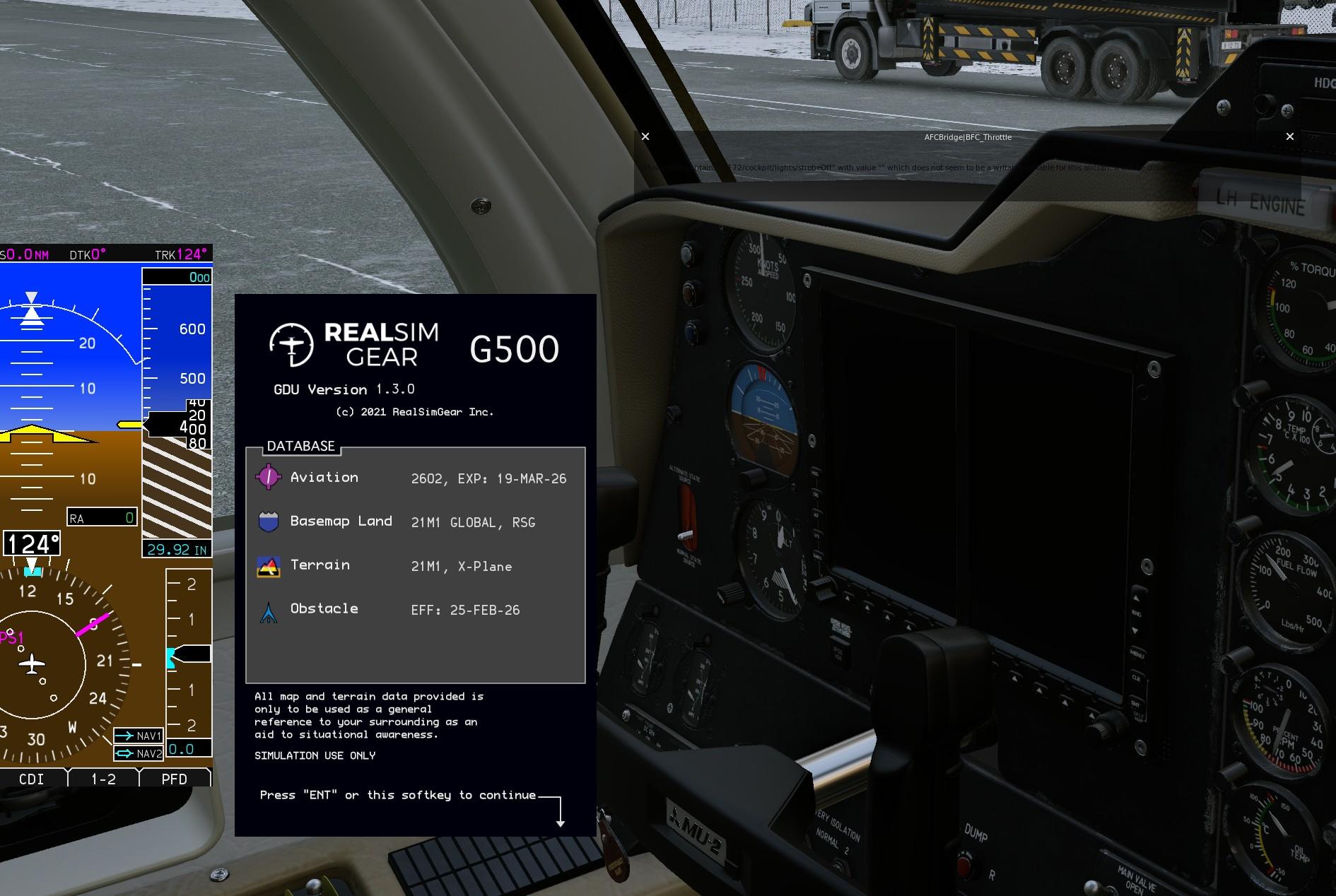
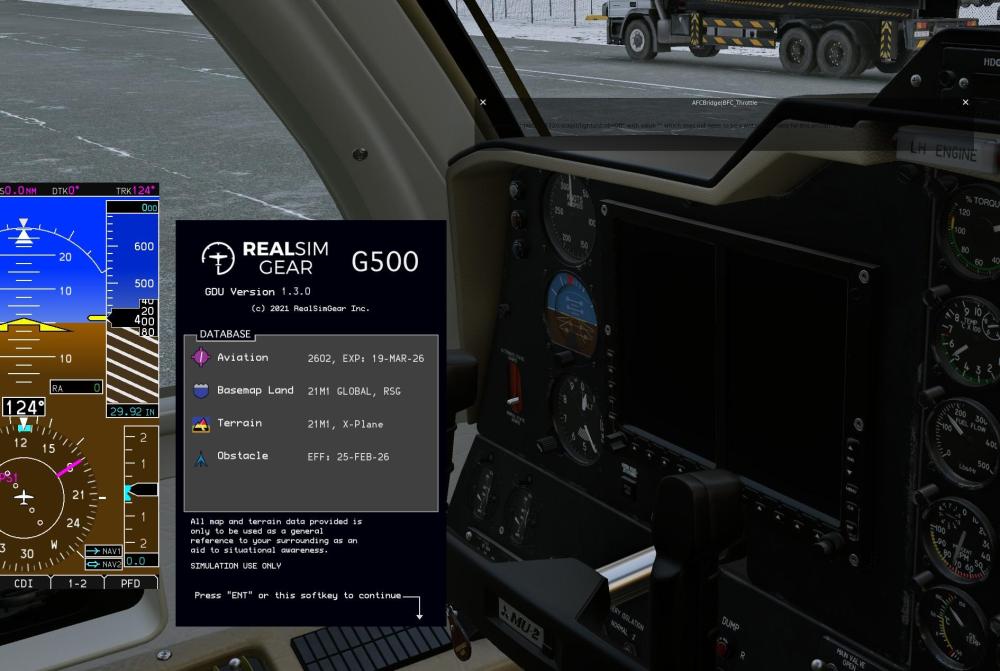
Any Ideas? G500 works 100% in all other aircraft. Pop-ups work fine in the MU-2 but is invisible in the 3D panel view.
-
Am I correct in assuming that the weather radar for the Challenger is being designed from scratch to be as true to life as possible?