



tkyler
-
Posts
2,827 -
Joined
-
Last visited
-
Days Won
620
Content Type
Profiles
Forums
Latest X-Plane & Community News
Events
Downloads
Store
Everything posted by tkyler
-
well definitely to improve it where it needs it ...Regarding the 750Txi, that's more on Garmin probably as RealityXP just 'ports' their simulator. As far as other plans...David has kindly offered to provide some performance data, which I'll seek to incorporate into the Moo. I see my imminent Moo 'todos' (things I'm unhappy with) to be...in no particular order or priority: Flight model improvements (chasing numbers), EGT, Fuel Flow, SRL behavior, performance, etc....more liveries, and the first 2-3 seconds of the engine starting sounds (gear whine). To me, those are the basics at least. Not quite sure what I'll look at after that just yet. As far as timing, I am indeed full time on X-Plane...but the holidays and IXEG work have taken precedence while Laminar has gotten XP12 stabilized. I'll tend to rotate every few weeks between projects and 'binge' the work and the IXEG is getting the binge treatment atm; however, the Moo's turn is coming back around quite soon....and I have a 3rd project in the works also that gets chipped on 'nights and weekends'....but won't take on any more than 3. Better to have a few quality pieces that I can maintain for years than get all strewn out with new models. -TomK
-
For the most part I myself have too. The lighting even looks pretty good...but there are some areas that need touch-up due to X-Plane's new lighting system...but I'll admit even for stickler like myself, they're minor. My real "todo" before declaring this 'XP12 compatible' is the flight testing, i.e. dynamics, trim and AP behavior. It MAY be that those are all "in line" with the XP11 version and after verifying such, I'll just declare this 'XP12 compatible'. Of course XP12 'compatible' doesn't mean 'optimal'. I still want to get back to 'chasing the numbers' with regards to EGT/ SRL/FF/performance, etc. I encountered this myself just yesterday the first time and put it on my bug list; however, I have not been able to repeat it yet. I've started / shutdown / restarted the engines several times now with no issues, BUT....it did happen ......... I just don't know the circumstances or sequence causing it yet. Can you not start it under any circumstances ever? A fresh load of the aircraft for example? -tkyler
-

Throttle detent, keyboard-only operations
tkyler replied to zpkarol's topic in Mitsubishi Marquise MU-2 v2
Looks like you're right that I accidentally broke this. Its always the first thing I put in (mouse operations); however, with the number of people using the bravo hardware, I really reworked all the "lift lever" commands and ended up adding 'joystick criteria to the lift commands'. Really sorry about this and putting in a fix (new command) for the next update. With XP12 final, I'm going through and tweaking the lights and some basic flight testing and will include this in the next path. Sorry about that and thx for reporting. -tkyler -
Thx for the report. Can't say I've noticed it, but then again, haven't been looking for it. I've noted it for examination. This may be a Laminar issue...as they are fiddling with the rendering settings quite a bit and camera views involving the prop have, in the past, presented some challenges. -tkyler
- 1 reply
-
- 1
-

-
So after a bit more research...the Autopilot maintenance manual does NOT mention the 20nm restriction, only the official "pilot manual" for the autopilot. I find it possible that the pilot manual may be erroneous (or ambiguous as to other criteria not elucidated) and more inclined to follow the maintenance manual wording. As such, I'll remove the 20nm restriction in the next update....unless I discover a reason otherwise...or some other operating mode where the 20nm limit has applicability. -tkyler
-
OK, I found it. its from the SPZ-500 operating manual of all places. (I was looking in the MU-2 manual supplement previously). So yea, you need to be more than 20nm from the station for NAV mode to engage. (See excerpt from Sperry docs below) This is documented in my MU-2 docs on autopilot usage. http://togasim.com/mu2docs/supplements/spz500.html#fd-mode-control-panel-mcp
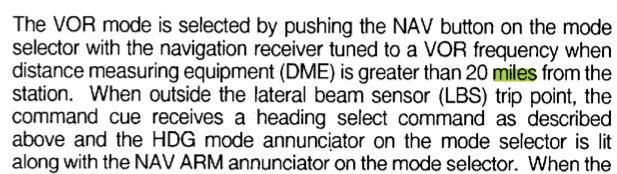
-
For some reason I cannot remember, nor find in the Sperry AP docs, I have prevented NAV capture within 20nm of the station. I cannot, for the life of me, remember why I might have done this. I will look over the docs again. -tkyler
-
that was poorly worded, sorry. "I have already put it in place in my development work, so as to be part of a future update for V12" It is not in place in the currently available version. With X-Plane's RC4, released today, I think X-Plane is in a good place to resume Moo tweaks. I'll probably release updates in two stages. 1) Visual changes, i.e. the rain effects and tweaked lighting...which just looks nicer. 2) Flight model refinement. I separate out the flight model refinement because it performs reasonably well in XP12 and most users, (me included) enjoy the more visual and sensory aspects of simming rather than 'by the numbers', i.e "we put in gas....we fly....make sure no needled go red, and enjoy the ride" Chasing numbers always involves more in depth tweaks, longer testing period, and frustrations fighting X-Plane's default models and I don't want to withold some of the cooler XP12 visual features while flight testing/refinement takes place. -tkyler
-
Its already in place. you can see it in THIS VIDEO. (if the link is working...seems to be down atm)....anyhow, the effect is a bit exaggerated for testing purposes. I may put in a preference that lets you set how "much" rain you want on the windshield...its pretty subjective on how much rain one expect to see on the glass for a given level of rain. -tkyler
-
So just an FYI update. I've been working on IXEG stuffs while Laminar tweaks the Release Candidates. I've held off updating the Moo further yet because 1)....I've worked for Laminar...and I know the kinds of changes that can be made in the early RC runs and 2)...it actually runs tolerably in V12. Once Laminar and most devs are suitably confident the lighting settings are stabilized or close to final, I'll turn some focus back to the Moo to see where things stand and what needs attention. The lack of liveries isn't lost on me, I know its a tough UV layout. That will get addressed in some fashion also. -tkyler
-
RGS G500 integration with RealityXP GTN 750 on MU-2
tkyler replied to Luiz Giorgi's topic in Mitsubishi Marquise MU-2 v2
Hi and thanks for purchasing!. With regards to the MU2, the NAV mode does not follow GPS routes. Refer to the Autopilot docs at the link below which explains the reasons and the (real life) workaround using GPSS. In particular, see the paragraphs regarding: "HDG Button / GPSS Operation / NAV Button" http://www.togasim.com/mu2docs/supplements/spz500.html Other aircraft may have different AP behavior/modes, but i cannot speak to those, only the MU2s. -
If you are using the OEM variant....no need to interface with the RXP pull down eh?.......BUT.....BUT.....I'm being facetious here... ....you are exactly correct. I'll look into this -TomK
-
Laterally, the AP will track GPS tracks, ILSs and VORs 'paths'. Vertical modes are always initiated / controlled by the pilot manually as you state. For lateral AP tracking purposes, a GPS track doesn't know if its its part of an approach/LNAV, an enroute segment, whatever...those are labels we put on the path....not the AP...its just a magenta line to "stay on" as far as the AP is concerned. So if you can enter some LNAV approach on a GPS unit and get it to display as a 'magenta' GPS track, then the AP will follow it laterally in GPSS mode. Vertical still needs to be manual though. In XP11, the GPS tracks do not display the approaches selected from the GPS units....they had to be entered 'waypoint by waypoint'. I'm unsure if that's changed in XP12, seems I heard it was but haven't tested that functionality yet. -TomK
-
I foresee two 'events' with regards to the 733. Event 1 is "port to XP12 'as is'. Event 2 is 'upgrades beyond the port'. The goal of event 1 is to get it to work in XP12 the way it does in XP11 given XPlane changes. Those who have made 733 purchases since early this year will certainly get the XP12 port version for free as stated on the XA product page. Beyond that XP12 port though, we have not made any determinations about what may or may not constitute a 'paid upgrade' beyond the fact that it shouldn't be egregious or outlandish. Regarding features 'beyond the xp12 port'... we have and hear arugments all the time for/against variants, cargo versions, etc and have not made up our minds yet about what may be next. The obvious things todo are the FMS work and upgrading all the 3D/textures/animations. As far as MSFS, a lot of us developers have kept an eye out on the whole market/dev process and a port is not a trivial thing, regardless of what Fenix / inisim is doing. We're talking multiple 1000s of man hours easily, and at my age and road traveled, that's a tall order.....regardless of the money potential. I rather enjoy my little world in X-Plane and those users who also see the same value in it. Perhaps Fenix, iniSim or someone else can do a 737-300. I can't speak for any other devs in the X-Aviation ecosystem, but for our part, we'll probably stick to X-plane with the 733...best I can tell from today. -TomK
- 90 replies
-
- 30
-
-
The XP12 "compatibility" work is underway FYI. First order of business is to get it flying as it does now in XP11, and then to begin improvements. -TomK
-
Hi Elijah, No. Those are GPS procedures and the SPZ autopilot does not take GPS generated signals. ILS is the only approach vertical guidance option for the older AP. Regarding the oscillation, what approach speeds are you seeing this at . I can try to simulate and look at the AP constants. I've had descent stability at 110-120 kias and TBH, haven't testes the AP constants a lot below those speeds. Also...is this XP11 or 12? TomK
-
have you tried clicking on the "ipad" tablet (in the side pocket to the left of the pilot seat)? Clicking on the tablet makes it animate "into" the bracket. Click the pocket again to "animate it back. Your screenshot is showing the "2D popup" version of the Avitab, which is different from the 3D version. The 2D version may be "popped out" of the X-Plane window and moved to another monitor, etc. -TK
-
v2.0.4 issues with 5-blade GNS version
tkyler replied to daemotron's topic in Mitsubishi Marquise MU-2 v2
Yea, there is a known issue with the EGPWS plugin by Saso (that the G500 integrates) on Mac that crashes, usually on 'aircraft unload'. Quite the annoyance during development as I myself suffer from this issue. -TK -
[2.0.4] Parking brake state not saved
tkyler replied to daemotron's topic in Mitsubishi Marquise MU-2 v2
I'll dig into these options daemotron. There are some controls I "override" the save setting, though the parking brake probalby shouldn't be one of them. -TK -
[2.0.4] M877 Chronometer Display not lit
tkyler replied to daemotron's topic in Mitsubishi Marquise MU-2 v2
agreed, this device needs improvement. TK -
could you post a screenshot of your issue please?
-
Good use case...definitely missed that one. Thanks! I'll put in a fix. Of course a careful manual adjust of the pref text file will fix the layout in cockpit. Regarding the powering....they should power with the radio switches. TK
-
Mitsubishi MU-2 Version 2.0 Release Announcement!
tkyler replied to Cameron's topic in Mitsubishi MU-2 v2
you mean how to "turn on" the avitab screen? "Open the screen" I don't understand. The "ipad".. has a power button on the top right of the bezel when its in the mounting bracket...its small, just like the real thing..but its there. Press it to turn it on / off. -tk -
Early work-in-progress...but eh....why not...could be fun. Just don't answer the phone if it rings after watching this video. exhaust_opt2.mp4
-
Mitsubishi MU-2 Version 2.0 Release Announcement!
tkyler replied to Cameron's topic in Mitsubishi MU-2 v2
So it looks like everything is OK then/ The frame/mounting bracket sits on the window and you click on the ipad/avitab in the side pocket to move it to/from the bracket. If you don't want to see the bracket, there is a preference to hide it. I do not see any problem with the screenshots you show...they are consistent with intended behavior -TomK
