



birdy.dma
-
Posts
508 -
Joined
-
Last visited
-
Days Won
12
Content Type
Profiles
Forums
Latest X-Plane & Community News
Events
Downloads
Store
Everything posted by birdy.dma
-
Ok Sometimes a click is lost thru the internet. It can happen with any part of the cockpit. In this case, there is a workaround. The P key (pause) is synchronized. Any pilot pause both sims. Then disconnect, reorder the wrong pit, reconnect and leave the pause.
-
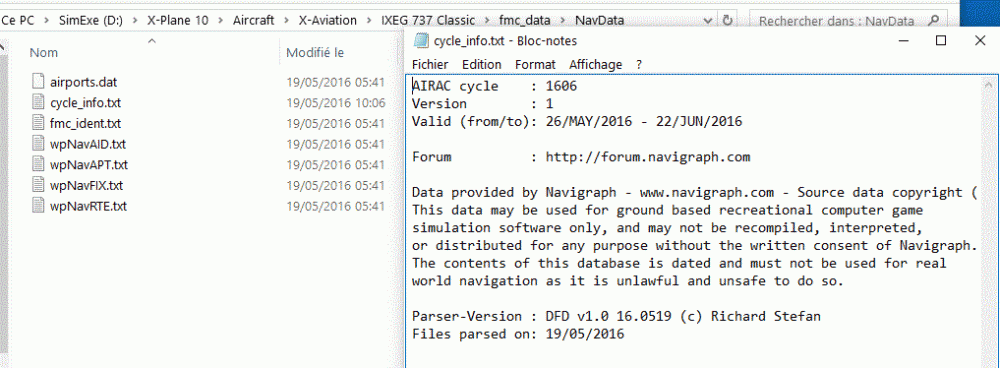
Have you those pictures on both side?

-
Double check your AIRACs. I am pretty sure they don't match. Also, if your flight plan is exported from EFASS, you must have same AIRAC in EFASS and fmc_data. You must share the very same flight plan in the coroutes folder.
-
A new one. Better with brakes and rudder when the slave have commands on ground. Better with speed brakes (don't use any axis. Only keyboard, assigned buttons or mouse). Smartco 1.4.2.zip
-
Sound problem: i got it. The Guards caps are faulty. Again, each pilots have to manipulate them. They are no more synchronized. Smartco.zip
-
Do you have the same state of the plane before the connection? (cold and dark, ready to fly, fuel and payload set...)
-
I think it is: Pilot Non Flying.
-
I had the problem with a friend of mine. The time of his mother board was not right (of course also time of win and x plane). There was a sad flickering of the slave pit.
-
@WR269 Will correct, but this is not the reason of your problems. (i have also missed a guard cap). @Destinate Check time of your mobos, OSs, and X planes.
-
Hi Gents, Much better. Commands added: ixeg/733/autopilot/at_disengage (provided with the 1.0.5 hotfix), and:sim/autopilot/autothrottle_toggle . Guards are now synchronized from master to slave. Not perfect, but better than before. Same for the door gear. Spring loaded knobs are working properly. APU knob, the 4 GEN knobs, and the ET knob of the clock. No joy with trims knobs (Pedestal). Smartco 1.0.5.zip
-
IXEG 737 Classic Shared Cockpit is fantastic
birdy.dma replied to DANDO123's topic in General Discussion
Here some help with IVAO: -
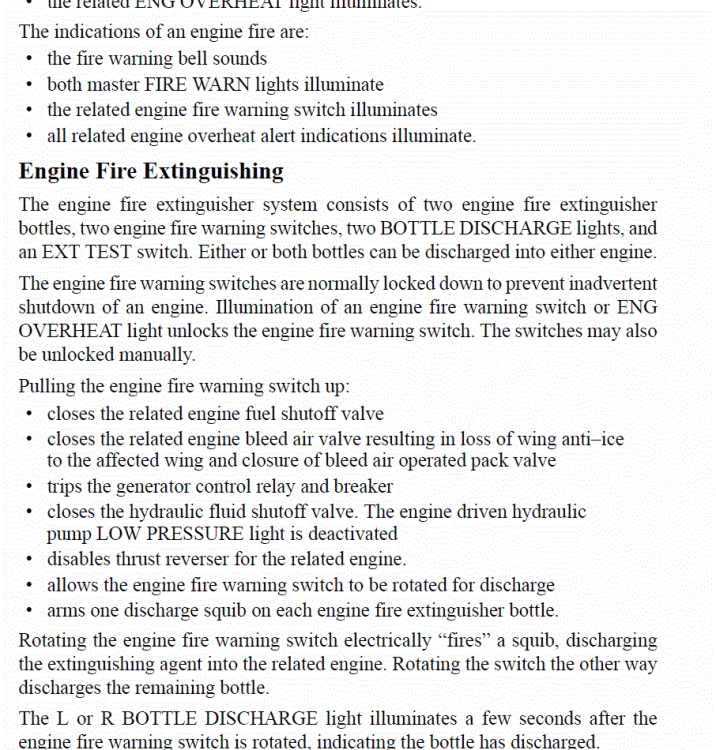
About the reverser and fire engine, my reference was the Operation Manual page 506, and about gear, it was just the noise of gear down as it is up. The noise is tied with the gear handle (up or down), not with the gear itself (any wheel up or down).
-
Tests done in a shared cockpit. We did crazy tests to break the landing gear system (engine shut down, electricity, hydraulics....). At some point it was broken. Lowering the landing gear handle, gear stays up, but we could hear the noise of the landing gear down. Ok, minor bug, but as we found it, I report. Pump to lower the nose wheel, well done, it is OK, then end of the test : crash (not of Gizmo, but of the plane). Second fly : Fire of engine 1 using the stock failure. Bell, bombers, we are safe and return to base. After touch down, reverse. Reverser was working on engine 1. This is not correct.
-
I was not happy with the Fuel used and FF. Here is a new logic for throttles and FF (and minor tweaks of autopilot). Now, set the same amount of fuel in each tank before the connection. Fuel used, FF and fuel displayed on the first progress page are correct. Smartco IXEG.zip
-
It's already done. By default, the knob is on Auto. So after take off, both will switch to charlie. As this knob is not sync, the pilote who speak can use Stby, Auto or On, the other one only Stby.
-
My bad. Sorry guys, my smartco file with weather was broken. Clouds not transmitted from master to slave, as reported by a lot of crews. This one should work, at least with X Plane weather and NOAA plugin. Smartco.zip
-
Safe travels!
-
Have you the exact same smartcopilot.cfg? May be a xjoymap.ini in one side only? Same hotfix for both pilots?
-
I am not facing my main computer. After a first glance, only bugs are fixed. No new feature, so no new commands or datarefs. They is no more room for improvements without some work on the plane itself (devs side). But it's too early. Bugs and VNAV are priority. We have to wait patiently.
-
IXEG 737 Classic Shared Cockpit is fantastic
birdy.dma replied to DANDO123's topic in General Discussion
So real: -
I am may be faulty. No blank lines: [SOUND] VOICE=1 [PREFERENCES] TAGGING=0 COUPLING=0 WEATHER=0 FIXEDWINDLAYER=1 MAXVISIBILITY=80000 TURBULANCE=15 [PLANE] RESOLUTION=8 [ACCOUNT] FOLLOWME=0 REMEMBER=1 HIDEADM=0 PORT=6809 SERVER=eu2.ivan.ivao.aero BASE=LFHO REALNAME=Claude ROULLIER PASSWORD=xxxxxxxx VID=xxxxxxxx CALLSIGN=VPI007 [CSL] PILOT1=VPI07
-
Elevator trim. You can use this one, but don't trim with the mouse, only with buttons of your joy. About jitters, have you fps under 20? Smartco.zip
-
How to disable the CSL of you partner (both pilots connected). Open X-Ivap.conf with your favorite text editor. [SOUND] VOICE=1 [PREFERENCES] TAGGING=0 COUPLING=0 WEATHER=0 FIXEDWINDLAYER=1 MAXVISIBILITY=80000 TURBULANCE=15 [PLANE] RESOLUTION=8 [ACCOUNT] FOLLOWME=0 REMEMBER=1 HIDEADM=0 PORT=6809 SERVER=eu2.ivan.ivao.aero BASE=LFHO REALNAME=Claude ROULLIER PASSWORD=XXXXXX VID=XXXXXX CALLSIGN=VPI007 [CSL] PILOT1=VPI07 Add the last 2 lines. Type here the call sign of the other pilot, and vice versa. PS: For the controlers, only one pilot must set the transponder to ON (The knob is not synchronized in my file). Claude.
- 37 replies
-
- 1
-

-
- pilotedge
- smartpilot
- (and 1 more)
-
Check PM.
- 37 replies
-
- 1
-
-
- pilotedge
- smartpilot
- (and 1 more)
-
Lol. Enjoy your meal.

