



mjrhealth
-
Posts
590 -
Joined
-
Last visited
-
Days Won
12
Content Type
Profiles
Forums
Latest X-Plane & Community News
Events
Downloads
Store
Everything posted by mjrhealth
-
I guess now that Vulcan is Nigh, I assume you have had a beta to play with. From laminar posts I see there may be some issues with cloud drawing...Bu we can wait till you see what you need to do. Thanks
-
I have some of carenados planes ,but without Thrandas input they are just pretty planes, and if you missed the discuss about the breakup, carenado just want output and he couldnt keep up with there demands, I hope it doesnt cause a drop in quality.
-
Having texture quality at max has being thoroughly discussed and does not benefit anyone, better off drooping it one notch, cant see anything else, Havnt had any issues with skmax on 11.4
-
Oh finally solved, it seems that C++2015 64bit redistribute went missing, i had to remove 2017 to reinstall it, all working again, teh error was mention on xplane website under xplane Q&A, And please note, there is a new 2015-2019 redistrubtal that replaces all version from 2015 and it works fine. Shows up at 2015-2019 Redistribtaul in programmes and features
-
Crazy, still havnt figured out whats going on. If i load an older copy of the plugin folder with the older SMP it loads fine, if i update SMP it wont work, if I delete all the plugins and let xplane replace the folder with clean install and no other plugins and install latest SMP it wont load. The only plugins that wont works Are SMP4.8.2, XJet from airfoil labs, and hangar OPS, same error - Error Code = 126 : The specified module could not be found. As you can see from all the plugins above the rest are fine even RWC. I do hope reinstalling SMP multiple times isnt going to cause an issue. Thanks
-
Going to update a backup copy of xplane I know works and see what happens
-
Seems Xplane isnt loading all XPL files, Just some not others, See attached. Posted bug report to laminar G:\X-Plane 11.4/Resources/plugins/HangarOps/64/win.xpl : Error Code = 126 : The specified module could not be found. loads rwc fine Loaded: G:\X-Plane 11.4/Resources/plugins/RealWeatherConnector/64/win.xpl (Sundog.MetarBridge). G:\X-Plane 11.4/Resources/plugins/xjet/64/win.xpl : Error Code = 126 : The specified module could not be found. Who knows.
-
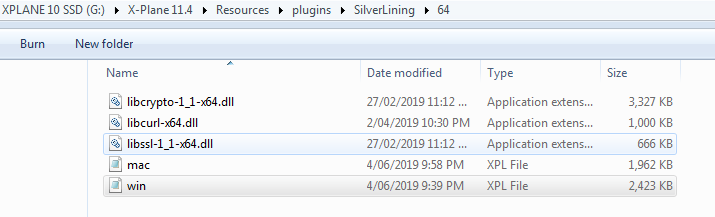
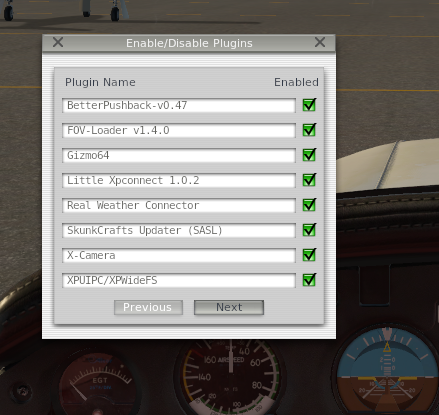
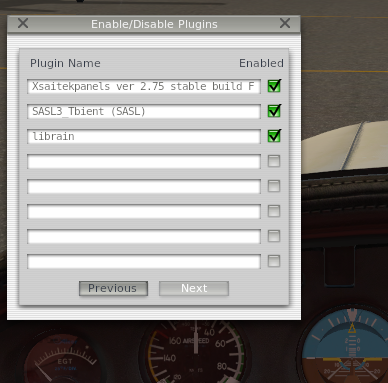
Hi I noticed something odd in my weather, so i checked to see if SPM was in the plugins drop down and it was missing, so I reinstalled, but it is still not showing up. It is installed in the correct folder, see pics but xplane cant find it. See error form log. Seems the last time it worked was in June from the Max-Metar file date. And yes my whole xplane folder is excluded with antivirus. G:\X-Plane 11.4/Resources/plugins/SilverLining/64/win.xpl : Error Code = 126 : The specified module could not be found. [SKUNKCRAFTS UPDATER INFO]: Starting X-Plane SASL plugin v3.6.5+8783e05 [Commercial Edition] [SKUNKCRAFTS UPDATER INFO]: SkunkCrafts Updater | Global | Start Full [SKUNKCRAFTS UPDATER INFO]: Loading cursors... Loaded: G:\X-Plane 11.4/Resources/plugins/SkunkCraftsUpdater/64/win.xpl (1-sim SkunkCrafts Updater). Log.txt GizmoLog.txt
-
Actually i think it is the ATC guiding arrows
-
Well some are patient and do appreciate the work you do. Thansk
-
I run a 1070 and with Refection at first notch i get 40 to 50 fps with reflections off i get 50 to 55, im happy
-
ANy more news on this project. Being quiet for a while.
-
Should post down here in support. Havnt tried in latest version but havnt had any issues yet. Saab support
-
It certainly does, but you have to turn teh volume up on teh left door panel
-
And to add to all of that. most developers have being holding off there updates waiting for a stable ver of 11 with its engine updates, before updating so they dont waste time chasing there butts. Now it is relatively stable the updates are slowly coming. And i will get ver 2 when its done. I dont get many planes,im not that fussy but when i find a good one, i dont let go. Thanks Goran for all that you do
-
Ignorance, Carenado was developed for xplane 11, this one was xplane 10 and needs code changes to get ti to spec. And if you bother to read carenados forums, there are many of theirs that need total overahauls for 11 because of the code. Wish we could all work miracles. Seems patients flew out the door years ago. And yes I would recommend this plane. And peopel wonder why so many developers quit.
-
I guess you have no idea how much effort these developers put in to give you a good product. This is the best of the two, and if his update includes the updated turbo stuff it will probably only get better. There is a reason why developers dont tell us dates, just gives some more excuses to complain,
-
I dont know what wingflex has to do wtih realsim dont know any pilot that flies a plane sitting on teh wings. Start plane look, oh wings flex cool. sit ion cockpit never see it again.
-
Another one just noticed the MAXX-METAR is 0KB, I guess ill be waiting too,
-
It is possible that your folder still has some write permissions causing your issue, Probably best to reinstall xplane some where other than windows, IE c:\xplane or another drive as most do. Than make a copy of teh clean working install, tha tway if it crashes you just need to copy it back no reinstall.
-
I have copies of all my planes and all the keys serial etc and once in a while I back up my install. Is it so hard to do..I guess it was an investment not worth protecting...
-
You can always create a profile for it without the Mixture lever which is what I do with Jets, you can do that in 11.25
