All Activity
- Today
-
 Norbert joined the community
 -

F/O stops being audible after a while in X-Plane 12.4.0
dcolson replied to dcolson's topic in Technical Support
Did another flight over an hour, carefully listened to audio the entire time, made sure it never disconnected, and sure enough everything worked? So I guess that must have been it. Thank you for the assistance! -

Take Command: CitationJet 525 v1.1.0 Update Released!
GolfCharlieTango replied to Cameron's topic in CitationJet 525
Setting the radar alt to 0 solved the minimum call out, at least for me. Now if I could just figure out the volume issue with the pass briefings Thanks for the help, much appreciated -
 okkk joined the community
 -

F/O stops being audible after a while in X-Plane 12.4.0
Pils replied to dcolson's topic in Technical Support
Even a momentary disconnect according to Windows (presumably) is enough. Maybe try wired (default) audio to see if that's the issue? -
F/O stops being audible after a while in X-Plane 12.4.0
dcolson replied to dcolson's topic in Technical Support
Yes, I'm using a wireless headset, though it never went to sleep during the flight, as I was actively flying and hearing audio from the game otherwise the whole time -
F/O stops being audible after a while in X-Plane 12.4.0
Pils replied to dcolson's topic in Technical Support
Are you using a bluetooth headset or similar? Something that goes to “sleep” after a time? Once the F/O’s audio device is “lost” it won’t come back without a restart of the flight session. -
dcolson joined the community
-
Had my first flight on X-plane 12.4, and initially during preflight I had to pause and go attend to something else, came back an hour later and the F/O no longer had any audio. The system worked fine and I could step through the checklist, but could not hear him. Audio settings all checked and volumes were correct. I restated the sim, and then continued my preflight. About an hour into the flight, just as I started the descent checklist, again, no audio (only for F/O). I finished the flight without his support sadly. Hoping there is a dumb fix I am missing?
-
 Pokrishkin7 joined the community
 -
 Emmes joined the community
 -
 elimansour joined the community
 -
 rtrt joined the community
 -
 mooneypilot2436 joined the community
 -
Unplug your second monitor.
-
All the way at the bottom..
-
Ok. Let me add most of the log. It is just my checklist and some other things. Log.txt
-
Again, the STC for the GFC500 is what would dictate that. You can make that feature request to RealSimGear, but again, this product is pretty much feature locked and the only changes will be those to keep it running between X-Plane versions.
-
I'm using the G500 with the GFC 500 autopilot, which can output autopilot state data to the G500. There is no remote FMA in the PAE A36 Glass Avionics version, so I'm stuck with no ready display of autopilot/navigation state in the vicinity of the G500 PFD. I bet every user of this aircraft (and perhaps others) would appreciate the ability to see the "Scorecard" data. What would persuade you to improve the G500 in this manner, Cameron?
-

Warning box appears after X-plane 12 upgrade
Cameron replied to OrcaFlight's topic in Entegra SR22 Series
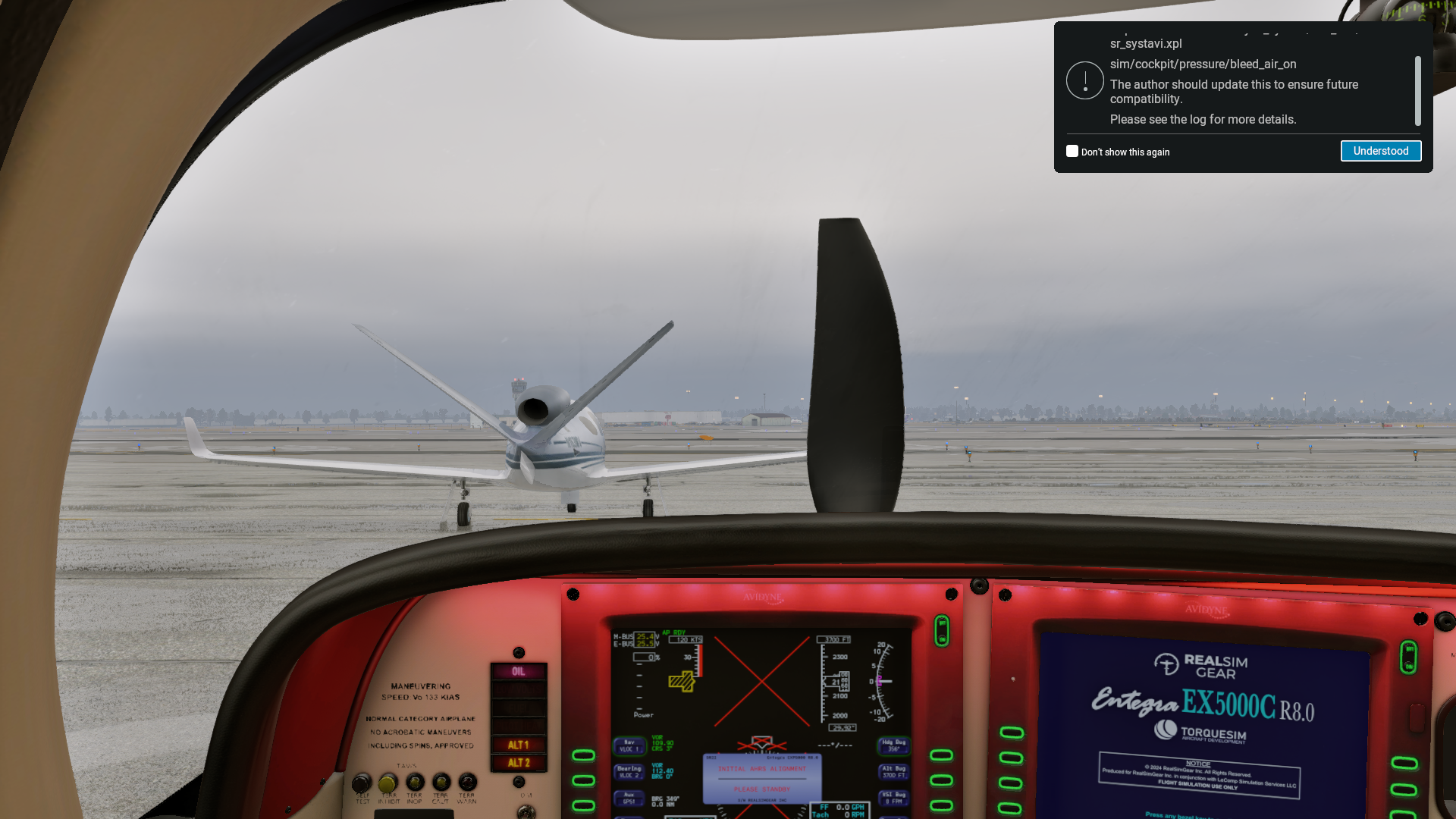
That's nothing more than a warning. X-Plane owns that window, not us. If you're having trouble dismissing it you should let Laminar know. -
An option card is just that...a non required option that Garmin will sell you to unlock a specific feature. But, what Coop said above is accurate. The FAA requires line of sight status indicators as part of an autopilot STC, so it does make sense the G500 did not ship with this by default. When the G500 was released, Garmin did not produce their own autopilot, so the assumption was the required line of sight items were already installed. That changed with the TXi when Garmin introduced their GFC line of autopilots. There are no plans to bring this to sim.
- Yesterday
-
The G500 SYSTEM SETUP page has a PFD OPTIONS section, but does not include NAV STATUS - STYLE 1/STYLE 2 options. Seems like a huge omission not to have it. and it can be found in the real-life G500 Pilots Guide section 3.4.1. Thus, it seems quite incorrect to say that the G500 doesn't have that feature. It simply is not implemented by RealSimGear as far as I can tell. But, surely, it should be implemented. FAA regulations require the navigation status to be displayed in line of sight of the PFD. It seems unreasonable to force a buyer of expensive glass avionics to install a clunky remote FMA unit. How can we get this NAV STATUS option implemented (sometimes called the "Scorecard")? I have seen an instance of a user of a real-life G500 state that he had the same option missing, but took it to the dealer who installed the option in a few minutes with an "option card" or something like that.
-
I have narrowed this issue down to you guys. I use the SR22T Entregra for my IFR training .. I have a plane with the same setup. I use Air Manager 5.1.1 with the Entrega panel -- works (or worked) great. UNTIL I upgraded to the new version of X-Plane 12. And this warning box appeared that you cannot get rid of. See pic -- no matter what you click it does not respond. When I first upgraded Air Manager also crashed .. lesson never upgrade if all is working. Spent all day trouble shooting this. I completely reinstalled X-plane 12 and the box went away and all was functioning except Air manager - reinstalled that and got that working again - needed to use the latest plugin. So all was good. Then I reinstalled your SR22 and the warning box came back - again non responsive to close it. Something is wrong with the plugin Log.txtLog.txtconflicts with the new version of X Plane 12. Let me know what I can do ...Thanks
-
Thanks for your answer, but, again, there's no option over there for adding payloads (I've read what youv've said about fuel), but whats really disapplointing is that this aircraft is not cheap, and has been there for a while, it's not a brand-new product, and it has no "default" option for carrying our what a freeware aircraft can do!
-
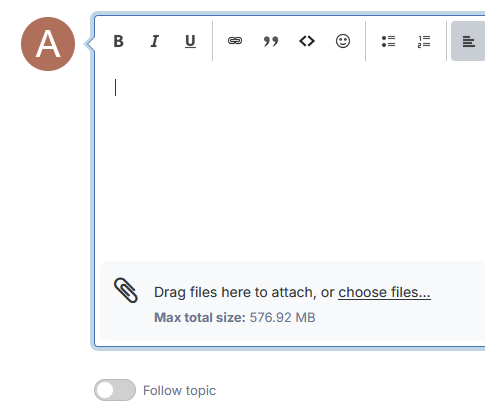
OK, on a phone it's "Add Files", just under where you draft your replies. On PC it's "Drag file here to attach, or choose files..." which will open a dialog box. One way or the other if you can use that to add the entire Log.txt to the post then that would help understand what's gone wrong But it's not impossible this forum is configured to prevent new members from uploading files as a safeguard against harassment, so you might not have that option yet!
-
I don't see add files. Where would it be?
-
-
Can you click "Add Files" when replying to this thread (or is that something you can't do immediately after registering)? What kind of display setup have you got? And do other planes work? It sounds like you might have some elaborate multi-monitor setup, if so, try dialling it down to a single-monitor X-Plane setup and if that doesn't work, try single-monitor in your OS.
-

Take Command: CitationJet 525 v1.1.0 Update Released!
Altimutater replied to Cameron's topic in CitationJet 525
I'm ready to believe the "Minimums" callout is a feature of the radalt, not any of the Gucci RNAV upgrades, and it does play that callout on self-test... however if so the self-test takes place instantly and that's a bit immersion-breaking for me. Two ways to fix it: Turn the radalt bug all the way down/counterclockwise, as it's the radalt needle finding itself suddenly below the bug that triggers the callout Back up and edit fmod/CJ525.snd with a good text editor, search for "minimum", you'll find a block of five lines relating to this callout. Put a # at the start of all five lines to comment them out. This disables the callout completely though (but perhaps the aircraft owner didn't specify this option) The third way is to use some fmod-fu to make the callout activate when on the approach or when testing the radalt by moving the bug, but not on power-on, but that is beyond the scope of _this_ thread -
Take Command: CitationJet 525 v1.1.0 Update Released!
GolfCharlieTango replied to Cameron's topic in CitationJet 525
2 other very minor things I noticed. - When you turn the avionics switch on, you hear the "minimums" call out. Not sure if that's normal. - Passenger briefing volume is extremely low, almost nothing. I've tried all sound sliders, and the volume slide control on the left console, nothing helps -
Take Command: CitationJet 525 v1.1.0 Update Released!
GolfCharlieTango replied to Cameron's topic in CitationJet 525
The above fix worked like a charm, thanks! -
Hi Jabari, Thanks for the report. We're looking into this. To diagnose the crash properly, we need a complete Log.txt from the session where the crash occurred. The one posted appears to be a partial capture. To get a clean log: 1. Start X-Plane 2. Load the Beech Sundowner C23 G5 3. Attempt to load a new flight until the crash occurs 4. Immediately after the crash (or on restart), grab Log.txt from your X-Plane root folder before loading anything else Please either attach it directly to this thread or paste it in full. The more complete the log, the faster we can track this down. Thanks for your patience.
-
Take Command: CitationJet 525 v1.1.0 Update Released!
Altimutater replied to Cameron's topic in CitationJet 525
There's a bug with the Direct-To buttons for the GTNX units in v1.1.0. Discord user Slartibart has found the fix: > `GTNXi` needs to be replaced by `GTNXI` in the file `objects/525_CLICKABLES.obj` > Looks like the commands, eg `TDS/GTNXI/DTO_1`, are case-sensitive. Pending an official update, this can be fixed by the user. Back up the file first, then open it with any good text editor e.g. Notepad++, then find and replace GTNXi with GTNXI. Any problems, replace your modified .obj with the backup and try again before asking for official support.