All Activity
- Past hour
-
Installed CL650 and now getting CTD before anything is loaded. Removing Gizmo64.plugin solves the CTD but then I get an error message upon entering the FBO. OS up to date, X-Plane up to date. Tried reinstalling CL650 to no avail. No additional plugins. Logs and contents of plugins directory attached. ls-resources-plugins.txt Log.txt Log_ATC.txt
-
 faxpy joined the community
 - Today
-
 struffy joined the community
 -
 Bicas_marquim joined the community
 -
Steering can't be enabled when the nose wheel is not mostly straight.
-
It's not a failure generated by the plane, it's done by X-Plane. The simulation is being too aggressive.
-
There's something very wrong with that mesh.
-
-
You'll have to provide the developers a Log.txt from the sim for any hope of resolution.
- Yesterday
-
 cptmarshall242 joined the community
 -

A problem I've found with the new Bonanza A36 and the G5
Coop replied to diamonddriller's topic in G5 Instruments
Yes, it's a 12.4 thing. We'll be doing new builds of nearly everything with due time for 12.4 to resolve some of these messages that X-Plane is throwing. -
 Thank you Altimutater, I just happened to read this a few minutes ago. Very excited about the changes coming up, I am really enjoying flying this aircraft.
 -
Thanks Coop. I look forward to the fixes Love the plane!
-
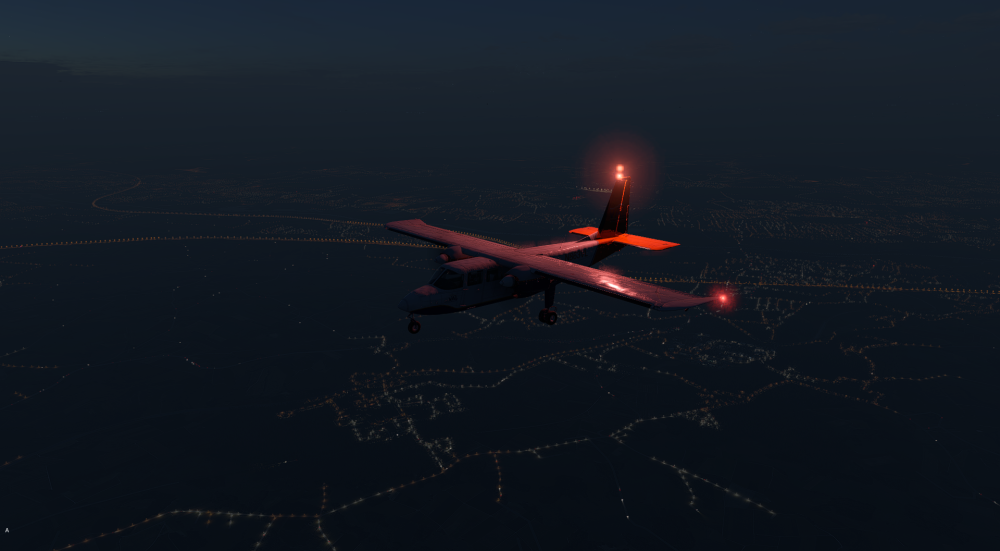
PS Seems only to appear at night Regards Marc
-
Hello, I bought this little gem a few days ago. But I have a small problem. After flying for a while, I switched to the outside view and saw that the beacon light is displayed twice. I can't turn it off either. Has anyone else noticed this? One more quick question: Is it possible to turn the passenger lights on and off separately? Best greetings Marc
-

How do I get support for X-Aviation Activation not working
dleuen replied to dleuen's topic in CitationJet 525
So I still haven't heard back anything on what the cause of this issue is nor how to resolve it. Where things stand for me right now is that I upgraded the CPU and memory in my system and it magically started working again on this system. I still have another system where I do get the error and have no way to resolve it. Very disappointing for such an expensive add-on aircraft. It is sadly preventing me from buying any other planes from X-Aviation. Is there no way to just reset my license on that system and login again? -
I've figured out the cause of this, this is a combination of datarefs not being written in libradio (this has been reported) and a bug in the X-Plane GNS530 when overrides are used for DME (to be filed with LR once we fix the libradio issue)
-
Yes, it will read what is installed with the standard X-Plane 12 format into X-Plane 12/Custom Data
-
Will be fixed with update 1.1.0, coming very soon.
-
Did you use up all your TKS fluid? It can be refilled in the SR22 menu.
-
LOP is a very fine line between being efficient and cooking the engine (there is a reason with the newer SR22T its highly discouraged to climb LOP and ROP is heavily used). If CHTs are climbing, lean further and/or increase airspeed to increase cooling. When LOP you need to keep your eyes on the temps like a hawk.
-
In order to debug what is going on, we will need you to send us a copy of the X-Plane log.txt file. You can find a guide to get this file here: How to find the X-Plane log.txt file?
-
You are running at 5fps. The physics engine requires your simulator to be running at least at 20fps, ideally 30+ fps. X-Plane in general requires >20fps to function properly.
-
@AIRBUXThat crash is within Gizmo, I'm not sure on the specifics on that error, but Gizmo is no longer required for the SR20 in X-Plane 12, you can remove that, though products that haven't been updated to use the new X-Aviation activator would no longer work.
-
It should be in the next update
-
Yep, these are engine failures due to substantial overtorque/temp
-
 DryTol joined the community
 -
 seair732 joined the community
 -
 Coop updated the changelog yesterday - this is fixed in v1.1, which is currently in testing... so hopefully will be in our hands quite soon! https://c.leco.mp/EoWMWWqLdRbZfU
 -
Plane CTD on start just in the G500 version. I have the RSG G500. The regular B2N islander G500 doesnt CTD. I have checked in internet and seems is a specific problem of the turboprop with the G500 version. Is definitively the interaction with the RSG plugin, bevause if u remove it, it doesnt happen. It only happen in the turboprop and not in the B2N G500. Wanted to know what is the situation. Thx
-
 ibanez971 joined the community
 -
 montiu joined the community
 - Last week
-
When doing the hyd test as part of the cockpit prep, I noticed the HYD L&R low pressure caution message appear as soon as the pumps are switched from on to auto after the test, shouldn't these messages appear only when the pressure drops into the yellow range?