



Bulva
-
Posts
193 -
Joined
-
Last visited
-
Days Won
3
Content Type
Profiles
Forums
Latest X-Plane & Community News
Events
Downloads
Store
Everything posted by Bulva
-
Próbuję bezskutecznie używać tych dwóch poleceń, aby przypisać je do przycisków na moim własnym kontrolerze: ---- AP PITCH TRIM KOŁO ---- xscenery / mu2b60 / ap_pitch_wheel_nose_down xscenery / mu2b60 / ap_pitch_wheel_nose_up Próbowałem skryptu lua, ale też bez skutku. Co ja robię źle ???
-
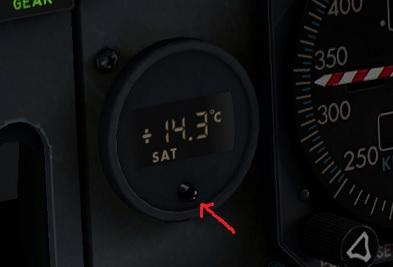
Thank you. Is it possible to switch SAT to TAT in hardware, as it is in the "steam gauge" engine instrument version ???
-
I'm ashamed to admit, but I don't know where to find information about the OAT temperature ??? Of course there is TAT. I searched on FMC sites (like in 737-800) but can't see OAT ...
-
Read carefully as to not misunderstand my issue
Bulva replied to HeliMaf's topic in 737-300 Aircraft Systems and Operation
Exactly. IXEG733 has a problem (bug) with resetting the parameter: "sim / flightmodel2 / controls / speedbrake_ratio" even with the Speedbrake lever fully retracted. It is also very annoying when using the XPRealistic add-on - if onces you use the speedbrake, the cockpit will never stop shaking again ;-) My simple and tiny lua script eliminates this inconvenience: TB_IXEG_Speedbrake_off.zip I think it will also solve HeliMaf's problem -
-
Everything I am writing is about the XP11 version. PS I checked several more times. Sometimes the Horn Cutoff button works correctly (usually on the ground), but more often its operation is ineffective (especially in flight)
-
4) It seems to me that the "Horn Cutoff" button does not work (the animation works, you can press it, but it does not silence the beep).
-
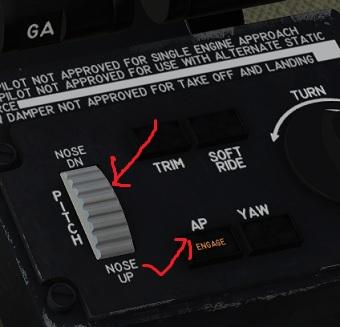
The problem as in the title: [EDIT] If you press any button on the top AP panel (ALT / HDG / NAV ... etc) before then the AP Pitch Trim knob does not turn on the AP. (Of course, AVION 1,2 is armed beforehand)
-
AD1) My temporary, makeshift solution: I added two lines in the lua file: set ("xscenery / mu2b60 / manips / L_power_lever_pull", 0.013) set ("xscenery / mu2b60 / manips / R_power_lever_pull", 0.013) Then, after turning on the simulation, the throttle levers move in the beta range.
-
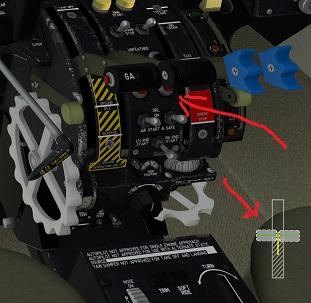
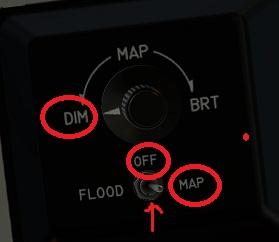
1) The animation of the throttle lever after starting the C&D plane remains in the back position until I move it above the "FLIGHT IDDLE" position. I am using Honneycomb Bravo: Later, when the throttle levers "jump" to the positions above "FLIGHT IDDLE" everything works fine (i.e. the beta range, rev is animated correctly). 2) Thank you very much for adding the MAP lighting intensity adjustment (on the ceiling) ;-). But now changing the position of the switch (the one below the knob) from "OFF" to "MAP" doesn't change anything. Shouldn't the lighting turn on only by setting the switch to the "MAP" position ? And the knob "DIM" allowed to change the intensity of lighting ??? Or, should switching to "MAP" give maximum brightness ??? How does it look in real MU2 ??? 3) sometimes there is a problem with the lack of IAS indications (when starting from the C&D state - which is mentioned in another thread and it was already in earlier versions of MU2) ---- [EDIT] AD1) I checked this situation with the Gladiator joystick. I assigned throttle for axis number 5. And the situation is the same as in the case of Bravo (no animation after switching on C&D simulation)


-
A request, as in the title, to add a GPU connect / disconnect command ;-)
-
TOGA Simulation MU-2 Marquise v2.0.4 Update Released!
Bulva replied to Cameron's topic in Mitsubishi Marquise MU-2 v2
I have this problem frequently. From earlier versions. I wrote about it here: Only if I start the simulation with cold & dark and take off the props "by hand" or with the help of assigned commands. When I remove props using the MU2 preferences window, then (I think) I don't have this problem/error. -
What is the closest aircraft to the Marquise?
Bulva replied to VirtualAviator's topic in General Discussion
- 1 reply
-
- 1
-

-
TOGA Simulation MU-2 Marquise v2.0.3 Update Released!
Bulva replied to Cameron's topic in Mitsubishi Marquise MU-2 v2
Thank you for another update of my favorite plane ... I am still waiting for the sound of opening the locker with the key / headphones . And I still think (and not only me) that the speed of the taxi is a bit too low PS Another nice video from real MU2. Set the movie to 17:55. For me, with this configuration of throttle and condition levers, the plane would not move at all. https://www.youtube.com/watch?v=YomFMUyPofY ;-) -
Cannot set NAV (and APR) mode on AP - ENBL
Bulva replied to Bulva's topic in Mitsubishi Marquise MU-2 v2
? -
I have not encountered such a case before. MU2 - version with GNS. At the ENBL airport (default scenery) there is a LOC (FD): 110.70 for RWY 07 or 109.35 for RWY 25. Why, after selecting the appropriate frequency, I am not able to set the NAV (or APR) mode on the autopilot ??? After selecting a frequency, the needle on the HSI "comes to life" and works properly. I checked the same in the C172SP and the autopilot can be easily armed in NAV (or APR) mode there. Is this a function MU2 or some kind of bug ???
-
Thanks again. Yes, of course, locks are releasing. Maybe I'm oversensitive (after too fast Taxi speed from the previous version). Suppose, the topic resolved ;-) Thx
-
Sorry, but one more question I watched a lot of videos on YT landings with MU2. After leaving the runway, pilots always put Condition Levers in the TAXI position (in the lower range) (which is in line with the checklist), while Power Levers remain in the Beta range. For me, the taxi speed is then ver, very low. It doesn't look like it does in this (e.g.) video (see from 8:08 minutes): https://www.youtube.com/watch?v=KKEzo4YZD4E
-
Thank you very much for the answers and factual explanations. I remember it was different in the previous version. But if now it is closer to the real behavior of MU2, I can only be happy. I love this plane. Thank you.
-
Only now (after returning from vacation) I could try v 2.0.2. I noticed that taxiing (when throttles are in the Beta range) is very slow nowadays. This was not the case in the previous version. I checked both after starting the MU2 from the cold & dark state (and releasing the Locks), as well as with the engines running. You need to push the throttle levers out of the beta range for the plane to roll faster. Am I doing something wrong? Two screenshots with the minimum and maximum Beta range - no changes to the engines indicators: P.S. This is not a hardware issue. After disconnecting my Honeycomb Bravo, using only the mouse, the plane also rolls very slowly (in Beta throttle range).


-
Don't forget to remove the engine intake covers.
-
TOGA Simulation MU-2 Marquise v2.0.2 Update Released!
Bulva replied to Cameron's topic in Mitsubishi Marquise MU-2 v2
I was able to quickly check v2.0.2 with my Bravo. This works great for me now (without my lua script ) Thank You very, very, very much - great job. I'm back to MU2 in 3 weeks and I can't wait PS still can't hear the sound of key locker door opening -
It looks very interesting and good. I really regret that I will not be able to participate in the first tests of v2.0.2 But, in two days I am leaving and I will be without XP access for ... 3 weeks PS And maybe by then you will improve a few things in VR (basically everything works perfectly for me, except for hyperactivity rotary potentiometers: cockpit lights , SELECT knobs (LH / RH PROP, PITOT STATIC, STALL VANE), AIR COND and CABIN ALT knobs.
-
-
Ah OK. I also hope. ;-)
