


About This File
Credits and acknowledgements
Special thanks and full credit go to @Matchstick creator of the original CJ525 N1 Calculator.
The N1 calculation system developed by Matchstick provided the original foundation for determining the applicable CJ525 N1 limits according to flight phase, altitude and temperature.
This calculation logic was adapted and incorporated into the CJ525 Human Throttle package. It supplies the N1 MAX targets used by the plugin during Takeoff, Climb, Cruise and Go-Around.
The Human Throttle project adds its own features around this calculation system, including:
- human-style thrust-lever management in N1 MAX mode;
- automatic takeoff engagement;
- return-flight rearming;
- flight-phase detection;
- conventional PI-D IAS HOLD;
- predictive N1 protection;
- automatic approach disconnection;
Original Matchstick CJ525 N1 Calculator:
https://forums.x-pilot.com/files/file/1635-cj525-n1-calculator/
The original N1 calculation work remains credited to Matchstick. The integration into CJ525 Human Throttle does not imply that Matchstick is responsible for, associated with, or endorses the additional autothrottle functions developed in this plugin.
CJ525 Human Throttle
Current version : 0.7.0
Installation
Requirements
- X-Plane 12
- TorqueSim CitationJet 525
- FlyWithLua NG+
- The included CJ525 N1 performance-table script
Installation steps
- Close X-Plane.
- Open the FlyWithLua scripts folder:
X-Plane 12/Resources/plugins/FlyWithLua/Scripts/
- Remove any older version of CJ525 Human Throttle from this folder.
Do not keep several controller versions active at the same time, as they may create duplicate commands or attempt to control the thrust levers simultaneously.
-
Copy the main controller into the
Scriptsfolder:
CJ525_Human_Throttle_v0.7.lua
- Copy the required CJ525 N1 performance-table script into the same folder.
The controller requires this script to calculate and publish the applicable N1 MAX target for Takeoff, Climb, Cruise and Go-Around.
- Start X-Plane 12 and load the TorqueSim CitationJet 525.
FlyWithLua should load the scripts automatically.
First startup
When the plugin starts for the first time, it uses its default settings:
Takeoff-to-Climb transition: 500 ft radio altitude
Automatic approach disconnect: 500 ft radio altitude
Touchdown flap assist: disable
The settings file is created when the settings are saved:
CJ525_Human_Throttle_settings.cfg
This file is stored in the same FlyWithLua Scripts folder.
Command assignment
The following commands can be assigned to keyboard keys, joystick buttons or hardware controls from the X-Plane control settings:
FlyWithLua/CJ525_Human_Throttle/toggle_AT
FlyWithLua/CJ525_Human_Throttle/AT_ON
FlyWithLua/CJ525_Human_Throttle/AT_OFF
FlyWithLua/CJ525_Human_Throttle/N1_MAX
FlyWithLua/CJ525_Human_Throttle/IAS_HOLD
FlyWithLua/CJ525_Human_Throttle/toggle_IAS_HOLD
Automatic takeoff engagement
No manual engagement is required during a normal takeoff when all conditions are met.
The system automatically engages in N1 MAX mode when:
The aircraft is in the TAKEOFF phase
The N1 performance calculator is in Takeoff mode
The published N1 MAX target is valid
The highest engine N1 rises above 70%
At exactly 70.0% N1, the system remains disengaged.
After landing, the next takeoff cycle is automatically rearmed when the aircraft is on the ground and the highest engine N1 decreases to 60% or below.
Checking the installation
After loading the aircraft, verify that:
- FlyWithLua reports no script errors;
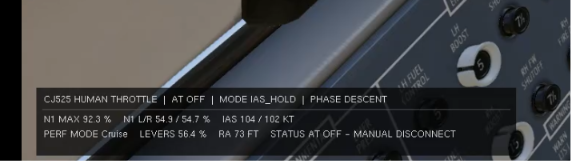
- the CJ525 Human Throttle monitor appears;
- the N1 MAX value is displayed;
- the commands are visible in the X-Plane control settings;
- the system automatically engages above 70% N1 during takeoff.
Troubleshooting
When the plugin does not load:
- Check the FlyWithLua debug file for errors.
- Confirm that only one version of the controller is installed.
- Confirm that the N1 performance-table script is present.
- Confirm that the loaded aircraft is the TorqueSim CitationJet 525.
- Reload all FlyWithLua scripts or restart X-Plane.
Description :
CJ525 Human Throttle adds thrust-management assistance to the TorqueSim CitationJet 525 in X-Plane 12.
The plugin is built around two complementary operating modes: N1 MAX and IAS HOLD.
Human-style N1 MAX management
N1 MAX mode is designed to simulate a Pilot Monitoring manually adjusting the thrust levers.
Instead of instantly placing the throttles at a calculated position, the system observes the engine N1 values and progressively moves both thrust levers toward the published N1 limit for the current flight phase.
The simulated Pilot Monitoring:
- adjusts the thrust levers through deliberate, progressive movements;
- pauses between corrections to observe the engine response;
- reduces the correction size when approaching the target;
- monitors both engines and uses the highest N1 when necessary;
- prevents the published N1 MAX limit from being exceeded;
- adapts the target to Takeoff, Climb, Cruise and Go-Around performance data.
During takeoff, N1 MAX can engage automatically when the highest engine N1 rises above 70%.
After landing, the system rearms when the aircraft is on the ground and N1 decreases to 60% or below. This allows automatic engagement on a return flight without reloading the Lua script.
Conventional IAS HOLD baseline
IAS HOLD reads the selected airspeed directly from the CitationJet cockpit speed selector and controls the thrust levers to capture and maintain that speed.
In the current version, IAS HOLD behaves like a conventional real-time autothrottle. A continuously evaluated PI-D controller applies small thrust corrections according to:
- the difference between selected and actual IAS;
- the current IAS trend;
- the aircraft’s vertical flight condition;
- the active gain schedule;
- the available N1 margin.
This conventional control law was intentionally developed and validated first to establish a stable and reliable autothrottle baseline.
IAS HOLD currently uses three control schedules:
- TRANSITION for larger speed changes and captures;
- LEVEL for stabilized flight close to the selected IAS;
- BASELINE for climb, descent and other non-level conditions.
N1 MAX protection always has priority over IAS HOLD commands.
Future humanisation of IAS HOLD
Future versions are planned to make IAS HOLD behave more like a human Pilot Monitoring operating the thrust levers.
The development objective is to progressively introduce:
- more deliberate throttle movements;
- observation periods between corrections;
- fewer continuous micro-adjustments;
- reaction timing based on aircraft energy trends;
- more natural anticipation during speed and altitude changes;
- less mechanical control behavior while preserving the validated N1 protections.
Version 0.7 should therefore be considered the validated conventional IAS autothrottle baseline, while N1 MAX already follows a more human-style Pilot Monitoring logic.
Edited by cmbaviator
added credits to Matchstick