
tkyler
-
Posts
2,827 -
Joined
-
Last visited
-
Days Won
620
Content Type
Profiles
Forums
Latest X-Plane & Community News
Events
Downloads
Store
Everything posted by tkyler
-
There are two adjustments you can make. FOV as described above is basically "camera zoom"....and the other is akin to "head tilt up or down". The "head tilt option" is found in Planemaker under the "Standard > Viewpoint" menu item. This will bring up a dialog screen with four tabs. Go to the "View" tab and look for the horizontal box undneath the 3 boxes on top. Its called, "SCREEN-CENTERS" and it's the values in the middle called, "View center". I'm sorry I can't remember if you change the values to be higher or lower, but do know it's the equivalent of "tilting your head up or down" to see more or less of the panel. The official description of the value is "where the horizon is on your screen". Thus a horizon very high on the screen means you're looking down more into the cockpit. Play with these values along with the FOV values and you should be able to adjust the default view to fit your screen how you like. Tom K
-
Asso X jewel.......er...millenium master....um...I mean Blackshape Prime....well all those are correct but most correct is Blackshape Prime. The design started out as the Asso X jewel in wood (my favorite of course), then a composite derivative evolved called the millenium master, whose molds were later sold to Blackshape and has finally become the Blackshape Prime. I've always been a huge fan of this Vidor design. Super performance on a 100hp motor. http://www.blackshapeaircraft.com/ http://www.x-aviation.com/catalog/blackshape-prime-p-95.html
-
We really don't know when. We know when we would LIKE to have it out, but our experience over the last 2.25 years has shown that you never know what comes down the way. Sometime in the first half of 2013 is desired by the team and that's really all we can say. We are very much committed to not cutting corners and providing a complete product. Work continues regularly however. I am nearly finished with the exterior and maybe in the next four weeks we can put up some screenshots....I'll work towards that milestone. Tom K Laminar / IXEG
-
This is not correct....or at least not a good way to do it as the trip from 2.6 to 2.49 looses all sorts of data blocks. Instead export out of 2.6+ in the "Wavefront (OBJ)" format...then that will import very well into 2.49; however, as airfighter pointed out, once you start creating animations, then this is no good as the animations will not make it through the migration from 2.6 > wavefront > 2.49. The geometry comes through great and any UV mapping done generally does too. Tom K Laminar / IXEG
-
http://en.wikipedia.org/wiki/PZL_M28 or thereabouts anyhow
-

ENGINE ICE PROTECTION usage question
tkyler replied to arb65912's topic in British Aerospace Jetstream 32
I don't mean to steal Intrance thunder AJ. I just happen to be here in the forum. Sorry Intrance! Nothing wrong with being overprotective. The MU2 (which I'm familiar with) uses a similar type of engine as the J32....and the "book" calls for turning on de-icing whenever you are in icing temperature range and there's visible moisture. Certainly better safe than sorry. Icing is always associated with moisture.....and temperature of course, those two being the mix that causes icing. On a micro-level, if you flew in and out of clouds at below freezing temperatures, your would be at icing risk in the clouds but not out of the clouds....at least in reality. True "icing conditions" are a bit more complex of course. X-Plane has no concept of "cloud volume" though and can't simulate icing on a "per cloud" basis. x-plane does keep track of temperature and precipitation and has a range of this combination where icing will accumulate, probably at a steady rate if I know Austin. TomK Laminar / IXEg -
ENGINE ICE PROTECTION usage question
tkyler replied to arb65912's topic in British Aerospace Jetstream 32
AJ, To elaborate a bit on Intrance response, a turbine engine "combustion reaction" is self-sustaining....that is fuel is fed to the "combustion process" which is already underway. There is no spark to ignite the mixture after the engine has been started. It just pours gas into an already existing fire in the combustion chamber. When in situations like rain or any type of moisture as Intrance pointed out, the moisture might "put out the fire". In this case, fuel is still being fed into the engine, but there is no spark/fire to ignite the fuel. In this case, you DO need a spark to light the fire. This is what continuous ignition is all about. It is designed to provide a source of ignition in situtions where there is excessive moisture pouring into the engine tries to extinguish the combustion. It is literally a fight between moisture trying to put out the combustion and the continuous ignition trying to keep the fuel lit. It is common to turn on continuous ignition before turning on engine anti-ice on aircraft where these functions are independent of one another. This is because if you turn on anti-ice on your engine and some ice melts and then flies into the engine...it could cause the engine to flame-out. X-Plane does not simulte this scenario by default though so it is unlikely what you've observed. It can be simulated with custom programming. Now as far as XP anti-ice goes. You can investigate this onscreen using the data in/out feature whereby you can print the icing ratios onscreen while you fly. X-Plane will display the amount of icing on the wings / engine / inlets and such. You can monitor these and see if ice is accumulating or the anti-ice system is not working. My gut tells me that x-plane is not detailed enough to consider the rate of icing. (I may be wrong) only that icing is accumulating or melting. So I see it unlikely that the anti-ice is working yet the icing is still going up. If I am wrong and x-plane can accumulate ice faster than the system can melt it, I would be surprised and impressed. We have overhauled some de-icing datarefs as recently as 2 weeks ago and introduced two new de-icing datarefs because of a bug in the de-ice system. It may be that Javier utilized the broken datarefs and has not implented the new ones, being they're only 2-3 weeks old. Javier? Tom K Laminar / IXEG -
HDR (High Dynamic Range) rendering is a user-settable rendering mode within x-plane that provides advanced shader features and effects like blurred engine exhaust, night lighting and atmospheric effects. It is also called "deferred rendering" which is terminology more meaningful to the programmers than the end users. So for simplicity, when we say, "HDR", we mean we have the fancy rendering effects turned on in the renderings settings of x-plane. Using HDR requires a "DX-11 compliant" video card so not all computers can use the HDR mode. Basically if you have a modern video card, it will support HDR, but how much you can squeeze out of it performance wise is dependent on the card and a matter of trial and error playing with x-plane options. HDR usually eats up some FPS when it is turned on....at least during the day. Night lighting performance is usually better. Tom K Laminar/IXEG I'm sure the download is great to you Michael, but a lot of people aren't you, particularly Mac users. A lot of products have a history of being rushed out the door come Christmas time in order to snag those Christmas sales. X-Plane is guilty of it last year and incomplete or hastily done products are not uncommon at the org there this time of year. As long as such shortcomings are disclosed, then of course that's fine and buyers can make informed decisions but personally, I think it makes x-plane add-on development look amateurish in the eyes of folks eyeballing x-plane as a purchase. Just exercise buyer beware and read the print so you know what your are or are not getting. TomK Laminar / IXEG
-
glad to help mGN and glad you're up and running and enjoying the scenery. ask anytime, we'll be here. TomK Laminar/IXEG
-
good luck Garyth. I'll check in the morning when I get up myself...after a night of less cultural activities and see how you fared. TomK Laminar / IXEG
-
to mGN: I responded to your scenery question in the scenery development forum. http://forums.x-pilot.com/index.php/topic/4269-airport-on-plateau/
-
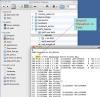
This is in response to user, MgN, but is probably applicable to others. Sometimes you may find that your airport sits on a high plateau, way above the surrounding scenery. This is set by a airport altitude value at the top of the apt.dat file. See picture below: If you are building your airport in WED, then this altitude is set from within WED. There was a bug in WED in the past whereby this value would be input as feet, but would export as meters. The thing is that x-plane READS the value as feet. So if you put 100' elevation in WED, WED would export that as 328 and your airport would be on a 228' foot plateau. That bug has since been fixed, but every now and then it rears its ugly head in some capacity I know not why. The straightforward solution is to go into the scenery folder, locate the apt.dat file, open it up in a text editor and set the value to the proper airport elevation. You can play with this value and reload x-plane to see its effects. TomK
-
mGN, I am in an absolute rush to leave th eoffice, but will reply (or someone else can). should be a small change in a text file. gotta run! back in hour or so.
-
VideoTutorial: Starting engines of the Jetstream32
tkyler replied to Japo32's topic in British Aerospace Jetstream 32
Intrance, as the developer of the MU2, the start locks are near and dear to my heart to simulate. X-Plane does not simulate this and I haven't been able to get Austin to implement it yet. It is possible to do some with custom programming, but it becomes very involved. The x-plane engine model is the most difficult part of the simulation to intervene in and overriding the prop pitch in x-plane to implement locks means writing not only your own prop governor algorithm, but also a fuel delivery algorithm....all without fully knowing what x-plane does behind the scenes. After 10.20 goes final, Austin has a pretty long list of new systems features he wants to implement for 10.30 and I am putting prop locks on the list. Tom K Laminar -
Until you feel comfortable visiting there, feel free to ask here (in the scenery section actually ). Some of the most experienced scenery developers regularly participate here. I'm sure we can get you answered in the meantime. Tom K Laminar
-
Two for one. another video of Jan flying around the pattern at Nice.
-
Hey guys. Jan has done another video showing some more details of the electrical system, which is pretty much ready to go. We have 17 electrical busses powered, we have equipment tied to each of these busses so when a bus goes down, things dependent on that bus go down. We have modeled generator heating and cooling, taking into account ambient temperatures and heat transfer coefficients, DC battery drain and voltage drops under heavy load, galley power, ground service bus with attendants switch, even coffee maker and hot air ovens. We have filament fadein/fadeout so the lights don't just pop on instantly. Momentary generator disconnects on switching power sources (you'll see lights flicker during this process) Warning annunciators are tied to their appropriate recall system..and lights dependent on voltage dim under voltage drops. Seems like a lot of detail but the coolest thing of all is you just let it run and it looks and feels real. No funny needle jumping, no instant on lights, it just all seems normal. Another video to follow shortly where Jan flies a simple pattern around Nice. -TomK
-
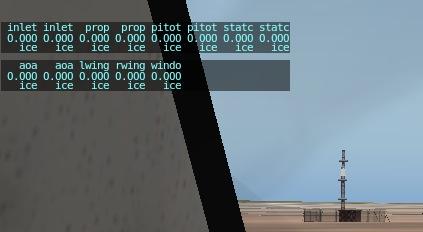
It depends upon which datarefs the authors used for the de-icing. Certainly it is worth a "double check". No visual indicators, but there is an indicator you can use. Go to the menu item "Settings > Data Input and Output". This will bring up a screen with lots of checkboxes on it. Checkboxes number 125 and 126 on the last column on the right are the icing status variables. Check the right most checkboxes on each of these "icing status" lines. Then when you close the window, you will see some numbers in the upper left corner of X-Plane. These numbers are ratios from 0 - 1 that indicates how much ice is accumulating. In icing conditions, these numbers will steadily increase. When you turn on de-icing, then the numbers should decrease. Above the numbers, you will see descriptions. When you see the same description twice, like "inlet inlet". The first one is usually the left side and the second one is the right side. I just confirmed on the King Air in beta 7, that "independent side deicing" works; HOWEVER, I think the King Air in beta 7 is borked for other reasons not related to ice so some of the switches may not work on the King Air....but X-Plane itself does have both sides de-icing independently now. -TomK
-
This should be fixed in the latest version, beta 7, I tested it on the King Air the other day to confirm. Also there now exists new, individual anti-icing dataref arrays for wing surface heat and engine inlet heat. These should be incorporated into multi-engine aircaft that have individual icing control for each side wing and engine inlet. TomK
-
Oh please, I can be as lazy as anyone....I see lots of problems with my work. If you change your mind, fire away! I have plans to one day provide a comprehensive training ground in all things development....blender, plane-maker, theory, scenery, development strategies, systems programming, texturing, etc and form a club for those who wish to engage in a higher level of development and are tired of scouring the net for information and how-tos and also want to learn tons of tips and tricks. It may be a good while yet because of my other projects, but I very much have a well-defined vision of providing training services for the community. As XP becomes more prevalent among flight sim users, and I believe it will, there will be a real need for training. I really enjoy it and fortunately, have been given good opportunities to gather lots of experience. In the meantime, I'll practice my voice-over skils and presentation software mastery Tom K
-
Hey pyoski, I'm so sorry, I've been out of town, I certainly don't avoid posting on purpose. Thank you for the compliments. Any suggestions you want to give on the King Air I'll certainly consider. The default planes are a bit of a mixed bag. The goal was to make them "much better than previous default aircraft", while still leaving a bit of room for payware developers to come in and do those models if they desired. Now mostly the reason for that was not to be "purposefully lower quality", but rather that the time to work on these was very limited relative to time spent on payware development. I had four of the default aircraft to do. We also specifically wanted to provide a mixed bag of technology, with some 3D instruments, some panel texture instruments, etc. so folks could look at them and see multiple ways of accomplishing tasks if they wanted. There are a few things I know I still need to do yet to the King Air and will chip on those continually...so please feel free to make any suggestion or criticism. With regards to copyright...unless you're reselling it or any part of it (say you use it as a base for payware) then you won't be violating anything. If you intend to modify / improve and distribute it freely, then by all means have a go at it. It can certainly stand for improvment in lots of areas but I'm always open to hear what folks have to say about it, good or bad. I wear big boy pants nowadays Tom K
-
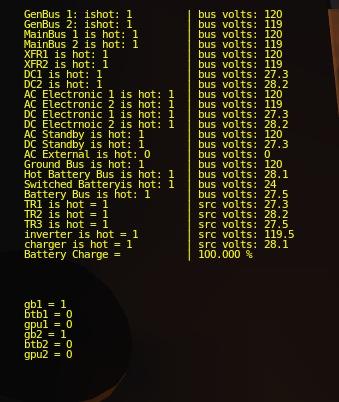
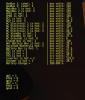
A little glimpse into our debug screen as we refine the electrical system. When the APU is started, the APU starter uses the battery and induces a really heavy load to the battery. Anybody care to guess what happens to the battery and the annunciator lights attached to the battery bus during the APU start?
-
yea, well at least I can reply here Jack. Thus far we have not implemented any type of failures or chance / random scenario control. We DO have hooks for that though, the system was very much designed to be open ended and accessible at many levels. For example, we have relays that control the electrical system switching...and our relay data structure has a "isfailed" property so we can fail any relay. We also have 'isfailed' properties for busses, switches and a lot of other stuff....so unlike xplane which just fails a major system, we can fail a component which of course can bring down an entire system. This can result is multi-level "problem solving". One user might simply want to do an engine out situation....another might want a random failure of a really obscure component and then have to sleuth their way to finding it....pushing their knowledge to the limit. Regarding obscure situations...we really try to hold fast to physics as much as possible. The aircraft is a machine after all and works in a very well documented environment. For a scenario like the APU start in flight, we would probably do some research on operating limits and only allow the APU to start in the "comfortable part" of those limits. In the transition areas of the limits, we might put a sliding randomization factor that makes it anybody's guess, including our own. In such a case, your knowledge of the limits of the APU would play a part in making darn sure you make the best decision. Tom K
-
Yes, any customer who owns the MU2 at the time the update becomes available will be eligible for the free update. Tom Kyler
-
I would also like to point something most of you do will not see. By it's very nature, programming is a technical issues and hurdles must be overcome as limits are pushed. We are handling some very advanced issues that will pave the way for more full featured and reliable products. Nobody works with Laminar more than Cameron to solve these issues for the benefit of the community to grow the market. He consistently takes strides to remove obstacles for any and all developers and does so in the face of many ignorant and childish criticisms. I would like to simply thank him publically for the steps that he has taken on the behalf of all developers of x-plane. Thanks Cam! P.S. The MU2 hurdle was unexpected...a unforseen result of pushing some new limits, but the solution will ensue! Tom